Pivot
Pivoting transforms data by converting rows into columns, enabling you to compare values side-by-side, spot trends efficiently, and gain clear insights across categories such as months and channels.
SALES_F using the following command:IMPORT SOURCE SALES
DEFINE VERSIONED DATASET SALES_F
ROWSOURCE SALES;
THIS = SALES[PROD_ID, CHANNEL_ID];
THIS[TIME_ID] = DATE_FORMAT(SALES.TIME_ID,'MMM');
THIS[AMOUNT_SOLD] = SUM(SALES.AMOUNT_SOLD);
GROUPBY [PROD_ID, CHANNEL_ID,TIME_ID];
PRIMARYKEY[PROD_ID, CHANNEL_ID,TIME_ID];
ENDSALES_F is as follows:
| PROD_ID | CHANNEL_ID | TIME_ID | AMOUNT_SOLD |
|---|---|---|---|
| 1 | Online | Jan | 500 |
| 1 | InStore | Jan | 150 |
| 1 | InStore | Mar | 700 |
| 2 | Online | Jan | 200 |
| 2 | InStore | Feb | 120 |
| 2 | InStore | Mar | 300 |
Single-Column Partitioned Pivot
You can use partitioning in pivot operations to group data by specific attributes, keeping each category, such as product or channel, distinct within the transformed dataset.
If you don't specify partition, all the columns in ROWSOURCE are included for partitioning, except those that you use in transpositions.
DEFINE VERSIONED DATASET PRODUCT_MONTHLY_REVENUE
 ROWSOURCE SALES_F;

 PIVOT
 (
 /* ------------------- SPECIFY PARTITION -------------------------- */

 WITHIN SALES_F[PROD_ID];

 /* --------------------SPECIFY TRANSPOSITIONS ---------------------- */
 // Either provide target column names on LHS for each of the month values
or if unspecified, it will auto-generate and map columns Jan,Feb,Mar

 THIS[Jan_Sales,Feb_Sales,Mar_Sales]= SUM(SALES_F.AMOUNT_SOLD) FOR
 SALES_F.TIME_ID IN('Jan','Feb','Mar');
 );

 // Optional. If not specified, PK will be assigned.
 PRIMARYKEY [PROD_ID];
END
In this example, the segment WITHIN SALES_F[PROD_ID,CHANNEL_ID] partitions the data by Product ID and Channel ID. The column mapping THIS[Jan_Sales, Feb_Sales, Mar_Sales] creates target columns for the months January, February, and March. The output creates separate columns for sales in January, February, and March.
The output from pivoting the PRODUCT_MONTHLY_REVENUE dataset is shown: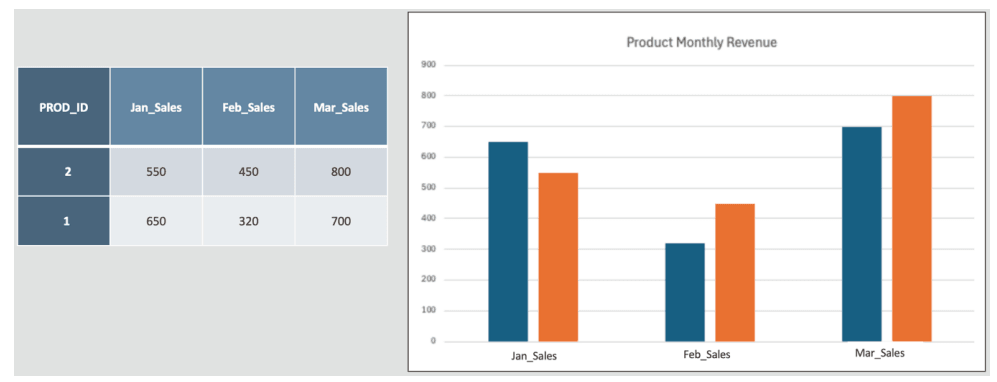
Description of the illustration dasrg-pivot-partition-single.png
Multi-Column Partitioned Pivot
You can use multi-column partitioning in pivot operations to group data by multiple attributes, providing users with a more detailed view of the dataset. This method enables analyst users to compare across dimensions, such as product and channel, helping them uncover deeper insights and patterns.
By partitioning on both Product and Channel, you can enable analysts to track unique revenue contributions for each combination.
DEFINE VERSIONED DATASET PRODUCT_BY_CHANNEL_MONTHLY_REVENUE
ROWSOURCE SALES_F;
 PIVOT
 (
/* ------------------------- SPECIFY PARTITION -------------------------- */
 WITHIN SALES_F[PROD_ID, CHANNEL_ID];

/* ------------------------SPECIFY TRANSPOSITIONS ----------------------- */
 THIS[Jan_Sales, Feb_Sales, Mar_Sales] = SUM(SALES_F.AMOUNT_SOLD) FOR
 SALES_F.TIME_ID IN ('Jan', 'Feb', 'Mar');
 );
 PRIMARYKEY [PROD_ID,CHANNEL_ID];
END
In this example, the segment WITHIN SALES_F[PROD_ID,CHANNEL_ID] partitions the data as composite key in multiple columns, Product ID and Channel ID. The column mapping THIS[Jan_Sales,Feb_Sales,Mar_Sales] creates target columns for each of the listed transposed values. The output generates separate columns for sales in January, February, and March by PROD_ID and CHANNEL_ID.
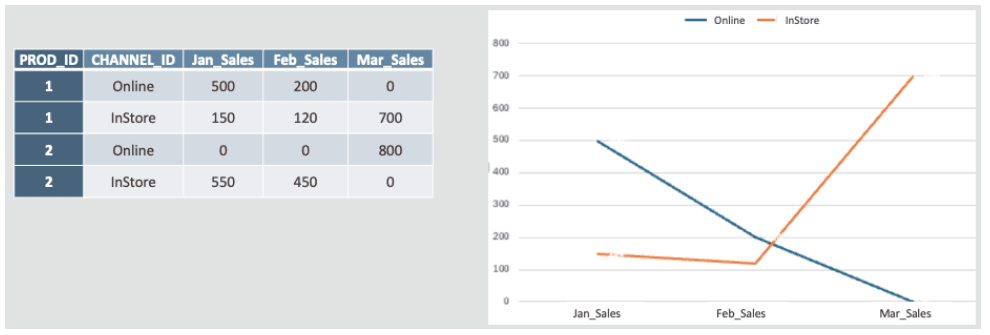
Description of the illustration dasrg-pivot-partition-multi.png
Multi-Dimensional Partitioned Pivot
You can use multi-dimensional partitioning in pivot operations to generate columns based on multiple attributes while aggregating a specific value. This pivot operation reorganizes the data to show the aggregated sales amounts for each category combination, such as Time and Channel.
DEFINE VERSIONED DATASET PRODUCT_BY_CHANNEL_MONTHLY_REVENUE_2
 ROWSOURCE SALES_F;
 PIVOT
 (
 /* ------------------ SPECIFY PARTITION -------------------------- */
 WITHIN SALES_F[PROD_ID];

 /* --------------------SPECIFY TRANSPOSITIONS ------------------- */
 //Sales per month
 THIS[Jan_Sales, Feb_Sales, Mar_Sales] = SUM(SALES_F.AMOUNT_SOLD) FOR
 SALES_F.TIME_ID IN ('Jan', 'Feb', 'Mar');
 // Sales per month + channel (multi dimensions)
 THIS = [SUM(SALES_F.AMOUNT_SOLD) -COLPREFIX 'Amt'] FOR (SALES_F.CHANNEL_ID,
 SALES_F.TIME_ID )IN (('Online','Jan'),
 ('Online','Feb'),('Online','Mar'),('InStore','Jan'),('InStore','Feb'),
 ('InStore','Mar));
 );

// Other transformations allowed after PIVOT section and only using the
 columns generated in PIVOT section
THIS[Jan_Inst_Online_Diff] = THIS.Amt_InStore_Jan - THIS.Amt_Online_Jan;
THIS[Feb_Inst_Online_Diff] = THIS.Amt_InStore_Feb - THIS.Amt_Online_Feb;
THIS[Feb_Inst_Online_Diff] = THIS.Amt_InStore_Mar - THIS.Amt_Online_Mar;

 PRIMARYKEY [PROD_ID];
END
In this example, the output for the dataset PRODUCT_BY_CHANNEL_MONTHLY_REVENUE_2 is as follows: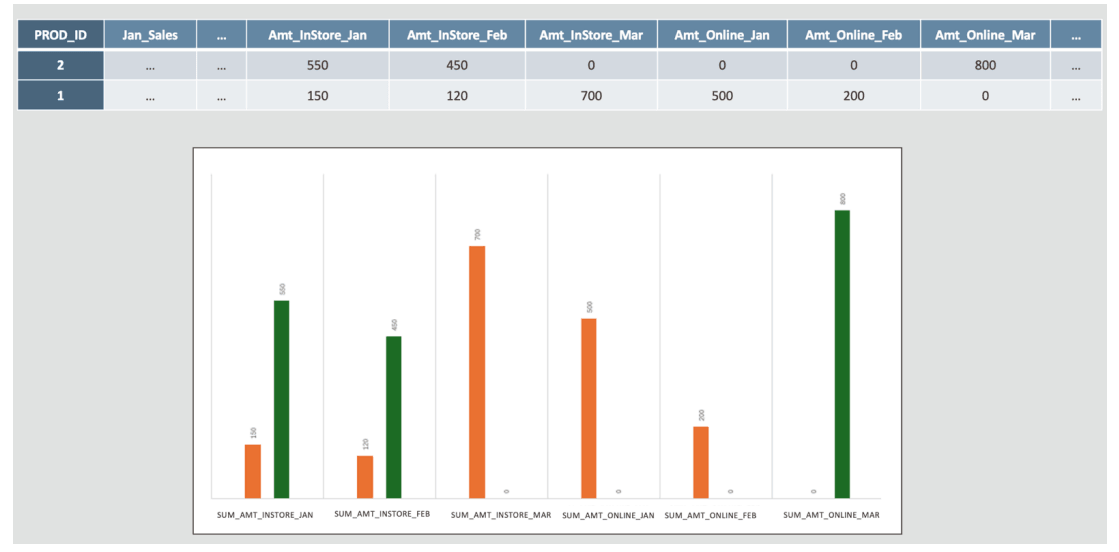
Description of the illustration dasrg-pivot-multidimension.png