Unpivot
You can use the UNPIVOT operator to transform columns back into rows, enabling business users to analyze the data in detail.
UNPIVOT helps your users to explore each attribute, provides greater flexibly, and reveals patterns and changes over time.
Example: You can UNPIVOT Jan_Sales, Feb_Sales, and Mar_Sales into the AMOUNT_SOLD column.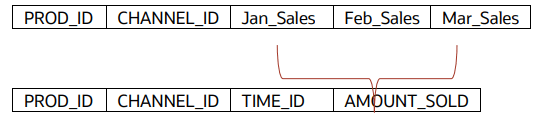
Description of the illustration dasrg-unpivot-totsoldcolumn.png
DEFINE VERSIONED DATASET SALES_F2[
 ROWSOURCE MY_SALES;
 UNPIVOT INCLUDE NULLS
 (
 WITHIN MY_SALES[PROD_ID, CHANNEL_ID];

 /* Target Columns TIME_ID, AMOUNT_SOLD are specified on LHS.
 The corresponding display values for PRODUCT column are specified in
 the LHS. Pairs on LHS map to columns on RHS, in sequence /*
 THIS[(TIME_ID : 'Jan', AMOUNT_SOLD),(TIME_ID : 'Feb', AMOUNT_SOLD),
 (TIME_ID : 'Mar', AMOUNT_SOLD)]=MY_SALES[Jan_Sales,Feb_Sales,Mar_Sales];
 );

 PRIMARYKEY [PROD_ID, CHANNEL_ID, TIME_D];
END
The output of the versioned
SALES_F2 dataset table is as follows:
| PROD_ID | CHANNEL_ID | TIME_ID | AMOUNT_SOLD |
|---|---|---|---|
| 3 | Online | Jan | 500 |
| 3 | InStore | Jan | 150 |
| 4 | Online | Jan | 0 |
| 4 | InStore | Jan | 550 |
| 3 | Online | Feb | 2000 |