Sending Exchange Integration Manager Logs to a Designated Email Address
Support for Exchange Integration Manager (EIM) ended on January 13, 2026. You may no longer receive any updates, issue fixes or customer support for EIM after this date.
Effective October 1, 2026, you may not be able to use EIM to integrate SuiteProjects Pro with Exchange Online. The EIM installer and all access to SuiteProjects Pro from EIM may be removed in future.
If your organization uses the EIM desktop application to integrate SuiteProjects Pro with Exchange Online or Exchange Server, switch to an alternative solution before October 1, 2026. For more information, see End of Support for Exchange Integration Manager.
You can configure Exchange Integration Manager to send integration logs to a designated email address.
To send the Exchange Integration Manager logs to a designated email address:
-
In SuiteProjects Pro Exchange Integration Setup, go to Options > Integration Settings
The Integration Settings window appears.
-
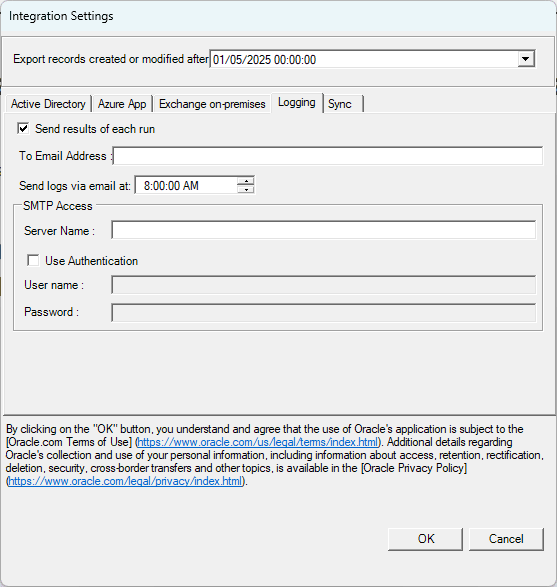
Click the Logging tab.
-
Check the Send results of each run box if you want a log of each synchronization to be sent to the specified email address . A message is sent and if errors occur, the number of errors appears in the title of the message to alert the receiver.
-
Enter the email address in To Email Address.
-
Enter the SMTP Server Name.
-
Check the Use Authentication box and enter the User name and Password if you must authenticate to use the SMTP service to send email.
-
Click OK.