Using Basic Authentication to Connect to Profitability and Cost Management
If you want to use basic authentication to connect to your Profitability and Cost Management application from NetSuite, you need to store user credentials in NetSuite.
To set up basic authentication to connect to Profitability and Cost Management:
-
In NetSuite, go to NetSuite EPM > Profitability and Cost Management > Connection Settings.
-
For Basic Auth, check Active Connection.
-
Check the displayed I acknowledge Basic Auth is not recommended for production and should only be used for testing or when OAuth option is not available box.
Important:You must check this box to confirm your understanding that you should use basic authentication only for testing purposes or when OAuth 2.0 is unavailable. Until you check the box, you can't start using basic authentication as your preferred authentication method.
-
Click Configure.
-
Enter credentials that you use to connect to your Profitability and Cost Management application:
-
In the Username field, enter the email address you use to sign in to your Profitability and Cost Management application.
Important:If your URL ends with .ocs.oraclecloud.com, enter the user name as is. If your URL ends only with .oraclecloud.com, you need to precede your user name with the domain name:
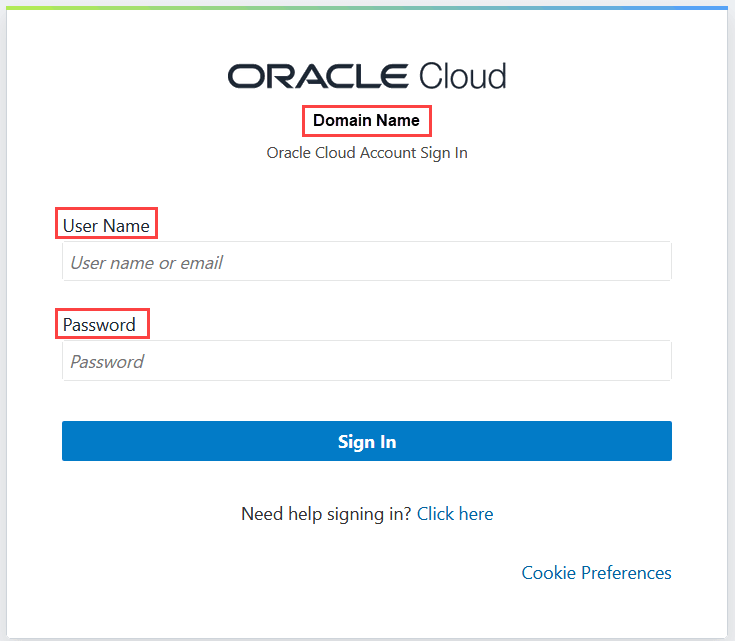
<your_domain>.<username>You can get the domain name from the Profitability and Cost Management login screen.
-
In the Password field, enter the password you use to sign in to your Profitability and Cost Management application.
The following screenshot shows the Profitability and Cost Management login screen with the domain name, user name, and password:
-
-
Click Save.