Step 2 Create the Saved Search
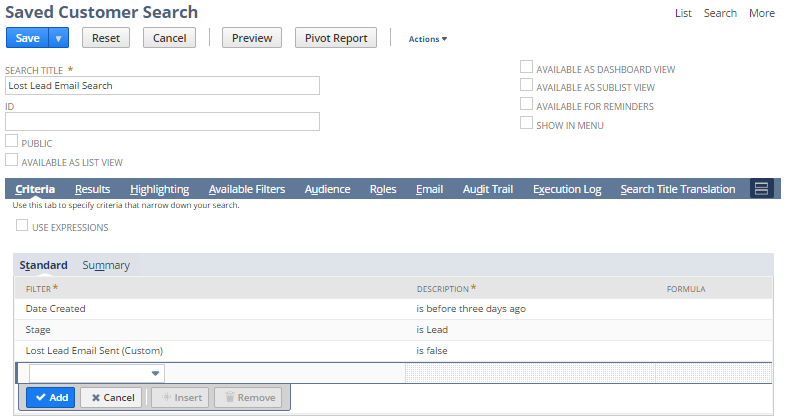
After you've created the custom entity field for the lead record, you create a saved search. In the saved search, you want to find lead records created more than three days ago with the Lost Lead Email Sent field equal to false.
To create the saved search:
-
Go to Lists > Search > Saved Searches > New.
-
On the New Saved Search page, click Customer.
-
In the Search Title field, enter Lost Lead Email Search.
-
On the Criteria tab, enter the following filter criteria in the Filter field:
Filter
Criteria
Date Created
before and 3 days ago
Stage
any of and Lead
Lost Lead Email Sent (Custom)
No
-
Click Save.
-
Continue to Step 3 Create the Workflow and Set the Schedule.