Add instruction guardrails to LLM nodes
You can now add a prebuilt instruction guardrail to each large language model (LLM) node in your workflows. The guardrail helps prevent hallucinations and keeps LLM responses focused on the business task at hand.
When enabled, the guardrail instructs the LLM to respond based on grounded enterprise facts and evidence. It also instructs the LLM to deflect inputs that are off-topic, unsafe, insecure, or unlawful. Instruction guardrails are an important part of a defense-in-depth approach to AI safety, security, and governance.
To enable the guardrail, edit the LLM node in workflow builder and set the option to enable guardrails to yes. After you enable the guardrail, you can use the LLM node's debug panel to view the text of the guardrail instruction sent to the LLM.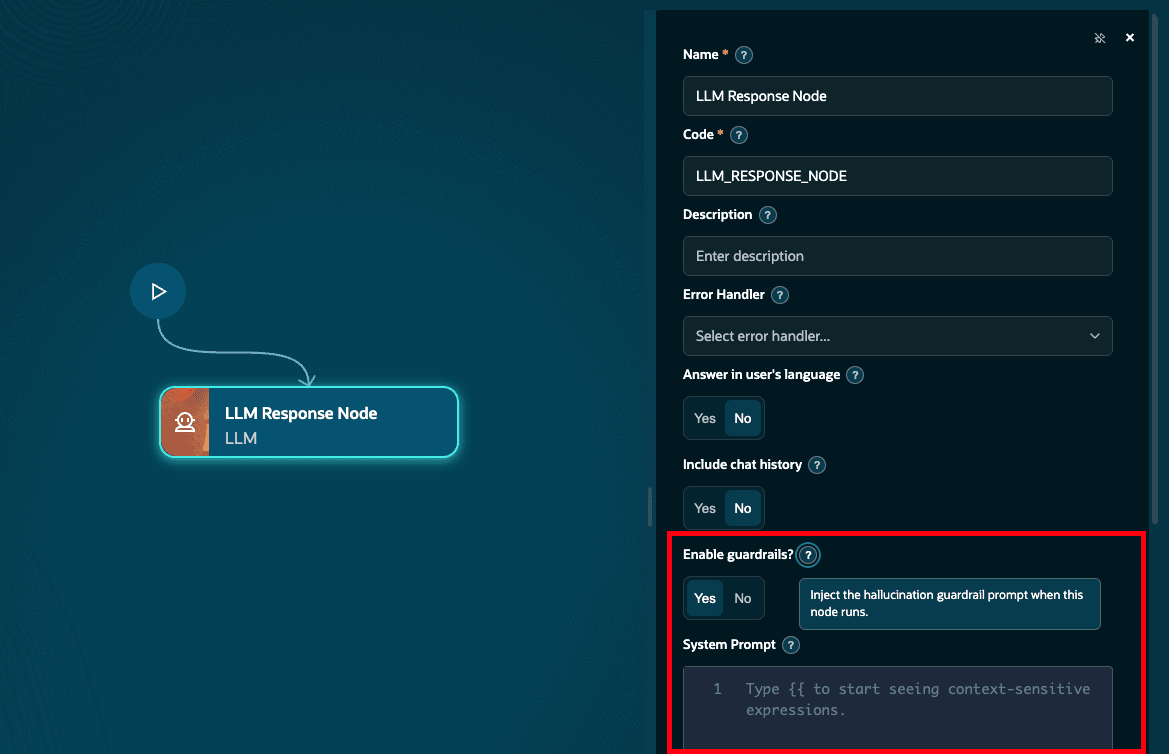
Enable guardrails option in the LLM response node
Instruction guardrails help you improve the reliability and safety of your workflows by keeping LLM responses grounded in enterprise information and focused on relevant business tasks. They also help reduce the risk of inappropriate responses by redirecting requests that don't meet established guidelines.
Steps to enable and configure
You must have access to use AI Agent Studio.
Access requirements
Access Requirements for AI Agent Studio