IPM Insights: Generative AI Narrative Summaries Available for Account Dimension
You can now review a Generative AI narrative summary for a set of insights based on the Account dimension. Previously, narrative summaries were not generated based on the Account dimension.
Applies To: Enterprise Profitability and Cost Management, Financial Consolidation and Close, FreeForm, Planning, Tax Reporting
To review a narrative summary of a set of insights based on a parent member:
- From the Home page, click IPM and then click Insights to open the Insights dashboard.
- Select an insight or insights for a parent member, and then from the Actions menu, select Summarize. The parent members and POV are the starting point for the analysis.
To review a narrative summary for a set of insights based on the Account dimension, the POV must be the same across the all the selected insights. - Enter a name for the summary.
- Select the insight type.
The analysis reviews and summarizes only a single insight type at a time. For example, you can’t summarize both anomaly insights and forecast variance and bias insights.
- Review the parent members and POV, which are based on your original insight selection, and if needed, use the Member Selector to select different members.
- Click Run.
GenAI evaluates all of the insights of the selected type for the parent members and their children for the specified POV and generates a meaningful summary description. For example, it can identify the child member or members that are contributing to the parent insight and describe the impact.
The summary includes only members that the user has access to.
- On the Insights dashboard, click the Summary tab, and then click the summary to review.
For example, if you select multiple insights where there are multiple accounts in the selection, Account becomes the anchor dimension:
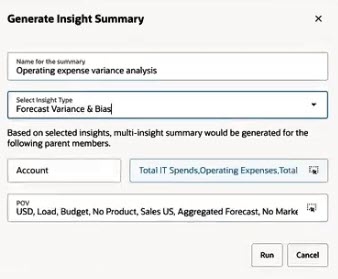
Account is the anchor dimension
You see a narrative summary based on accounts:
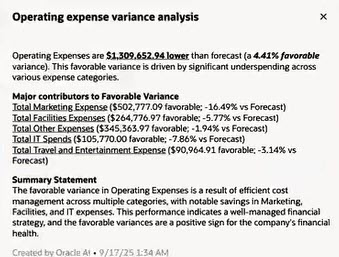
The narrative summary is based on the Account dimension
Business Benefit: This enhancement is useful for teams that rely on account member-based reporting. You can now conduct deeper, more relevant analyses without needing to manually consolidate insights across different account members.
Steps to enable and configure
To enable Generative AI to summarize insights:
- From the Home Page, click Application, and then click Settings.
- In the Enable AI section, select Generative AI to enable insight summaries.
Tips and considerations
- If you select multiple insights and there are multiple accounts in the selection, Account is the anchor dimension, and the narrative summary is summarized by account. Note that the POV must be the same across all of the selected insights.
- If you select multiple insights and the account member is the same but the members in other dimensions are different, then the narrative summary is summarized by the other dimension.
Key resources
- Enterprise Profitability and Cost Management
- Administering and Working with Enterprise Profitability and Cost Management
- Financial Consolidation and Close
- Working with Financial Consolidation and Close
- FreeForm
- Working with FreeForm
- Planning
- Working with Planning
- Tax Reporting
- Working with Tax Reporting