Predictive Cash Forecasting: Integration with Oracle Cloud ERP
Predictive Cash Forecasting integration with Oracle Cloud ERP is now generally available. Along with the existing Predictive Cash Forecasting features, the integration now offers the following features:
- Offers automated ready-to-use integration with Fusion Cloud ERP sources for Accounts Receivables, Accounts Payables, and Cash Management to seed cash flows.
- Provides pre-seeded Data Integration pipelines for Predictive Cash Forecasting integration with Fusion data sources.
- Allows you to drill through to Cloud ERP aggregate Analytical Views and detailed transactions to understand the actuals and forecast in detail and for deeper analysis.
The drill-through capability allows cash and treasury users to understand the forecast amount in detail in the context of additional business attributes. Users can drill to web-based aggregate Analytical Views and further to detailed transactional views for Receivables, Payables, and Cash Management for the seeded cash flow sources. These transaction listings and their business attributes help users understand, analyze to make decisions for actions, and gain confidence of the forecast outcomes.
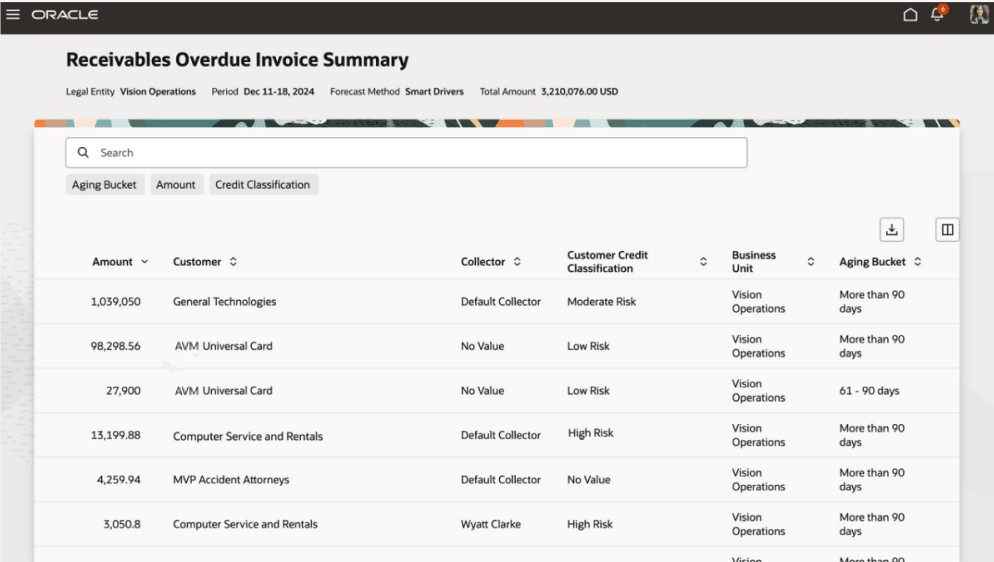
Drill through to Receivables Overdue Invoice Summary
Overall, Predictive Cash Forecasting offers a comprehensive solution for cash forecasting that can help businesses make better decisions for their liquidity planning and working capital management strategies. Automated integration of Fusion Cloud ERP provides the power to use real-time transactional data from Receivables, Payables and Cash Management sources for analysis of actuals and reliable forecasts backed by underlying transactions. Users can gain actionable insight in advance, make informed decisions, and take appropriate actions to better manage working capital. With its advanced features and flexibility, it is a valuable tool for any organization looking to improve its cash forecasting capabilities.
Business Benefits:
- Optimize cash by finding problems and opportunities earlier with increased automation and more frequent cash forecast updates.
- Act more quickly by aligning stakeholders and by unifying scenario planning with corrective actions.
- Improve liquidity with deeper insights.
Steps to enable and configure
- Log a Service Request (SR) and request to enable Analytical Views.
- Perform the following setup tasks in Cloud ERP:
- Enable the Predictive Cash Forecasting feature using the Change Feature Opt In option for Financials offering in Cloud ERP Setup and Maintenance. Obtain the promo code through the SR.
- Perform configuration tasks as described in the Implementation Checklist for Oracle Fusion Cloud ERP Administrators.
- Perform the following setup tasks in Cloud EPM:
- Create a new Planning application of type Cash Forecasting in Cloud EPM.
- At the end of the Application Creation wizard, click Configure. Or, from the Home page, click Application and then click Configure.
- Click Enable Features, select the features you want to enable, and then click Enable. When you click Enable, the Predictive Cash Forecasting artifacts are populated, including dimensions, forms, line items, rules, navigation flows, and so on.
- Perform additional configuration tasks as described in the Implementation Checklist for Administrators.
Tips and considerations
- This release provides integration between the existing Predictive Cash Forecasting capabilities and Fusion Cloud ERP (Accounts Receivable, Payables, and Cash Management).
- Operational readiness of ERP business processes having data impacting cash flows, to be available in its most current and complete state for cash forecasting is important.
- Requires Analytical Views.
- Requires an EPM Enterprise subscription to enable the Predictive Cash Forecasting application in Cloud EPM.
- Requires a separate instance to enable the Predictive Cash Forecasting application in Cloud EPM.
- Predictive Cash Forecasting applications are multi-currency only.
- Predictive Cash Forecasting applications are Hybrid Essbase enabled in EPM.
- Predictive Cash Forecasting applications provide Redwood Experience.
Key resources
Access requirements
- Set up access to both Cloud ERP and Cloud EPM applications using one set of credentials by defining the single sign on. This allows you to seamlessly access both applications with a single login.
- Set up Cloud EPM connections to Cloud ERP using the Manage Enterprise Application option in the topology definition.
- Use the Cloud ERP Manage Job Roles task in the Users and Security functional area to create user-defined roles, in addition to the predefined roles with the required roles and privileges for assignment to users.
- Use the Cloud ERP Manage Data Access for Users task in the Users and Security functional area to assign users access to appropriate data based on their job roles.
- Define entity level security in Cloud EPM that matches the Cloud ERP entity level access. To support web drill-through to data in Cloud ERP, security must match in Cloud EPM and Cloud ERP.