Application Diagnostics Enhancements
Application Diagnostics has been enhanced to improve the accuracy, coverage, usability, and automation of Application Diagnostics reports.
- BSO formula reporting: For account members with default formulas that do not contain conditional logic, the Application Diagnostics report now reports the issue for the source Block Storage Option (BSO) plan type instead of all BSO plan types.
- ASO formula validation: The Application Diagnostics report now validates eligible Aggregate Storage Option (ASO) cube outlines and displays relevant Essbase formula-validation messages on the new Formula worksheet. To view this information, disable Set Query Tracking and clear All Aggregations for each ASO cube. You can perform both actions in Calc Manager.
- Validation reports: When a validation rule exceeds 500 results for a cube and dimension, repeated detail rows in the Application Diagnostics report are replaced with one summarized row. Summary sheets identify governed validations and indicate that counts are approximate.
- Diagnostics after daily backup: A new Application Settings option, Run Application Diagnostics after daily backup now allows you to control whether an Application Diagnostics report is generated automatically as part of the daily backup process. By default, the setting is set to No.
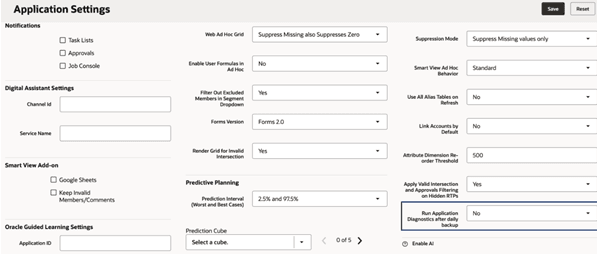
run_application_diagnostics_after_daily_backup_screenshot
Applies to: Freeform, Planning
Business Benefit: These enhancements proactively address potential performance issues by identifying formula and outline concerns, improving usability, reducing the time spent reviewing large diagnostic reports, and automating diagnostics after daily backups, as required.
Key resources
- Administering Planning
- Administering FreeForm