Enhanced Jobs Console with Updates to the Job Workflow
A new Jobs interface with dedicated tabs for different types of jobs—Model Operations (Enterprise Profitability and Cost Management only), Import Export, App Maintenance, and Integration—is now available. This allows you to create, edit, schedule, submit, duplicate, or delete certain job types from the tab where they are managed. In addition, you now have the ability to enter a range of dates for the start date and end date when scheduling a job.
As part of this change, the job-related options previously available in the Actions menu on the Application, Overview screen have been moved to the applicable Jobs tabs. The changes to the Actions menu are illustrated in the following image: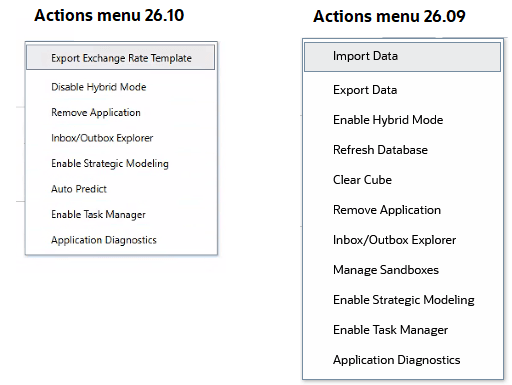
To work with jobs using the updated user interface:
- From the Home page, select Application and then Jobs.
- At the bottom of the Jobs console, select the tab for the type of job you want to work with. The following tabs are available:
- All Jobs: Shows all jobs, including jobs that are processing, completed, have errors, completed with a threshold violation, are pending cancellation, have been cancelled, completed with errors, and completed with warnings.
- Pending: Shows all pending jobs that have been scheduled to run.
- Model Operations (Enterprise Profitability and Cost Management only): Use this tab to submit, schedule, or delete "Calculate Model", "Clear Point of View", "Copy Point of View", and "Delete Point of View" jobs that were defined and saved as a job using PCM Agent.
- Import Export: Use this tab to edit, delete, submit, schedule or duplicate Import and Export jobs. You can also click Create Job to create a create a job to work with export or import of data and metadata, cell-level security, exchange rates, valid intersection, and so on.
Note: Some operations, previously available through buttons on the Application / Overview / Dimensions tab, have moved to the Jobs console. For example, metadata export and import operations can now be performed by creating a job on the Import Export tab on the Jobs console.
- App Maintenance: Use this tab to edit, delete, submit, schedule or duplicate Application Maintenance jobs. You can also click Create Job to create a job to manage application-level activities such as invoke administration mode, clear cube, compact outline, merge data slices, refresh the database, optimize aggregation, and restructure cube.
- Integration: Use this tab to schedule Data Integration jobs related to pipeline, integration, batch, and system maintenance.
Applies to: Enterprise Profitability and Cost Management, Freeform, Planning
Rationale: These changes are part of the technological transition within the Cloud EPM environments. The updated listing pages, introduced in earlier releases, offered enhanced search capabilities and were widely adopted by our customers.
Where possible, Oracle provides a transition period for you to adapt to interface changes. In this case, the redesigned page structure requires a direct transition to updated navigation. As Oracle continues improving the interface, we aim to preserve familiar workflows wherever possible while making everyday tasks simpler and more efficient.
Business Benefit: The redesigned Jobs console categorizes jobs to streamline job workflow actions. The new tabs for different jobs types improves consistency and usability and supports better search and the ability to track, schedule, and cancel pending jobs.
Key resources
- Administering and Using Enterprise Profitability and Cost Management
- Administering Planning
- Administering Freeform