Direct Asset Transactions in Secondary Ledger Tax Books with Different Currency
Perform direct asset transactions including additions, adjustments, and book transfers within tax books linked to secondary ledgers, even when the ledgers operate in a different currency from the primary ledger. By removing the dependency on the corporate book, the feature enables tax books to function with greater operational independence and flexibility. Currency conversions are applied at the transaction level using either the provided fixed asset cost or a conversion rate, ensuring accurate valuation and compliance with local statutory requirements.
Enhancements to multicurrency processing in Assets make it easier to record and adjust asset values when a tax book is linked to a secondary ledger that uses a different currency from the primary ledger. You can now directly enter asset costs in the tax book’s currency or specify the conversion rate to be used between the primary and tax book currencies in the file-based data import templates. This reduces reliance on daily rates and simplifies handling legacy asset conversions where historical rates are needed.
The enhanced multicurrency capabilities are available in the following file-based data import templates:
- Fixed Asset Mass Additions Import
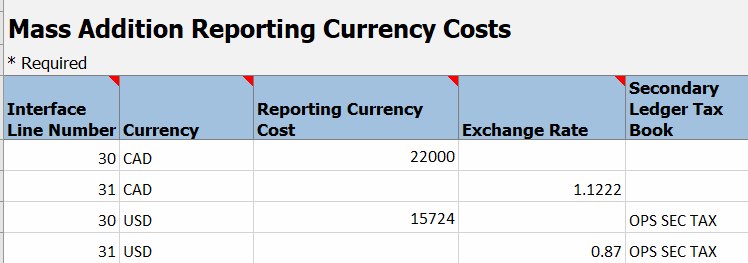
In the FA_MC_MASS_RATES sheet, you can enter either the asset cost in the tax book’s currency or the applicable conversion rate using the new ‘Secondary Ledger Tax Book’ column. For corporate book asset conversions, you can also specify these values for any related reporting currencies and secondary ledger tax books. The mass copy process will use the provided data when assets are copied from the corporate book to the tax book. For assets added directly to a tax book, simply enter the cost or conversion rate, and the asset addition process will apply it. The template also supports multiple source lines for a transaction, with different rates for each if needed.
- Fixed Asset Mass Adjustments Import
A new sheet, FA_ADJ_RATES_INT_V, lets you specify conversion rates for both adjustment and invoice addition transactions. Enter reporting currency rates for corporate books or secondary ledger rates for tax books. Both source line and non-source line cost adjustments are supported. For invoice additions with multiple source lines and rates, use the Fixed Asset Mass Additions Import template. - For Adjustment transactions, the cost entered in FA_ADJUSTMENTS_T sheet can represent either the adjustment amount or the new total cost, depending on whether a conversion rate or amount is provided:
- With a conversion rate or amount: It represents the adjustment amount by which the current asset cost will be increased or decreased. It does not represent the new total cost of the asset after the adjustment.
- Without a conversion rate or amount: It represents the new total cost of the asset after the adjustment; this is the behavior prior to the introduction of this feature, and it continues to apply after this feature as well.
The business benefits include:
- Enhanced Financial Accuracy: Reduce currency conversion errors by allowing direct input of asset costs in the tax book’s currency or by specifying a conversion rate for each transaction.
- Consistent Asset Valuation: Ensure consistent asset valuation across primary ledgers, secondary ledgers, and reporting currencies, supporting more accurate financial analysis and reporting.
Steps to enable and configure
- Download the latest import templates:
- Fixed Asset Mass Additions Import
- Fixed Asset Mass Adjustments Import
- Enter the asset cost in the tax book currency or provide the appropriate conversion rate in the dedicated columns or sheets (see Description above for details).
- Import the templates through the standard file-based data import process for Fixed Assets.
Tips and considerations
- For legacy asset conversions for secondary ledger tax book, historical rates can now be specified directly for accurate value mapping.
- When processing corporate book asset conversions, ensure that values for any related reporting currencies and secondary ledger tax books are included.
- Use the Fixed Asset Mass Additions Import template when invoice additions require multiple source lines with different conversion rates.
- Asset additions and adjustments performed through the UIs or ADFdi spreadsheets use daily rates only. Similarly, transactions uploaded using file-based templates without a specified conversion rate will also use daily rates.
- Invoice addition transactions can be used only when the source lines are allowed for the secondary ledger tax book.
- When both cost and exchange rate are entered for a transaction, the cost will be considered.
- It is recommended not to make further edits or updates to the assets loaded through file-based import using the "Create Asset Additions" and "Adjust Assets" spreadsheets or the "Edit Source Lines" and "Change Financials Details" pages. Instead, you should purge the data and re-import it using the File-Based Import template.
Key resources
How to Perform Direct Asset Transactions in Secondary Ledger Tax Books with a Different Currency
Access requirements
No new access requirements.