Automated Asset Creation from Payables Invoices
Automatically update the status of asset invoice addition lines to Post when all required asset creation details, such as asset category, location and assignments, are available. Additionally, assign a default asset book to these lines, based on the secondary balancing segment value, along with the other qualified segments of the asset clearing account.
Currently, for asset purchase lines transferred from Payables to Assets, the depreciation expense account is defaulted using the Transaction Account Builder, the asset category is derived from the clearing account, and the asset location is derived from the ship-to location. With this feature, Assets provides the following enhanced defaulting capabilities:
- Asset location can be defaulted from the customer location.
- The status of asset lines can be set to Post when the asset category and assignments are defaulted.
With these defaulting capabilities, you can now automatically create assets from asset purchase invoices transferred from Payables.
Default Asset Location from Customer Location
Currently, for asset purchase invoices transferred from Payables, the asset location defaults based on the mapping between the asset location and the ship-to location. For standard purchase orders, the ship-to location is typically an internal company location set up as an HR Location in Oracle. However, for drop-ship purchase orders, the delivery location is the customer’s site, which is created as a Trading Community Architecture location.
To map each customer site location to an asset location, you can enter the mapping using the rapid implementation spreadsheet, which can be downloaded through the setup task ‘Update Fixed Asset Configuration in Spreadsheet.’
The Location Mapping sheet in the Update Fixed Asset Configuration in Spreadsheet is used for mapping asset location to HR Location, now this sheet has two new columns Customer Site Number and Customer Name for mapping to a customer site location. To map an asset location to both an HR location and a customer location, you need to enter in two rows because each row can map to only one type of location.
Steps to Map
- Open the rapid implementation spreadsheet and navigate to the Location Mapping sheet. Create new mappings as required, or click the Download button to review and modify existing mappings.
Default Status to Post
The Prepare Assets Transaction Data process automatically set asset lines to post after the asset category, location, and depreciation expense accounts have been defaulted. Since these values are defaulted by the application, ensure that the default values are appropriate for each asset addition line before submitting the Post Mass Additions process
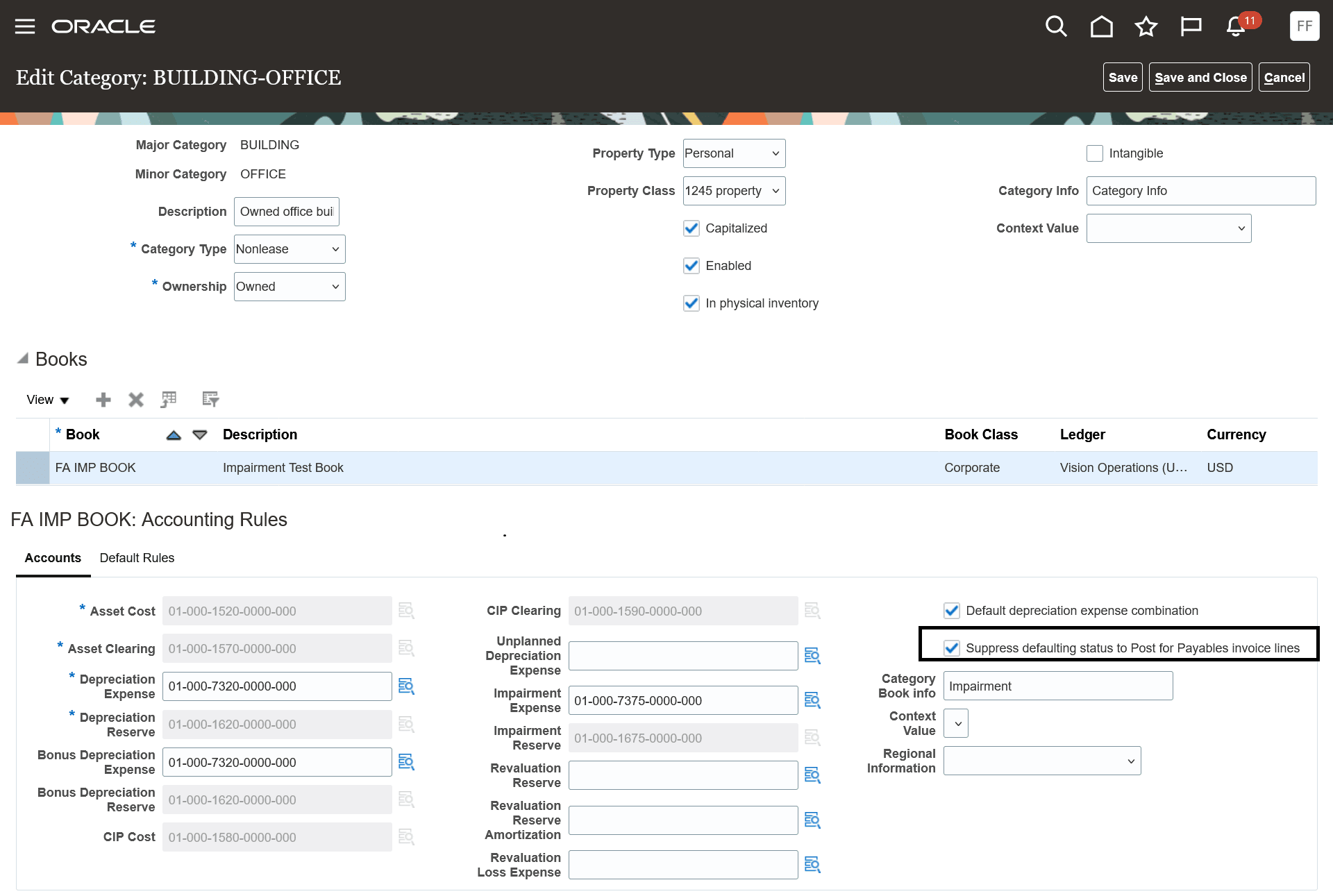
You can choose not to set the status to Post for a particular category within an asset book by enabling the “Suppress defaulting status to Post for Payables invoice lines” option in the category assignment setup.
Transfer Payables Invoice Lines to Asset Book by Second Balancing Segment
Assign a default asset book to source lines transferred from Payables based on the qualified segments of the asset clearing account which now includes the second balancing segment.
When you have a separate asset book for each second balancing segment, you must specify a unique second balancing segment in the asset clearing account for each asset book in the category setup. The Create Mass Additions process now transfers Payables invoices to the appropriate asset books by considering the second balancing segment from the invoice charge account.
The business benefits include:
- Enhance productivity and streamline operations by fully automating the Payables to Fixed Assets process, thereby removing the manual intervention required for posting asset addition lines.
- Ensure efficiency, especially during period-end close, by automatically processing the final asset-related invoices.
- When managing multiple asset books within a primary ledger, accurately assign the asset book to asset addition lines from Payables, utilizing the secondary balancing segment value of the asset clearing account, in conjunction with the primary balancing segment value, cost center, and natural account segments.
Steps to enable and configure
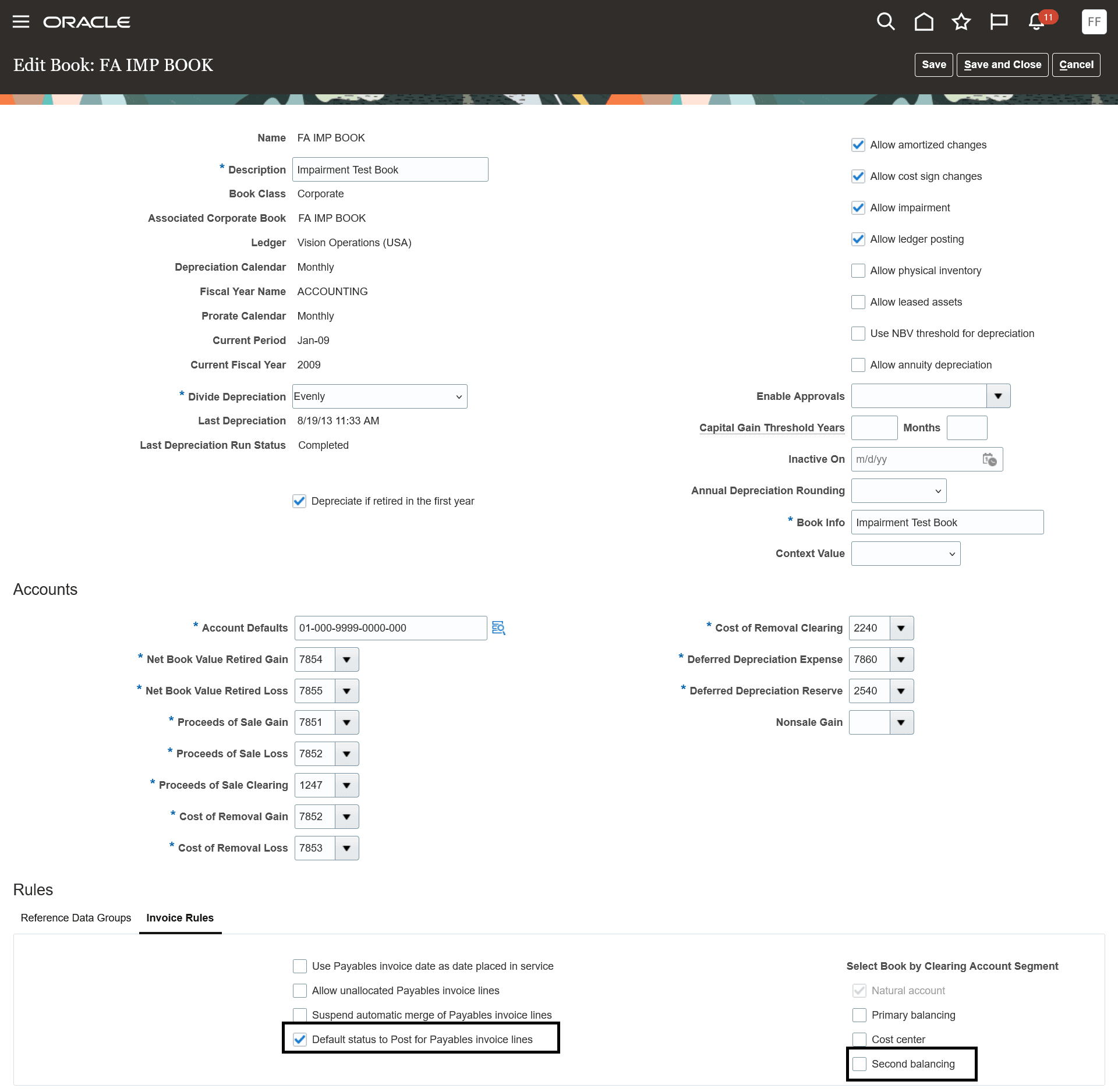
Setup and Maintenance-> Manage Asset Books -> Enable the following options:
- Default status to Post for Payables invoice lines
- Second balancing
Tips and considerations
Don’t enable this feature for an asset book or for a category within an asset book if any of the following apply:
- Approval is required for asset additions because you need to specify an approval type.
- Required descriptive flexfield segments or global descriptive segments exist for which values must be entered before adding assets.
- Segregation of duties is enabled, where a reviewer must review transactions before posting.
Key resources
- How to Default Asset Status to Post for Payables Invoice Lines
- Guidelines for Transferring Asset Invoices Using Rule-Based Accounting
- Create a Location Mapping
Access requirements
No new access requirements.