 Advanced Event Model Configuration in Accounting Hub
Segregate accounting data from multiple source systems which are processed through a single Accounting Hub application into separate journal categories in the General Ledger. The Accounting Hub's event modeling initially supported only one event class and process category per application, limiting its use to a single journal category for that specific event class. Enable the advanced event model configuration to define multiple event classes and process categories in Accounting Hub applications. Multiple event classes support better transaction organization based on the source system ensuring appropriate categorization of journals when they are posted into General Ledger, enabling greater flexibility and granularity.
Customers often use a single Accounting Hub application to import transactions from multiple source systems. Because these transactions are all associated with one event class, the same journal category is applied to all journals generated in the General Ledger. As a result, it becomes challenging to identify the originating source system for each journal entry, which limits the flexibility of the accounting event model. With the advanced event model configuration, you can define multiple process categories and event classes within a single Accounting Hub application to better align with your business requirements. Using multiple process categories gives you greater control over processing different data sets in one Accounting Hub application, enabling you to separate the create accounting process by process category and, minimize performance impacts from high-volume data. Additionally, multiple event classes allow you to classify journals based on their originating source systems, enhancing auditability and traceability.
Key Capabilities
Following are some of the key enhancements made to support advanced event model configuration for Accounting Hub applications -
- Advanced Source System Definition Template
On enabling this feature, the advanced source system template is available to users to define the complete event model hierarchy including definition of multiple process categories and event classes for new accounting hub applications. The structure of this template is similar to the prior source system template with the following additional changes –
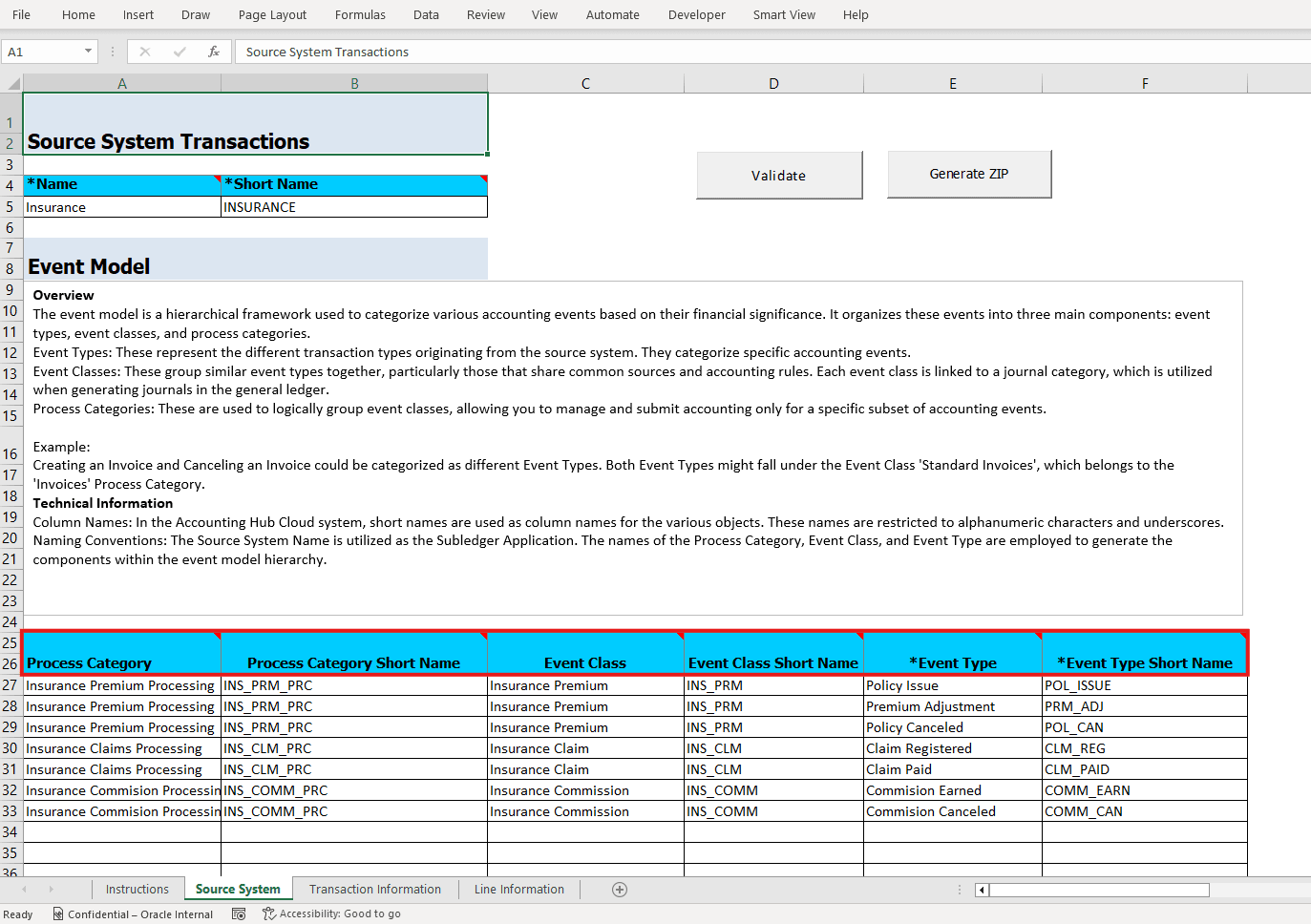
- Process Category, Process Category Short Name, Event Class, and Event Class Short Name columns have been added in the Source System sheet.
- The Transaction Type Name and Short Name columns have been renamed to Event Type and Event Type Short Name respectively in the Source System sheet.
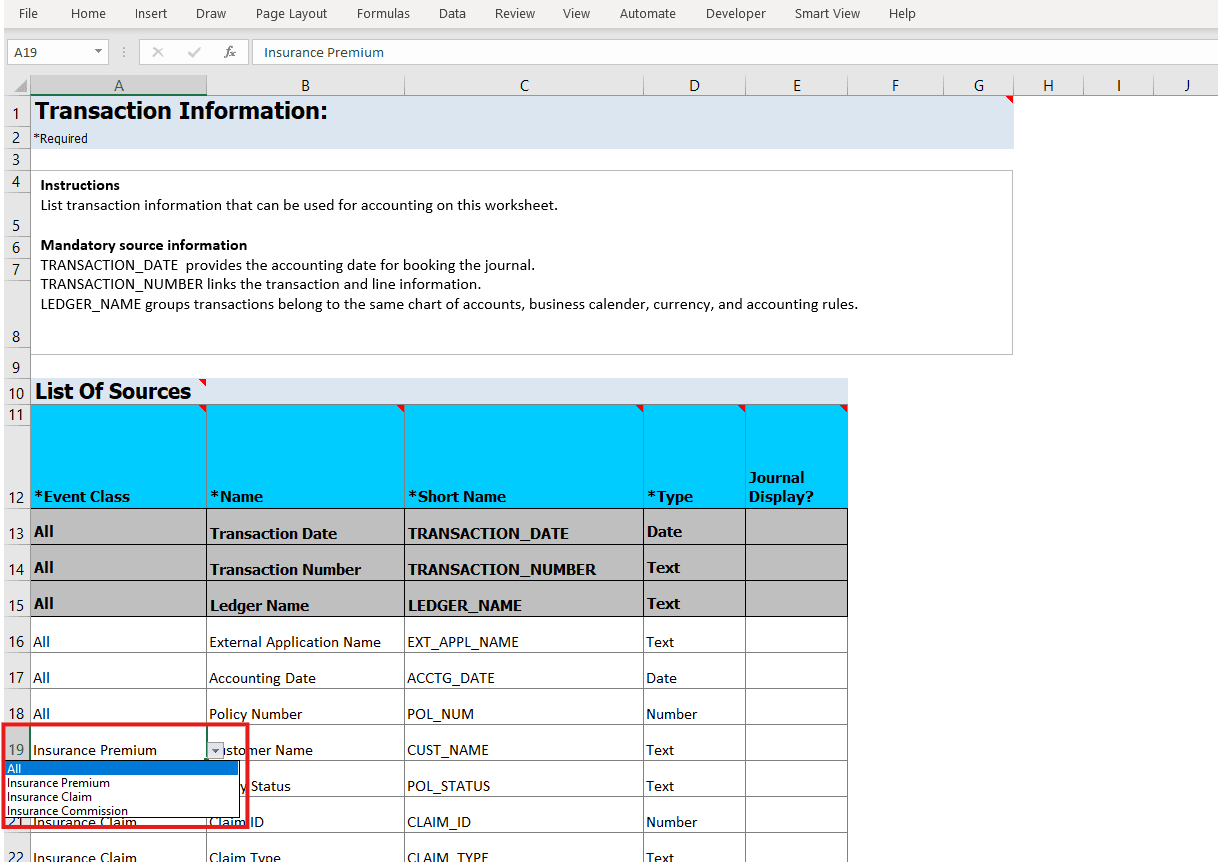
- A new column Event Class has been added in the Transaction Information and Line Information sheets to capture the source assignments to event class. Sources can be re-used across multiple event classes in the application with the flexibility to add them at the line or header level, when multiple event classes are configured in the accounting hub application, you can define sources which are either common to all event classes or assign sources to specific event classes only. The Event Class column captures this information, it allows you to specify the value "All" indicating the source is common to all the event classes defined in the application or choose a specific event class from the list to which the source must be assigned. This list is based on the event classes entered in the Source System sheet.
- Event Model updates in existing Accounting Hub applications using the Rapid Implementation Template
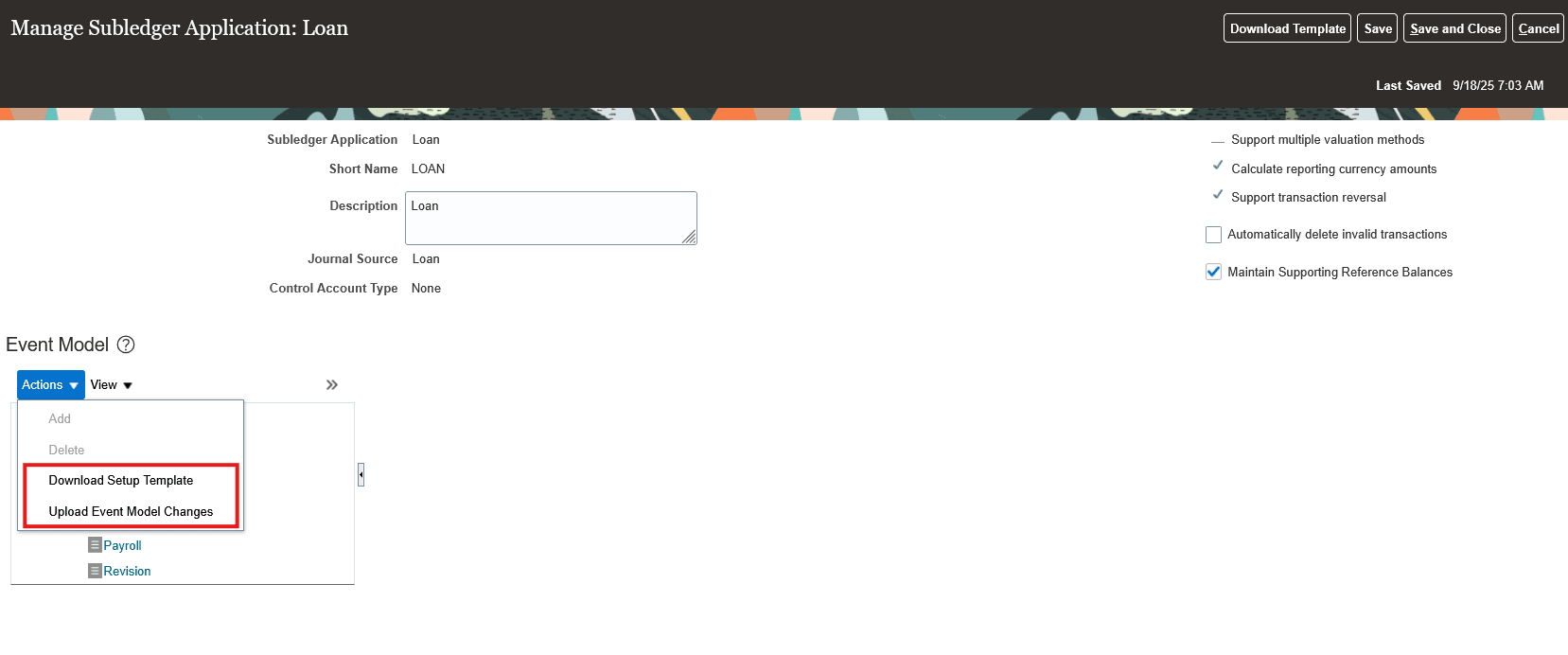
For existing accounting hub applications, when the feature is enabled users can download a rapid implementation template using the Download Setup Template action from the Event Model section of the Manage Subledger Application page to incrementally add process categories and event classes along with source assignments. After the changes are validated successfully and the zip file for upload is generated, this file should be uploaded using the Upload Event Model Changes action.
- Event Model updates in existing Accounting Hub applications from the Manage Subledger Application page
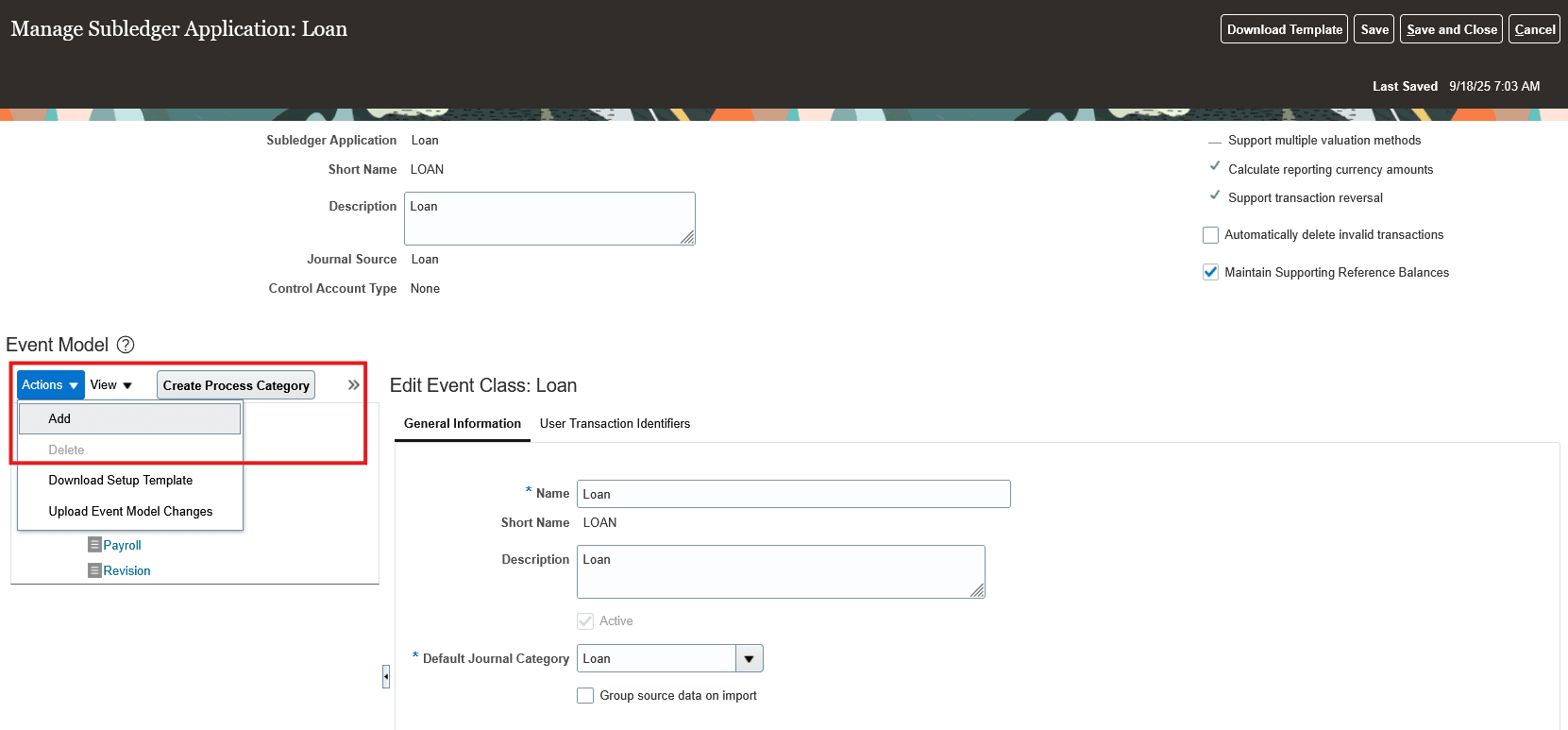
For any quick changes to the event model configuration in existing accounting hub applications, addition or deletion of process categories and event classes are supported through UI actions in the Event Model section of the Manage Subledger Application page.
- New Source or Source Assignment addition for an Event Class
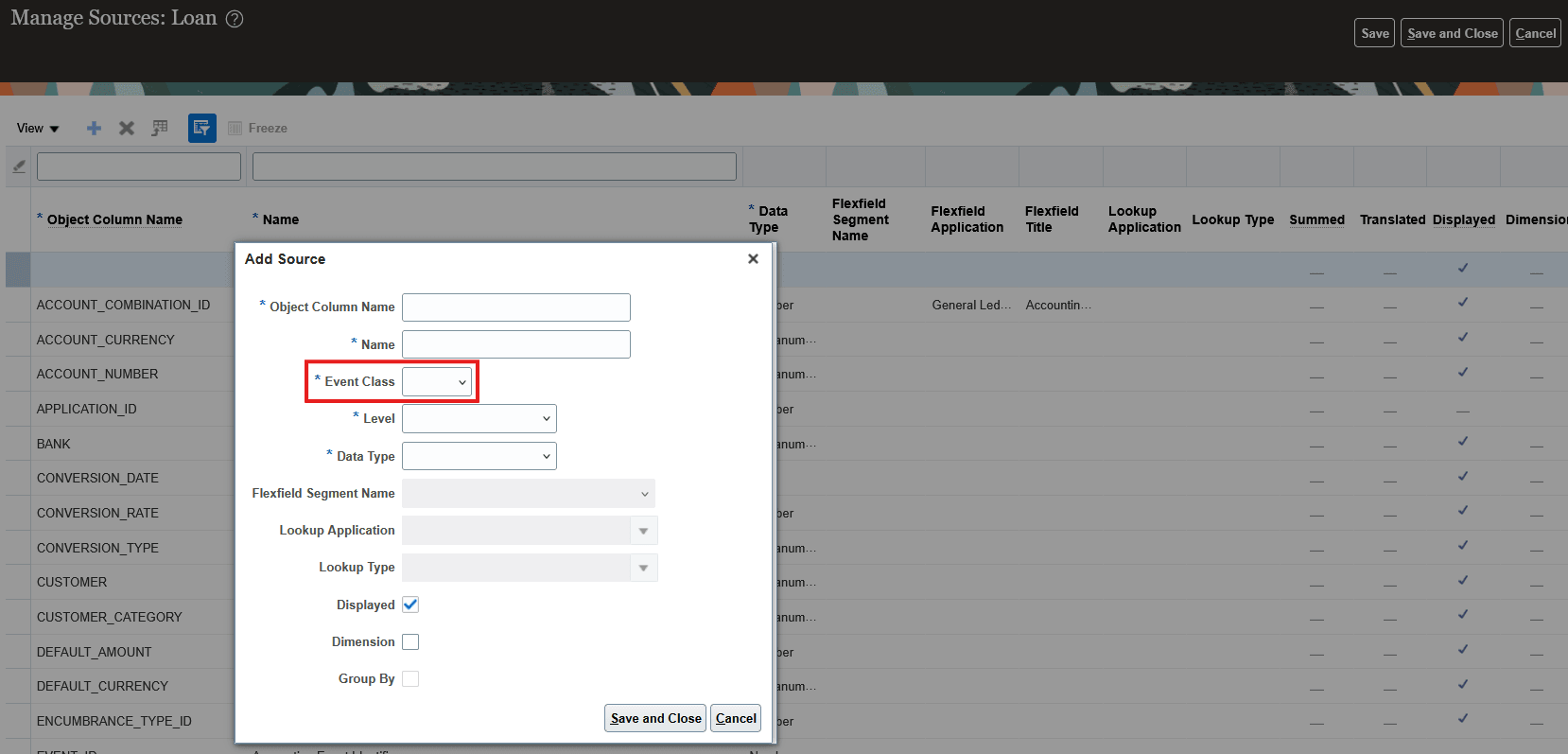
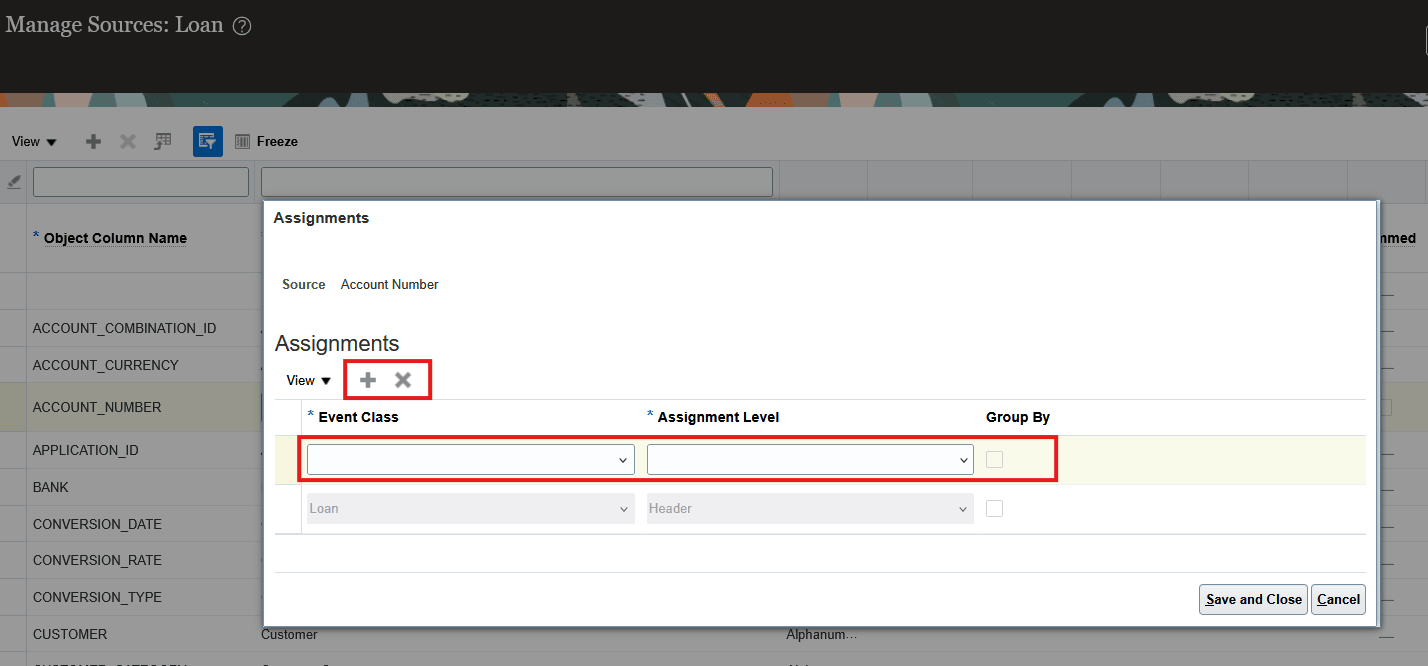
A new pop-up window has been introduced to capture the source details while adding a new source for Accounting Hub applications with multiple event classes. The event class information should be specified at the time of adding the source to ensure that the source is assigned to the appropriate event class. Sources can be re-used across multiple event classes in the application with the flexibility to add them at the line or header level, additional event class assignments can be added from the Assignments window for a specific source.
New Source Addition
New Source Assignment Addition
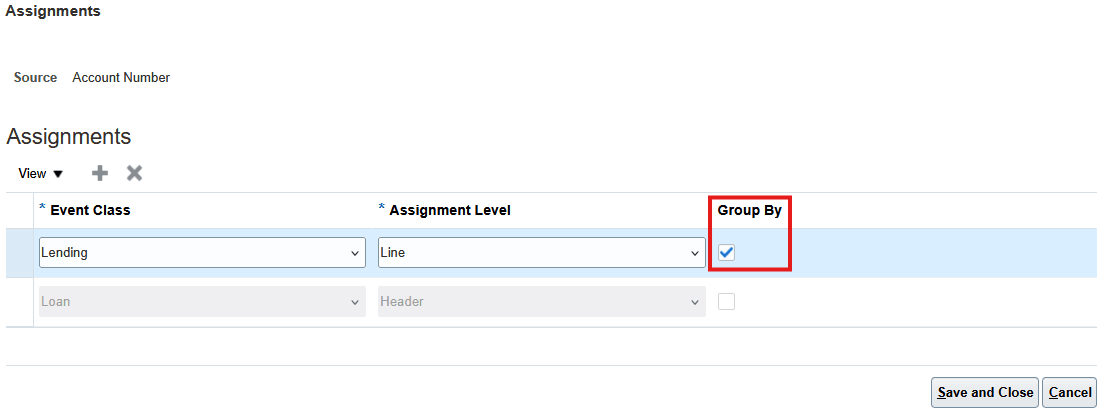
- Group By specification at Event Class Source Assignment level for Splitting Large Transactions
When the Accounting Hub application includes multiple event classes, the Enable Group Source Data on Import option can be enabled for specific event classes of the application. On enabling this option for specific event classes, you can choose which event class source assignments at the line level should be used as grouping attribute.
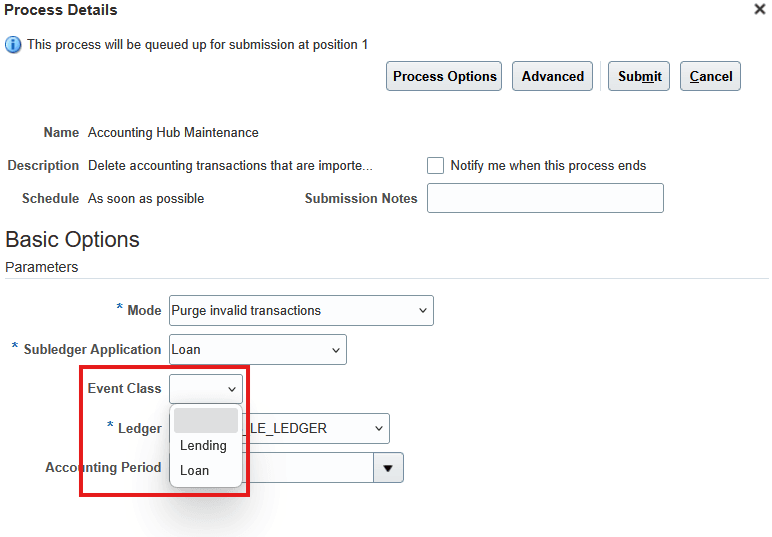
- Purge Transactions by Event Class as additional criteria
Purge invalid, unaccounted, or pending reversal transactions using event class as an additional optional filter criteria in the Accounting Hub Maintenance process when the Accounting Hub application has multiple event classes defined.
- Upload Transactions for All or Specific Event Classes
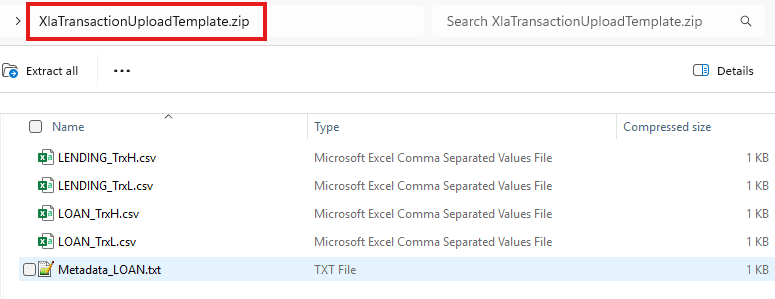
The transaction upload template now contains a pair of header and line CSV files per each event class. You can choose to upload transactions for all event classes or, for specific event classes only by excluding those CSV files for which transaction import is not required from the zip file used for upload.
Event Modeling Considerations
It is important to thoroughly analyze your source systems before designing the accounting event model. Below is a quick reference of the components of the accounting event model -
- Event Types - Event types serve as the foundational layer of the accounting event model by representing distinct business transactions within the source system that result in financial activity and necessitate accounting entries. Conducting a comprehensive analysis of the source systems is essential to identify all transaction types that generate financial movements within the business processes. Every transaction type with a financial impact should be mapped and defined as a unique event type in the Accounting Hub application event model. This ensures that all relevant financial events are accurately captured and processed for accounting purposes.
- Event Classes - Event classes serve as a mid-level grouping within the event model hierarchy, allowing you to group event types that either originate from similar business processes or share common accounting rules. By grouping event types with similar accounting requirements under an event class, you can define accounting rules at the event class level streamlining the maintenance of accounting rules. Each event class is mapped to a specific journal category which is used to generate journals in the General Ledger. It ensures that journals resulting from different business processes (such as invoice creation, payment creation, etc.) are categorized distinctly resulting in better financial visibility and auditability.
- Process Categories - Process categories allow you to group related event classes together based on how and when accounting should be processed for these group of events. For example, you may want to process accounting for invoice creation and invoice cancellation events together but handle payment events separately. Segmenting different event classes using process categories allows you to balance system workloads for large data volumes by distributing accounting processing across these different process categories rather than processing all of them at once. It reduces performance bottlenecks, minimizes processing times and allows for easier management of exceptions or errors during accounting runs.
Additionally, it is also important to define which transaction and transaction line sources (or attributes) will be available from the source systems to generate accounting entries. With support for multiple event classes, you can now define common sources for all event classes under an Accounting Hub application or have event class-specific transaction and line sources. The default set of sources will be common for all event classes defined in the Accounting Hub application.
Business benefits include:
The business benefit of this feature is the ability to achieve an additional level of detail and organization in accounting hub journal entries posted to the general ledger. This leads to enhanced transparency in financial reporting by clearly distinguishing accounting entries originating from different source systems or transaction types within the same subledger application.
Steps to enable and configure
Use the Opt In UI to enable this feature. For instructions, refer to the Optional Uptake of New Features section of this document.
Offering: Fusion Accounting Hub
Tips and considerations
Tips
- The Advanced Source System Template can be used to define a simple event model configuration by leaving the Process Category and Event Class related columns blank in the template and only entering the event type details based on the source system transactions. In this case, the Accounting Hub application is created with a single process category and event class which is based on the application name and short name.
- For mapping new event classes to existing sources, use the Source Assignment window from Manage Sources page by clicking on the Object Column Name for the existing source.
- Deletion or updates to the existing Process Category and Event Class will be supported from the Manage Subledger Application page if they are not used in accounting rules and no accounting events have been generated for them.
- Upload transactions for specific event classes by excluding those CSV files for which transaction import is not required from the zip file used for upload.
Considerations
- Enabling the Flexible Configuration of Accounting Hub Cloud Service End to End Flow feature is a pre-requisite to enable the Advanced Event Model Configuration in Accounting Hub feature.
- After the Advanced Event Model Configuration in Accounting Hub feature is enabled to define an Accounting Hub application with multiple event classes, the transaction import always uses the FBDI transaction template with all the columns irrespective of whether they are mapped to application sources or not, even if the feature is disabled later. Always download the latest template from the application and use the correct transaction template version for upload.
- If the Support transaction reversal option is enabled for an Accounting Hub application with multiple event classes, reversals will be allowed i.e., the reversal column will be included in the transaction upload template for all event classes of the application. Reversals can’t be enabled for a specific event class only.
- For existing Accounting Hub applications when the feature is opted-in, only incremental addition of process categories, event classes and sources will be supported through Rapid Implementation template. Changes to the existing event model components (process categories, event class, event type) such as update or delete are not supported through the template.
- With Advanced Event Model Configuration in Accounting Hub feature enabled, a maximum of 10 event classes and 10 process categories can be added in the Accounting Hub application event model.
- Backward compatibility for the rapid implementation template will be supported for the next couple of releases i.e. users can use the simple template for defining source systems with single process category and event class.
- No impact is expected to the transaction upload template for existing Accounting Hub applications unless multiple event classes are defined.
- While migrating setup for Accounting Hub applications with multiple process categories and event classes, ensure the Advanced Event Model Configuration in Accounting Hub feature is enabled in both the source and target environments.
Key resources
Based on Idea 597665 from the Subledger Accounting and Accounting Hub Idea Lab on Oracle Cloud Customer Connect.
Access requirements
No new access requirements.