Payments Agent for Payment Options, Offers, and Execution
The Oracle Payments Agent transforms the payments process from a focus on just paying suppliers to using the outstanding payment information to evaluate payment options and benefits in light of working capital goals. The agent works with users to manage and optimize payment processing using conversational experience. Using AI and integrated application capabilities, the Payments Agent supports users across the payment lifecycle, including evaluating payment options, generating supplier offers, guiding users through payment execution, and handling exceptions. The Payments Agent is composed of a set of dedicated, task-specific assistants. The Payment Options Assistant helps users evaluate payment opportunities, compare benefits across payment programs such as dynamic discounting, virtual credit cards, and supply chain financing, and assign the most suitable programs to transactions. The Supplier Offers Assistant supports the full lifecycle of dynamic discount offers, including drafting personalized offers, communicating with suppliers, and processing responses. The Payment Execution Assistant helps automate end-to-end supplier payment execution across multiple payment methods by applying compliance and fraud checks, monitoring acknowledgments and reconciliation, and identifying failures or delays to ensure accurate, secure, and auditable payment processing. In the current release, the Payment Options Assistant supports opportunity evaluation across dynamic discounting and virtual credit card payment programs. The Supplier Offers Assistant enables dynamic discount offer management, and the Payment Execution Assistant supports payment submission and scheduling using templates, payment run queries, and navigation to the Payables Payment landing page.
Context and Purpose
Traditionally, payment processing has been a manual, scheduling-driven function often limited to conventional methods like Check or ACH. The legacy process lacks real-time guidance on fund utilization, and payment programs are limited to pre-onboarded suppliers. The Payments Agent addresses these challenges by introducing real-time decision support into the payment process, helping users evaluate options such as dynamic discounting and virtual cards at the point of payment and apply them to eligible transactions.
Payments Agent assesses the potential financial impact of different payment programs using outstanding installment data and program attributes. For dynamic discounting, it considers the trade-off between early payment discounts and the opportunity cost of accelerating cash outflow. For virtual cards, it evaluates benefits such as rebate potential and extended payment float based on financing duration and applicable program terms. These calculations are presented comparatively, allowing users to understand relative value across programs and make informed decisions aligned with cash flow and working capital objectives.
The Payments Agent also supports translating payment decisions into action by enabling users to create and manage supplier offers and track responses within the same guided experience. For accepted offers, the related installments are updated and included in subsequent payment processing so that execution aligns with the selected payment strategy. The Payments Agent further supports users during execution by guiding the scheduling and monitoring of payment process requests and surfacing status, exceptions, and follow-up actions to help ensure payments are completed as intended.
Note: In Release 26A, once the feature is enabled, clicking the existing Payables Payments link in the Payables menu will automatically open the Payments Agent.
Reimagined Business Process
The Payments Agent reimagines traditional disbursement functions by transforming the role of the Payables function from tactical "operational specialist" to strategic "governors". This shift moves organizations away from static, schedule-based payment runs, often limited to conventional methods like Check or ACH, toward a dynamic, continuous orchestration model.
By embedding "Observe, Plan, and Act" logic into the core ERP, the agent transforms Accounts Payable from reactive to a proactive, yield-generating and capital-optimizing service. Routine tactical work is handled by the agent, allowing specialists to manage by exception and focus on high-level additional cash generation objectives.
| Component | Experience |
|---|---|
| Payment Options |
|
| Supplier Offers |
|
| Payment Execution |
|
What is to Come
The Payments Agent is a living capability designed to grow alongside the evolving needs of autonomous finance. While Release 26A establishes the foundation for offer management and execution tracking, future updates will focus on refining the conversational interface and expanding the financial reach of the agents.
- Insights: In 26B, the Insights view surfaces a prioritized, actionable list of payment execution exceptions, delays, acknowledgment or reconciliation issues, and supplier offer activity, with guided navigation from each insight to the relevant assistant for resolution.
- Expanded Program Support: The Supplier Offers Assistant will expand beyond Dynamic Discounting to include the full lifecycle management of Virtual Credit Card payments.
- Standing Offers and Persistent Enrollment: Payments Agent will support "Standing Offers," allowing suppliers to permanently enroll in optimization programs, further reducing the need for invoice-by-invoice negotiation.
- Improved Agentic Experience: Payments Agent will provide a canvas layout, enabling a side-by-side experience where the agent and the user interface operate in a single, synchronized view, allowing the user to query the agent while simultaneously viewing the real-time lifecycle of payment process requests in the standard interface.
- Expanded Insights: The Insights will expand to support additional categories of insights allowing user to perform proactive actions related to Payment Options and Supplier Offers assistant.
- Frictionless Supplier Outreach: Payments Agent eliminates the need for a supplier to have a registered user in the Supplier Portal. The agent can also deliver offers via secure, email-based workflows without the overhead of user management in the Supplier Portal.
Assistant Overview
The Payments Agent is composed of three task-specific assistants. The Payment Options Assistant helps users evaluate payment opportunities, compare benefits across payment programs, and assign the most suitable programs to transactions. The Supplier Offers Assistant supports the lifecycle of dynamic discount offers, including drafting, emailing, and processing supplier responses. The Payment Execution Assistant helps schedule payments, manage the payment process request lifecycle, and handle exceptions.
In the current release, the Payment Options Assistant supports opportunity evaluation for various payment programs; the Supplier Offers Assistant focuses on dynamic discount offers; and the Payment Execution Assistant helps schedule payments, and manage the payment process request lifecycle.
Experience Overview: Payments Agent
The Payments Agent interacts with users using three overview pages: Payment Execution, Payment Options, and Supplier Offers. Users can easily navigate through each stage of the payments experience - from managing payment execution, to exploring available payment options, and reviewing outstanding offers and supplier responses.
Payment Execution Assistant
The Payment Execution Assistant supports the scheduling, submission, and monitoring of payment processing. The assistant guides users through the submission of payment process requests, shows the status of payments and payment files, and highlights exceptions or conditions that prevent successful completion. It helps users take timely action when issues occur, while preserving existing validations, approvals, and controls within the payment process.
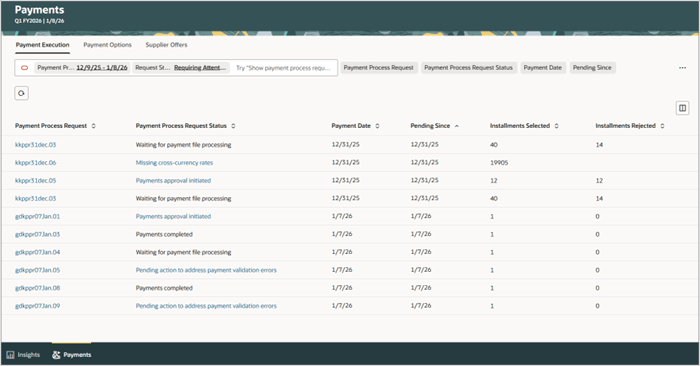
The Payment Execution Experience
Use natural language on the Payment Execution overview page to inquire about specific payments, payment files, or payment process requests. For example, ask for the status of a particular payment or file and request related details directly in the assistant. Where appropriate, the assistant provides links to the standard payment page, from where users can open the relevant payment, file, or request pages to review or perform pending actions.
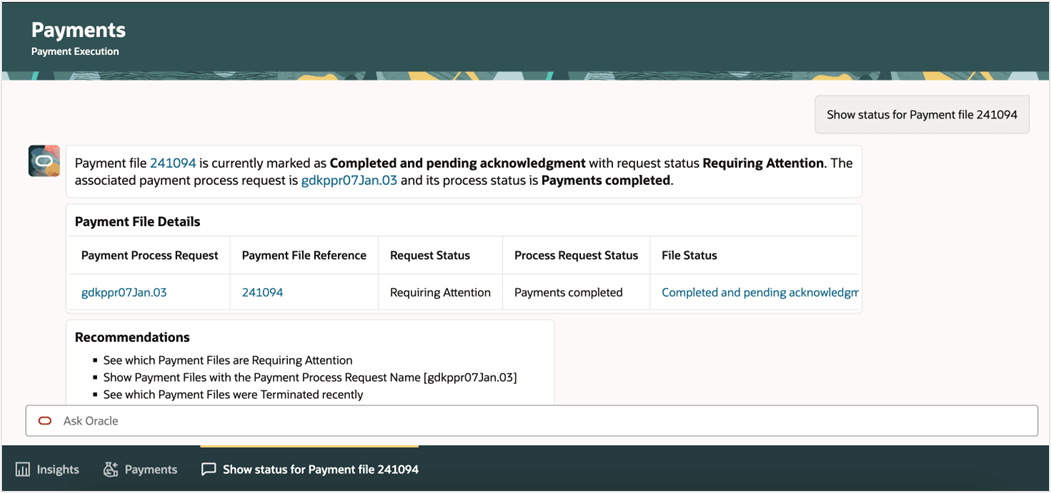
User reviews the status of a payment file and request related details directly in the assistant
Payment Options Assistant
The Payment Options Assistant helps users review suppliers’ upcoming payable installments and to identify which are due in the coming weeks. Users can ask the assistant to compare the financial benefits of different payment programs, including dynamic discounting and virtual credit card programs. The assistant applies the program terms and financial assumptions to calculate and explain the economic impact of each option, guiding users so they can select the approach that best aligns with their cash management and financial objectives. It also supports the creation of draft dynamic discount offers based on user confirmation, which are then passed to the Supplier Offers Assistant for review, communication to suppliers, and processing through the offer lifecycle.
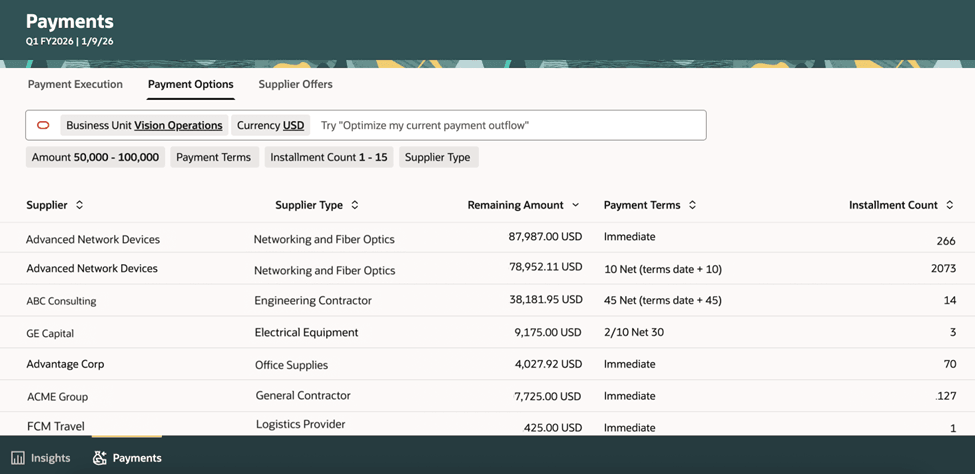
User can review suppliers’ upcoming payable installments and to identify which are due in the coming weeks
Users can interact with the Payment Options Assistant using natural language to perform tasks such as: requesting a benefit comparison between different payment options or preparing draft communications for a payment strategy.
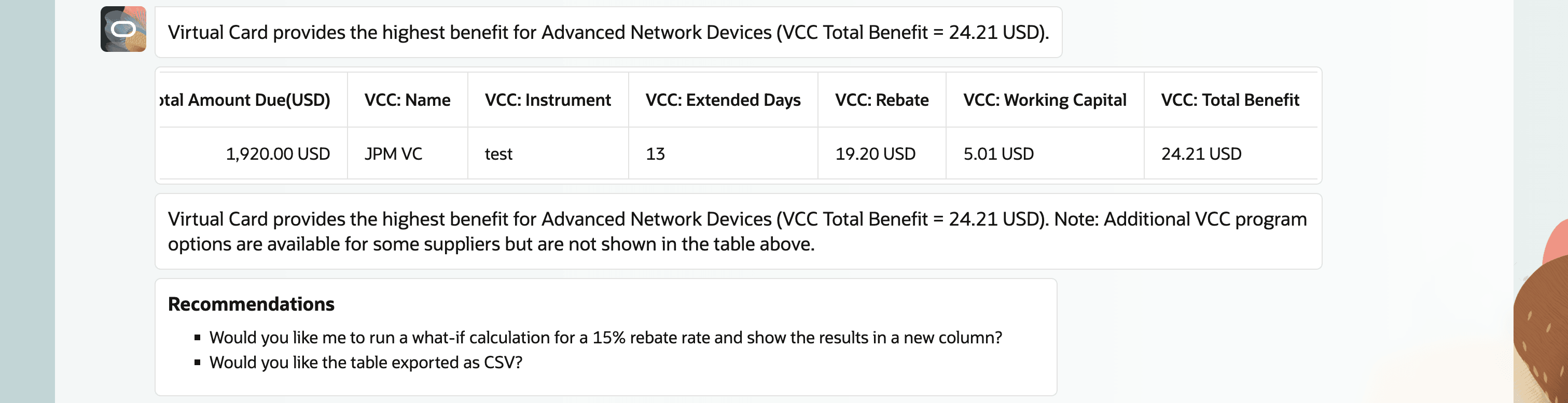
Payment Options Assistant found Virtual Card providing highest benefit amongst other programs
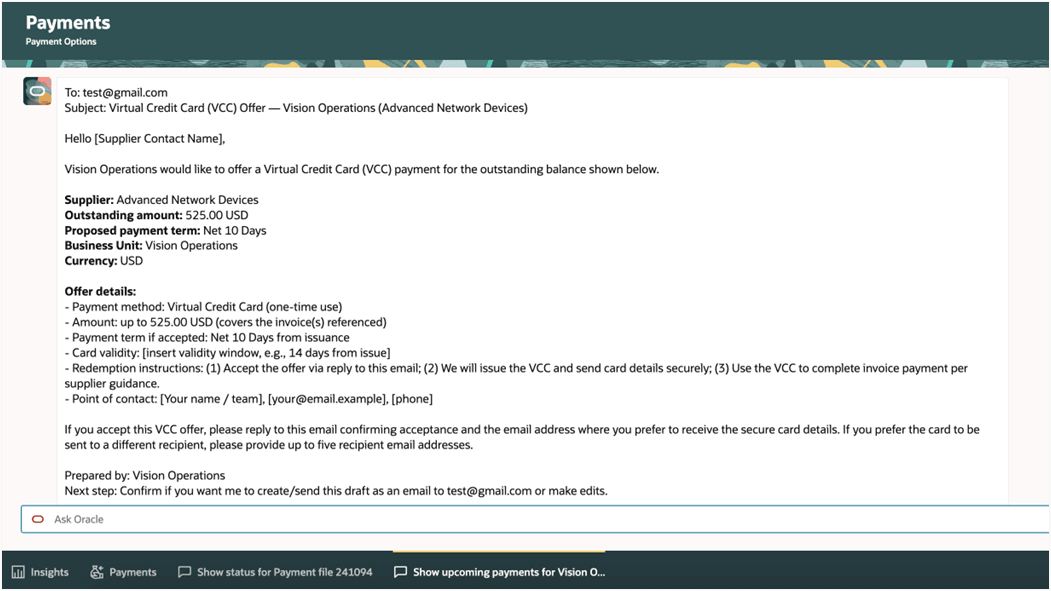
User can preview the virtual credit card offer draft
Supplier Offers Assistant
The Supplier Offers Assistant guides users through the creation, review, and communication of dynamic discount offers to suppliers and tracks supplier responses throughout the offer lifecycle. It ensures that accepted offers are reflected in subsequent runs in order that negotiated terms are consistently applied and that visibility and control over supplier interactions is maintained.
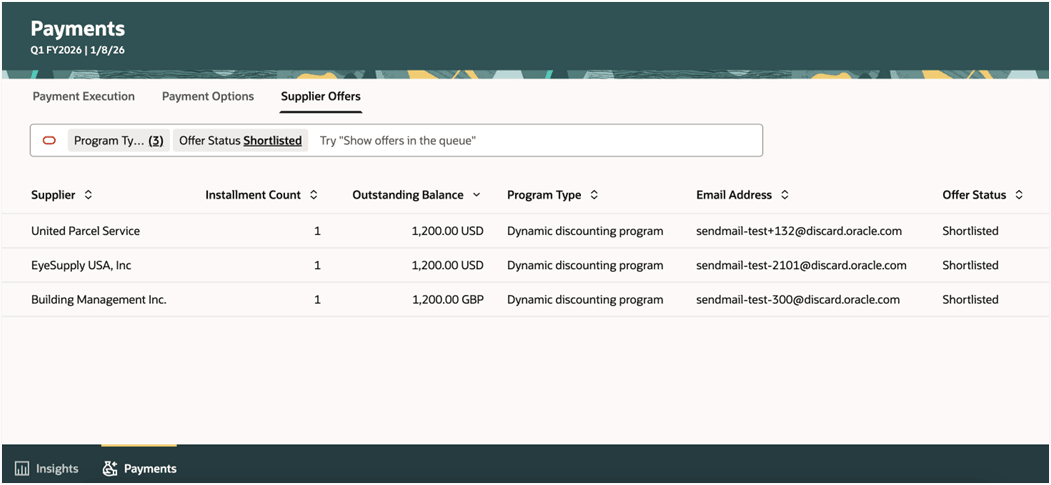
Users can review offers and track the communication of dynamic discount proposals sent to suppliers
Users can use natural language on the Supplier Offers overview page to search for, review, and manage supplier offers. For example, users can ask to see open or expired offers for a specific supplier, review the status of an offer, or send a reminder of a particular offer to the supplier.
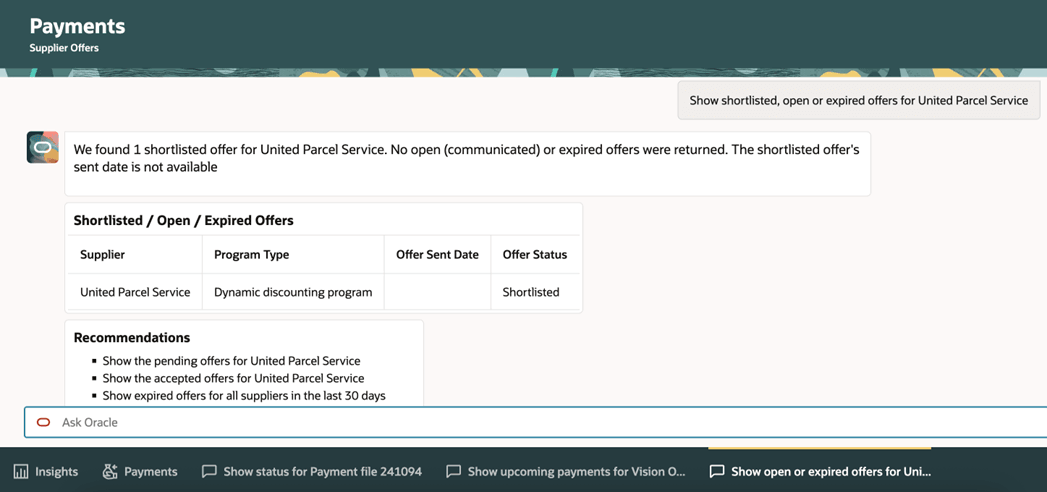
User can review and manage supplier offers
These are the business benefits:
- Centralized Visibility: A single, guided experience to monitor payment insights, evaluating optimization opportunities, and managing execution and exceptions.
- Operational Efficiency: Uses insights view and conversational assistance to identify issues early and reduce manual investigation.
- Optimized Cash Flow: Enhances liquidity and surplus cash utilization through integrated programs like virtual cards and dynamic discounting for paying supplier invoices.
- Financial Gain: Generates incremental financial benefits via early-payment discounts and virtual card rebate revenue.
- Strategic Agility: Streamlines the payment lifecycle to improve market responsiveness and strengthen supplier relationships.
Steps to enable and configure
For 26A, Oracle Development will reach out to select customers with steps to enable as per Early Adoption program. The feature is not available to be enabled outside of the early adoption program.
Tips and considerations
Scope and Limitations
- The assistants support evaluation, guidance, and orchestration but do not replace standard payment setup, approvals, or controls.
- Supplier Offers Assistant only supports dynamic discounting offers in this release. Future releases will include virtual credit cards and supply chain financing.
- Draft recommendations, offers, and schedules always require user review and confirmation before any action is taken.
- Payment Execution Assistant focuses on inquiries, scheduling, and lifecycle management for payment process requests, payment files, and payments. Unrelated payment functions, for example, accounting or netting, aren’t handled by this assistant.
Data Readiness and Setup
- You must create dynamic discounting programs before you can create offers for suppliers.
- Financial benefit analysis and recommendations depend on the accuracy and completeness of your program definitions, financial assumptions, and transaction data.
- For virtual card or other bank-integrated capabilities, enable the respective features by following the relevant implementation guides. If you wish to enable these features, contact Oracle Support.
- If reference information or required setup is missing or outdated, the assistants may not be able to generate recommendations or may return incomplete results.
Operational Best Practices
- When selecting suppliers and installments for dynamic discount offers, prioritize invoices with longer original payment terms, a meaningful number of remaining days before the due date, and suppliers who have historically accepted early payment incentives. Also consider the strategic importance of the supplier relationship and the supplier’s likely cash-flow needs so that offers are targeted where early payment is most valuable to the supplier and most likely to be accepted.
- Review insights and recommendations regularly to identify operational issues early.
- Review how insights are generated by enabling or disabling them, or by fine-tuning the frequency and time frame through creating a copy.
- Use the Payment Options Assistant to compare benefits and simulate scenarios before drafting offers.
- Validate business unit, currency, and supplier context before running opportunity evaluations to ensure accurate results in the Payment Options Assistant.
- Monitor supplier responses to offers and follow up promptly to avoid delays in paying accepted offers.
- Use the execution views to track payment status and address exceptions quickly to prevent downstream processing delays.
- Designate the offer recipient by configuring a supplier portal user with the early payment administration role.
- Use the Select Early Payment Invoices option when submitting a payment process request to include invoices accepted for dynamic discounting. You can process only dynamic discounting invoices, only due invoices, or both, based on your selection. (Automated Processing of Early Payment Discounts)
Security and Compliance
- The assistants operate within your existing security, approval, and segregation-of-duties framework and do not bypass access controls or validations.
- Align usage with your organization’s security and data governance standards. Review automated outreach, such as emailing offers, with internal policies before enabling at scale.
- All accounting, tax, and regulatory treatments continue to follow your existing configuration and standard processing rules.
- Users only see and act on information and transactions they are authorized to access.
Change Management
- Train Payment Specialist on the conversational flows so they can efficiently evaluate programs, finalize dynamic discount offers, and schedule payments.
- Consider the impact of payment strategy adjustments on vendor relationships and cash flow planning.
- Communicate changes in payment practices to internal stakeholders and, where appropriate, to suppliers to ensure alignment and avoid surprises.
Reliability and Ongoing Use
- Periodically review program settings and financial assumptions to ensure that recommendations continue to reflect current market conditions and business priorities.
Key resources
- Implementation Guide: Provided by Oracle Support with your promotion code.
- Oracle Help Center: Refer to the Using Payables guide for payment processing, Dynamic Discounting, and Virtual Credit Card program overviews.
- Implementing Financials Guide: Payables and Payments setup and program configurations.
- REST API Documentation: Payables and Payments services.
- Security Reference for Financials: Payments and payables duties and privileges.
Access requirements
Users who will access the Payments Agent features should be assigned the Payment Specialist job role or an equivalent custom role that includes the required privileges.