Control Access to Contracts Using Access Groups
You can now use access groups to control access to contract records. Access groups are an alternative way of granting data permissions to users. After creating an access group and assigning users to it, all group members receive access to contract data based on the object sharing rules defined for the group. These rules determine which contracts users can see and the type of access provided, such as Read or Full access. Using access groups is mandatory for accessing contracts through the Redwood Contracts UI, and they can also be used with the contracts classic UI. The recommended approach is to move fully to access groups for simpler and more streamlined management. Access groups and data security policies can still be used together when required.
Access groups can supplement existing data security policies. When both access groups and data security policies are configured, users receive the combined visibility granted by both mechanisms. If you want only the access provided by the access group to take effect, you must remove the visibility granted through existing data security policies, such as policies based on contract ownership or Business Unit based security or team membership. Access groups work alongside functional security: they determine which contract records a user can access, while job roles continue to govern the actions the user can perform on those records.
Access groups also offer several advantages over custom data security policies. They provide better performance, support more flexible attribute-based access, and are significantly easier to manage. Because of these benefits, access groups are the recommended mechanism for controlling access to contract data, especially when adopting the Redwood Contracts UI.
System Access Groups for Contracts
The following system access groups are created for predefined contract-related roles. Users are added or removed from these groups automatically based on job role assignment.
- Customer Contract Administrator Group
- Customer Contract Manager Group
- Customer Contract Team Member Group
- Enterprise Contract Administrator Group
- Enterprise Contract Manager Group
- Enterprise Contract Team Member Group
- Supplier Contract Administrator Group
- Supplier Contract Manager Group
- Supplier Contract Team Member Group
These groups appear under Access Groups with Type = System Group and cannot be modified.
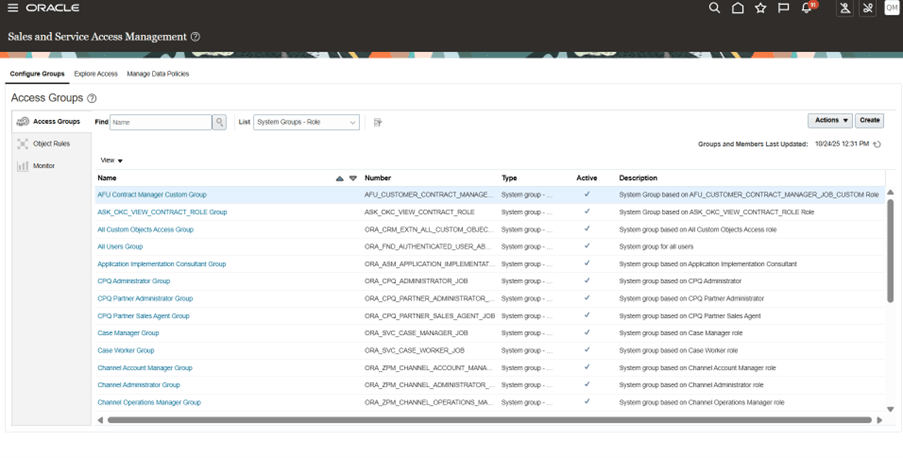
System Groups
Predefined Object Sharing Rules for Contracts
The following predefined rules are available for the Contract object. These rules are automatically associated with the appropriate system access groups and cannot be modified.
General Access Rules
- All Contracts
Contract Owner Based Rules
- Contract Owner Read Access
- Contract Owner Full Access
Sales Contract Rules
Business Unit Based
- Sales Contract by Business Unit
Resource Based
- Sales Contract Read Access by Resource
- Sales Contract Full Access by Resource
Resource Ancestor Based
- Sales Contract Read Access by Resource Ancestors
- Sales Contract Full Access by Resource Ancestors
Resource Organization Manager / Member / Ancestor / Descendant Based
- Sales Contract Read Access by Resource Organization Manager
- Sales Contract Read Access by Ancestor Resource Organization Manager
- Sales Contract Read Access by Resource Organization Member
- Sales Contract Read Access by Descendant Resource Organization
- Sales Contract Full Access by Resource Organization Manager
- Sales Contract Full Access by Ancestor Resource Organization Manager
- Sales Contract Full Access by Resource Organization Member
- Sales Contract Full Access by Descendant Resource Organization
Procurement Contract Rules
Business Unit Based
- Procurement Contract by Business Unit
Resource Based
- Procurement Contract Read Access by Resource
- Procurement Contract Full Access by Resource
Resource Ancestor Based
- Procurement Contract Read Access by Resource Ancestors
- Procurement Contract Full Access by Resource Ancestors
Resource Organization Manager / Member / Ancestor / Descendant Based
- Procurement Contract Read Access by Resource Organization Manager
- Procurement Contract Read Access by Ancestor Resource Organization Manager
- Procurement Contract Read Access by Resource Organization Member
- Procurement Contract Read Access by Descendant Resource Organization
- Procurement Contract Full Access by Resource Organization Manager
- Procurement Contract Full Access by Ancestor Resource Organization Manager
- Procurement Contract Full Access by Resource Organization Member
- Procurement Contract Full Access by Descendant Resource Organization
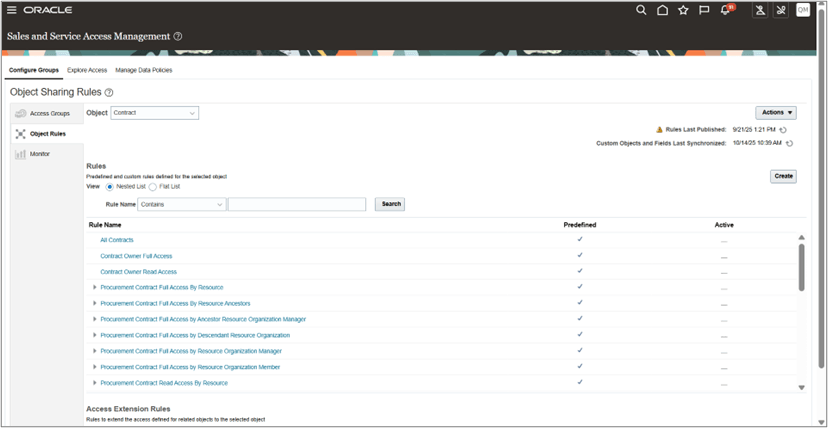
Contract's Predefined Object Sharing Rules
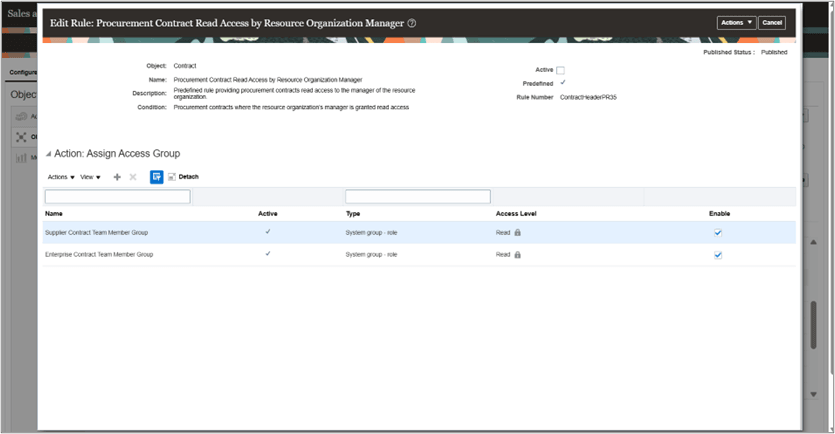
Editing Predefined Object Sharing Rule
Defining Custom Contract Access Rules
You can configure custom contract access rules using a wide range of contract attributes. These attributes allow you to precisely control which contract records an access group can see or act on, based on business criteria.
Common attributes available for rule definition include:
- Business Unit
- Contract Status
- Intent
- Contract Type
- Contract Class
- Legal Entity
- Version Type
- Template Flag
- Contract Number
- Contract ID
- Created Date
- Amount
- Hold Reason
- All Extensible Attributes
- All Descriptive Flexfields
Once a custom rule is defined, one or more access groups can be assigned to it with the appropriate level of access - Read or Full.
You can also reference predefined system rules as predefined conditions when creating a custom contract access rule.
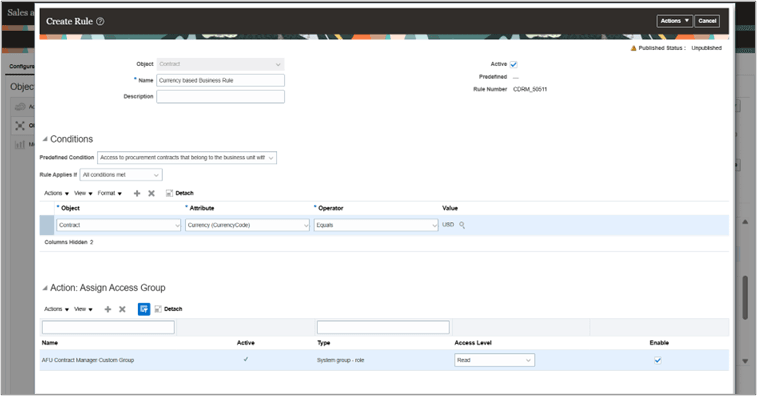
Custom Rule Creation
After modifying access groups or object sharing rules for Contracts, you must run the required ESS jobs from all four tabs under the Monitor section to ensure the changes are applied. These include the processes from:
- Update Groups and Members
- Run when user or role assignments change.
- Publish Rules
- Run when object sharing rules or rule assignments are modified.
- Synchronize Custom Objects and Fields
- Run when custom objects, attributes are updated
- Perform Object Sharing Rule Assignment (Contract Object)
- Run to populate object sharing assignments
Running all applicable ESS jobs ensures that access group membership, rule conditions, and contract visibility are fully synchronized across the application. The Perform Object Sharing Rule Assignment job, in particular, should be scheduled to run frequently, typically every 15 to 30 minutes, to keep contract access assignments up to date.
For more details, refer to the official Access Groups Oracle documentation: https://docs.oracle.com/en/cloud/saas/sales/fasac/overview-of-access-groups.html
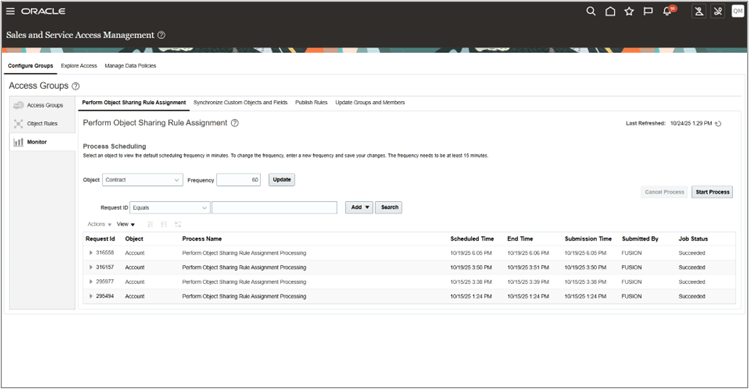
Monitor Tab to run ESS jobs
Access groups and object sharing rules provide a flexible and business-friendly way to control who can see contracts on the list page, without relying on complex data security policies. These rules determine which contracts users can see and the level of access provided, such as Read or Full access.
Steps to Enable and Configure
Object Sharing Rules can be enabled using in the following ways:
-
Using predefined contract related access groups
-
Creating a Custom Job Role, leveraging Predefined Access Group or Custom Access Group and creating a Predefined rule or Custom Rule
Method 1- Enable Access Using Predefined Contract Related Groups
-
Identify the correct predefined contract related access group. Available predefined groups include:
-
Customer Contract Administrator Group
-
Customer Contract Manager Group
-
Customer Contract Team Member Group
-
Enterprise Contract Administrator Group
-
Enterprise Contract Manager Group
-
Enterprise Contract Team Member Group
-
Supplier Contract Administrator Group
-
Supplier Contract Manager Group
-
Supplier Contract Team Member Group
-
-
Assign the corresponding predefined contract role to the user
-
Users automatically become members of the matching predefined access group when they receive the corresponding predefined role.
-
Additionally, you can add any other required users, provided they are defined as resources and employees.
-
-
Use existing default sharing rules
-
Predefined sharing rules (Example: Sales Contract by Business Unit (Full) is already mapped to Customer Contract Administrator Group.
Assigning the role gives the user these access privileges by default.-
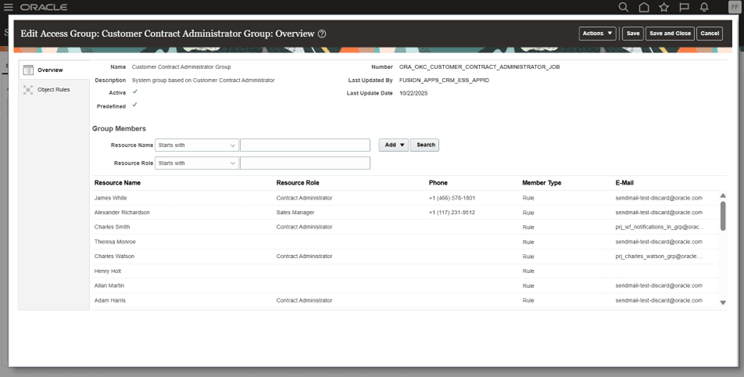
Customer Contract Administrator Predefined Group
-
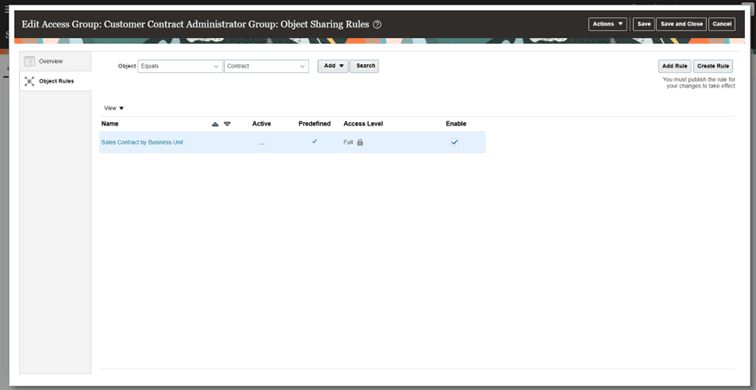
Predefined Object Rule of Customer Contract Administrator Group
-
-
-
(Optional) Assign additional predefined or custom sharing rules
-
If more access is required, assign additional rules to the predefined group or add the user to additional groups.
-
-
Run these scheduled process
-
Import User and Role Application Security data
-
Retrieve Latest LDAP Change
-
-
Go to the Monitor tab.
-
Run the required ESS jobs from all four subtabs as applicable:
-
Update Groups and Members
-
Publish Rules
-
Synchronize Custom Objects and Fields
-
Perform Object Sharing Rule Assignment (Contract Object)
-
-
Schedule these processes to run at regular intervals to support near real-time access updates. The Perform Object Sharing Rule Assignment job, in particular, should be scheduled to run frequently, typically every 15 to 30 minutes, to keep contract access assignments up to date.
-
-
Validate access
-
For example, if Test User belongs to Business Unit A, create a contract in Business Unit A and another in Business Unit B. Test User should only see the Business Unit A contract based on the configured access group rule.
-
Method 2- Creating a Custom Job Role, leveraging Predefined Access Group or Custom Access Group and creating a Predefined rule or Custom Rule
Example: Restricting access to Confidential Contracts using DFF
This rule ensures that users can access all contracts that belong to their own Business Unit, except contracts marked as Confidential.
If a contract’s “Confidential” DFF attribute is set to Yes, it is hidden from the user even if the user normally has visibility to all other contracts in that Business Unit.
Below are steps:
-
Create a new user
-
Go to Tools, open the Security Console, and then select Users
-
Create User, fill required fields (User Name, Email, Resource etc).
-
Save the user.
-
-
Deep Copy the standard Customer Contract Administrator role
-
Go to Tools, open the Security Console, and then select Roles
-
Search for the predefined Customer Contract Administrator role.
-
Use Copy to create a new custom role (Eg: Customer Contract Administrator Custom Role).
-
Click on Copy role
-
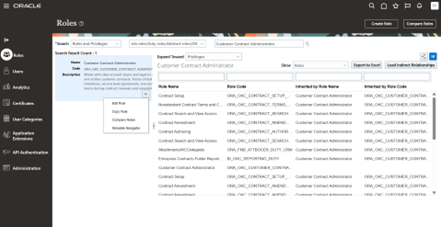
Copy Customer Contract Administrator Custom Role to create a new custom role
-
-
Select “Copy top role and inherited roles” and then click on “Copy Role” button
-
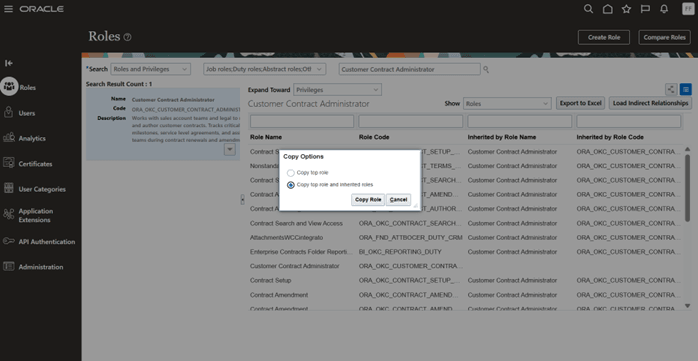
Select “Copy top role and inherited roles” to Copy Role
-
-
Modify the role name and role code based on your requirement and click on “Next”
-
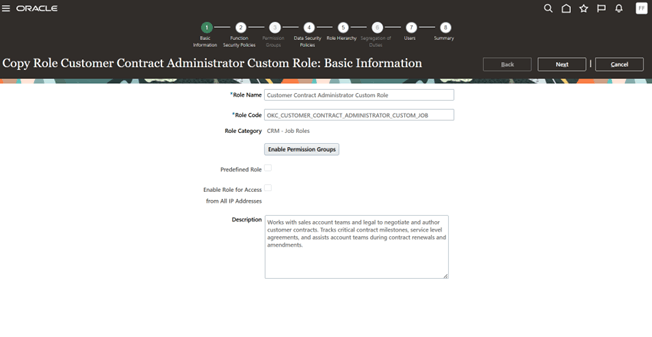
Providing Role Name and Role Code for the Newly created Deep Copied Custom Role
-
-
Keep the Functional Security Policies and Permission Groups as is. Click on “Next”
-
-
-
Remove Data Security Policies from the copied role
-
Remove any data security policy (DSP) grants that directly provide contract visibility (you will reprovide visibility via access groups). Keep functional privileges required to view or edit contracts.
-
Under “Data Security Policies” search for “Grant on Contract” under Policy Name
-
Remove all Grant on Contract policies from the actions menu, by clicking on “ Remove Data Security Policies”
-
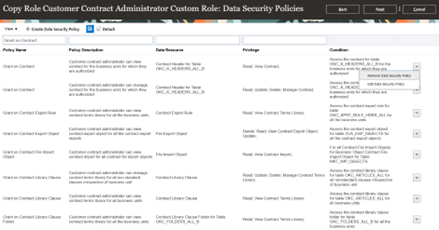
Removal of Grant on Contract policies from the Actions
-
-
In this example, we have 2 DSPs which are of policy name Grant on Contract, so remove them and click on Next
-
-
-
Add and Remove Roles from Role Hierarchy
-
Under Role Hierarchy search for the below role code and delete it
-
“ZCA_ACCESS_GROUPS_ENABLEMENT_DUTY_CUSTOM”
-
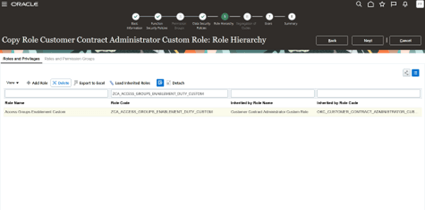
Removal of ZCA_ACCESS_GROUPS_ENABLEMENT_DUTY_CUSTOM
-
-
Then, click on “Add Role”, search for the below role, add it and click on Next
-
“ORA_ZCA_ACCESS_GROUPS_ENABLEMENT_DUTY”
-
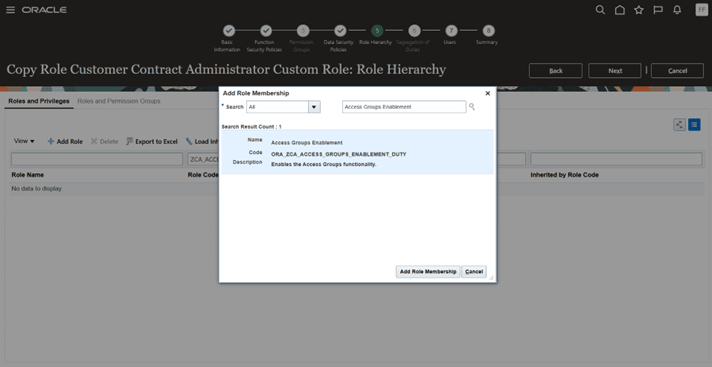
Addition of ORA_ZCA_ACCESS_GROUPS_ENABLEMENT_DUTY
-
-
-
-
-
Click on Submit and Close
-
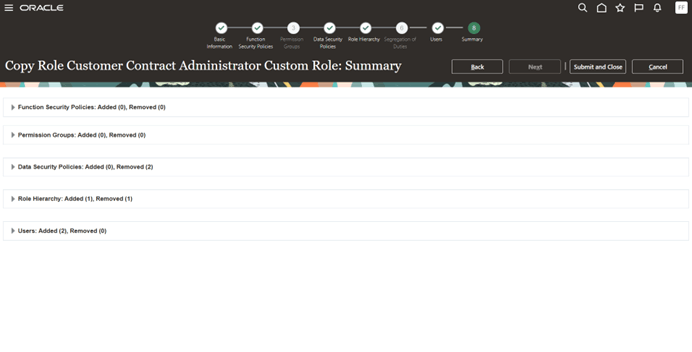
Submitting Custom Role creation
-
-
Add your newly created user (who is defined as a resource and employee) to the custom role. Additionally, you can add any other required users, provided they are defined as resources and employees.
-
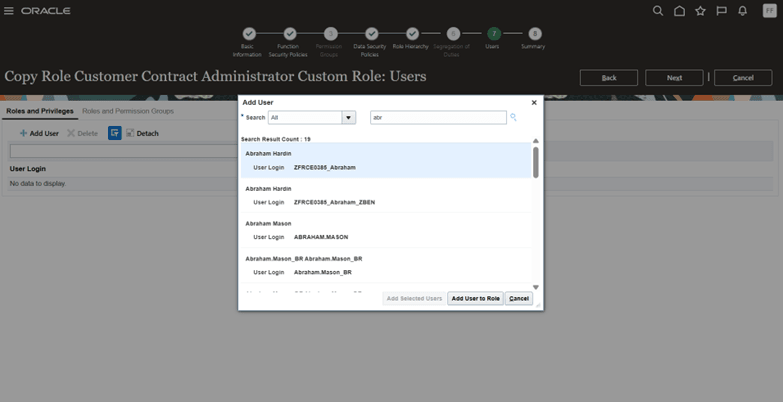
Addition of new and existing users to the custom role
-
-
After the above custom role is created remove “Grant on Contract” policies from each of these custom roles, ensuring grants are not given to the Customer Contract Administrator Custom Role indirectly.
-
In this case, since the duty role we used to deep copying is Customer Contract Administrator Role remove the “Grant on Contract” policies from below custom roles
-
OKC_CONTRACT_AUTHORING_DUTY_CUSTOM
OKC_CONTRACT_SEARCH_VIEW_DUTY_CUSTOM
OKC_CONTRACT_AMENDMENT_DUTY_CUSTOM
-
-
Search for each of these roles from Roles, Click on actions and then Click on Edit Role
-
Example, in this case we are searching for
-
OKC_CONTRACT_AMENDMENT_DUTY_CUSTOM
-
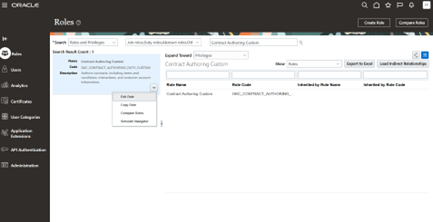
Search for OKC_CONTRACT_AMENDMENT_DUTY_CUSTOM
-
-
Go to Data Security Policies, search for Grant on Contract policy name and then delete all the policies under the name Grant on Contract
-
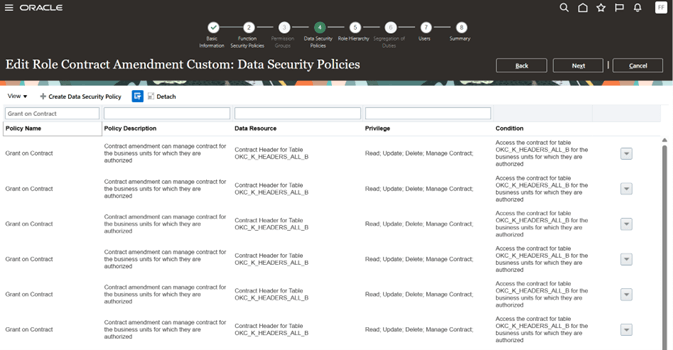
Removal of Grant on Contract policy from Data Security Policies
-
-
Repeat this for OKC_CONTRACT_SEARCH_VIEW_DUTY_CUSTOM and OKC_CONTRACT_AMENDMENT_DUTY_CUSTOM
-
-
-
Similarly, when you deep copy any other contract-related predefined role, the resulting custom duty roles will still contain the original Grant on Contract data security policies. To ensure that Access Groups fully control contract visibility, Grant on Contract policies must be removed from the corresponding custom duty roles.
-
Contract Administrator and Customer Manager Roles (Customer, Supplier, Enterprise)
-
The following six predefined job roles belong to this group:
-
Customer Contract Administrator
-
Customer Contract Manager
-
Supplier Contract Administrator
-
Supplier Contract Manager
-
Enterprise Contract Administrator
-
Enterprise Contract Manager
-
-
When the above 6 roles are deep copied, these roles will include the following custom duty roles, and all must have their Grant on Contract DSPs removed:
-
OKC_CONTRACT_AUTHORING_DUTY_CUSTOM
-
OKC_CONTRACT_SEARCH_VIEW_DUTY_CUSTOM
-
OKC_CONTRACT_AMENDMENT_DUTY_CUSTOM
-
-
-
Contract Team Member Roles (Customer, Supplier, Enterprise)
-
The following three predefined abstract roles fall into this group:
-
Customer Contract Team Member
-
Supplier Contract Team Member
-
Enterprise Contract Team Member
-
-
When the above 3 roles are deep copied, they will include the following custom team duty roles, and all must have their Grant on Contract DSPs removed:
-
OKC_CONTRACT_AUTHORING_TEAM_DUTY_CUSTOM
-
OKC_CONTRACT_SEARCH_VIEW_TEAM_DUTY_CUSTOM
-
OKC_CONTRACT_AMENDMENT_TEAM_DUTY_CUSTOM
-
-
-
In summary: remove the Grant on Contract DSPs from any custom duty role that was created as part of your deep copy process, so that Access Groups control visibility instead of data security policies.
-
-
-
Run these scheduled process
-
Import User and Role Application Security data
-
Retrieve Latest LDAP Changes
-
Note: Once these two ESS jobs and “Update Groups and Members” job (mentioned below) is run from Monitor tab of Sale and Services Access Management then the above custom role gets created as a system group under access group.
-
-
-
Verify Access Groups
-
Go to Tools, open Sales and Service Access Management, then select Configure Groups and navigate to the Access Groups page.
-
You will see that the Customer Contract Administrator Custom Role Group is created as a system group
-
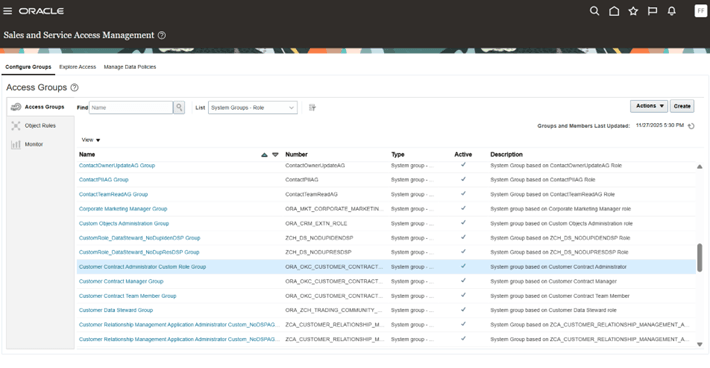
Customer Contract Administrator Custom Role Group
-
-
You can add additional group members as needed, and you will also notice that the user included during the deep copy role creation is already present in the group
-
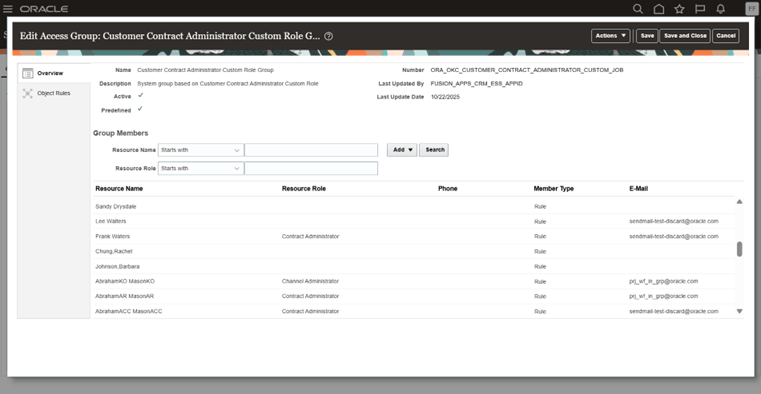
Addition of Group Members
-
-
-
Create an object sharing rule for the Contract object
-
Go to ‘Object Rules’, select the object as ‘Contracts’ and then you can either add a predefined rule or custom rule by clicking on ‘Add Rule’ or create your own custom rule using ‘Create Rule’.
-
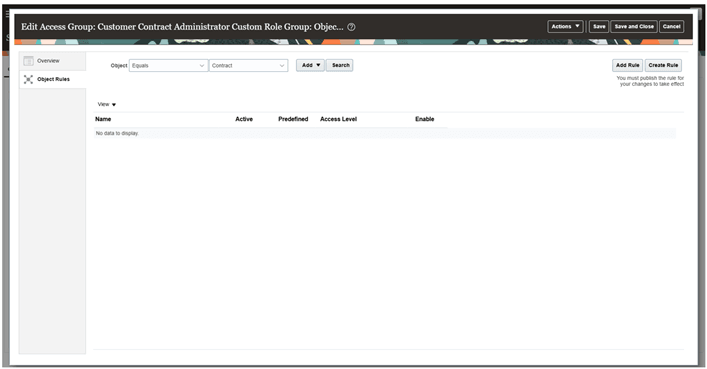
Object Rules creation page
-
-
For this use case, create a custom rule by clicking on “Create Rule”:
-
Enter the name of the rule, select the object as “Contract”,
-
Select the DFF attributes as Confidential Contract
-
Put the values as “Yes”
-
This signifies - if your contract contains a DFF attribute (for example, Confidential Contract) with the value Yes, the custom object sharing rule can use this attribute to grant access. Users who are members of the corresponding access group will then be able to view those restricted contracts.
-
If needed you can also add a predefined condition. Expanding the dropdown gives you the list of predefined rules.
-
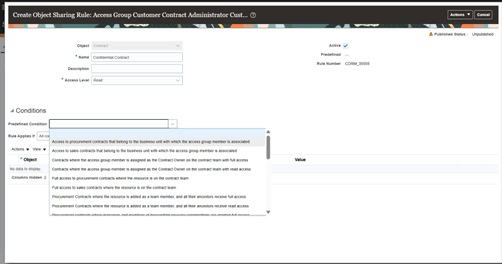
Adding BU related Predefined rule leveraging Predefined Condition
-
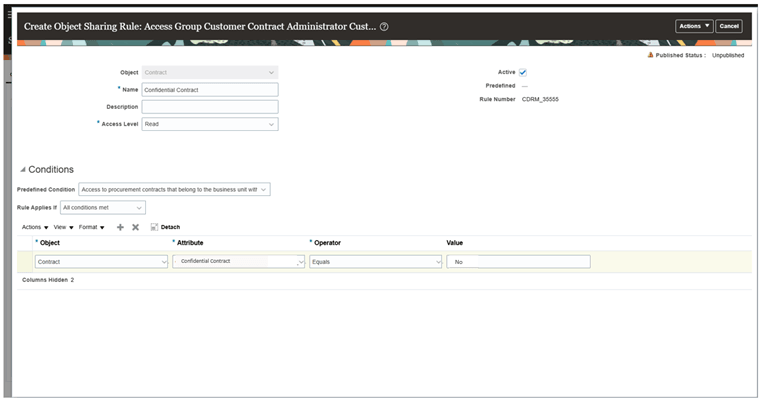
Custom Rule on Confidential Contract DFF
-
-
-
Publish the rule
-
Ensure the rule is active and click on Publish from Actions menu. Alternatively, you can run the below “Publish Rules” ESS job from Monitor tab to publish the rules.
-
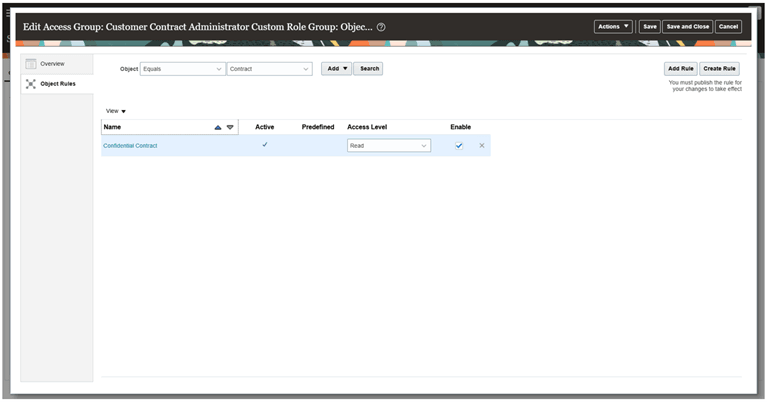
Saving and Publishing the created rule
-
-
To process and apply the above custom rules:
-
Go to the Monitor tab.
-
Run the required ESS jobs from all four subtabs as applicable:
-
Update Groups and Members
-
Publish Rules
-
Synchronize Custom Objects and Fields
-
Perform Object Sharing Rule Assignment (Contract Object)
-
-
Schedule these processes to run at regular intervals to support near real-time access updates. The Perform Object Sharing Rule Assignment job, in particular, should be scheduled to run frequently, typically every 15 to 30 minutes, to keep contract access assignments up to date.
-
-
Test user access
-
Log in as the test user
-
Navigate to: Contracts from Contracts List Page
-
Create or identify two sample contracts in the same Business Unit as the test user:
-
Contract A (Confidential): Set Confidential Contract = Yes
-
Contract B (Non-Confidential): Set Confidential Contract = No
-
-
Ensure the user belongs to the access group where the BU + “Confidential Contract = No” rule is implemented.
-
Run required ESS jobs (Perform Object Sharing Rule Assignment, Publish Rules, etc.) so the rule is applied.
-
Verify expected access behavior:
-
The test user should see Contract B (Restricted Contract = No).
-
The test user should NOT see Contract A (Restricted Contract = Yes), even though both contracts belong to their BU.
-
This confirms that the Access Group rule correctly excludes confidential contracts from the user’s visibility.
-
-
Tips And Considerations
Using access groups is mandatory for accessing contracts through the Redwood Contracts UI. Access groups supplement the data access that users already receive through contract job roles, contract team membership, or existing data security policies. If you want only access-group-based visibility to apply, you need to remove any existing data security policies. Otherwise, users may continue to see contract records through both access mechanisms. Access groups control which contract records a user can see, they do not grant functional privileges.
Access Requirements
For more details on Sales and Service Access Management, refer to the official Access Groups Oracle documentation:
https://docs.oracle.com/en/cloud/saas/sales/fasac/overview-of-access-groups.html