 Bill Groups to Combine Bill Transactions into Invoices
Address complex invoicing requirements by assigning bill transactions to a common Bill Group so they are included on the same invoice. The Bill Group attribute can either be populated programmatically as part of an integrated solution, where external business logic determines invoice grouping, or by manual assignment. This feature greatly increases the flexibility of how transactions are grouped into invoices, ensuring that customers are billed how they want to be billed, and reducing the need for complex and inefficient workarounds.
How does it work?
This feature delivers two ways to "tag" billable transactions with a common bill group identifier, so that they are invoiced together:
1. Manage the bill group attribute directly on bill transactions:
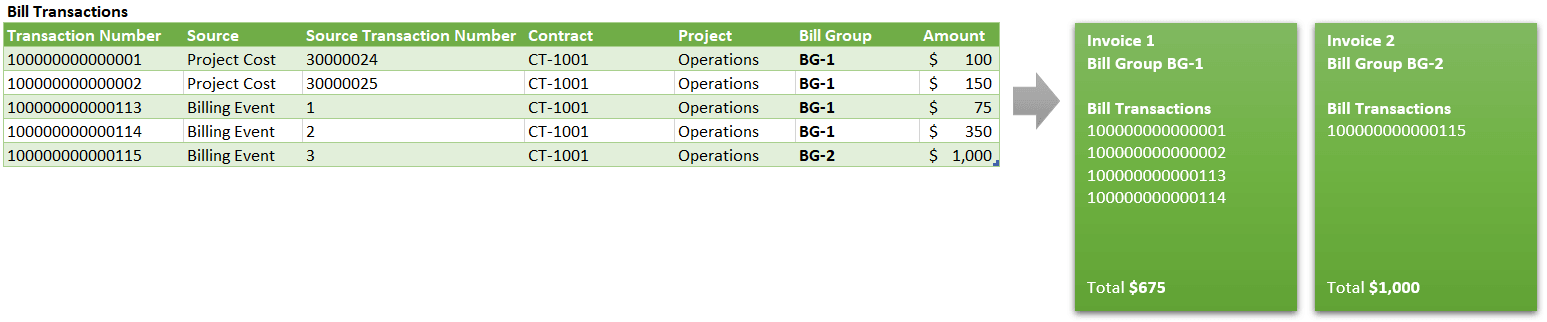
An example showing bill transactions tagged with the same bill group being invoiced together.
2. Manage the bill group attribute indirectly using nominated descriptive flexfield segments on project costs and/or billing events:
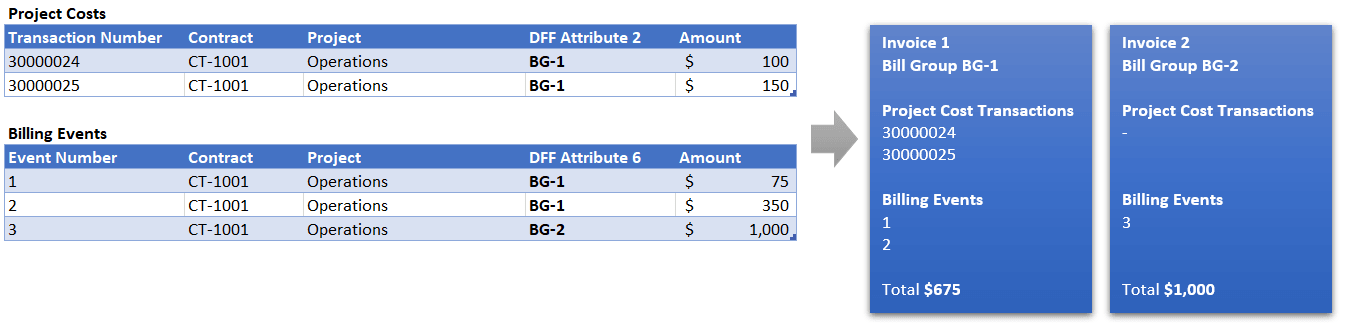
An example showing project costs and billing events tagged with the same flexfield value being invoiced together.
Bill group is a free-text attribute with a maximum of 1000 characters, and not a new setup object. This provides the most flexibility to programmatically tag transactions, without the need to coordinate additional setup tasks.
Please refer to the Tips and Considerations section for details of upcoming features related to invoice grouping enhancements.
NOTE: Grouping by bill group is subject to existing built-in grouping logic, such as Contract and Bill Set. For example, tagging two transactions with the same bill group that are associated with different contracts will not result in them being included on the same invoice.
Worked example 1 - Manage the bill group attribute directly on bill transactions
Programmatically set the bill group on bill transactions (arising from billable project costs or billing events) using file-based data import, where business logic outside of Fusion determines the bill group. This approach requires the Bill Transaction Creation on Cost Import feature to be opted in.
High-level steps:
- Ensure the Bill Transaction Creation on Cost Import feature is opted in. Please consult the related What's New content for other changes in application behavior when enabling this opt-in, such as the disablement of partial billing when hard limits are reached.
- Leverage the new Import Project Contract Bill Transactions file-based data import (FBDI) template to build an integrated solution that updates unbilled transactions with bill groups according to your own business logic.
- Run the Generate Invoices process as normal. Invoices will be generated according to existing built-in grouping logic (such as invoicing by contract and bill set) plus the new bill transaction bill group attribute.
- Optionally enable the new Bill group required for invoicing contract type option. Use this control if your business process requires the bill group attribute to be set for all bill transactions.
- With this option enabled, any transactions which do not have a bill group set will raise an exception during invoice generation.
- With this option disabled, any bill transactions without the bill group attribute set will be invoiced together.
- Review bill group values using the Project Billing - Bill Transactions Real Time subject area in Oracle Transactional Business Intelligence (OTBI).
- Note, this approach only applies to external billing, as the Bill Transaction Creation on Cost Import feature only creates bill transactions for external billing.
Worked example 2 - Manage the bill group attribute indirectly using nominated descriptive flexfield segments on project costs and/or billing events
Define a descriptive flexfield segment on project costs and/or billing events, and nominate them as a proxy for the bill group.
This option assumes that the Bill Transaction Creation on Cost Import feature is not yet opted in, so business process flows are agnostic of the bill transaction business object. This route may be of particular benefit where an existing integrated billing solution has the capacity to determine which billing events and/or project costs should be invoiced together. In such a scenario, tagging source transactions with a proxy for the bill group may be simpler than reconfiguring the integration to update bill transactions.
High-level steps:
- Define a descriptive flexfield segment on project costs* and/or billing events to be used as a proxy for bill group. Make a note of the attribute column selected, such as "ATTRIBUTE6" or "USER_DEF_ATTRIBUTE1".
- Set the following profile options at site level to instruct the application to use these segments as a proxy for bill group when invoices are generated. Navigate to Setup and Maintenance > Manage Administrator Profile Values. Search for the new profiles by name (or code):
- Map Project Costing DFF Column to Bill Transaction Bill Group (ORA_PJB_EI_DFF_BILL_GROUP_MAP)
- Map Billing Events DFF Column to Bill Transaction Bill Group (ORA_PJB_EVENT_DFF_BILL_GROUP_MAP)
- Prior to invoicing, set the value for the flexfield segments during transaction entry or through subsequent update.
- Run the Generate Invoices process as normal. Invoices will be generated according to existing built-in grouping logic (such as invoicing by contract and bill set) plus the value specified in the nominated flexfield segments.
- Optionally enable the new Bill group required for invoicing contract type option. Use this control if your business process requires the bill group attribute to be set for all bill transactions.
- With this option enabled, any transactions which do not have a bill group set will raise an exception during invoice generation.
- With this option disabled, any bill transactions without the bill group attribute set will be invoiced together.
- Note, this approach applies for all billing types; external, intercompany, and interproject.
*Attributes from the Descriptive Flexfield or the Project Standard Cost Collection Flexfield can be used.
The benefits of this feature are:
- Increases the flexibility of how transactions are grouped into invoices, ensuring that customers are billed how they want to be billed.
- Reduces the need for complex and inefficient workarounds, which typically involve iteratively applying and releasing billing holds and running Generate Invoices.
Steps to Enable and Configure
As described in the worked examples above, this feature can be enabled by either:
- Opting in to the Bill Transaction Creation on Cost Import* feature and programmatically setting the bill group on bill transactions or,
- Configuring descriptive flexfield segments on project costs and/or billing events and nominating those segments to be used as a proxy for bill group.
*The Bill Transaction Creation on Cost Import feature can be found in Setup and Maintenance under the Project Financial Management offering. Use the Select Change Feature Opt In link above the Functional Areas table, and click the edit button in the Features column for the Project Billing row.
Tips And Considerations
- It's recommended to use one of the two approaches outlined in the worked examples above, and not both at the same time. However, if the profile options are set and the Bill Transaction Creation on Cost Import feature is enabled, the nominated flexfield segment values are copied to the bill group when bill transactions are automatically created. You can then perform subsequent updates to the bill group on the bill transactions. However, for subsequent updates to the flexfields, there is a subtle difference in behavior between billing events and project costs:
- Updates to the billing event flexfield are automatically synchronized to the bill group on the associated unbilled bill transaction.
- Updates to the project cost flexfield are not automatically synchronized to the bill group on the associated unbilled bill transaction(s). The bill transactions need to be updated directly.
- Process Configurators and Billing Extensions create billing events during the Generate Invoices process (often referred to as automatic billing events), so it's not possible to tag these events in advance with a bill group. As an alternative, consider creating these events using an integrated solution ahead of invoice generation, thus enabling either of the above approaches for bill groups.
- If the contract type option to mandate bill group is enabled, no exception will be raised for automatic billing events and they'll simply be grouped onto a separate invoice.
- Bill groups provide maximum flexibility for invoice grouping, so it's vitally important to test any solution design thoroughly, allowing for data growth and possible impacts to user experience. For example, if every single bill transaction is tagged with a globally unique bill group, there'll be as many invoices as bill transactions, which may quickly become unwieldy.
- If the bill group attribute is updated after a transaction has been billed, this has no effect unless the transaction is reprocessed through an adjustment or cancel-rebill. In short, the bill group only applies during invoice generation.
- In an upcoming release, application administrators will also be able to create simple invoice grouping rules from the most commonly requested grouping criteria. For example, invoice by project and top task, or by billing event type. Invoice grouping rules will be associated at the bill plan level, much like the Associated Project grouping option available today. This functionality will complement bill groups, providing even greater flexibility and choice:
- Use invoice grouping rules for simple, commonly requested grouping criteria.
- Use bill groups for more complex grouping requirements, where external business logic is needed.
Key Resources
- Based on several ideas from the Project Management Idea Labs on Oracle Cloud Customer Connect, such as idea number 708488.
- Download the Import Project Contract Bill Transactions Excel workbook template from the File-Based Data Import (FBDI) for Project Management guide.
Access Requirements
The Run Import Project Contract Bill Transactions Process (PJB_RUN_IMPORT_PROJECT_CONTRACT_BILL_TXNS_PROCESS_PRIV) privilege is required to run the Import Project Contract Bill Transactions process. This privilege is assigned to the following out-of-the-box job roles:
- Project Integration Specialist (ORA_PJF_PROJECT_INTEGRATION_SPECIALIST_JOB)
- Project Application Administrator (ORA_PJF_PROJECTS_APPLICATION_ADMINISTRATOR_JOB)