 Project Change Request Lifecycle Management
Improve governance and reduce delays by routing change requests to the right approvers based on business-specific criteria such as priority or financial impact thresholds. Enable stakeholders to approve requests directly from emails to improve responsiveness in change management. Leverage business events triggered by status changes to automate downstream actions, such as consolidating requests into change orders or sending notifications upon approval, to reduce manual effort and ensure timely execution. Use the Change Management subject area in Oracle Transactional Business Intelligence to monitor and analyze the full change request lifecycle.
This feature extends the capabilities of the Project Change Requests and Consolidation into Change Orders functionality that was delivered in the 25D update. The set of enhancements include:
- Configurable Rules for Change Request Approvals
- Configurable Change Request Lifecycle
- Public Business Event Generation for Status Changes
- Modification Controls for Change Orders Linked to Change Requests
- Analytical Reporting of Change Requests
Configurable Rules for Change Request Approvals
The project application administrator can configure an approval rule using the simplified rule configuration spreadsheet. For example, when the cost impact of a change request exceeds $5,000, the request is routed to the client's designated approver for review and approval in accordance with project policy. If the cost impact is $5,000 or less, the system automatically approves the change.
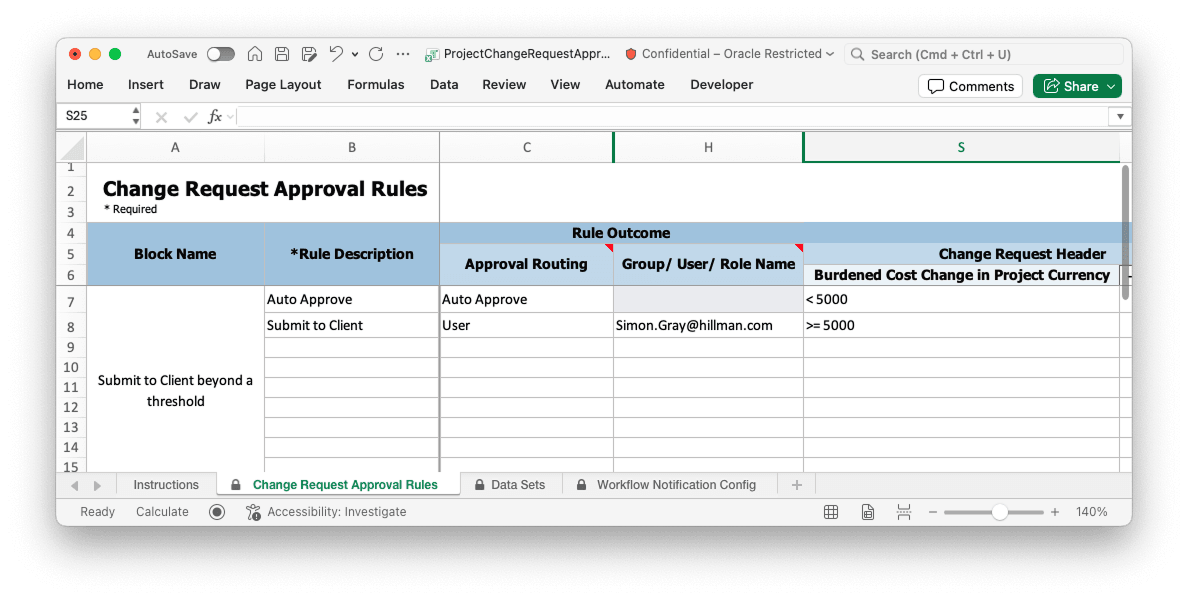
Change Request Approval Rules spreadsheet, showing approval routing based on cost thresholds
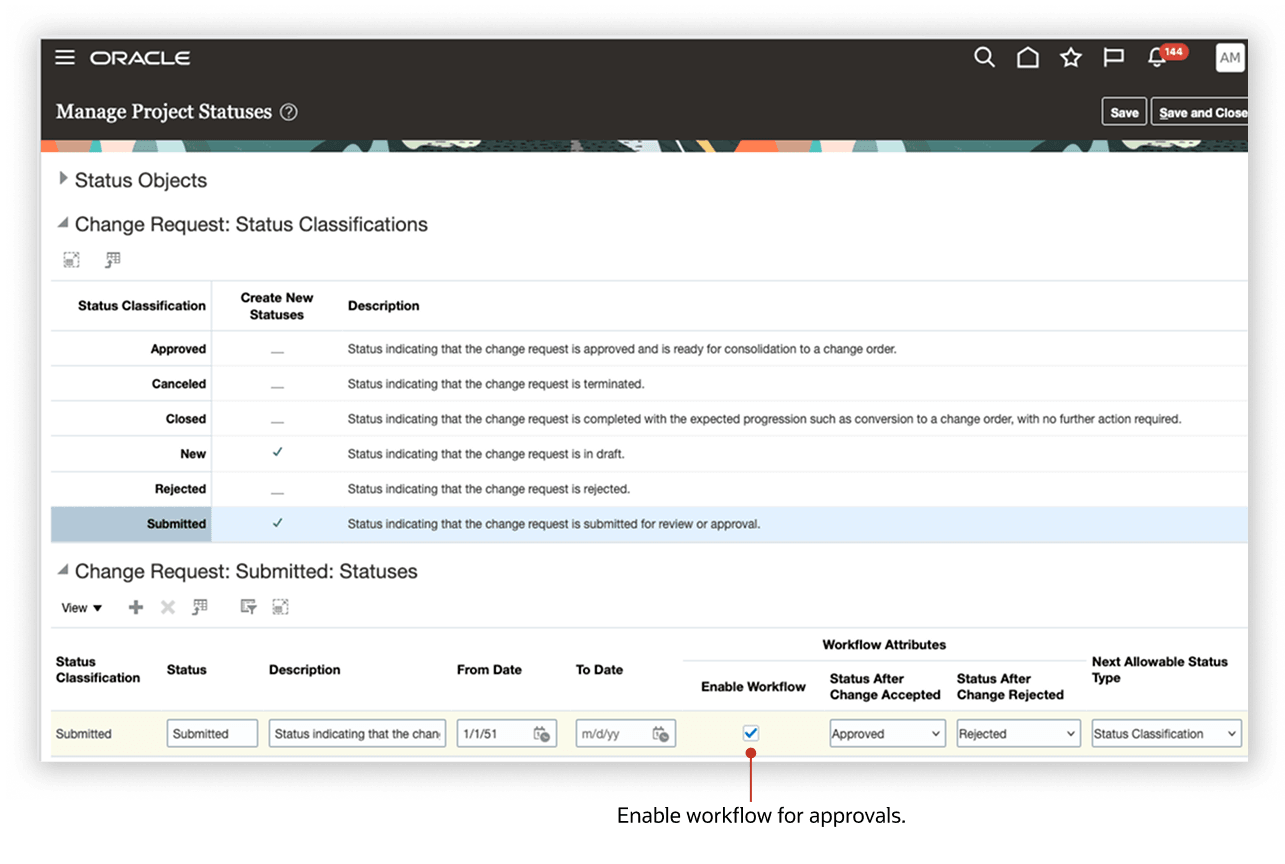
Manage Project Status setup page showing change request status classifications and workflow settings
When a new change request with a cost change of $10,000 is set to Submitted status, the system automatically triggers an approval workflow. The designated approver receives an email notification with all relevant details as shown below. They can conveniently review, approve, reject, or request additional information directly from the notification. Upon approval, the change request status is updated to Approved in the system.
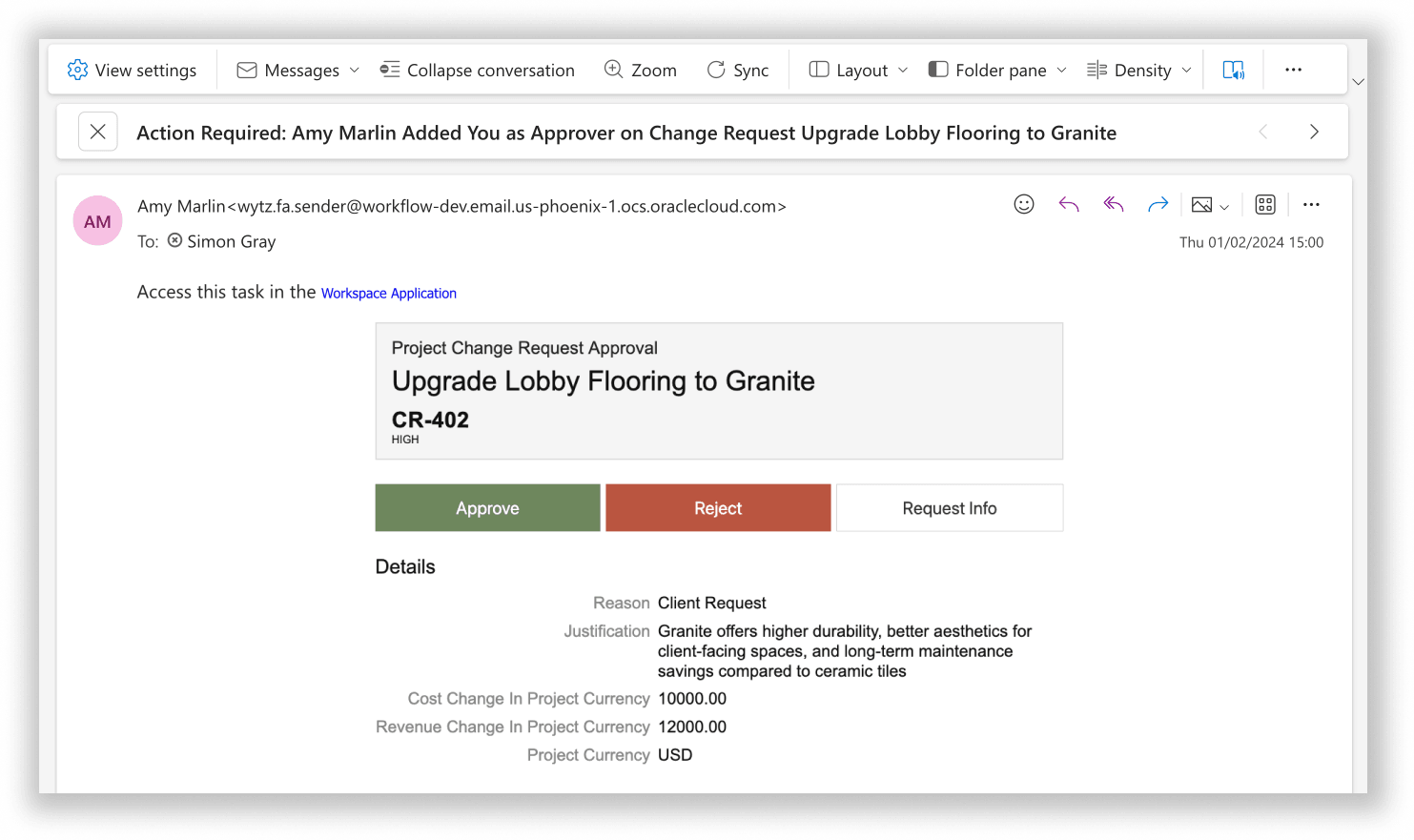
Email notification requesting approval for a project change request
Configurable Change Request Lifecycle
Configure the change request lifecycle as per the business need by using the next allowable statuses. For example, application administrators can introduce an In Review status and add it as the next allowable status for New status as shown below. This allows change requests to undergo internal review before being submitted for final approval. This enhanced visibility reduces unnecessary follow-ups and improves accountability, leading to smoother project workflows.
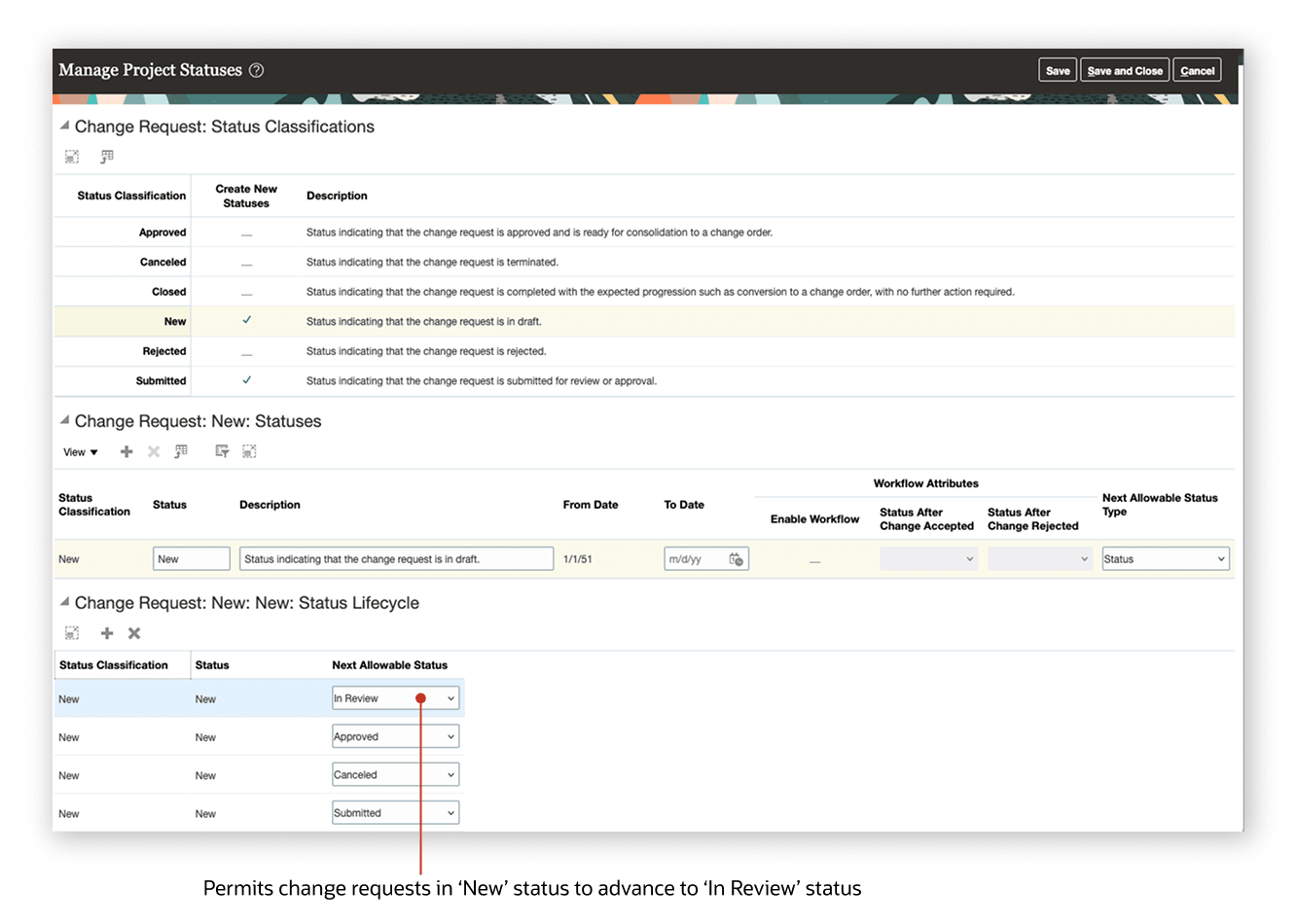
Manage Project Statuses setup page, showing the next allowable statuses
Public Business Event Generation for Status Changes
Integration specialists can now use public business events for change request status and priority changes to build custom automations. For example, when a project change request moves to approved status, use this business event to automatically generate the corresponding change order using Oracle Integration Cloud Service.
Modification Controls for Change Orders Linked to Change Requests
Project application administrators can restrict editing of change orders that were created from change requests by using the Update Impact Details in Change Order status action. Steps to disable the status action control are provided in the Steps to Enable section.
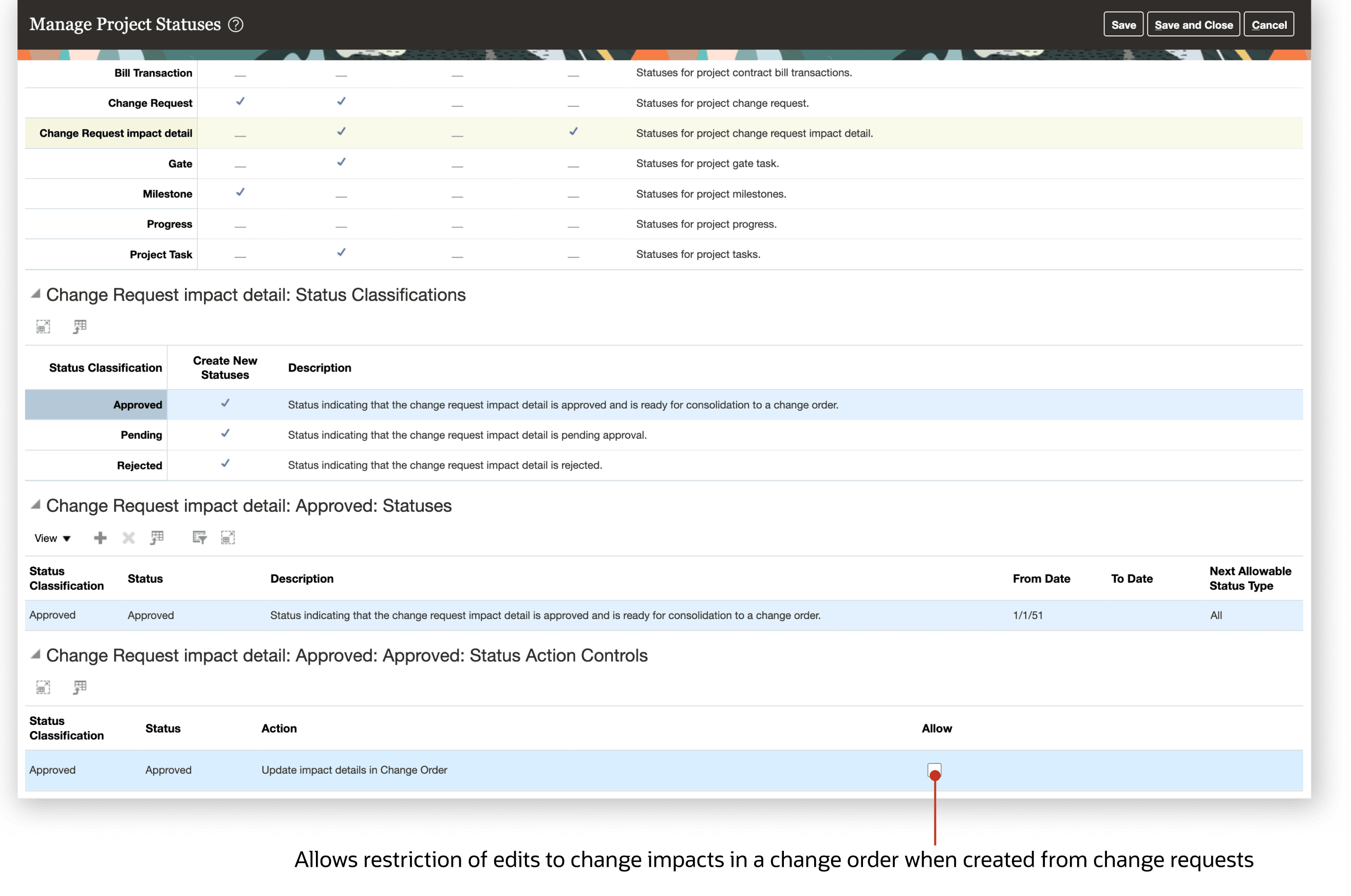
Manage Project Statuses page, showing the status action control
Analytical Reporting of Change Requests
Project managers can now use the Project Management - Change Management Real Time subject area in Oracle Transactional Business Intelligence to gain deeper insights into the change request lifecycle with new measures and dimensions. They can monitor and analyze key metrics such as approval status, financial impact, and processing times across multiple dimensions, including project, change reasons, and priority. To build reports that track impacts to existing tasks, use the dimensions in the Task folder. To report on scope impacts involving newly added tasks, use the new dimensions in the Change Request New Task folder.
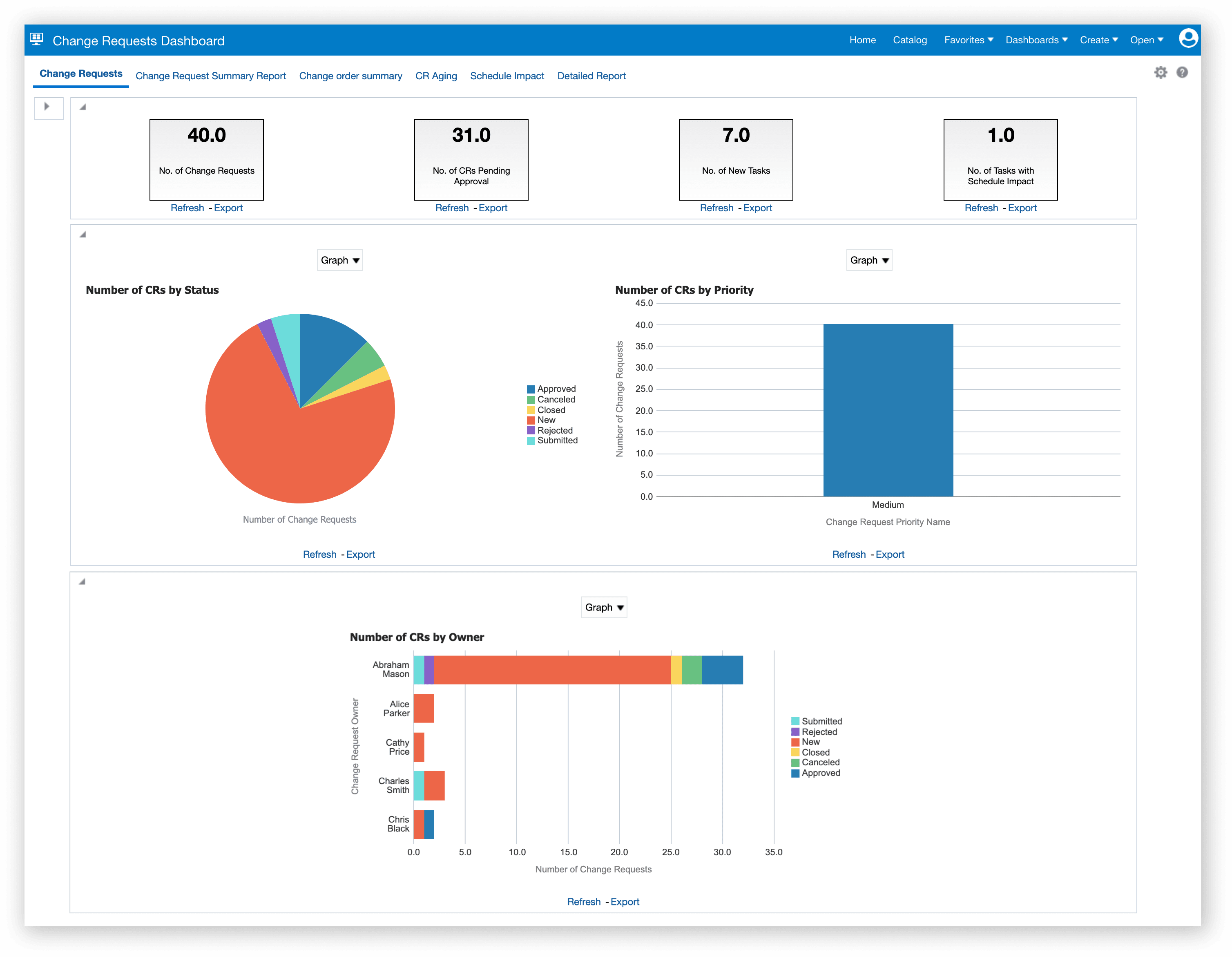
Dashboard example created in Oracle Transactional Business Intelligence to monitor change requests
The business benefits are:
- Accelerate collaboration and approvals by allowing stakeholders to review and take action directly from email notifications, reducing approval cycle times and minimizing project delays.
- Strengthen compliance and governance by locking change orders from edits once created from approved change requests, minimizing risk of unauthorized or untracked modifications.
- Drive performance improvements with advanced analytical reporting, enabling project teams to monitor approval status, financial impact, and processing times, and to quickly identify and address bottlenecks in change management.
Steps to Enable and Configure
To enable workflow and configure approval rules for change requests:
- Navigate to Setup and Maintenance --> Manage Project Statuses
- Select the Submitted status classification under Change Request Object.
- Enable workflow by selecting the checkbox under workflow attributes for Submitted status Classification. Set Status After Change Accepted and Status After Change Rejected as Approved and Rejected respectively.
- Navigate to Setup and Maintenance --> Manage User-Defined Rules for Project Management.
- Download the Project Change Request Approval rule template.
- Enter rules and conditions and upload, ensuring the upload is successful.
To disable updates of change orders created from change requests, disable status action control with the following steps:
- Navigate to Setup and Maintenance --> Manage Project Statuses
- Select Approved status classification under Change Request Impact Detail Object.
- For Approved status uncheck the Allow option.
To enable public events for change request status and priority changes:
- Use the ERP business events REST API to retrieve the business event and update the business event-enabled indicator. This indicator determines whether to initiate the business event or not.
ERP Business Events REST API Definition - /fscmRestApi/resources/11.13.18.05/erpBusinessEvents/
Note that the REST-Framework-Version is set to 9.
- Submit a GET request on the REST resource to retrieve the Business Event ID for the Business Event Code “ProjectChangeRequestStatusChanged”.
- Example: <hostname>/fscmRestApi/resources/11.13.18.05/erpBusinessEvents?q=BusinessEventCode=’ProjectChangeRequestStatusChanged’
- Submit a PATCH request on the REST resource to update the enabled indicator: <hostname>/fscmRestApi/resources/11.13.18.05/erpBusinessEvents/{{ErpBusinessEventId}
Example of contents of the request body in JSON format
{"EnabledFlag": true}
- Once you enable the feature, integration specialists can subscribe to the event in Oracle Integration Cloud to perform additional actions when the change request status or priority changes.
Tips And Considerations
- Approvals can be sent to stakeholders outside the company through emails by adding them as project team members.
- Stakeholders inside the company can approve change requests from the bell notification or Worklist page.
- To enable workflow for the seeded Submitted statuses or any custom status, there must not be any change requests in that particular status.
- Workflow can only be enabled for the statuses in Submitted status classification.
- A change request that is submitted for approval can be withdrawn from the worklist and from the edit change request page. On withdrawal, the change request will be set to New status.
- Payload Attributes for the change request status event are as follows
- ChangeRequestId
- ProjectId
- Number
- Name
- ReasonCode
- StatusCode
- PriorityCode
- OwnerId
- ApproverId
- ApprovalDate
- CancellationReasonCode
- RejectionReasonCode
- The initial creation of Change Request will not raise a public event.
Key Resources
- Refer Manage Workflow Rules Using a Spreadsheet topic of the Implementing Common Features for Financials and Project Management guide for details for configuring change request approvals rules.
- Refer Creating and Administering Analytics and Reports for Project Management guide for details on configuring reports.
- Refer REST API for Oracle Fusion Cloud Financials on the Oracle Help Center, specifically the Enable Business Events REST API under Get Started - Use Cases for details on enabling business events.
- Refer Manage Project Statuses topic in Implementing Project Financial Management and Grants Management Guide for details on configuring the change request lifecycle.
- Based on Idea 881484 from the Project Management Idea Lab on Oracle Cloud Customer Connect
Access Requirements
To add or configure rules for change request approval, you need the following privilege
- Manage User-Defined Rules for Project Management (PJF_MANAGE_USER_DEFINED_RULES_PRIV)
To enable workflow, define change request lifecycle statuses and to toggle status action control, in addition to privileges needed to execute setup tasks, users will also need the following privilege
- Manage Project Statuses (PJF_MANAGE_PROJECT_STATUSES_PRIV)
In Oracle Transactional Business Intelligence reports, the user will be able to access change requests where they are the owner or as authorized by the Manage Project Change Requests (PJE_MANAGE_PROJECT_CHANGE_REQUESTS_DATA) data privilege.