 Change Order Automation for Contract Updates
Automatically update the project contract when changes to the schedule, revenue plan, or budget are approved, ensuring seamless alignment between project execution and contractual commitments. Capture changes to tasks or assignments, and once approved by stakeholders, automatically apply these changes to the associated contract, project plan, and budget. This automation improves operational efficiency and reduces the risk of billing errors or budget overruns.
Changes to the contract can only be driven from the task and milestone resource changes on the financial project plan or budget impacts. During implementation, there the change implementor has the choice to either update the contract automatically or have a notification sent to the contract owner to manually update the contract. Automatic update assumes that the change implementor has the necessary permission to update the contract.
This capability enhances the features listed below by allowing users to update contracts through a change order:
- 24A Change Order Automation for Project Budget Adjustments
- 25B Change Order Automation for Financial Project Plan Amount Adjustments
- 25C Change Order Automation for Project Scope Adjustments
Once a change order with revenue impacts reaches the implementation stage, the change implementor can directly update the associated contract by specifying key details such as the contract line and amendment effective date. Upon submitting the change order implementation, the application automatically amends the contract with the approved adjustments, ensuring revenue, billing, and financial planning remain consistent.
Additionally, the change orders that are ready for financial project plan adjustments can automatically baseline the financial project plan, keeping it synchronized with the latest approved changes.
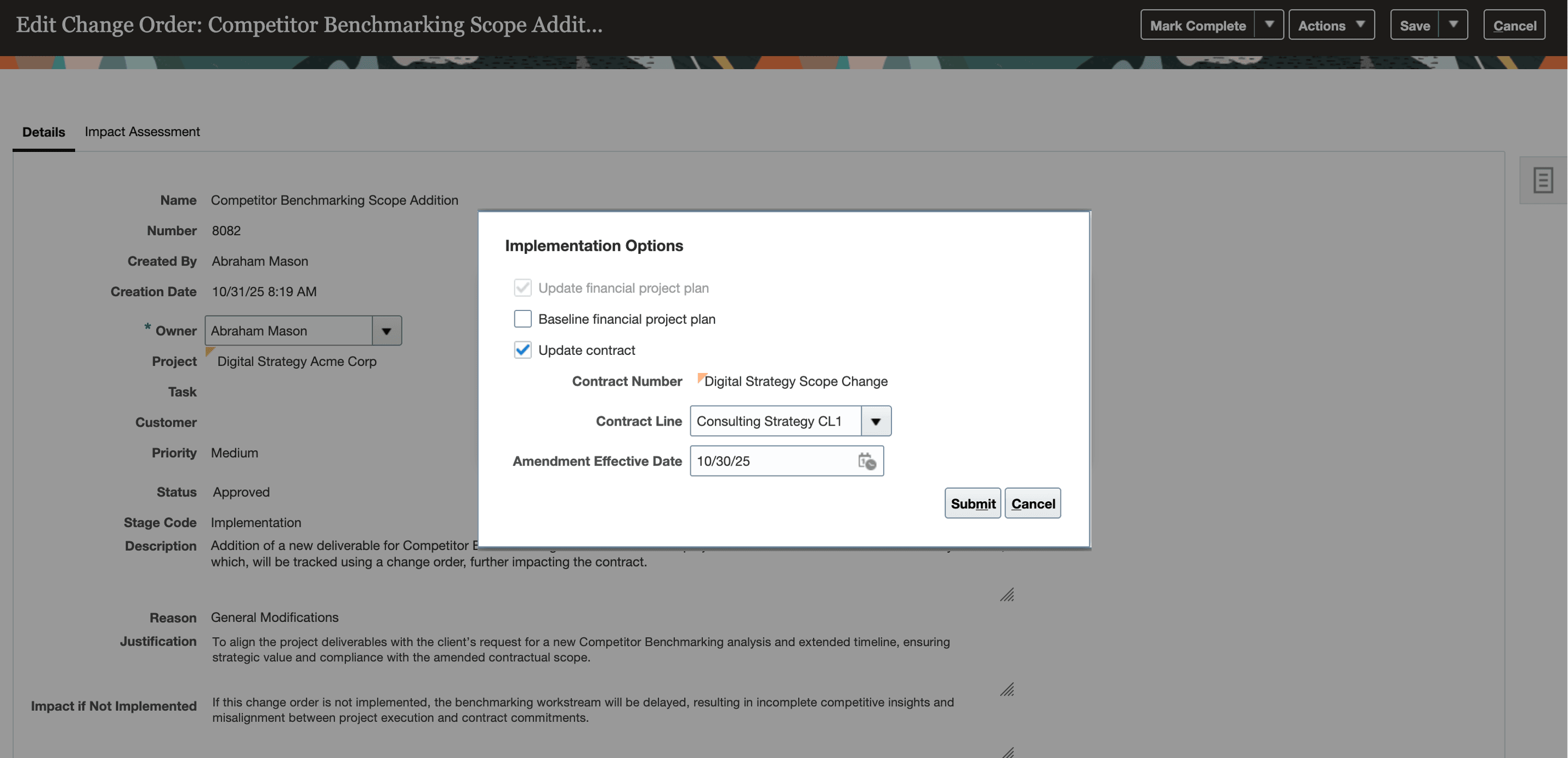
Change Order Contract Updates Implementation Options
If the change implementor doesn't have the required permissions to update the contract, they can notify the contract owners to make the update manually by selecting Notify Contract Owners to Update Contract on the Implementation Options dialog window.
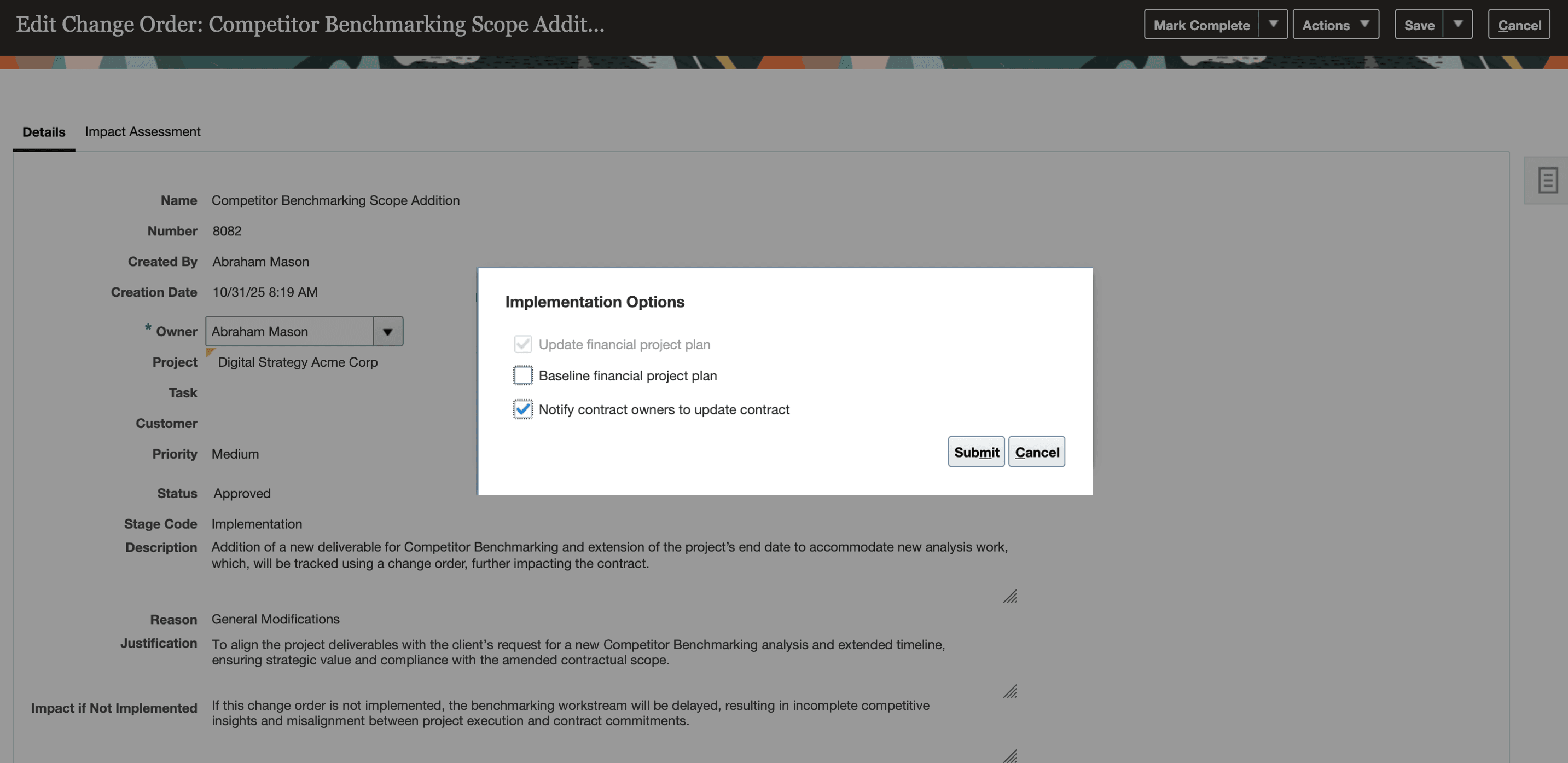
Implement and Mark Complete dialog window with notify contract owner option.
After implementation, users can view change order details within the associated contract line's comments section for audit and traceability purposes.
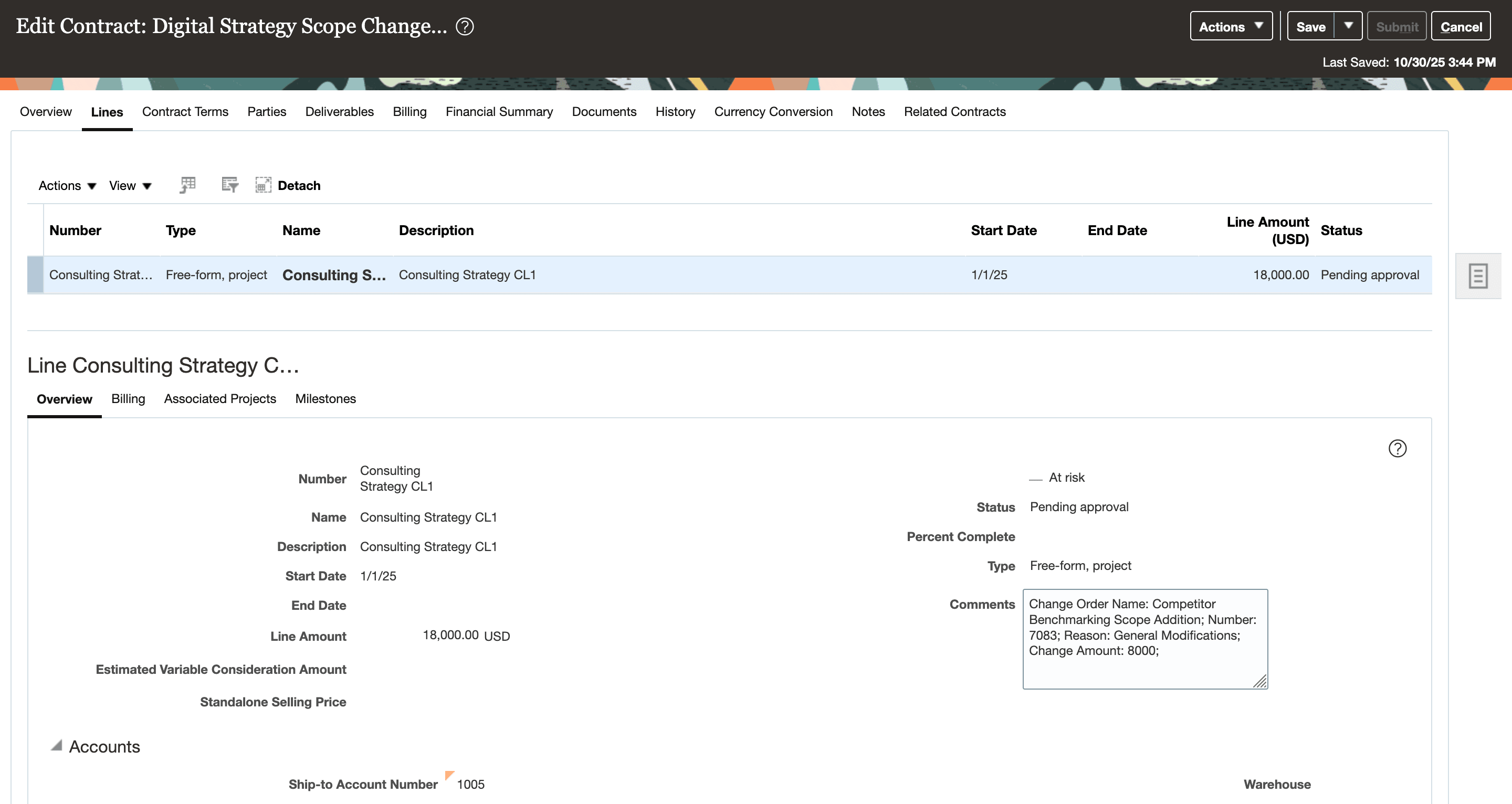
The contract is pending approval with the updated changes of the change order.
These are the business benefits:
-
Maintain real-time alignment between planning and billing by automatically reflecting approved project scope and funding changes in the related contracts.
-
Reduce administrative overhead by eliminating manual contract amendments after project change approvals.
-
Improve traceability and compliance through direct, auditable updates within the contract.
-
Minimize delays and inconsistencies across systems, ensuring approved scope and funding adjustments are immediately available for billing and revenue recognition.
Steps to Enable and Configure
Use the Opt In UI to enable this feature. For instructions, refer to the Optional Uptake of New Features section of this document.
Offering: Project Financial Management No Longer Optional From: Update 27A
The feature opt-in choice is set to Yes by default for New Customers, and set to No by default for Existing Customers. If additional time is needed before activating this feature, you have the option to set the Opt-in choice to No. This feature will be always enabled from update 27A.
Tips And Considerations
-
You can revise the revenue amounts on existing project billable milestones, and these updates will automatically adjust the corresponding contract funding and contract line amounts. However, creating new billable milestones isn’t supported at this time.
- The Update Contract option is available during change implementation only when:
- The project is linked to a single contract.
- The contract status is Active or Expired.
- The change order includes a revenue impact as part of its Project Plan or Budget and Forecast impact assessment.
- You can automatically update the contract only if the change order’s impact assessment level aligns with the project’s contract association. For example, if a project has five top tasks and the contract is associated with just one top task, the contract can be updated automatically only when the change order impacts roll up to that specific top task.
- The Change Orders REST API now supports automatic contract updates. Use the ImplementationStatus as IMPLEMENTED and ContractAmendmentMethod as AUTOMATIC for automatically updating the contract.
- The following existing privileges are required to automatically update the contract from the change order:
- Functional Privileges
- Create Contract (OKC_CREATE_CONTRACT_PRIV) functional privilege to create contracts through the change order process.
- Edit Contract (OKC_EDIT_CONTRACT_PRIV) functional privilege to modify existing contracts during the change order process.
- Edit Contract by Web Service (OKC_EDIT_CONTRACT_VIA_WEB_SERVICE_PRIV) functional privilege to edit contracts using web services as part of the change order.
- View Contract (OKC_VIEW_CONTRACT_PRIV) functional privilege to view contracts linked to the change order.
- Data privileges: The following table outlines the existing data security policy for granting contract management privileges based on business unit authorization.
Existing Data Security Policies
Policy Name Policy Description Data Resource Privilege Condition Grant on Contract A customer contract administrator can manage contracts for the business units for which they are authorized. Contract Header for Table OKC_K_HEADERS_ALL_B Manage Contract; Update; View Contract; Read
Access the contract for table OKC_K_HEADERS_ALL_B for the business units for which they are authorized.
- Functional Privileges
Key Resources
- Based on Idea 792040 from the Project Management Idea Lab on Oracle Cloud Customer Connect.
- Based on Idea 798137 from the Project Management Idea Lab on Oracle Cloud Customer Connect.
- Based on Idea 512997 from the Project Management Idea Lab on Oracle Cloud Customer Connect.
- Related Help:
- Change Order Automation for Project Budget Adjustments in the Defining and Managing Financial Projects guide.
- Change Order Automation for Financial Project Plan Amount Adjustments.
Access Requirements
No new access requirements.