 Payroll Cost Distribution to Projects Using Time Cards with Cost Accrual
Calculate and apply a provisional cost for a time card entry using cost rates to provide visibility of project labor costs prior to the distribution of actual payroll costs. Optionally exclude time card transactions which are pending payroll distribution from the billing and revenue recognition processes to avoid unwanted exceptions and reduce resulting adjustments when the time cards are costed using distributed payroll actual costs.
These capabilities enhance the Payroll Cost Distribution to Projects Using Time Cards 25B release feature.
Time Card Cost Accrual
There can be a significant amount of elapsed time between workers recording their hours in time cards, and the subsequent distribution of payroll costs to those time cards. For example, a worker may be required to report time on a weekly basis yet is paid on a monthly basis. Calculating and applying a provisional cost for time cards prior to the actual payroll cost processing enables project managers to see an estimated cost of their project labor as hours are recorded, reducing the risk of over-spending. It also enables project managers to produce more accurate interim project performance reports.
To create provisional costs for time cards, enable the Accrue Time Card Costs Using Rates option when creating or editing a labor schedule version that uses time card distribution. The cost rate applied is determined using the same rate derivation logic used when costing a time card transaction that's not eligible for payroll cost distribution, which considers project task cost rate overrides, labor costing overrides, and organization costing rules. If the Accrue Time Card Costs Using Rates option is not enabled, then time card transactions are imported with a cost rate of 0.
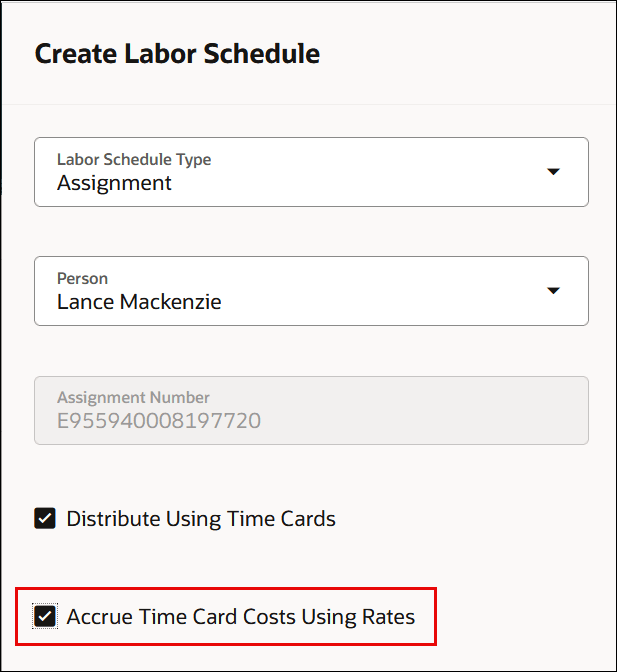
The Accrue Time Card Costs Using Rates Option in the Create Labor Schedules Page
When payroll costs are imported and processed, the provisional cost on a target time card transaction is reversed and replaced with the distributed actual payroll cost. These adjustments can be seen in the cost distributions of a time card transaction, as well as in the Adjustment History.
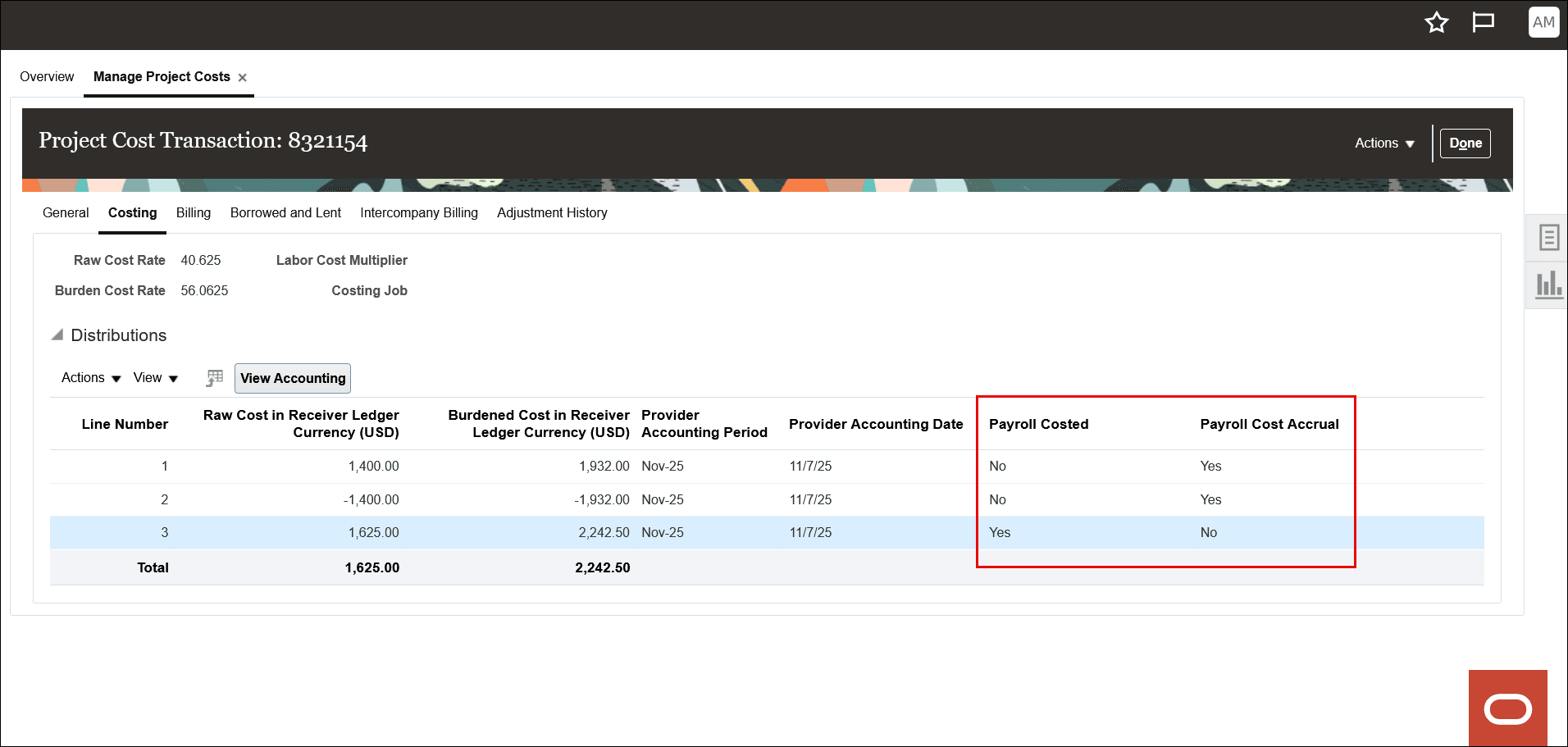
Time Card Cost Distribution Lines After Payroll Cost Distribution
Use Oracle Transactional Business Intelligence (OTBI) to report on labor schedules enabled for time card cost accrual and analyze time card provisional costs that are pending payroll distribution to identify trends and drill into details to resolve exceptions. Use the following attributes to build analyses required by your business:
| Subject Area | Attribute |
|---|---|
| Projects - Labor Schedule Analysis Real Time | Labor Schedules Details > Time Card Cost Accrual Flag |
| Projects – Labor Distribution Cost Analysis Real Time | Labor Schedules Details > Time Card Cost Accrual Flag |
| Project Costing - Actual Costs Real Time | Expenditure Item and Cost Distribution Details > Cost Distribution Payroll Cost Accrual Flag |
Invoicing and Revenue Controls
To avoid unwanted exceptions or adjustments, billable time card transactions that are pending payroll distribution are automatically placed on a Pending payroll distribution invoice or revenue hold when invoicing or revenue recognition is based on the time card's cost. The invoice or revenue holds are applied when pricing is performed on the time card transaction, which can occur as part of the Import Costs process if the Bill Transaction Creation on Cost Import feature has been enabled; else in the Generate Invoices or Generate Revenue processes. When the time card transaction is payroll cost distributed, the pending payroll distribution invoice or revenue holds are automatically removed.
Note: The pending payroll distribution invoice and revenue holds are only applicable when the invoice or revenue amount is based on the time card transaction's cost. If the invoice or revenue amount is rate-based, that is, quantity x unit price (bill rate), then no holds are applied even if the time card is pending payroll distribution.
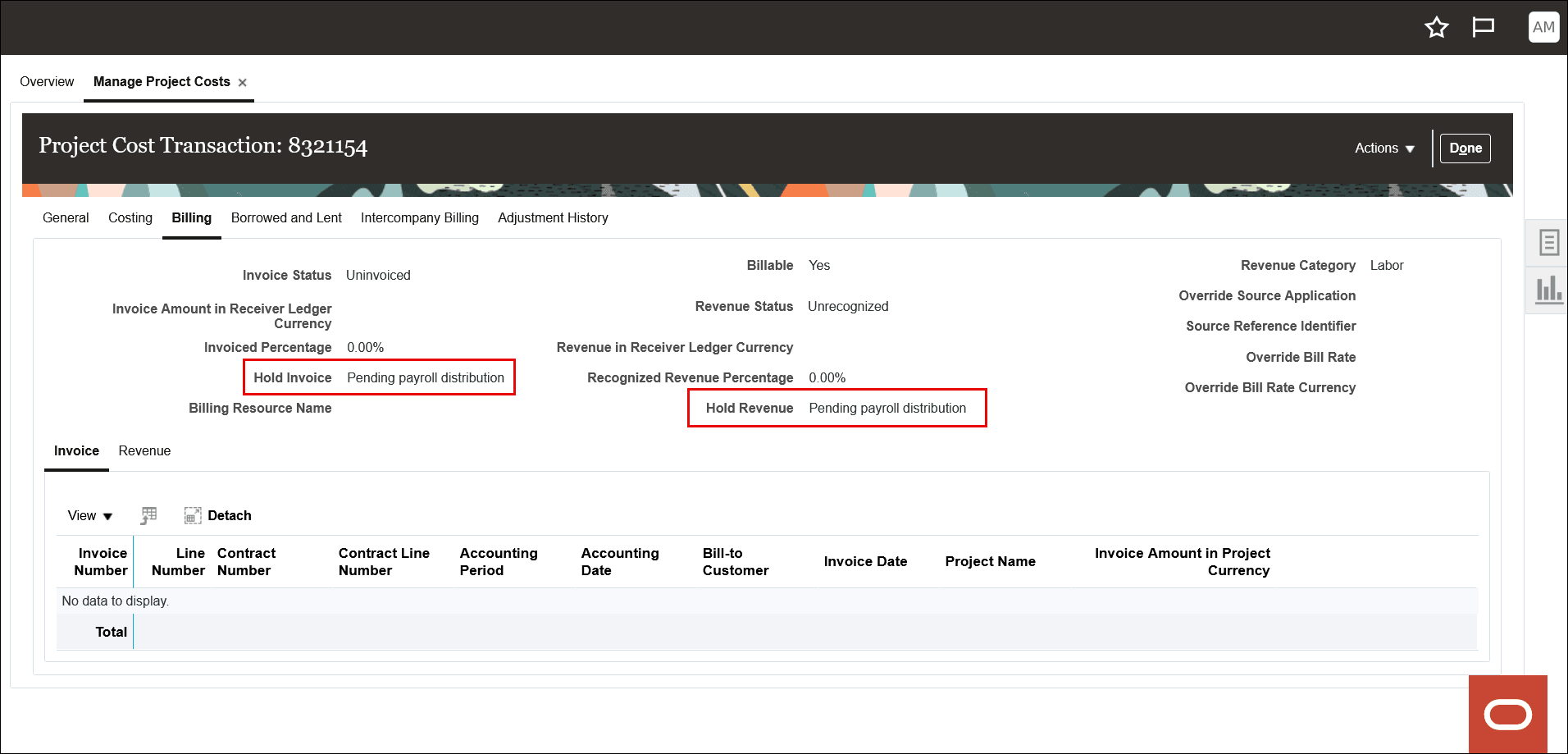
Invoice and Revenue Holds for a Time Card Pending Payroll Distribution
If invoicing or revenue recognition is based on the cost of time cards, such as when using cost reimbursable methods, executing these processes prior to payroll distribution could result in billing exceptions or undesirable rebills.
For example:
- A billable time card that's eligible for payroll distribution is imported into Project Costing, and the Accrue Time Card Costs Using Rates option isn't enabled on the labor schedule version. Therefore, the time card is imported with a cost rate of 0, and its payroll costed status is Pending. The invoicing method on the associated contract is cost reimbursable, so attempting to invoice this time card would result in the "The transaction isn't billed because billing is based on raw or burdened cost that's zero. (PJB_ZERO_COST)" billing exception.
- The Accrue Time Card Costs Using Rates option is enabled on the labor schedule version, and a provisional cost is calculated and applied to the time card transaction upon import into Project Costing. The time card is still pending payroll cost distribution; however, its current cost isn't 0. Invoicing this transaction at this point wouldn't result in the PJB_ZERO_COST billing exception; however, the amount billed is based on the provisional cost. When payroll costs are imported and processed, the target time card's provisional cost is reversed and replaced with the distributed payroll actual cost. This cost adjustment would result in a credit and rebill situation if the time card had already been invoiced.
Automatically applying the pending payroll distribution invoice and revenue holds is controlled by the following two site-level administrator profile options, which are enabled by default:
- Apply billing hold to time cards pending payroll distribution when pricing is based on cost (ORA_PJB_INV_HOLD_PENDING_PAYROLL_COSTING)
- Apply revenue hold to billable time cards pending payroll distribution when pricing is based on cost (ORA_PJB_REV_HOLD_PENDING_PAYROLL_COSTING)
You can disable the automatic invoice or revenue holds by updating the appropriate profile option value to "No". As mentioned above, disabling these controls may result in billing exceptions or rebills.
This feature offers the following business benefits:
- Improved decision-making and reduced risk of unexpected overspend by providing project managers with provisional labor costs as hours are recorded, without needing to wait for payroll to be distributed.
- Prevent unnecessary invoicing and revenue recognition exceptions and avoid adjustments resulting from premature processing of a time card that's pending payroll cost distribution.
Steps to Enable and Configure
You don't need to do anything to enable this feature.
Tips And Considerations
- If you have active labor schedule versions with time card distribution enabled and you want to enable the new Accrue Time Card Costs Using Rates option, you must end date or inactivate the current labor schedule versions and create new ones.
- To account for labor costs differently based on costs calculated using standard costing or payroll costing, use the new Cost Distribution Payroll Cost Accrual Indicator subledger accounting source in addition to the existing Cost Distribution Payroll Costed Indicator subledger source in your rules for the Labor Cost and Labor Cost Adjustment event classes if you need to account for labor costs differently based on costs calculated using standard costing or payroll costing.
- The pending payroll distribution invoice and revenue holds are applied for all billing types: External, Interproject, and Intercompany.
- If the time card transaction is associated with multiple contract bill or revenue plans, holds are applied if any one of them uses cost as the calculation basis.
- Manual invoice or revenue holds can be applied to time card transactions having the pending payroll distribution holds applied. However, when the invoice or revenue holds are removed, if the criteria for the pending payroll distribution holds are still met, the pending payroll distribution holds are reapplied.
Key Resources
- Overview of Labor Distribution: See the Labor Distribution section in the Oracle Project Management documentation.
- Based on Idea 915887 from the Project Management Idea Lab on Oracle Cloud Customer Connect.
Access Requirements
No new access requirements.