Payments Agent for Payment Options, Offers, and Execution
The Oracle Payments Agent transforms the payments process from a focus on just paying suppliers to using the outstanding payment information to evaluate payment options and benefits in light of working capital goals. The agent works with users to manage and optimize payment processing using conversational and insights-driven experiences. Using AI and integrated application capabilities, the Payments Agent supports users across the payment lifecycle, including evaluating payment options, generating supplier offers, guiding users through payment execution, and handling exceptions*. Real-time insights enable users to address potential issues early and strengthen operational oversight at every stage. The Payments Agent is composed of a set of dedicated, task-specific assistants. The Payment Options Assistant helps users evaluate payment opportunities, compare benefits across payment programs such as dynamic discounting, virtual credit cards, and supply chain financing, and assign the most suitable programs to transactions. The Supplier Offers Assistant supports the full lifecycle of dynamic discount offers, including drafting personalized offers, communicating with suppliers, and processing responses. The Payment Execution Assistant helps automate end-to-end supplier payment execution across multiple payment methods by applying compliance and fraud checks, monitoring acknowledgments and reconciliation, and identifying failures or delays to ensure accurate, secure, and auditable payment processing. In the current release, the Payment Options Assistant supports opportunity evaluation across dynamic discounting and virtual credit card payment programs. The Supplier Offers Assistant enables dynamic discount offer management, and the Payment Execution Assistant supports payment submission and scheduling using templates, payment run queries, and navigation to the Payables Payment landing page. Natural language insights help proactively resolve issues and improve operational control.
Note *GenAI services are currently available in the Oracle Cloud Infrastructure (OCI) Commercial Realm (OC1). If your Oracle Fusion Applications environment is hosted outside OC1, you’ll be able to take advantage of these capabilities when GenAI services are rolled out to your region.
Context and Purpose
Traditionally, payment processing has been a manual, scheduling-driven function often limited to conventional methods like Check or ACH. The legacy process lacks real-time guidance on fund utilization, and payment programs are limited to pre-onboarded suppliers. The Payments Agent addresses these challenges by introducing real-time decision support into the payment process, helping users evaluate options such as dynamic discounting and virtual cards at the point of payment and apply them to eligible transactions.
Payments Agent assesses the potential financial impact of different payment programs using outstanding installment data and program attributes. For dynamic discounting, it considers the trade-off between early payment discounts and the opportunity cost of accelerating cash outflow. For virtual cards, it evaluates benefits such as rebate potential and extended payment float based on financing duration and applicable program terms. These calculations are presented comparatively, allowing users to understand relative value across programs and make informed decisions aligned with cash flow and working capital objectives.
The Payments Agent also supports translating payment decisions into action by enabling users to create and manage supplier offers and track responses within the same guided experience. For accepted offers, the related installments are updated and included in subsequent payment processing so that execution aligns with the selected payment strategy. The Payments Agent further supports users during execution by guiding the scheduling and monitoring of payment process requests and surfacing status, exceptions, and follow-up actions to help ensure payments are completed as intended.
Note: The Payments Agent is accessible through the new Payments Agent link, which is available by default in Release 26B from the Navigator menu. For continuity, the existing Payables Payments work area remains available and fully functional, allowing users to transition gradually.
Assistant Overview
The Payments Agent is composed of three task-specific assistants. The Payment Options Assistant helps users evaluate payment opportunities, compare benefits across payment programs, and assign the most suitable programs to transactions. The Supplier Offers Assistant supports the lifecycle of dynamic discount offers, including drafting, emailing, and processing supplier responses. The Payment Execution Assistant helps schedule payments, manage the payment process request lifecycle, and handle exceptions.
In the current release, the Payment Options Assistant supports opportunity evaluation for various payment programs; the Supplier Offers Assistant focuses on dynamic discount offers; and the Payment Execution Assistant helps schedule payments, manage the payment process request lifecycle, and uses natural language insights to help proactively resolve issues and improve operational control.
Experience Overview: Insights-Driven Payments
The Insights view anchors the new payments experience by surfacing payment run status, exceptions, delays, and patterns that may require operational attention, helping users quickly see what is happening and what needs action. It provides visibility into pending, failed, or delayed payments; failed transmission or acknowledgment file processing; pending approvals that require attention; and other conditions that can affect timely, accurate payment processing. From each insight, users can navigate directly to review details or take action in the relevant assistant, enabling a guided flow from awareness to resolution within a single experience.
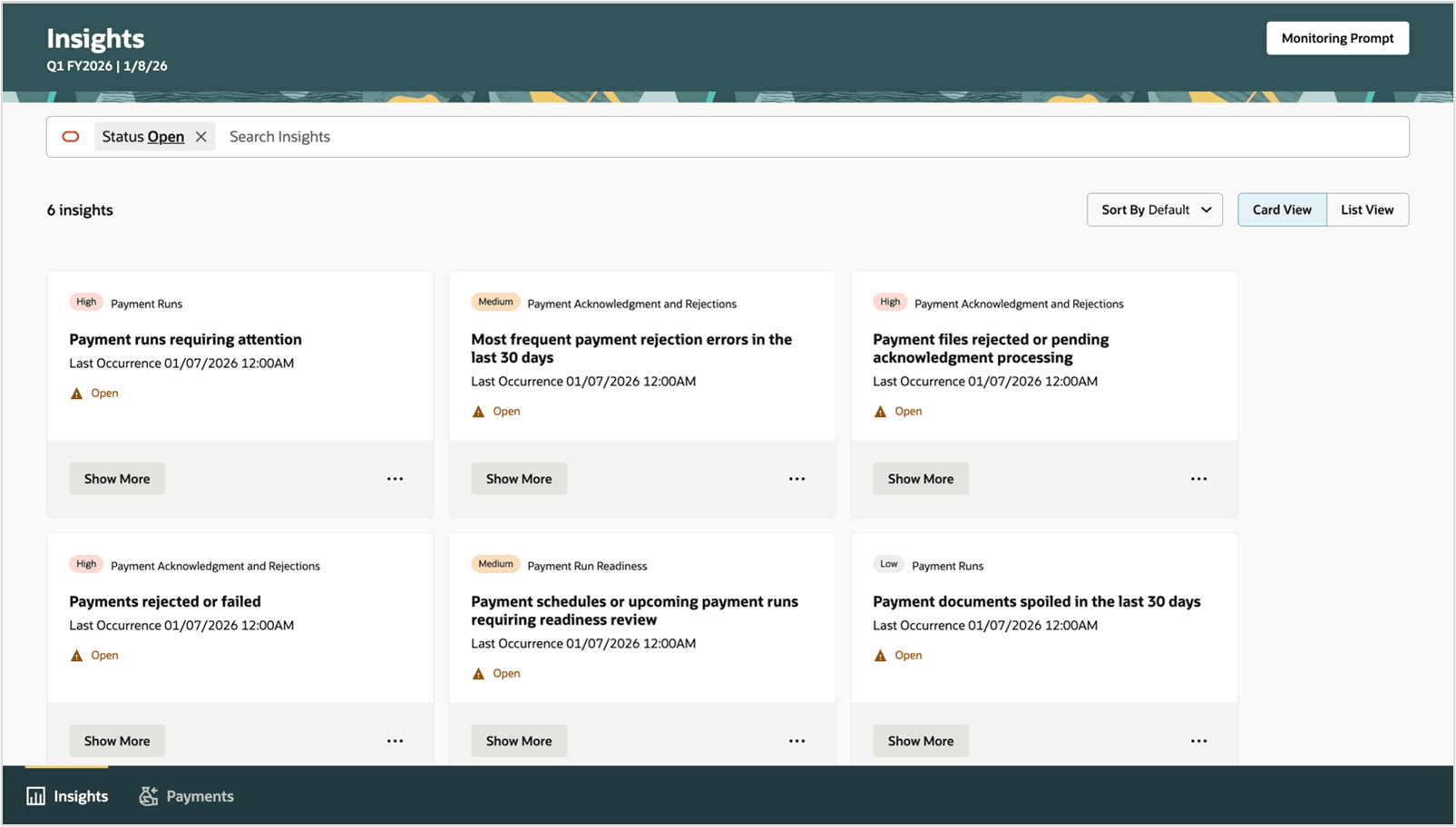
Insights
User has an option to review payment runs that require immediate user review and action, invoices in shortlisted supplier offers that are not ready for payment, payment schedules or upcoming payment runs require readiness review.
In the current release, users receive a prioritized, actionable list of insights spanning the following scenarios: payment documents spoiled in the last 30 days; payment files terminated, pending action, or partially acknowledged due to acknowledgment failure; payment files pending acknowledgment for more than two days; payments rejected due to acknowledgment failure; and the most frequent payment rejection errors in the last 30 days.
Experience Overview: Payments Agent
The Payments Agent is accessible through the Navigator under the Payments Agent group. The Payments Agent interacts with users using three overview pages: Payment Execution, Payment Options, and Supplier Offers. Users can easily navigate through each stage of the payments experience - from managing payment execution, to exploring available payment options, and reviewing outstanding offers and supplier responses.
Payment Execution Assistant
The Payment Execution Assistant supports the scheduling, submission, and monitoring of payment processing. The assistant guides users through the submission of payment process requests, shows the status of payments and payment files, and highlights exceptions or conditions that prevent successful completion. It helps users take timely action when issues occur, while preserving existing validations, approvals, and controls within the payment process.
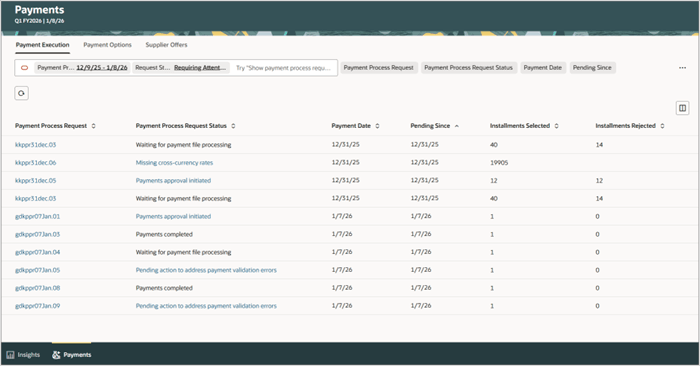
The Payment Execution Experience
Use natural language on the Payment Execution overview page to inquire about specific payments, payment files, or payment process requests. For example, ask for the status of a particular payment or file and request related details directly in the assistant. Where appropriate, the assistant provides links to the standard payment page, from where users can open the relevant payment, file, or request pages to review or perform pending actions.
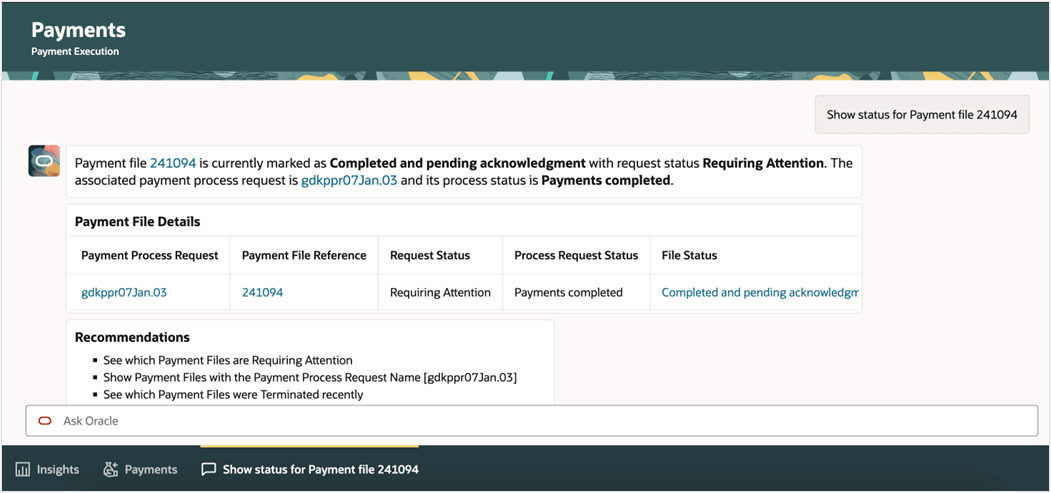
User reviews the status of a payment file and request related details directly in the assistant
Payment Options Assistant
The Payment Options Assistant helps users review suppliers’ upcoming payable installments and to identify which are due in the coming weeks. Users can ask the assistant to compare the financial benefits of different payment programs, including dynamic discounting and virtual credit card programs. The assistant applies the program terms and financial assumptions to calculate and explain the economic impact of each option, guiding users so they can select the approach that best aligns with their cash management and financial objectives. It also supports the creation of draft dynamic discount offers based on user confirmation, which are then passed to the Supplier Offers Assistant for review, communication to suppliers, and processing through the offer lifecycle.
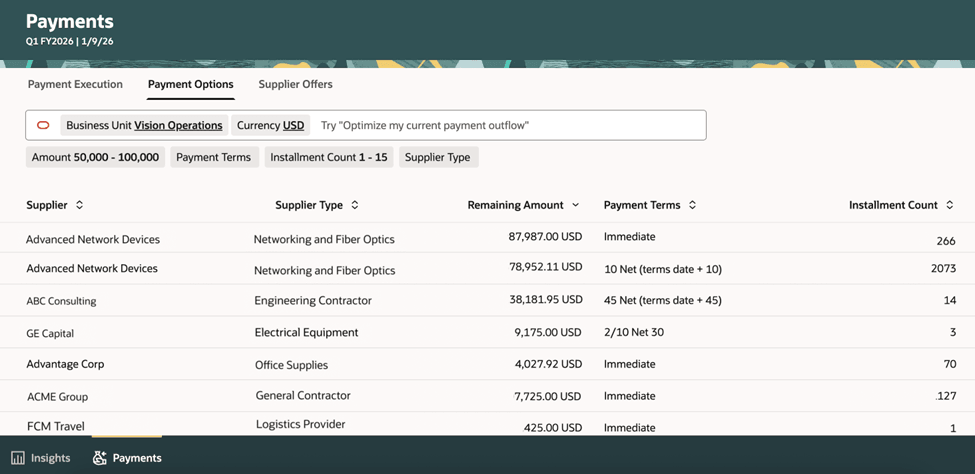
User can review suppliers’ upcoming payable installments and to identify which are due in the coming weeks
Users can interact with the Payment Options Assistant using natural language to perform tasks such as: calculating benefit for dynamic discounting, requesting a benefit comparison between different payment options or preparing draft communications for a payment strategy.
Payment Options Assistant shows dynamic discounting benefits
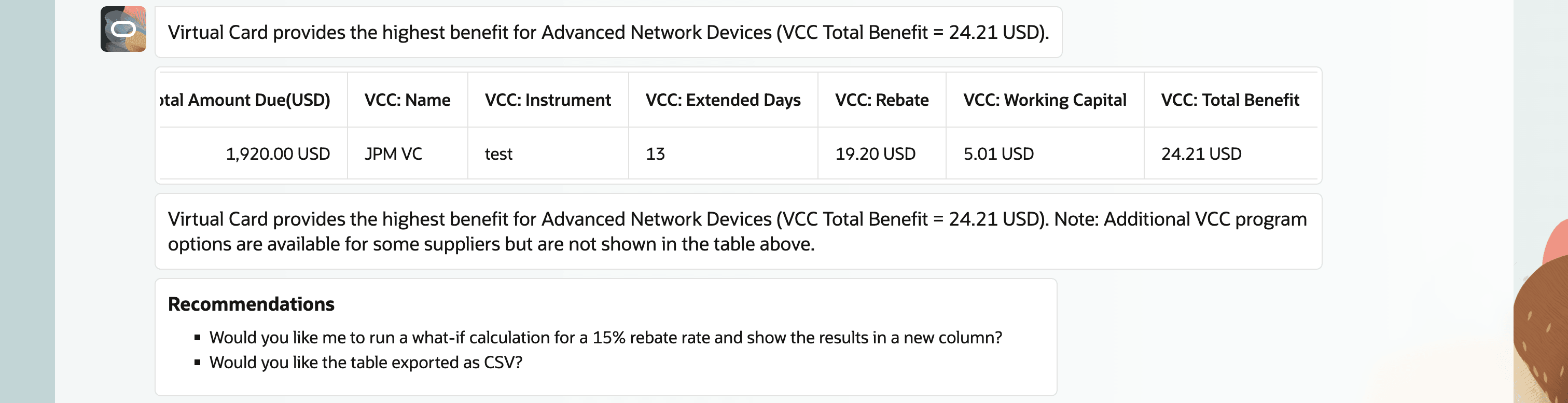
Payment options Assistant shows Virtual Cards benefits
Payment Options Assistant can provide the benefits analysis amongst various programs
User can preview and create the draft offers for dynamic discounting
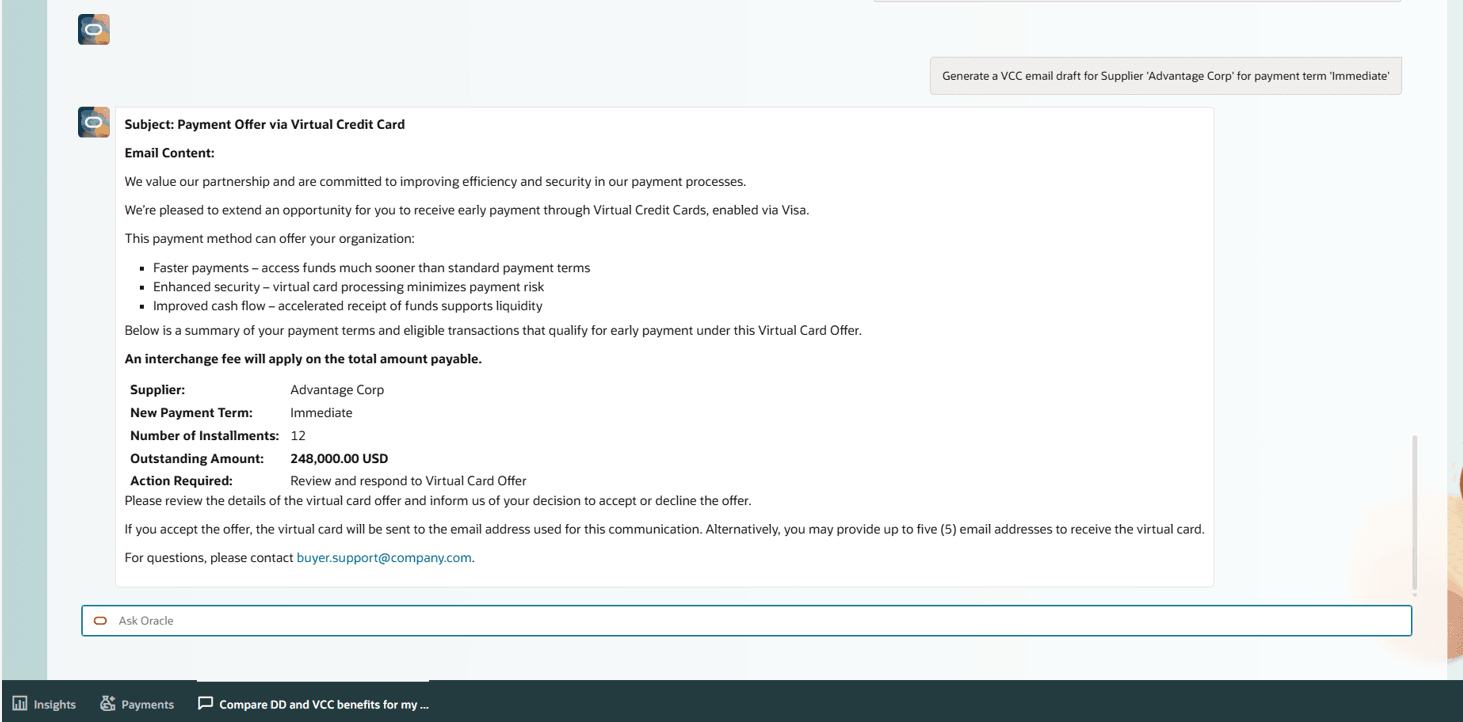
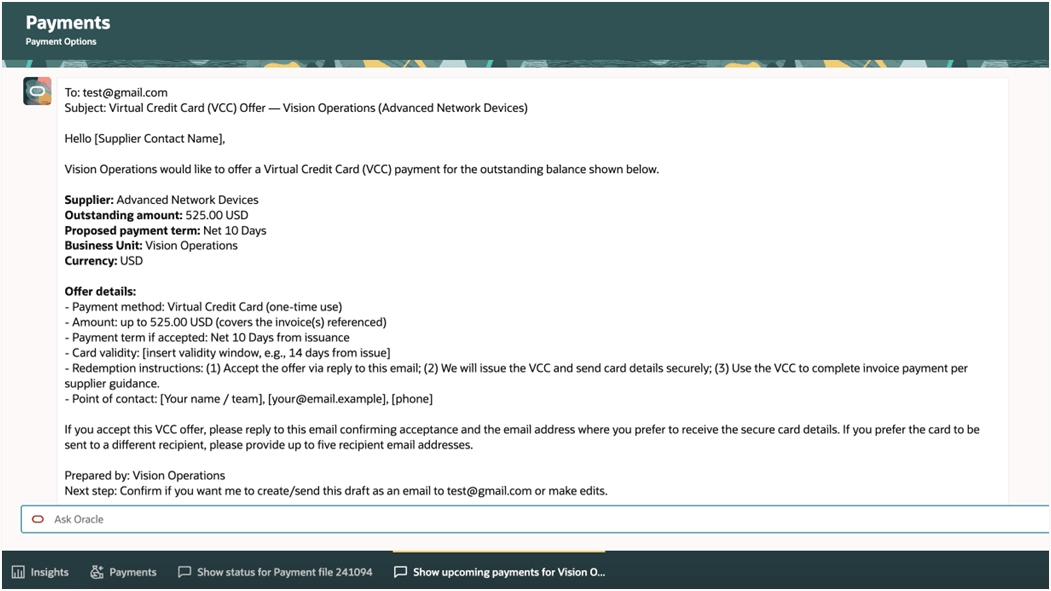
User can preview and create the draft offers email for virtual card
The VCC offer email drafts are for outreach only, you can use them for offline communication.
Once the draft offers are created, they can be tracked, and final communication can be sent to the suppliers through the Supplier Offers Assistant.
Supplier Offers Assistant
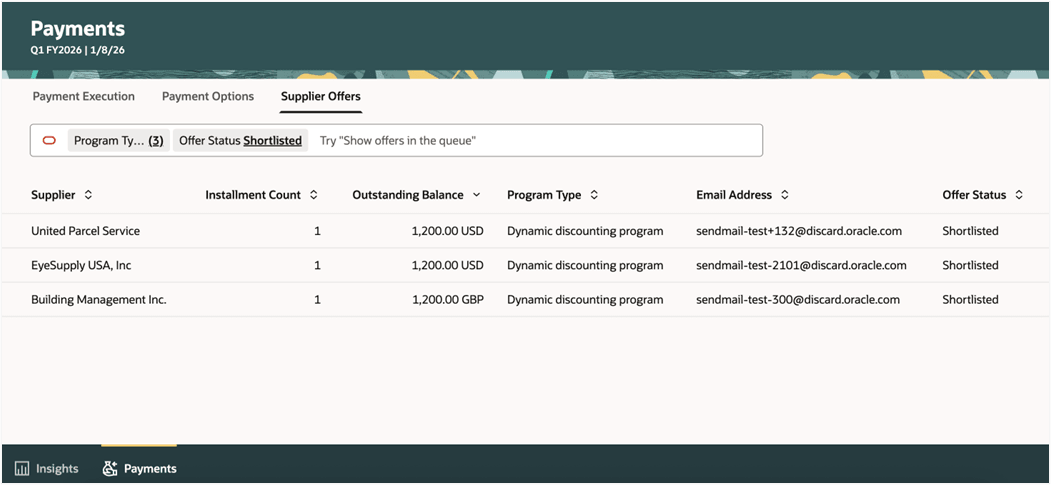
The Supplier Offers Assistant guides users through the creation, review, and communication of dynamic discount offers to suppliers and tracks supplier responses throughout the offer lifecycle. It shows the shortlisted offers by the Payment Options Assistant. It ensures that accepted offers are reflected in subsequent runs in order that negotiated terms are consistently applied and that visibility and control over supplier interactions is maintained.
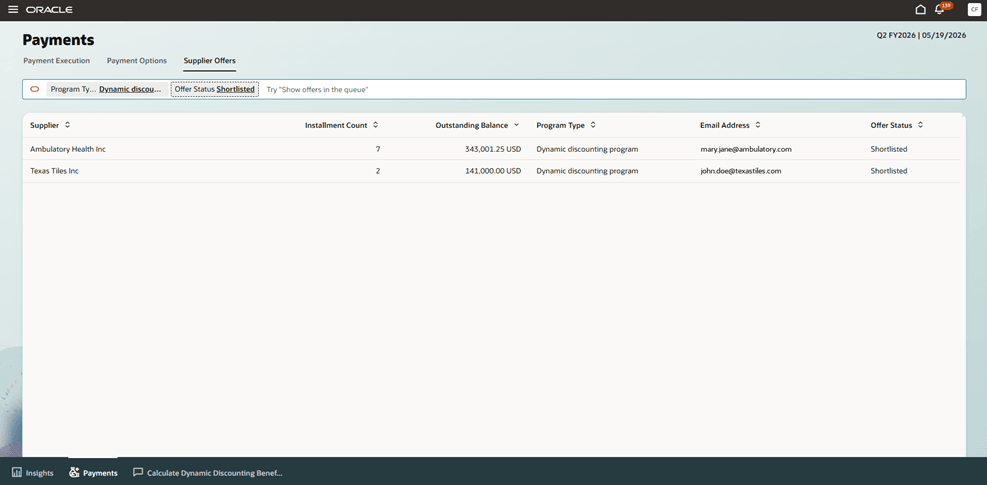
User reviews the shortlisted offers
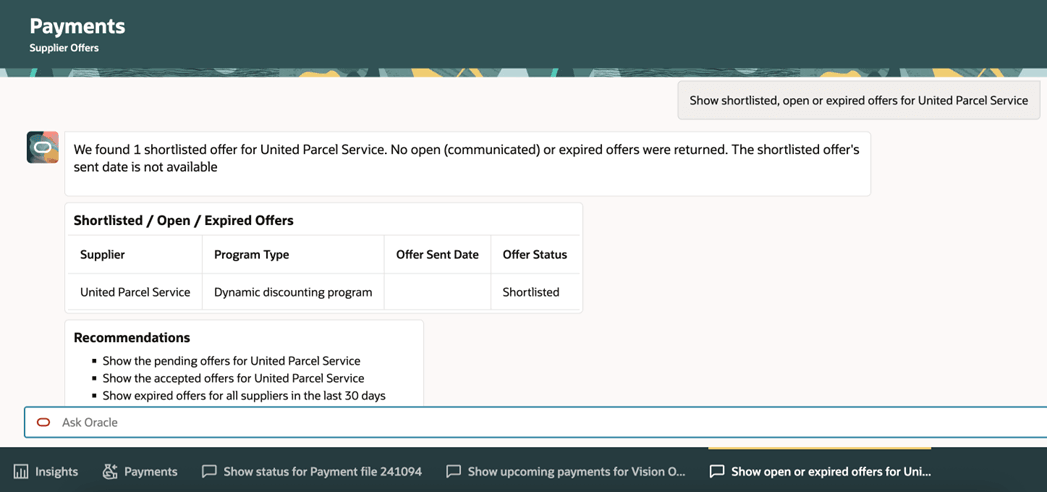
Users can use natural language on the Supplier Offers overview page to search for, review, and manage supplier offers. For example, users can ask to see shortlisted offers, send dynamic discounting offer mail to suppliers, see open or expired offers for a specific supplier, review the status of an offer, or send a reminder of a particular offer to the supplier.
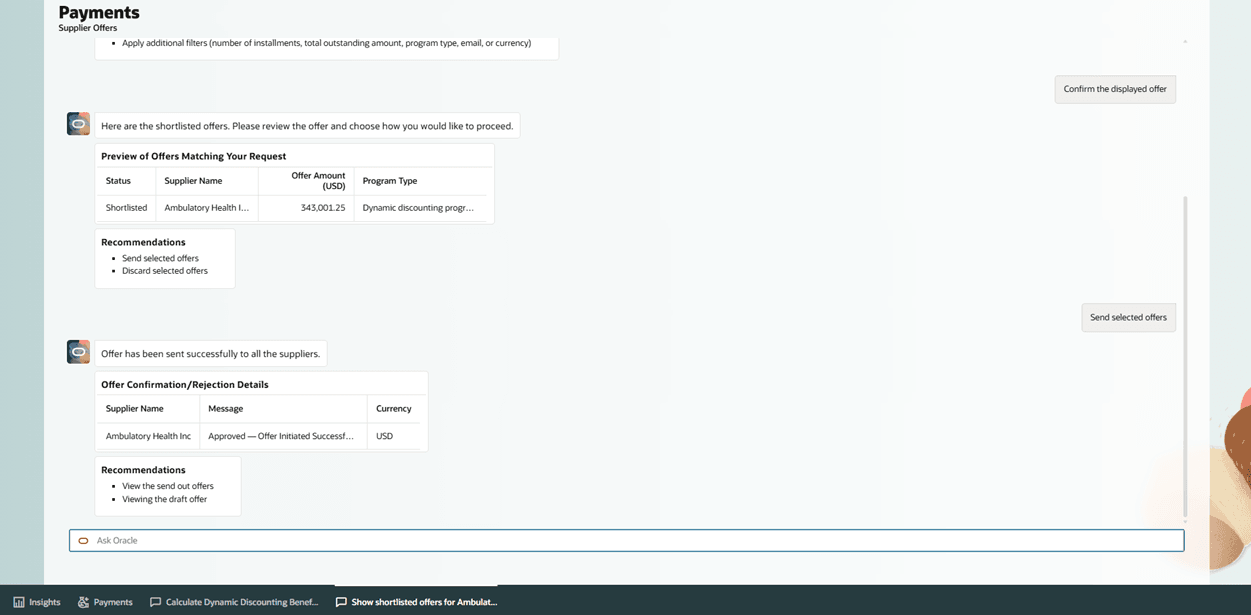
User can review and send the supplier offer
These are the business benefits:
- Centralized Visibility: A single, guided experience to monitor payment insights, evaluating optimization opportunities, and managing execution and exceptions.
- Operational Efficiency: Uses insights view and conversational assistance to identify issues early and reduce manual investigation.
- Optimized Cash Flow: Enhances liquidity and surplus cash utilization through integrated programs like virtual cards and dynamic discounting for paying supplier invoices.
- Financial Gain: Generates incremental financial benefits via early-payment discounts and virtual card rebate revenue.
- Strategic Agility: Streamlines the payment lifecycle to improve market responsiveness and strengthen supplier relationships.
Steps to enable and configure
The steps below cover only configuration that is specific to the Payments Agent. For standard security administration tasks — such as creating roles, assigning roles to users, enabling permission groups, assigning data access, and completing standard security synchronization — refer to Securing Oracle Applications Cloud.
- Refer to the AI Agent Studio: Setup & Access Guide and complete the prerequisite steps for Enabling Security Console Integration with SAS Policy Store and providing End User Access.
- Assign Payments Agent runtime access to the target users. Two custom job roles are required and must be assigned to the same users.
a. In the Security Console, go to Roles, search for the predefined Payment Specialist job role (ORA_AP_PAYMENT_SPECIALIST_JOB), and copy it to create a custom job role.
b. Enter a unique name and role code for the custom job role, and select Enable Permission Groups.
Note: You must select Enable Permission Groups for the custom Payment Specialist job role. If permission groups aren’t enabled, users might be unable to access or use the Payments Agent even after the role is assigned.
c. Review the role hierarchy and save the custom job role.
d. Create a custom job role that includes either ORA_FUN_FIN_AI_AGENT_RUNTIME_DUTY_HCM or ORA_FUN_FIN_AI_AGENT_RUNTIME_DUTY, as applicable.e. On the Users page, assign both custom job roles to each user who requires access to the Payments Agent, and then select Save and Close.
Use the standard security procedures in Securing Oracle Applications Cloud for creating roles, assigning roles to users, and enabling permission groups.Access Role/Duty Purpose Payments Agent functional access
Custom job role copied from Payment Specialist ( ORA_AP_PAYMENT_SPECIALIST_JOB
) with Enable Permission Groups selectedGrants access to the Payments Agent assistants. Financials Intelligent Agent chat access
Custom job role with ORA_FUN_FIN_AI_AGENT_RUNTIME_DUTY_HCM or ORA_FUN_FIN_AI_AGENT_RUNTIME_DUTY
Grants access to the Financials Intelligent Agent chat interface. Assign this role to the same users who have the Payment Specialist role.
- For AI Agent Studio administrator users who will maintain payment program reference documents, create a custom discretionary job role with the required Financials Intelligent Agent administration access.
Include the following duties and permission group:Role / Permission Group Code Manage Financials Intelligent Agent
ORA_FUN_MANAGE_FIN_AI_AGENT_HCM
Manage Financials Intelligent Agent
ORA_FUN_MANAGE_FIN_AI_AGENT
Fai Genai Agent FIN Administrator Duty
ORA_DR_FAI_GENERATIVE_AI_AGENT_FIN_ADMINISTRATOR_DUTY
- To configure customer-specific financing program terms for the Payment Options Assistant, complete the following steps:
a. In AI Agent Studio, use the Financing Programs RAG tool (ORA_FIN_AP_FINANCINGPROGRAMSRAG) to upload reference documents for Dynamic Discounting and Virtual Credit Card.
b. Set each document to Ready to Publish before adding the file.
c. Then run the Process Agent Documents scheduled process and confirm that each document shows a Published status. These documents provide customer-specific program rates and terms used by the Payment Options Assistant for ROI and benefit calculations. Without published reference documents, the assistant uses system defaults. - To enable the Payments Agent to recognize users’ authorized business units, complete the following additional data-access steps:
a. Assign business unit data access for the Payment Specialist role using the standard Manage Data Access for Users task. The Payments Agent displays data only for the user's authorized business units.
b. After assigning business unit data access, click Process Permission Group Policies on the Manage Data Access for Users page so that the Payments Agent recognizes the user's authorized business units. Standard security synchronization processes do not perform this step.
c.If the button is not visible, add lookup code MDA_36604437 to the ORA_ERP_CONTROLLED lookup type (meaning: Show Button for Process Permission Group Policies), then return to the page.
Note: This Agent requires certain Oracle-managed technology prerequisites to be enabled in your environment. If these prerequisites are not currently available, on trying to access, users will see a message "Access to Payment Agent requires technology components managed by Oracle. Please log a service request with Oracle Support to enable these components and list the agent(s) you want to configure in the SR Title field."
Tips and considerations
Scope and Limitations
- The assistants support evaluation, guidance, and orchestration but do not replace standard payment setup, approvals, or controls.
- Supplier Offers Assistant only supports dynamic discounting offers in this release. Future releases will include virtual credit cards and supply chain financing.
- Draft recommendations, offers, and schedules always require user review and confirmation before any action is taken.
- Payment Execution Assistant focuses on inquiries, scheduling, and lifecycle management for payment process requests, payment files, and payments. Unrelated payment functions, for example, accounting or netting, aren’t handled by this assistant.
Data Readiness and Setup
- You must create dynamic discounting programs before you can create offers for suppliers.
- Financial benefit analysis and recommendations depend on the accuracy and completeness of your program definitions, financial assumptions, and transaction data.
- For virtual card or other bank-integrated capabilities, enable the respective features by following the relevant implementation guides. If you wish to enable these features, contact Oracle Support.
- If reference information or required setup is missing or outdated, the assistants may not be able to generate recommendations or may return incomplete results.
Operational Best Practices
- When selecting suppliers and installments for dynamic discount offers, prioritize invoices with longer original payment terms, a meaningful number of remaining days before the due date, and suppliers who have historically accepted early payment incentives. Also consider the strategic importance of the supplier relationship and the supplier’s likely cash-flow needs so that offers are targeted where early payment is most valuable to the supplier and most likely to be accepted.
- Review insights and recommendations regularly to identify operational issues early.
- Review how insights are generated by enabling or disabling them, or by fine-tuning the frequency and time frame through creating a copy.
- Use the Payment Options Assistant to compare benefits and simulate scenarios before drafting offers.
- Validate business unit, currency, and supplier context before running opportunity evaluations to ensure accurate results in the Payment Options Assistant.
- Monitor supplier responses to offers and follow up promptly to avoid delays in paying accepted offers.
- Use the execution views to track payment status and address exceptions quickly to prevent downstream processing delays.
- Designate the offer recipient by configuring a supplier portal user with the early payment administration role.
- Use the Select Early Payment Invoices option when submitting a payment process request to include invoices accepted for dynamic discounting. You can process only dynamic discounting invoices, only due invoices, or both, based on your selection. (Automated Processing of Early Payment Discounts)
Security and Compliance
- The assistants operate within your existing security, approval, and segregation-of-duties framework and do not bypass access controls or validations.
- Align usage with your organization’s security and data governance standards. Review automated outreach, such as emailing offers, with internal policies before enabling at scale.
- All accounting, tax, and regulatory treatments continue to follow your existing configuration and standard processing rules.
- Users only see and act on information and transactions they are authorized to access.
Change Management
- Train Payment Specialist on the conversational flows so they can efficiently evaluate programs, finalize dynamic discount offers, and schedule payments.
- Consider the impact of payment strategy adjustments on vendor relationships and cash flow planning.
- Communicate changes in payment practices to internal stakeholders and, where appropriate, to suppliers to ensure alignment and avoid surprises.
Reliability and Ongoing Use
- Insights and recommendations reflect the state of the system at the time they are generated and need to be refreshed if underlying data changes.
- Periodically review program settings and financial assumptions to ensure that recommendations continue to reflect current market conditions and business priorities.
What is to Come
As the autonomous payments experience continues to expand, the Payments Agent will grow along with it, with new features, functionalities, and experiences to support the evolving needs of customers. While the current capabilities of the Payments Agent are detailed above, customers can expect additional expansions and updates over the course of future releases. This includes broader program support as the Supplier Offers Assistant extends beyond Dynamic Discounting to cover the full lifecycle of Virtual Credit Card payments, the introduction of Standing Offers enabling suppliers to permanently enroll in optimization programs, a new canvas layout delivering a side-by-side agentic experience where the agent and interface operate in a single synchronized view, additional Insights categories empowering users to take proactive action on Payment Options and Supplier Offers, and frictionless email-based supplier outreach eliminating the need for registered Supplier Portal users.
Key resources
- Oracle Help Center: Refer to the Using Payables guide for payment processing.
- Implementing Financials Guide: Payables and Payments setup.
- REST API Documentation: Payables and Payments services.
- Security Reference for Financials: Payments and payables duties and privileges.
Access requirements
Users who will access the Payments Agent features should be assigned the Payment Specialist job role or an equivalent custom role that includes the required privileges.