Ledger Agent for Agentic AI-Powered General Ledger Experience
Proactively monitor balances, journals, and transactions to streamline finance operations using the Ledger Agent. With prompt-assisted monitoring, Ledger Agent provides clear AI-generated insights and explanations across Ledger and Subledger data, surfacing them to accountants only when intervention is required. Accountants can ask natural language questions about balances, variances, insights, and process statuses, and receive precise responses powered by advanced financial entity recognition and dynamic query generation-significantly improving efficiency and business insight into General Ledger processes.
Key Capabilities
Proactive Monitoring
- Use predefined monitoring prompts to surface operational process exceptions, such as accounting process exceptions or manual posted journals without approvals, at a frequency of your choosing, for example, Day - 5 or daily.
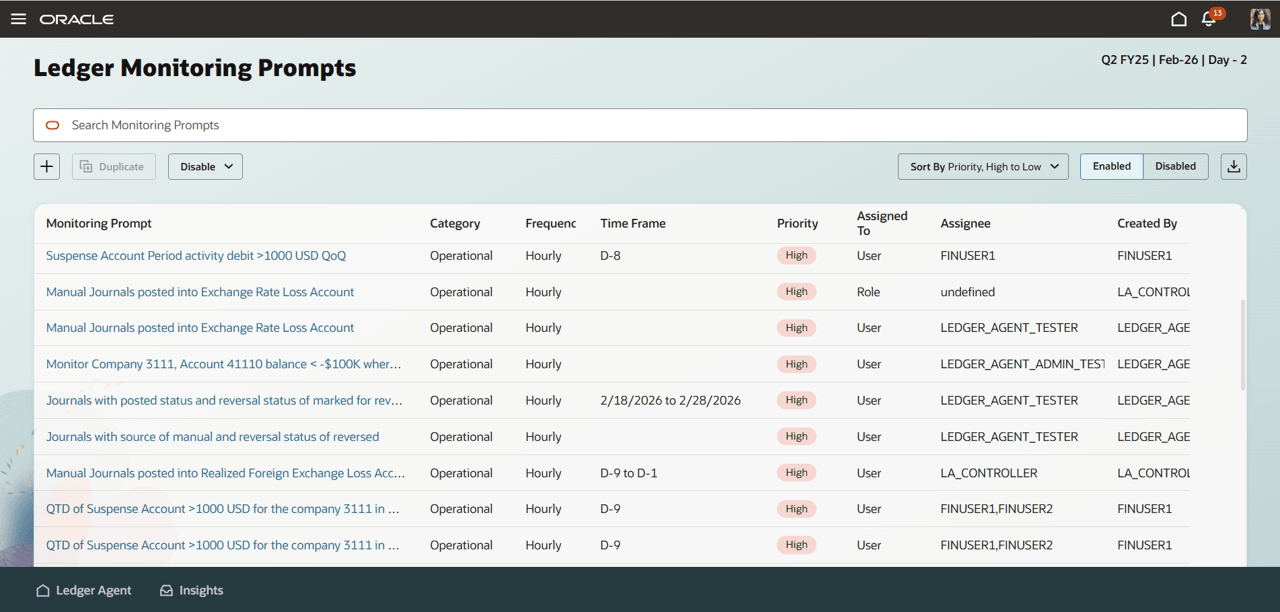
Ledger Monitoring Prompts
-
Use the catalog of prompts as a reference to tailor and personalize monitoring prompts to monitor for revenue, costs, variance, anomalies, and other checks at required frequency. Specify accounts or parent accounts using hierarchies, the period, and other dimensions to personalize the prompt to your business need and area of responsibility. Once activated, Ledger Agent proactively surfaces insights whenever the conditions are met.
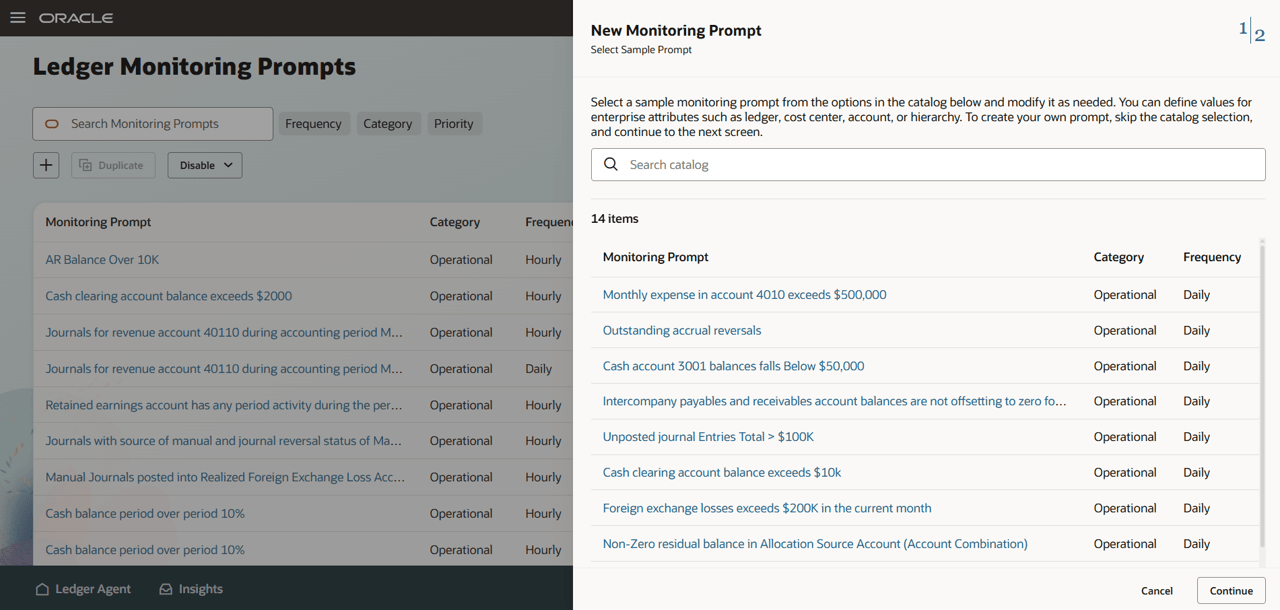
Prompt Catalog
Insight Explanations
- Receive rich, contextual summaries for each generated insight to quickly understand operational and control issues from correlated data. Use natural-language follow-ups in a conversational flow to learn more and reach a decision.
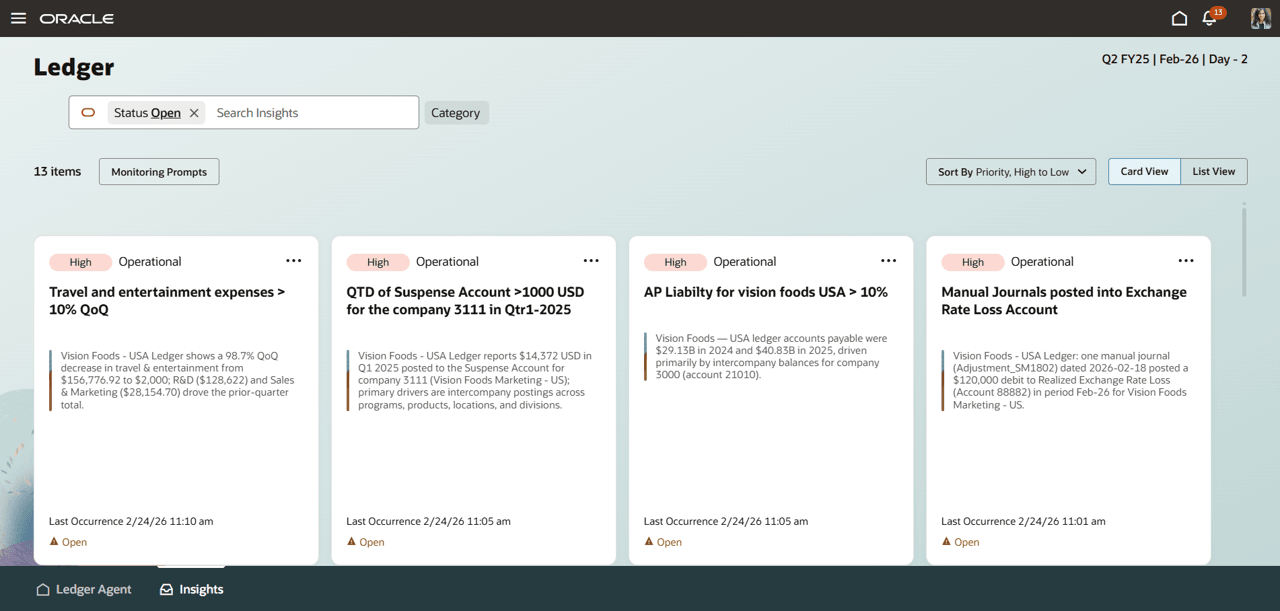
Ledger Agent Insights
- Surface actionable, root-cause explanations for process exceptions, variances, reconciliation differences, and period-end checks, with clear next steps.
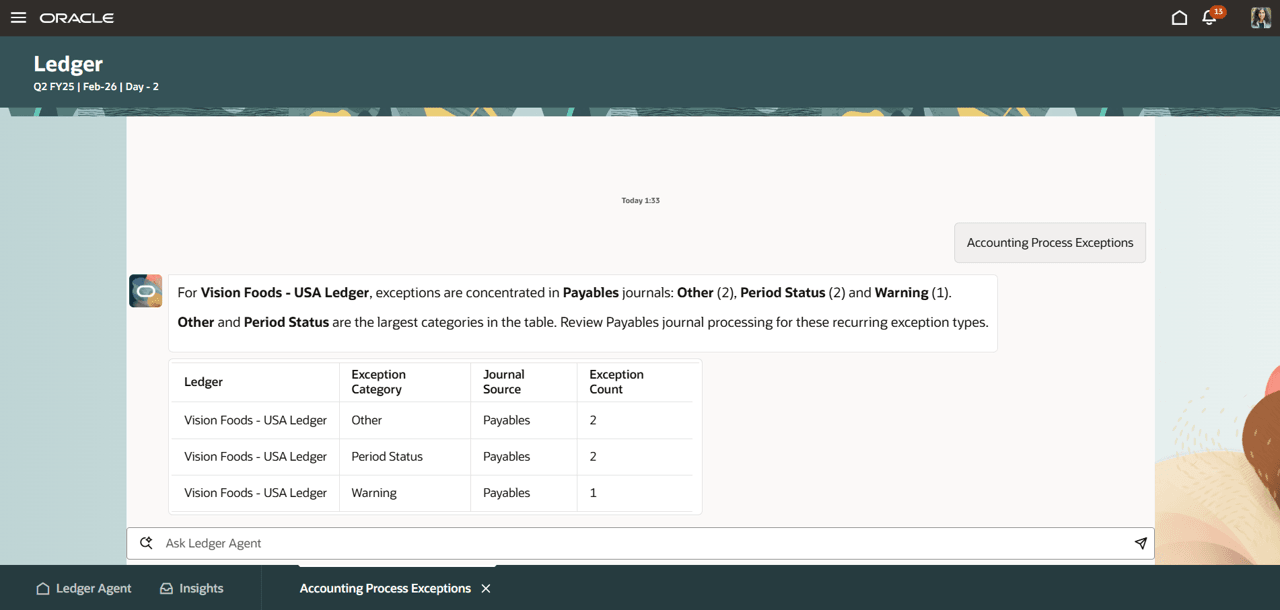
Accounting Exceptions Insight Explanation
Account analysis and Balance Inquiry
- Use natural language balance inquiry - ask questions about financial data, including specific accounts, time periods, and comparative analyses, and receive detailed, contextualized responses on demand. Ask follow-up questions related to balances, journals or subledger transactional details.
- Inquire on journal summaries to analyse account activity.
- Use free-form natural language or use guided prompt templates for commonly encountered analyses. These let you select specific values for dimensions to create deterministic prompts for accurate results
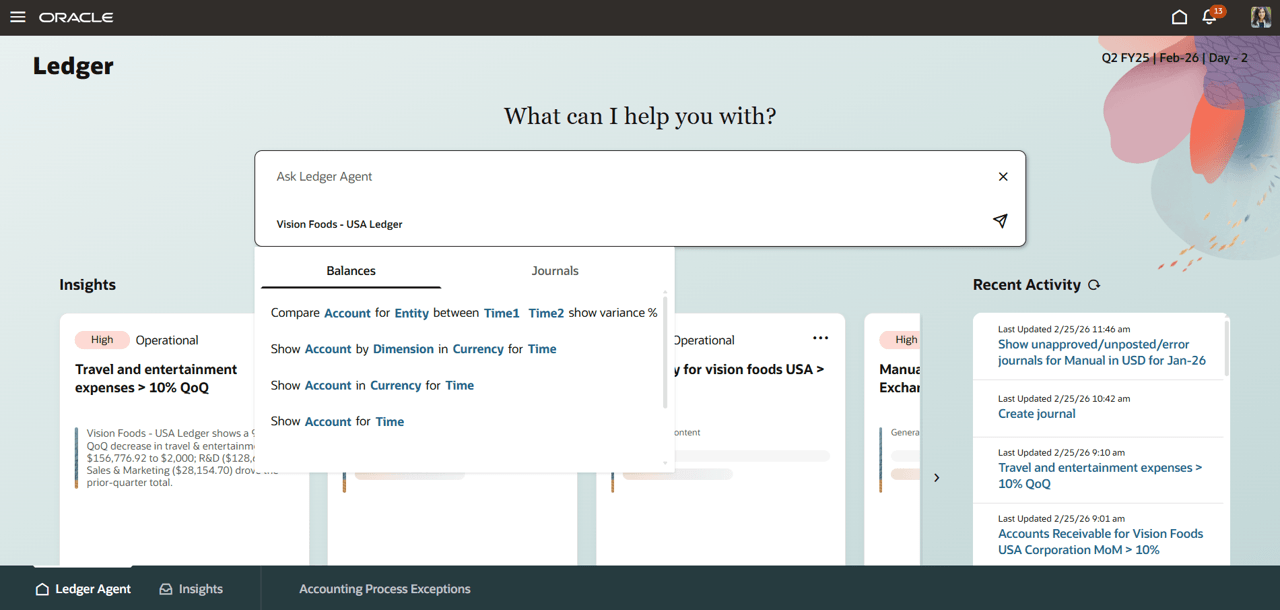
Ledger Agent Overview - Syntax based prompts
In addition, access ledger functions such as manage journals, accounting process statuses, and allocations. Ledger Agent delivers connectivity between inquiry, explanation, and action, reducing time spent in navigating legacy experiences or assembling information from disparate sources.
Business Benefit:
Ledger Agent modernizes day-to-day General Ledger activities by combining automation, proactive insights, and natural language interaction in a single, guided experience, giving Accounting and Finance teams more continuous visibility into balances, journals, and transactions. Using predefined and configurable monitoring prompts, it can continuously scan for anomalies and operational exceptions and surface contextual AI-generated insights, supporting earlier detection and resolution rather than relying on periodic, manual checks. Teams can also ask natural-language questions to get contextual responses on balances, variances, and process statuses—reducing time spent navigating multiple screens or assembling information from disparate tools and reports, which improves productivity for ad hoc inquiries and investigations. Overall, this helps teams maintain higher-quality, up-to-date financial positions through ongoing monitoring and faster analysis, while applying strong security and access controls so users only see or act on what they are authorized to access.
Steps to enable and configure
Ledger Inquiry Assistant role is needed to navigate to Ledger Agent. Refer to the Access Requirements section for details. Without this step Ledger Agent page will not be accessible.
For any error after completing the Access Requirements, get in touch with Oracle Support.
Tips and considerations
Tips
Refer to the Ledger Agent – Adoption Guidance doc for detailed adoption approach.
- Review the catalog of monitoring prompts provided with Ledger Agent to get a good variety of monitoring that is possible through Ledger Agent (traditionally checklists and reports).
- Pick the monitors that are most relevant for your tracking and tailor them to create the essential tracking of financials for accuracy and control.
- Establish Ledger Agent as the preferred choice for all ad hoc inquiries and investigations (traditionally multiple single-purpose experiences with limited granularity).
- Use syntax based prompts for frequently used inquiry constructs.
- Provide human understandable, fully formed, self-explanatory descriptions for enterprise metadata such as,
- chart of accounts dimensions, hierarchies
- journals sources, journal categories, ledgers, legal entities
- Rationalize operational reporting by expressing the business intent in natural language prompts for instant insights.
Considerations
- Supporting details are provided within Ledger Agent for subledgers Payables and Receivables.
- Inquiry on Average Daily Balances and Budget Balances are not supported in this phase.
- Natural language conversation is English-only in this phase.
- Users are unable to retrieve or resume a conversation once it’s closed.
- Questions outside GL balances, journals, and subledger supporting details are considered off-topic for the Ledger Agent.
- Results are limited to the data your user is authorized to access based on roles/privileges.
- In non-production environments, limited data movement may prevent some monitoring prompt conditions from triggering unless representative data exists.
Key resources
Customer Connect Forum - Ledger Agent
Access requirements
Take the following steps to provide users access to the Ledger Agent.
Ledger Agent Access
Consider the scenario that applies to you best for granting access to Ledger Agent.
- Scenario 1: Your finance users have been assigned custom roles for General Ledger access. Data Access Set assignments are in place for users using these roles
- Scenario 2: Your finance users have been assigned seeded roles like General Accountant, General Accounting Manager etc. for General Ledger access. Data Access Set assignments are in place for users using these roles.
1. Add the Ledger Agent Role
For Scenario 1 – where you have an existing custom job role being used by General Ledger users, add the Ledger Inquiry Assistant role as per below -
- Navigate to Security Console.
- Search for the custom job role you wish to use for Ledger Agent.
- Click Edit Role.
- Enable the option “Enable Permission Groups”.
- Save the changes.
- Navigate to Role Hierarchy > Roles and Privileges.
- Add Ledger Inquiry Assistant discretionary job role.
- Navigate to Role Hierarchy > Roles and Permission Groups.
- Add Ledger Inquiry Assistant discretionary job role.
- Save the changes.
For Scenario 2 – where you use seeded job roles for General Ledger users, add the Ledger Inquiry Assistant role as per below -
- Navigate to Security Console.
- Create a new custom job role as below –
- Role Name: Specify a name e.g. Ledger Agent Custom Role.
Role Code: Specify a code e.g. LEDGER_AGENT_CUSTOM_ROLE. - Role Category: Financials – Job Roles.
- Enable the option “Enable Permission Groups”.
- Save the role.
- Role Name: Specify a name e.g. Ledger Agent Custom Role.
- Navigate to Role Hierarchy > Roles and Privileges.
- Add Ledger Inquiry Assistant discretionary job role.
- Navigate to Role Hierarchy > Roles and Permission Groups.
- Add Ledger Inquiry Assistant discretionary job role.
- Add users to the custom job role, save and submit the custom job role.
- Assign Data Access Sets to Users
- Navigate to Manage Data Access for Users task > Add Data Access Set (DAS) access for the new custom job role created and assigned to the users.
- Specify the data access sets for each user.
2. Perform below steps
- Deploy GL# Flex
- Navigate to Setup and Maintenance > Manage Key Flexfields
- Search for GL#
- Click on Deploy Flexfield button
- Wait until Actions > Flexfields Business Object Service Synchronization Status displays “status: APM_DEPLOYMENT_DEFAULTED” before proceeding further
- Navigate to Setup and Maintenance > Manage Key Flexfields
- Enable REST access to read AI Support business objects Enabled profile
- Navigate to Setup and Maintenance > Manage Profile Categories
- Search for ORA_FND_AUTH_REST_ACCESS
- Navigate to ORA_FND_AUTH_REST_ACCESS: Profile Options section
- Add the Profile Option AI Support business objects Enabled (ORA_FND_BOSS_AI_ENABLED) profile
- If the setup is already performed, you will get a unique constraint error that can be ignored.
- Navigate to Setup and Maintenance > Manage Profile Categories
- Configure SVS - Segment Value Security (if applicable)
- This step is only required if Value set security is enabled in the General Ledger.
- Identify the distinct security roles for different users.
- Enable the option “Enable Permission Groups” for these roles (assuming they are custom roles).
- For each SVS condition in Edit Data Security UI for a secured value set a corresponding security view is generated during flex deployment.
- Navigate to Security Console > Search and edit the permission groups enabled job role to add the value set business object and security view(s) to apply segment value security at runtime.
- Navigate to Permission Groups > Click + Add Permission Groups and search for read:<value set code> (e.g., read:VF_Company).
- In Details section > Security Views > Click + Add Security Views and add the applicable security view(s)
3. Create a new Admin role for Monitoring Prompts
- Create this role to grant additional privileges to Finance / IT leads for viewing and sharing monitoring prompts with other users / roles.
- Navigate to Security Console.
- Create a new custom job role as below –
-
- Role Name: Sensors Prompt Admin Custom Role , Role Code: SENSORS_PROMPT_ADMIN_CUSTOM_ROLE.
- Role Category: Financials - Job Roles.
- Enable the option “Enable Permission Groups”.
- Navigate to Function Security Policies > Click + Add Function Security Policy.
- Add the privilege Administer Monitoring Prompts.
- Navigate to Role Hierarchy > Roles and Permission Groups.
- Add the duty role Monitoring Prompt Administration Duty.
- Add Users.
- Save and Close.
4. Sync LDAP executing the jobs
- Import User and Role Application Security Data
- Send Pending LDAP Requests
- Retrieve Latest LDAP Changes
5. Sync Data Access Sets Assignments to SAS
- Navigate to Manage Data Access for Users task > Click Process Permission Group Policies button
- Dismiss the popup notification that says, “The job to process permission group policies has been submitted”. The Financials Maintenance Stream job gets invoked.
- Navigate to Scheduled Processes > Monitor Financials Maintenance Stream job completed successfully after which you can access the Ledger Agent