Payables Agent for Invoice Ingestion, Compliance, and Control
Overview
The Payables Agent delivers automation and best practices across the invoice lifecycle, enabling near-touchless processing. By reducing manual effort, organizations lower errors, improve efficiency, and allow teams to focus on strategic activities. Over time, Payables shifts from a cost center to a value-generating function through faster cycle times, early payment discounts, and reduced leakage via better exception management and anomaly detection.
The touchless experience is built on unified invoice ingestion, automated processing, intuitive exception handling, and straight-through processing from capture to payment readiness. It standardizes and accelerates invoice handling with automated data enrichment, strong compliance controls, and full visibility. By replacing manual, fragmented, and reactive processes with proactive automation and supplier collaboration, organizations achieve faster processing, stronger compliance, improved supplier satisfaction, and better financial outcomes. Powered by Gen AI, the Payables Agent automates invoice ingestion, compliance, and control across multiple sources and formats. It supports multilingual recognition and integrates with global e-invoicing providers. A unified configuration framework enables attribute defaulting, anomaly detection, and conversion of natural language SOPs into system rules. Enhanced image recognition and training capabilities streamline multi-format, multi-page invoice capture, while a consolidated Invoice List view simplifies exception management and improves operational efficiency.
As part of this release, Document IO, a Gen AI-powered document ingestion agent, becomes the default ingestion engine for all customers*, replacing the existing Intelligent Document Recognition (IDR) backend engine for supplier invoice attribute recognition. Leveraging large language models (LLMs), Document IO interprets invoice documents, extracts and labels relevant information, and intelligently maps extracted data to supplier invoice attributes, enabling more reliable and scalable processing of image-based invoices while reducing the need for manual intervention. Document IO supports a wide range of file types, languages, and multi-page documents with improved image recognition, ensuring accurate and efficient supplier invoice processing across global operations.
This release also introduces a unified configuration framework named Capture. Invoice ingestion supports multiple file formats, languages, and multiple page documents with improved image recognition. This touchless ingestion process is further refined using a unified view across streams with training capabilities through the Invoice Document Stream. Furthermore, organizations can resolve any exceptions across invoices using a single, consolidated view on the Invoice List page.
Note: * GenAI services are currently available in the Oracle Cloud Infrastructure (OCI) Commercial Realm (OC1). If your Oracle Fusion Applications environment is hosted outside OC1, you’ll be able to take advantage of these capabilities when GenAI services are rolled out to your region.
Payables Agent Pages and Components
Several new pages and components support this new business process, providing increasing levels of intelligence, automation, and user empowerment throughout the Payables lifecycle. Each component is engineered to transform specific pain points in the Payables experience, making Payables processes frictionless, intuitive, and scalable for global enterprises.
| Component | Experience |
|---|---|
|
Configuration |
Capture: Define configurations for Document Receiving Endpoints and Stream configuration definitions. Configure endpoints, email aliases, and other key details to support Invoice ingestion. |
|
Streams |
Monitor real-time visibility into invoice ingestion of streams with up-to-date processing statuses to review overall health of touchless operations. Review document capture review to view individual invoice detailed processing steps and results to accelerate understanding and actions taken on invoice ingestion. |
|
Training |
Access from the Streams page to upload new or review existing Invoice layouts for training and review the training status. Import or export training data from one instance to another. |
|
Invoice List |
View all invoice management tasks, including both exception handling and querying on one place. View all invoices and statuses in a central hub, verify exceptions and take the appropriate action on them. |
Note: The Payables Agent can be accessed through the new Payables Agent link from the Navigator menu. To ensure continuity, the existing Payables work area remains available and fully functional, enabling users to transition gradually.
To achieve Touchless Payables, the following sections describe configuration requirements, and simplified user interfaces redesigned to improve user experience.
Configuration
Configuration for this feature is organized into a section named Capture, providing a structured approach to invoice ingestion and processing. These configurations ensure invoices are received and invoices are automatically processed.
Capture
Capture has 2 Sections:
- Document Receiving End Points - Capture configuration defines the endpoints used to receive invoices from external parties such as suppliers, and can view all email aliases captured at the Invoice Image documents level. These endpoints enable the automatic ingestion and processing of invoices from multiple sources without manual intervention.
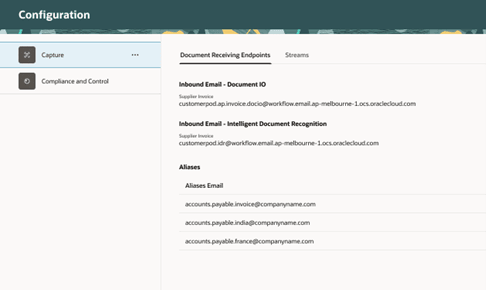
The Configuration – Capture – Document Receiving Endpoints Setup
-
Streams - A continuous flow of documents, characterized by similar sender, file-type, and channels. This displays the active streams through which documents are received and processed, and Invoice Image Document Ingestion and Electronic Invoice Ingestion Assistants ingest the invoice documents into the appropriate streams. Additionally, Email Aliases can be captured and updated as needed for each individual stream.
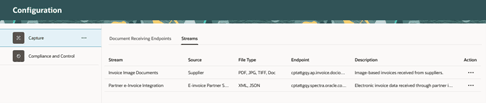
The Configuration – Capture – Streams Setup
Onboarding New Formats
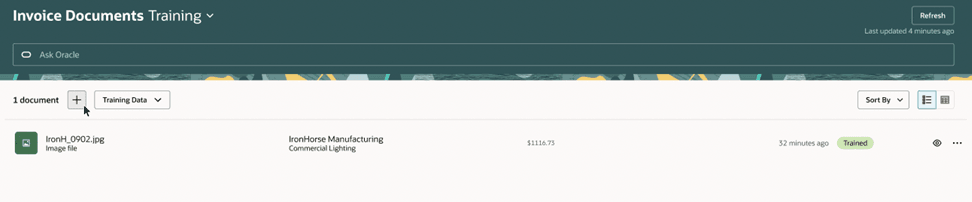
Onboarding new formats allows the system to learn and process new invoice layouts during regular operations. Using LLMs, most attributes are recognized automatically, and training is only required for the few unrecognized fields. This one-time training is typically for high volume suppliers that ensures maximum invoices are ingested in a touchless manner where you upload invoices and provide input for adaptive learning that gets reused in future ingestions.
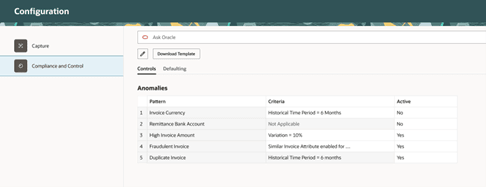
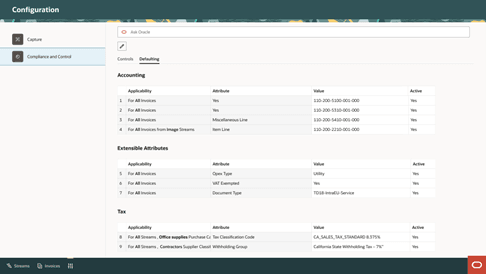
The Invoice Document Training Page
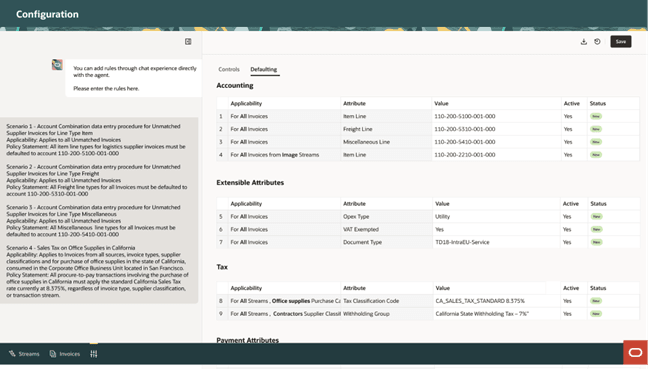
The Invoice Document Training Experience
Stream
The Streams page displays all invoices ingested through the Invoice Image Document Ingestion and Electronic Invoice Ingestion Assistants, providing a centralized view with key details such as Stream Name, File Type, File Name, Supplier, Amount, Date, and Status. The Ingestion Assistant ingests invoices from multiple channels—such as email or integration services—and organizes them into Streams based on file type, source, and channel. Each file may contain a single invoice (image) or multiple invoice records (electronic). Users can easily search, sort, and filter invoices on the Streams page to manage and monitor processing efficiently.
- File Capture Status – Overall Status of the File: This status provides a high-level view of whether the system was able to successfully extract the minimum required attributes from the document to initiate invoice creation. This status helps the users quickly identify whether a document is fully automated or requires manual review.
- Status Summary – Invoice Level Details Status Within the File. In cases where a file contains multiple invoice records, the Status Summary provides a consolidated view of the outcomes for those invoices. Even if a file is processed successfully at the document level, some invoices within it may fail due to individual data issues. This field gives the user insights into whether issues are isolated to a few invoices or affect the entire file. It also helps in determining the urgency and scope of corrective actions required.
The Invoice Document Streams Page
Invoice List
The Invoice List brings all invoice management tasks, exception handling, and query capabilities into one powerful, streamlined screen. The unified Invoice List is designed to be the central hub for all invoicing needs, offering a complete view of every invoice, whether it is processing smoothly or flagged for an exception. On this page, users can verify exceptions or violations observed on invoices and quickly take the appropriate action on them, whether it be resolving invoice rejections or making other required invoice corrections.
The Invoice List Page
Business Benefit:
This experience combines automation and user experience innovation to enable a modern, intelligent approach to invoice processing. It unlocks several business benefits across various capabilities, including Invoice Capture, Onboarding New Formats, Streams, and the Invoice List. While these all holistically help improve data accuracy, and help streamline resolution and improve operational efficiency, they also each individually provide their own unique benefits.
- Touchless Capture of Supplier Invoices: The Payables Agent powers touchless capture and validation of supplier invoices and payment requests, reducing manual efforts and errors.
- Reduce Manual Intervention: Minimize time spent entering or correcting invoice details, freeing staff to focus on higher value tasks.
- Accelerate Invoice Processing: With attributes autofilled, invoices move through the workflow faster, supporting touchless processing and faster payments.
- Eliminate Post Payment Cleanup: Catch issues at the point of entry, drastically reducing the time and resources needed for reconciliation, manual clean up, and funds recovery after payments are made.
- Focus User Attention: Direct users to the small subset of invoices that require investigation, reducing noise and allowing users to focus on critical risk items.
- Increase Efficiency: Eliminate context switching and navigation, reducing time spent locating and reviewing invoices.
- Enforce Deeper Control: Use smart filters or simple language queries to drill down to the exact invoices you need to focus on, without requiring any complex queries.
- Gain Total Visibility: Maintain a comprehensive overview of your entire invoice pipeline, ensuring timely approvals and proactive management of exceptions.
Steps to enable and configure
Feature Enablement
In 26B this feature is enabled by default. After the required security roles and privileges described below are configured, users can access the feature through the new “Payables Agent” navigation entry.
Note: This Agent requires certain Oracle-managed technology prerequisites to be enabled in your environment. If these prerequisites are not currently available, on trying to access, users will see a message "Access to Payables Agent requires technology components managed by Oracle. Log a service request with Oracle and list the agent in the SR title."
Tips and considerations
Configuration
Capture
- Create a user-friendly email address and auto forward the rules to your Oracle Cloud email address. Use the alias functionality to capture this information to share with suppliers.
- If you have operations that warrant multiple business units, then you can have one email per business unit which will help in automatically deriving the business unit. However, you will have to do a one-time setup for the Alias to BU mapping.
Onboarding New Formats
- Identify high volume suppliers that submit invoices in image-based formats, and onboard those related supplier invoice formats.
Streams
- Set up Supplier Names and Addresses in Oracle Cloud Procurement or Oracle Cloud ERP. Make sure that they match exactly to the Supplier Addresses on the invoices.
- Decide your PO format.
- Verify that the PO formats on invoices match exactly to the PO formats set up in Procurement.
- Analyze if there are any specific types of Suppliers that should be excluded from recognition. For example, you should exclude invoices from internal suppliers.
Invoice List
- The invoice list by default filters for invoices that require your attention. Use the smart filters to view a set of invoices based on a different priority.
- When the smart filters are applied for the invoices you are looking for, the Payables Agent helps you with your specific questions about the invoice data and engage in a dialogue to complete complex review or action workflows.
- Correct the invoices that are rejected during invoice import through the new and intuitive correction spreadsheet.
- For invoices flagged with exceptions you can either cancel the invoice, correct the invoice if any data was incorrectly captured, or release the exceptions if you believe it was falsely flagged.
What is to Come
As the Touchless Payables experience continues to expand, the Payables Agent will grow along with it, with new features, functionalities, and experiences such as compliance and control to support the evolving needs of customers. While the current capabilities of the Payables Agent are detailed below, customers can expect additional expansions and updates over the course of future releases. This includes the continued growth of supported streams, a new Insights view providing rich, contextual summaries containing details and enabling action on operational and control issues, additional configuration options in Capture and further expansion of real-time, natural language analysis with the use of Ask Oracle.
Key resources
-
Reference Document – Security Reference for Financials: Payments and Payables duties and privileges – Configuring Security in Oracle ERP Cloud
Access requirements
Security and Access Details
Access to new feature components and pages are managed through specific security artifacts tailored to the underlying design requirements. This section offers a consolidated view of these controls, including the privileges and roles required to grant access to the relevant pages. Make sure you’ve finished all necessary prerequisites; For detailed instructions and reference materials, refer to the document listed in the Key Resources section.
| Component Name | Component Type | Security Details | ||
|---|---|---|---|---|
| Artifact Name | Artifact Type | Security View | ||
| Capture | Page - Edit | Manage Payables Document Capture | Privilege | |
| read:Document Integration Stream Definition | Permission Group | AllRowsAllFields | ||
| read:Document Integration Channel | Permission Group | AllRowsAllFields | ||
| update:Document Integration Channel | Permission Group | AllRowsAllFields | ||
| read:Document Integration Stream Category | Permission Group | Payables Rows All Fields | ||
| Capture | Page - View |
View Payables Document Capture |
Privilege | |
| read:Document Integration Stream Definition | Permission Group | AllRowsAllFields | ||
| read:Document Integration Channel | Permission Group | AllRowsAllFields | ||
| update:Document Integration Channel | Permission Group | AllRowsAllFields | ||
| read:Document Integration Stream Category | Permission Group | Payables Rows All Fields | ||
| Invoice Documents Streams | Page - Edit | Manage Supplier Invoice Stream | Privilege | |
|
read:Payables Document Stream Detail |
Permission Group | All Rows and Unrestricted Fields | ||
| Invoice Documents Streams | Page - View |
View Supplier Documents in Stream |
Privilege | |
|
read:Payables Document Stream Detail |
Permission Group | All Rows and Unrestricted Fields | ||
| Invoice Documents Training | Page - Edit | Manage Supplier Documents Training | Privilege | |
| Invoice Documents Training | Page - View | View Supplier Documents Training | Privilege | |
| Source File |
Button |
Download Payables Invoice Source Document | Privilege | |
| Invoices | Page | Manage Payables Invoice List Activities | Privilege | |
| Payables Invoice Processing Duty | SAS Duty Role | |||
| read:Business Unit | Permission Group | AllRowsAllFields | ||
| read:Currency | Permission Group | AllRowsAllFields | ||
| read:Data Sensor Entity Tag | Permission Group | AllRowsAllFields | ||
| read:Payables Invoice Installment | Permission Group | AllRowsAllFields | ||
| Open Corrections Spreadsheet | Button |
Correct Payables Import Validation Errors |
Privilege | |
Data Security Access for Invoice List Page:
For the custom job role that grants access to the new Stream, List, and Graphic Equalizer pages, an additional step of Data Security Access is required. This custom job role (for Invoice List Page access) must have Business Unit access to that custom role. If BU access is not granted, the user will not be able to see the invoice in the Invoice List page. Even when the user drill downs from the Stream page to the corresponding invoice on the Invoice List page, they will not be able to see it without the appropriate data security access.
To configure this Data Security Access, you need to navigate to Manage Business Unit Data Access for Users, select the user name and the custom role created above, and grant access to the appropriate Business Unit, click Process Permission Group Policies to trigger the Permission Group Policies processing. Once this is completed, the user will be able to drill down from the Stream page to the Invoice List page, view the invoice, and search for invoices directly from the Invoice List page.