Cash Processing from Bank Statements and Remittance Advices
Overview
Bank Statement and Remittance Advices Processing enhancements extend Oracle’s broader investment toward Cash Processing Agent–driven capabilities, advancing a more automated and connected approach to cash processing within Receivables and Cash Management workflows.
Receipts can now be automatically created directly from bank statement lines, while remittance advices across multiple formats can be ingested, interpreted, and matched to receipts within a unified process. By bringing together receipt creation, remittance ingestion, and matching into a single coordinated flow, these enhancements reduce manual intervention and improve the accuracy and timeliness of cash application.
Building on the existing foundation for bank statement ingestion and reconciliation, this release extends processing to include remittance-driven workflows and tighter integration between receipt creation and cash application. The combined use of structured bank data and unstructured remittance information improves matching outcomes and helps reduce exceptions. Enhanced exception handling further streamlines processing by enabling users to review extracted data alongside source documents and resolve issues more efficiently within a unified workspace.
These enhancements represent a continued step toward the Cash Processing Agent vision, where cash processing becomes increasingly automated through AI-driven data extraction, matching, and exception handling. Users can leverage chat-driven resolution experience to investigate issues, understand processing outcomes, and take corrective actions more efficiently. Looking ahead, support will expand to additional remittance and bank statement formats, lockbox integrations, and improved handling of complex scenarios such as partial payments and ambiguous remittance details.
Key Capabilities
Bank Statement and Remittance Advices Processing brings together core cash processing activities into a single, coordinated flow spanning ingestion, reconciliation, receipt creation, matching, and cash application.
Automated Ingestion and Data Extraction
Bank statements and remittance advices are ingested and interpreted using trained templates and learned mappings. Supported bank statement formats, including BAI2, MT940, and CAMT053, along with remittance documents in formats such as PDF, are processed to extract receipt details, references, and payer information, making this data available for downstream processing without manual intervention.
Receipt Creation and Reference Enrichment from Bank Statements
Eligible bank statement lines are converted into receipts based on configured rules, eliminating the need for manual transformation of bank data. Key attributes, including payer details and payment references, are derived from both structured fields and unstructured additional information, ensuring that receipts are created with sufficient context for matching and application.
Matching of Remittance to Receipts
Remittance advices are automatically matched to receipts using available references, amounts, dates, and customer information. Where direct matches are not found, remittance records are retained and associated when corresponding receipts become available.
Exception Handling and Review
Receipts that cannot be fully processed due to missing, incomplete, or ambiguous data are surfaced for review. Cash Application Specialists can review extracted data alongside source documents, make corrections, and complete processing through the streamlined correction flow.
Role-Based Processing, Monitoring, and Reconciliation
Cash Application Specialists manage receipt and remittance processing within a unified workspace, where they review extracted data, resolve exceptions, and complete application activities.
Cash Managers track processing status across bank documents, monitor outcomes, and address reconciliation exceptions using Cash Management workflows. End-to-end visibility supports timely issue resolution and ongoing operational efficiency.
Receipt Processing Monitoring Page
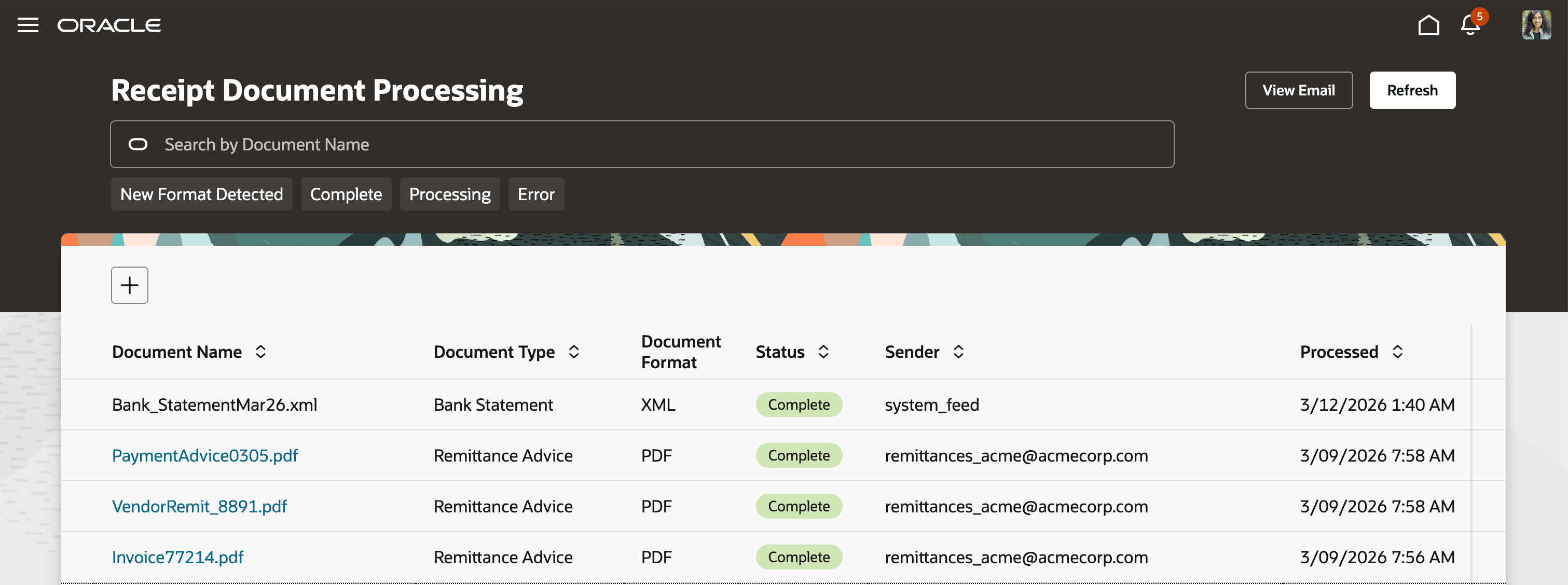
Bank Documents Monitoring Page
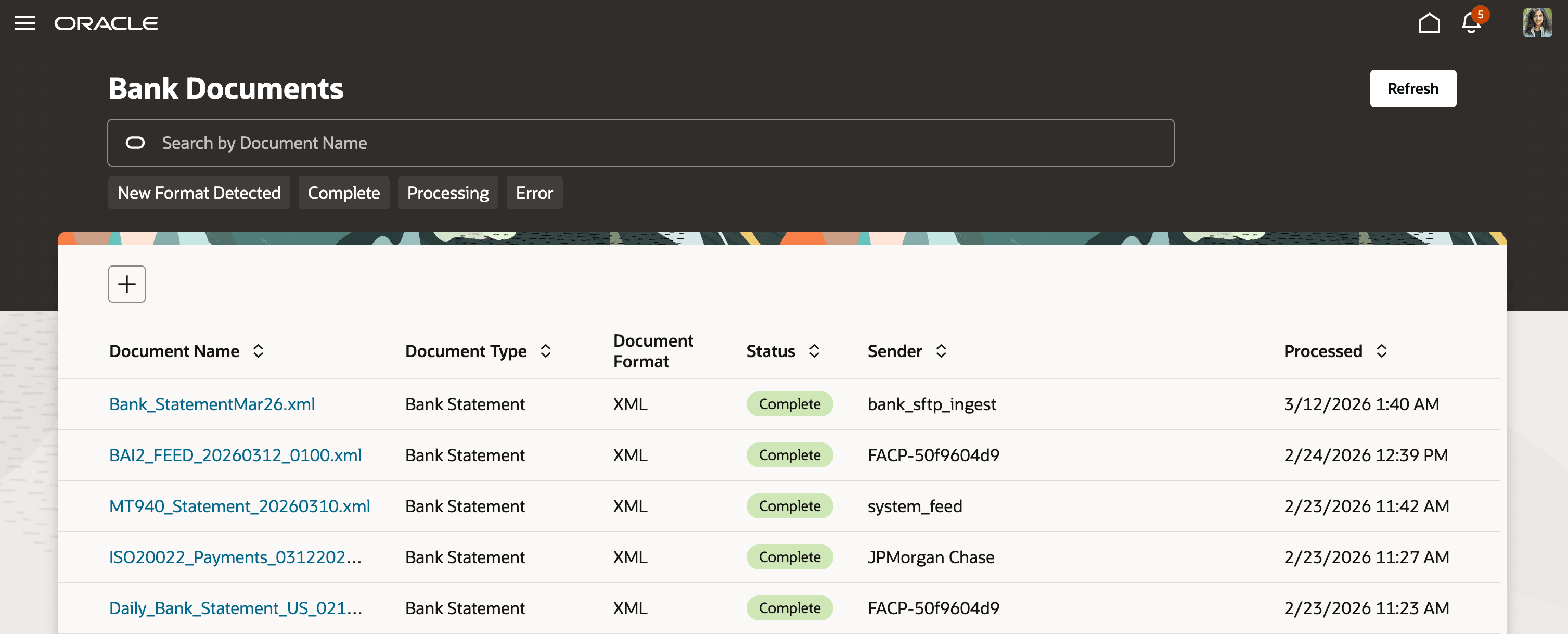
Business Benefits
Bank Statement and Remittance Advices Processing enhancements simplify and accelerate incoming customer payment processing while improving visibility across the cash application lifecycle.
- Reduced manual effort and faster payment preparation: Automated ingestion of bank statements and remittance advices, combined with receipt creation and matching, accelerates intake and minimizes manual processing.
- Improved matching accuracy and fewer exceptions: Consolidating structured and unstructured data enhances reference quality, leading to more reliable matching and reduced exception volumes.
- More efficient exception handling: Exceptions are identified earlier and presented with relevant context, enabling quicker resolution.
- Unified end-to-end processing: A single workflow for ingestion, reconciliation, receipt creation, matching, and cash application reduces fragmentation and reliance on external tools.
- Enhanced visibility: Centralized tracking of processing status improves monitoring, issue resolution, and overall predictability.
Steps to enable and configure
To enable this feature you need to log a Service Request (SR).
For 26B, Oracle Development will reach out to select customers with steps to enable as per Early Adoption program. The feature is not available to be enabled outside the early adoption program.
Tips and considerations
- Receipt creation from bank statements is a configurable capability at bank account level that can be enabled through a phased rollout, by bank, region, or legal entity, based on your organization’s specific needs.
- Not all receipts will process automatically; receipts with incomplete or ambiguous data, such as missing references or unclear business unit derivation, are routed to exception flows and should be resolved using the provided correction tools.
- Establish regular monitoring of document processing through Cash Management and Receivables interfaces to quickly identify and resolve ingestion failures, receipt creation issues, and unmatched remittances.
- Invest time in onboarding and training document formats, particularly for customer-specific variations, as accurate initial mapping reduces exceptions and improves long-term processing efficiency through system learning.
Key resources
- Guidelines for Applying Receipts and On-Account Credit Memos
- How You Process Electronic Bank Statements
- How Bank, Branch, and Account Components Work Together
- Automatic Reconciliation
- Implementation User Guide: Provided by Oracle Support
Access requirements
List of Access Requirements and Privileges
| S. No. | Privilege Name/Permission Group |
Description |
Role |
|---|---|---|---|
| 1 |
View Bank Statement File Ingestion |
View bank statement files and ingestion history |
Cash Manager |
| 2 |
Train Bank Statement File Format |
Upload, map, and save a new bank statement format (generate fingerprint) |
Cash Manager |
| 3 |
Delete Bank Statement |
Delete a bank statement file from processing history/queue |
Cash Manager |
| 4 |
View Remittance Advices |
View remittance advices documents and ingestion history |
Cash Application Specialist |
| 5 |
Train Remittance Advices Format |
Upload, map, and train new formats (generate fingerprint) |
Cash Application Specialist |
| 6 |
Delete Remittance Advices Format |
Delete a trained format/fingerprint (removal of remittance formats/files) |
Cash Application Specialist |
| 7 |
Define Remittance Advices Email |
View/add/edit the remittance advices email address used for ingestion |
Cash Application Specialist |