Redwood: Migrate B2B Location Codes to Customer B2B properties
You can use a Redwood page to define and maintain location codes used to identify ship-to and bill-to locations when processing order-to-cash messages.
Here are the messages that support this feature:
- Purchase Order - Inbound
- Purchase Order Change - Inbound
- Purchase Order Cancellation – Inbound
- Purchase Order Acknowledgment - Outbound
- Purchase Order Change Acknowledgment - Outbound
You now have:
- Reduced maintenance when addresses change: When a physical address is updated, you maintain it only once in the customer site master data. Partners can continue using the same code without updating their message payloads.
- Lower payload complexity: Exchanging codes instead of full addresses can reduce verbosity and limit transmission of detailed location data.
Steps to enable and configure
You can access this functionality by enabling the feature Simplify Configuration and Processing for B2B Messaging.
- Perform the following standard steps to set up your documents:
- Define your providers.
- Configure your delivery methods.
- Create connections.
- Assign connections and properties to your documents.
- Add customer messaging partner properties.
- Follow these steps to set up and use your Messaging Location Codes:
- Select Partners from the in-app navigation bar.
- On the Customer Messaging Properties tab, select Messaging Location Codes.
- On the Messaging Location codes page, select Add.
- Enter the customer details. Note that the Site Number displays only customer sites that don’t already have a location code assigned. The Ship-to Site and Bill-to Site fields reflect the site’s defined address purposes.
- Select Create.
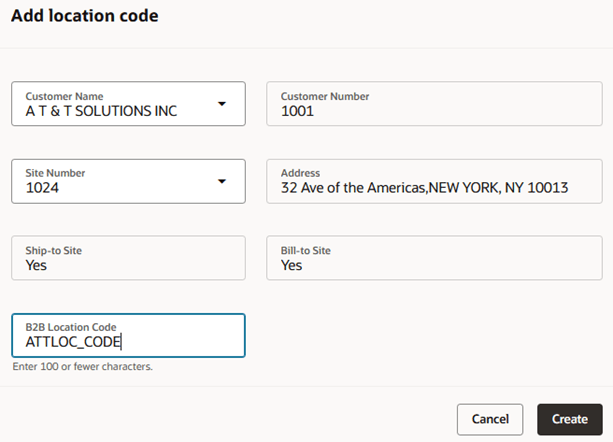
Add a Messaging Location Code
- As an alternative to adding location codes manually, you can import them using a .csv file.
The .csv file must include three columns with the following column headers (in any order):
| Column Header | Description |
|---|---|
| CustomerNumber | Identifies the customer number |
| PartySiteNumber | Identifies the customer site number |
| LocationCode | Identifies the location code |
-
- On the Messaging Location codes page, select Import.
- Drag and drop the .csv file and select Import.
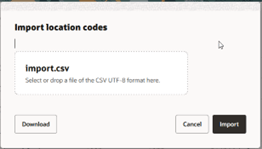
Import Location Codes
A message displays the scheduled process ID, which can be used to monitor the import status on the Scheduled Processes page.
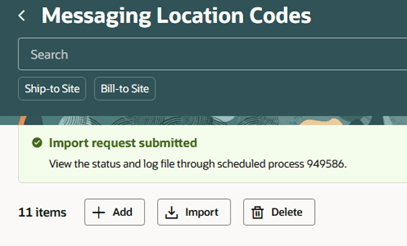
Messaging Location Codes - Import request submitted message
- To process a message like an inbound order, update the payload to include the required location codes at the Xpath locations specified in the table.
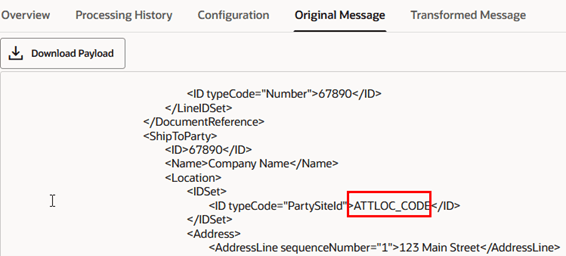
Original Message Payload
- Once the message is processed, the transformed file will contain the expected values at the Xpath locations specified in the table.
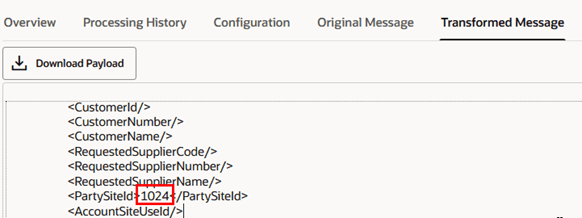
Transformed Message Payload
Xpaths to Include Location Codes in the Payload
These paths correspond to the OAGIS10 Collaboration Messages.
| Document | Header or Line Level on Order | Ship-To or Bill-To Code | XPath of Original Message | XPath of Transformed Message |
|---|---|---|---|---|
| PROCESS_PO_IN | Header level | Bill-to | CollaborationMessage/BusinessObjectDocument/DataArea/PurchaseOrder/PurchaseOrderHeader/BillToParty/Location/IDSet/ID[@typeCode="AccountSiteUseId"] | /Request/InboundCollaborationDocument/DOO_ORDERS/DOO_ORDER/DooOrderHeadersAllInt/DooOrderAddressesInt/AccountSiteUseId |
| PROCESS_PO_IN | Header level | Ship-to | CollaborationMessage/BusinessObjectDocument/DataArea/PurchaseOrder/PurchaseOrderHeader/ShipToParty/Location/IDSet/ID[@typeCode="PartySiteId"] | /Request/InboundCollaborationDocument/DOO_ORDERS/DOO_ORDER/DooOrderHeadersAllInt/DooOrderAddressesInt/PartySiteId |
| PROCESS_PO_IN | Line level | Bill-to | CollaborationMessage/BusinessObjectDocument/DataArea/PurchaseOrder/PurchaseOrderLine/Party[@role='BillTo']/Location/IDSet/ID[@typeCode="AccountSiteUseId"] | /Request/InboundCollaborationDocument/DOO_ORDERS/DOO_ORDER/DooOrderLinesAllInt/DooOrderAddressesInt/AccountSiteUseId |
| PROCESS_PO_IN | Line level | Ship-to | CollaborationMessage/BusinessObjectDocument/DataArea/PurchaseOrder/PurchaseOrderLine/ShipToParty/Location/IDSet/ID[@typeCode="PartySiteId"] | /Request/InboundCollaborationDocument/DOO_ORDERS/DOO_ORDER/DooOrderLinesAllInt/DooOrderAddressesInt/PartySiteId |
| CHANGE_PO_IN | Header level | Bill-to | CollaborationMessage/BusinessObjectDocument/DataArea/PurchaseOrder/PurchaseOrderHeader/BillToParty/Location/IDSet/ID[@typeCode="AccountSiteUseId"] | /Request/InboundCollaborationDocument/DOO_ORDERS/DOO_ORDER/DooOrderHeadersAllInt/DooOrderAddressesInt/AccountSiteUseId |
| CHANGE_PO_IN | Header level | Ship-to | CollaborationMessage/BusinessObjectDocument/DataArea/PurchaseOrder/PurchaseOrderHeader/ShipToParty/Location/IDSet/ID[@typeCode="PartySiteId"] | /Request/InboundCollaborationDocument/DOO_ORDERS/DOO_ORDER/DooOrderHeadersAllInt/DooOrderAddressesInt/PartySiteId |
| CHANGE_PO_IN | Line level | Bill-to | CollaborationMessage/BusinessObjectDocument/DataArea/PurchaseOrder/PurchaseOrderLine/Party[@role='BillTo']/Location/IDSet/ID[@typeCode="AccountSiteUseId"] | /Request/InboundCollaborationDocument/DOO_ORDERS/DOO_ORDER/DooOrderLinesAllInt/DooOrderAddressesInt/AccountSiteUseId |
| CHANGE_PO_IN | Line level | Ship-to | CollaborationMessage/BusinessObjectDocument/DataArea/PurchaseOrder/PurchaseOrderLine/ShipToParty/Location/IDSet/ID[@typeCode="PartySiteId"] | /Request/InboundCollaborationDocument/DOO_ORDERS/DOO_ORDER/DooOrderLinesAllInt/DooOrderAddressesInt/PartySiteId |
| CANCEL_PO_IN | Header level | Bill-to | CollaborationMessage/BusinessObjectDocument/DataArea/PurchaseOrder/PurchaseOrderHeader/BillToParty/Location/IDSet/ID[@typeCode="AccountSiteUseId"] | /Request/InboundCollaborationDocument/DOO_ORDERS/DOO_ORDER/DooOrderHeadersAllInt/DooOrderAddressesInt/AccountSiteUseId |
| CANCEL_PO_IN | Header level | Ship-to | CollaborationMessage/BusinessObjectDocument/DataArea/PurchaseOrder/PurchaseOrderHeader/ShipToParty/Location/IDSet/ID[@typeCode="PartySiteId"] | /Request/InboundCollaborationDocument/DOO_ORDERS/DOO_ORDER/DooOrderHeadersAllInt/DooOrderAddressesInt/PartySiteId |
| CANCEL_PO_IN | Line level | Bill-to | CollaborationMessage/BusinessObjectDocument/DataArea/PurchaseOrder/PurchaseOrderLine/Party[@role='BillTo']/Location/IDSet/ID[@typeCode="AccountSiteUseId"] | /Request/InboundCollaborationDocument/DOO_ORDERS/DOO_ORDER/DooOrderLinesAllInt/DooOrderAddressesInt/AccountSiteUseId |
| CANCEL_PO_IN | Line level | Ship-to | CollaborationMessage/BusinessObjectDocument/DataArea/PurchaseOrder/PurchaseOrderLine/ShipToParty/Location/IDSet/ID[@typeCode="PartySiteId"] | /Request/InboundCollaborationDocument/DOO_ORDERS/DOO_ORDER/DooOrderLinesAllInt/DooOrderAddressesInt/PartySiteId |
| ACKNOWLEDGE_PO_OUT | Line level | Ship-to | /processOutboundCollaboration/OutboundCollaboration/GetOrderDetailsResponse/Order/OrderLine/ShipToPartySiteIdentifier | CollaborationMessage/BusinessObjectDocument/DataArea/PurchaseOrder/PurchaseOrderLine/ShipToParty/Location/IDSet/ID[@typeCode="PartySiteId"] |
| ACKNOWLEDGE_CHANGE_PO_OUT | Line level | Ship-to | /processOutboundCollaboration/OutboundCollaboration/GetOrderDetailsResponse/Order/OrderLine/ShipToPartySiteIdentifier | CollaborationMessage/BusinessObjectDocument/DataArea/PurchaseOrder/PurchaseOrderLine/ShipToParty/Location/IDSet/ID[@typeCode="PartySiteId"] |
Tips and considerations
- You can only import location codes by submitting the Import B2B Location Codes process from Messaging Location Codes.
- The system relies on specific XPath expressions to extract location codes. Ensure that incoming XML strictly follows expected structure.
- Ensure the correct typeCode is used. Any deviation will prevent code extraction. Here are the typeCodes:
- PartySiteId (Ship-to)
- AccountSiteUseId (Bill-to)
Key resources
Refer to the Configuring and Managing B2B Messaging for Oracle Fusion Cloud SCM guide on the Oracle Help Center.
Access requirements
Users who are assigned a configured job role that contains this privilege can access this feature: Manage B2B Trading Partners (CMK_B2B_TRADING_PARTNERS_PRIV).
This privilege was available prior to this update.