Budget Adjustment Assistant
The Budget Adjustment Assistant helps budget office users create budget entries using natural language for control budgets sourced from Enterprise Performance Management (EPM). The assistant helps resolve any creation issues before the budget transaction is submitted. Users can also review approved budget entries and check budgetary control balances.
Use the Budget Adjustment Agent to:
- Add/Reduce budget to a budget account, period, control budget.
- Transfer budget amounts between accounts and periods
- Review Budgetary Balances
- Review Budget Entries
Users can enter ‘help’ and the assistant will show examples of what it can do.
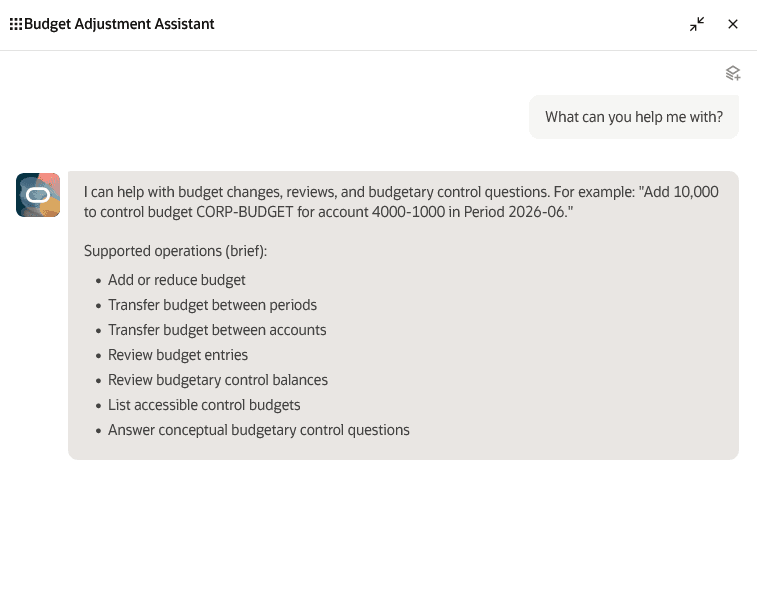
Budget Adjustment Assistant Help Response
The Budget Adjustment Assistant helps budget office users work more efficiently by creating budget entries for control budgets sourced from Enterprise Performance Management (EPM) using natural language. It guides users through budget adjustments, helps identify and resolve creation issues before submission, and provides quick access to approved budget entries and budgetary control balances.
Key business benefits include:
- Improves productivity by allowing users to create budget adjustments through simple natural language prompts instead of navigating multiple pages or forms.
- Reduces errors before submission by helping resolve budget entry creation issues before the transaction is submitted.
- Supports faster issue resolution by helping users identify problems during entry creation and take corrective action earlier.
Steps to enable and configure
The Budget Adjustment Assistant role is needed to use the assistant within the AI Agent Studio. Refer to the Access Requirements section for details.
Tips and considerations
- The control budget must have source budget type EPM Financials module.
- Existing control budget security is enforced: users must either have created the control budget, be the named budget manager, or have been assigned data access to specific control budget.
- When you see “Sorry, the assistant is unavailable right now. If the issue persists, contact your help desk,” it may indicate an incomplete setup. Verify that all access requirements have been met.
Key resources
Budget Entry in Using Financials for the Public Sector guide.
Access requirements
Use one of the following two options to grant users access to the Budget Adjustment Assistant.
A) Users without Budget Manager role or custom role derived from Budget Manager role
To enable users without the seeded Budget Manager role or a custom role derived from the Budget Manager role to use the Budget Adjustment Assistant
Create and assign a custom job role with the following configurations.
- Role Category: Financials Job Roles
- Enable Permission Groups
Function Security Policies > Privileges are required for the agent to create budget transactions and view budgetary control validation results.
- Import Budget Amounts (XCC_IMPORT_BUDGET_AMOUNTS_PRIV)
- Review Budget Impact (XCC_REVIEW_BUDGET_IMPACT_PRIV)
Data Security Policies are required for the agent to be able to access existing pages.
- Policy Name: Control Budget Access for Review Budgetary Control Balances and Review Budget Entries
- Data Resource: Control Budget
- Data Set: Select by Instance Set
- Condition Name: Access the control budget for table XCC_CONTROL_BUDGETS - for the Control Budgets that the current user has created
- Actions
- Review Budgetary Control Balances
- Review Control Budget
- Enter Budgetary Control Budget Entry
- Read
Role Hierarchy > Roles and Permission Groups grants access to the Budget Adjustment Assistant
- ORA_XCC_BUDGET_ENTRY_CREATION_ASSISTANT_DUTY
Role Hierarchy >Roles and Privileges grants access to Review Budget Entry and Review Budgetary Control Balances via deeplinks if the user doesn't already have access add this role.
- Budgetary Control Self Service Reporting (ORA_XCC_SELF_SERVICE_REPORTING_DUTY_OBI)
B) Users with Budget Manager role or custom role derived from Budget Manager role
To enable users with the seeded Budget Manager role or a custom role derived from the Budget Manager role to use the Budget Adjustment Assistant
Create and assign a custom job role with the following configurations.
- Role Category: Financials Job Roles
- Enable Permission Groups
Create Data Security Policies are required for the agent to be able to access existing pages.
- Policy Name: Control Budget Access for Review Budgetary Control Balances and Review Budget Entries
- Data Resource: Control Budget
- Data Set: Select by Instance Set
- Condition Name: Access the control budget for table XCC_CONTROL_BUDGETS - for the Control Budgets that the current user has created
- Actions
- Review Budgetary Control Balances
- Review Control Budget
- Enter Budgetary Control Budget Entry
- Read
Role Hierarchy > Roles and Permission Groups grants access to the Budget Adjustment Assistant
- ORA_XCC_BUDGET_ENTRY_CREATION_ASSISTANT_DUTY