Payments Agent for Payment Options, Offers, and Execution
The Payments Agent continues to enhance conversational, insight-driven experiences across Payment Options, Supplier Offers, and Payment Execution. In this release, a new page for Payments Agent provides a centralized workspace where users can access key insights, interact through the Ask Oracle bar, and manage payment processing activities from a single location. The Payment Options assistant now leverages historical supplier spending analysis to identify suppliers that are strong candidates for financial programs such as dynamic discounting. By enabling business users to target the most relevant suppliers, this feature helps accelerate adoption of early payment offers and improve working capital outcomes. Enhancements to the Payment Execution experience introduce a more agent-driven approach to the payment lifecycle. Users are presented with contextual insights and recommended next steps, enabling more informed decision-making and more efficient management of payment activities.
An overview page provides a unified, insight-driven workspace where payment specialists can review key alerts, ask payment-related questions, and navigate into the relevant assistant, all from a single entry point. Payment Execution capabilities are expanded to support conversational inquiry across payment process requests, payment files, acknowledgments, validation exceptions, settlement, and reconciliation, with contextual next-step recommendations surfaced at each stage. Payment Options now incorporates historical supplier spend analysis, enabling targeted identification of dynamic discounting candidates based on spend patterns, payment behavior, and program eligibility.
Across all three assistants, enhanced insights deliver proactive, condition-based alerts—including recurring settlement failures, unreconciled payments, and supplier profile gaps, helping users address issues earlier and reduce exception review effort.
Following are the details of the key enhancements included in this release.
Payments Agent Overview
- Provides a centralized entry point for payment specialists to review payment-related insights, choose the relevant assistant context, and ask payment-related questions in Ask Oracle.
- Unifies Payment Execution, Payment Options, and Supplier Offers in a single experience, letting users begin with an insight or natural-language question and move into the appropriate assistant flow.
- Provides predefined prompt suggestions and context-aware prompt selection across Payment Execution, Payment Options, and Supplier Offers, helping users ask about payments, payment files, payment process requests, supplier spend, supplier offers, and insight conditions.
- Helps users move from issue awareness to review and follow-up without manually switching across multiple payment pages, reports, and transaction views.
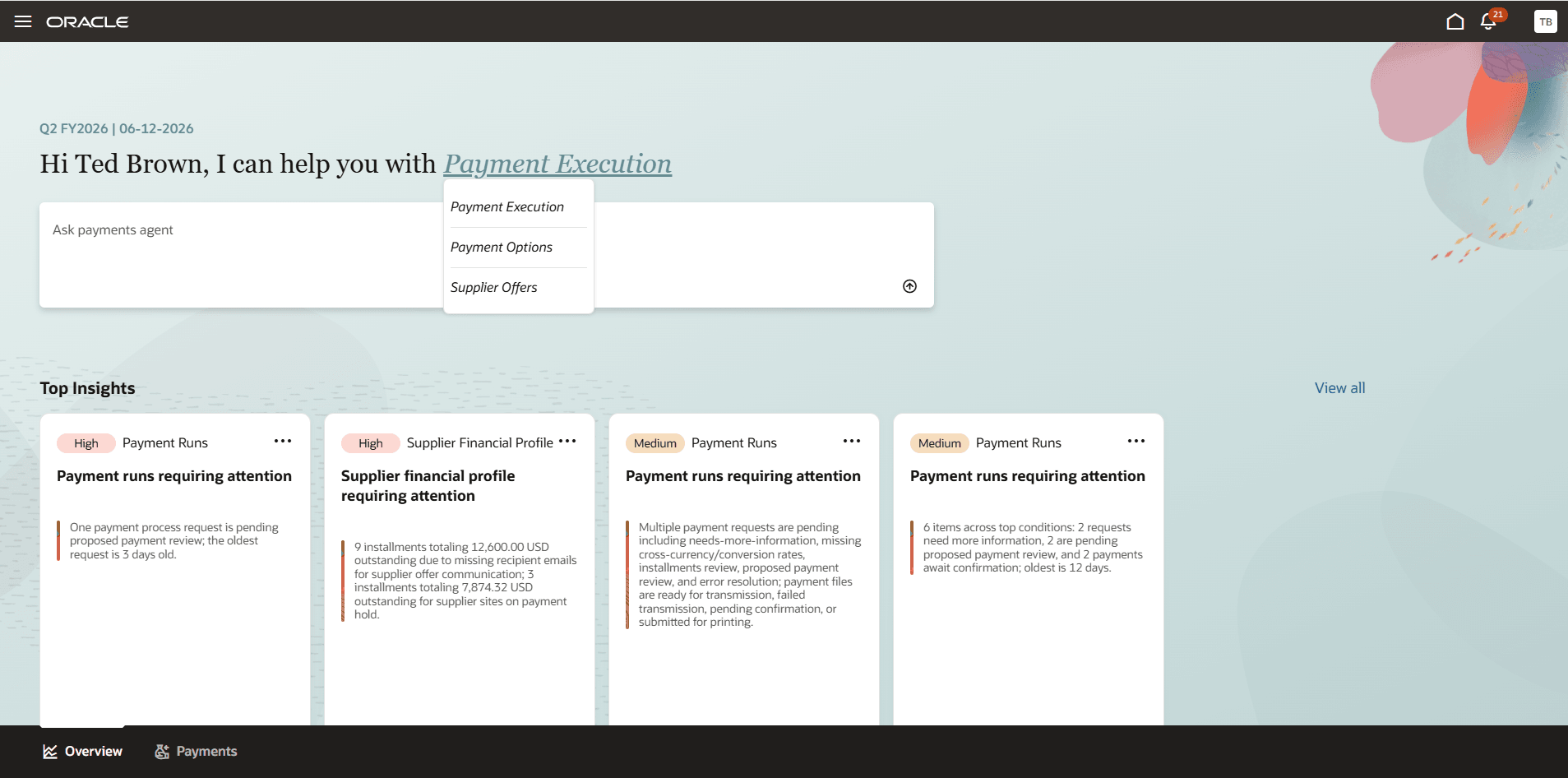
New Payments Agent experience with Insights
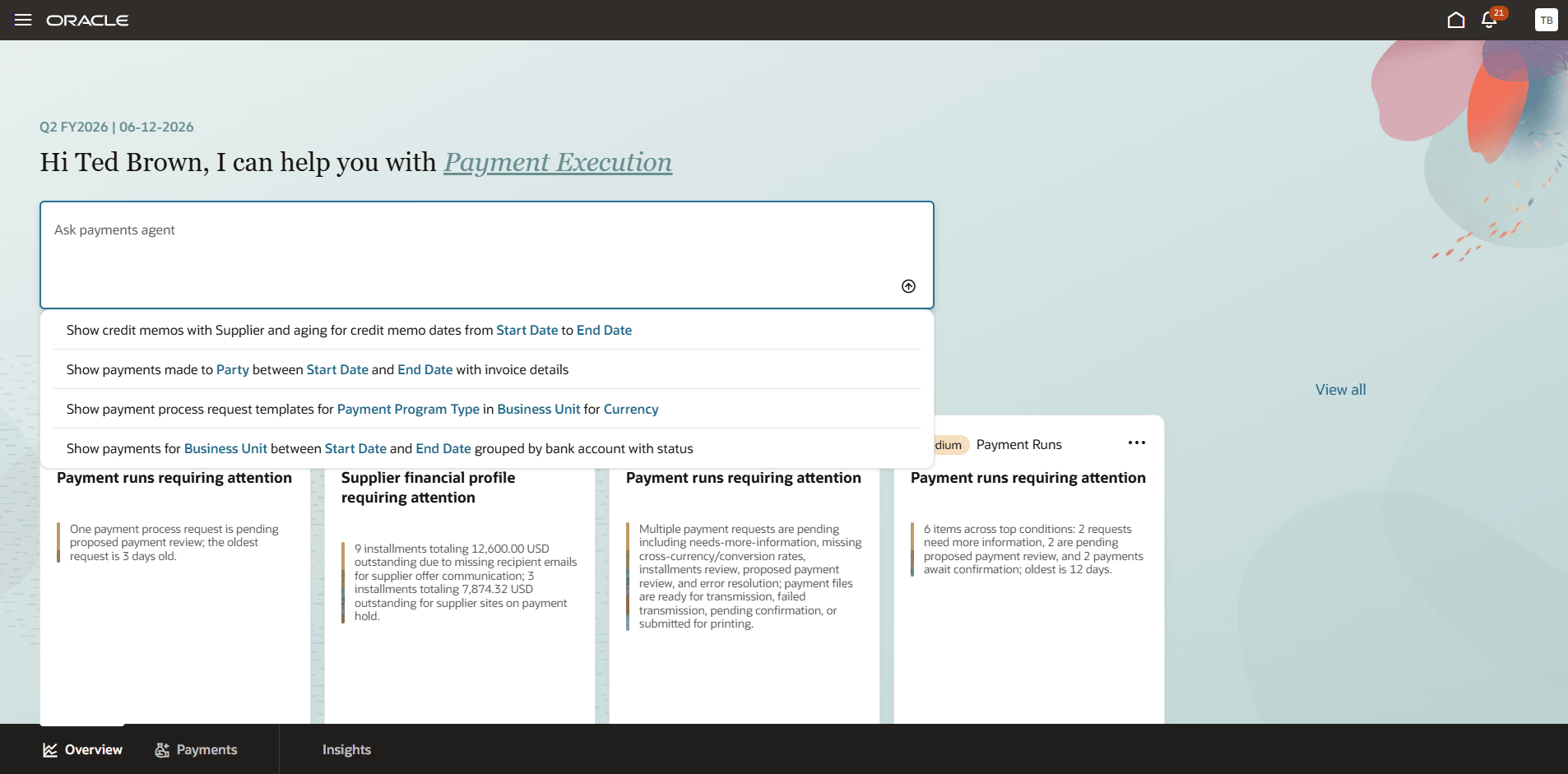
Users can choose from many predefined prompts for frequent quick queries
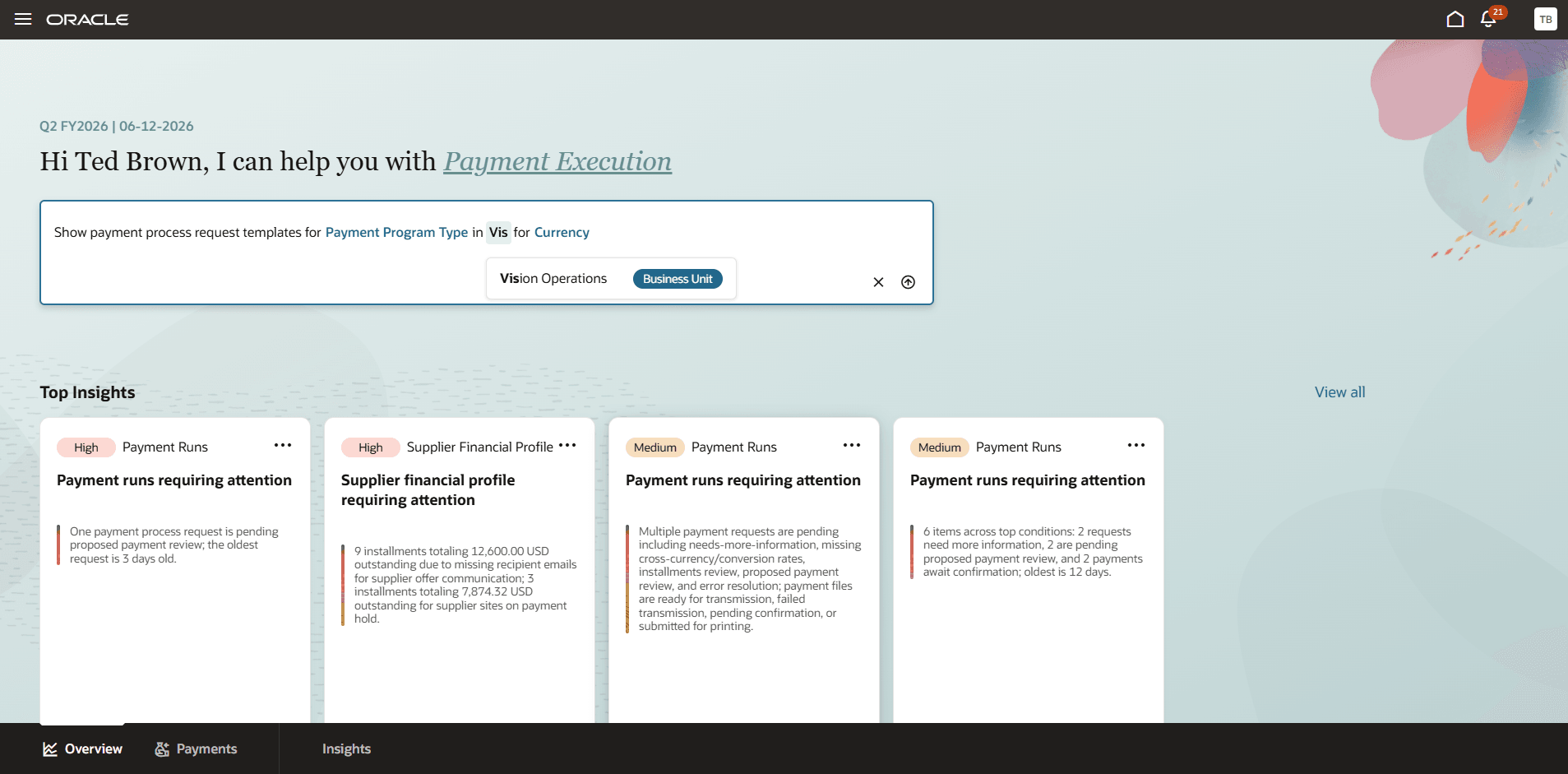
Users can enter values in the predefined prompts for easier and faster query experience
Payment Execution Assistant
- Quickly find and explore details about payment process requests, payment files, individual payments, installments, acknowledgment status, validation issues, and reconciliation all from a single chat interface.
- Ask questions in natural language to instantly pull up payments or payment files flagged with errors, rejections, unresolved issues, or pending settlement and reconciliation.
- Get a clear, at-a-glance summary of payment issues that need your attention, such as stuck payments, unresolved errors, unsettled transactions, or repeated card settlement failures, so you always know where things stand.
- Receive smart, context-aware suggestions on what to do next based on the current state of your payment process requests, whether it's following up on a rejected file, resolving a validation error, or checking on a pending settlement.
- Enhance payment process request template discovery over criteria such as legal entities, business unit, currency, payment method, payment programs and others with natural language queries.
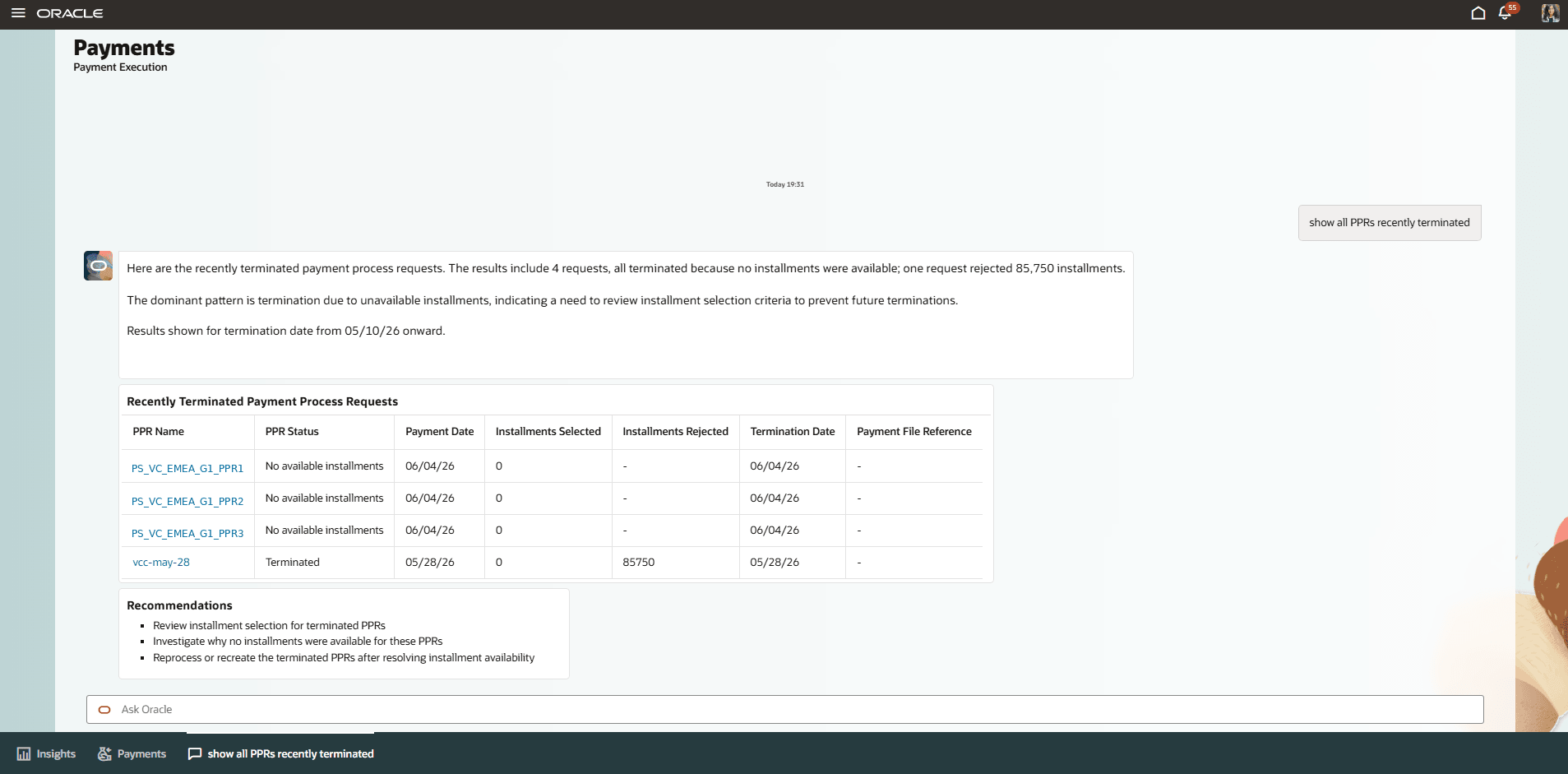
Users can query about the payment process requests
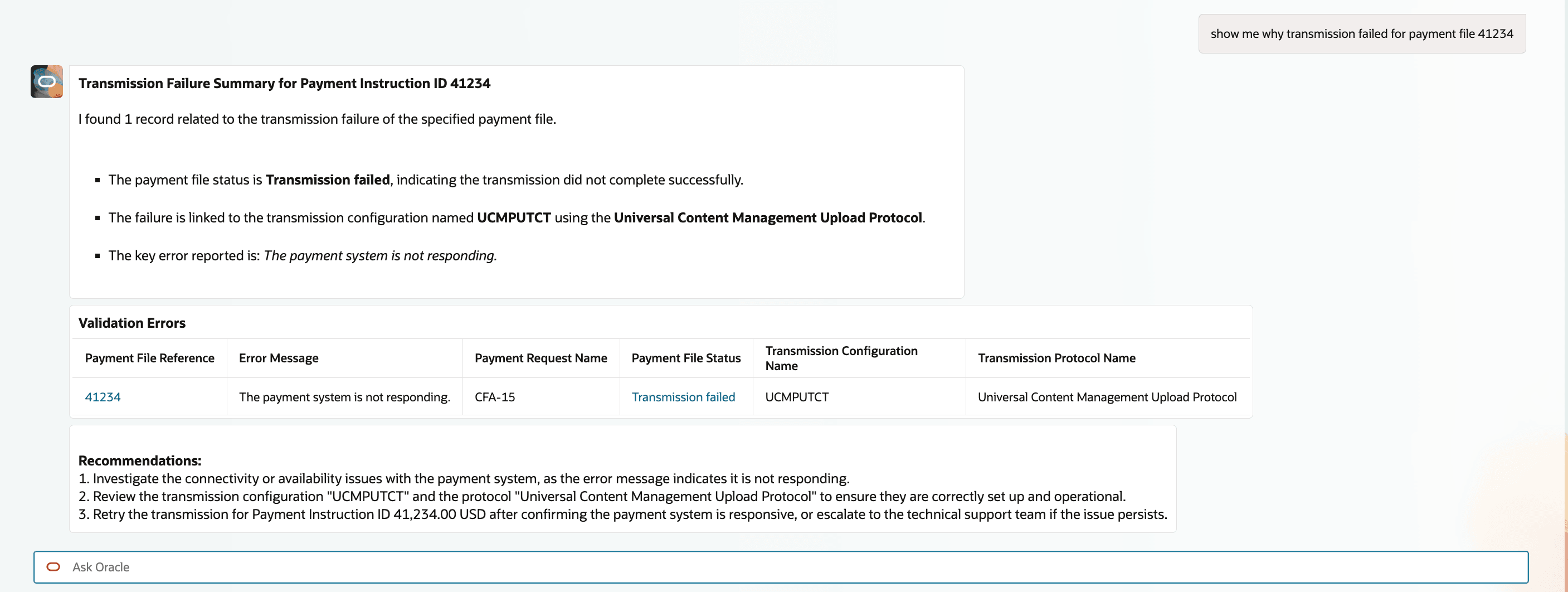
Users can view why the transmission failed for a payment file in the chat itself
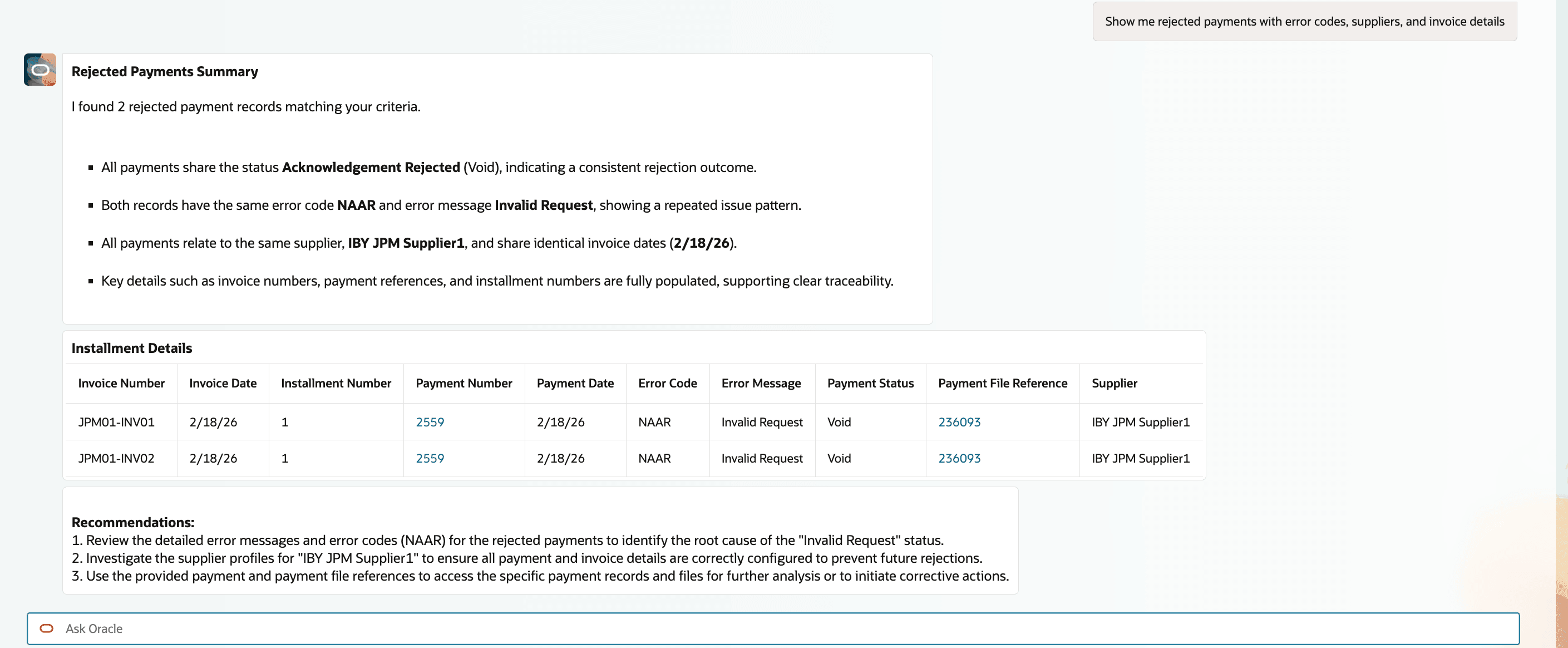
Users can view bank rejected payments with summary, reasons for failure and suggestions for next actions
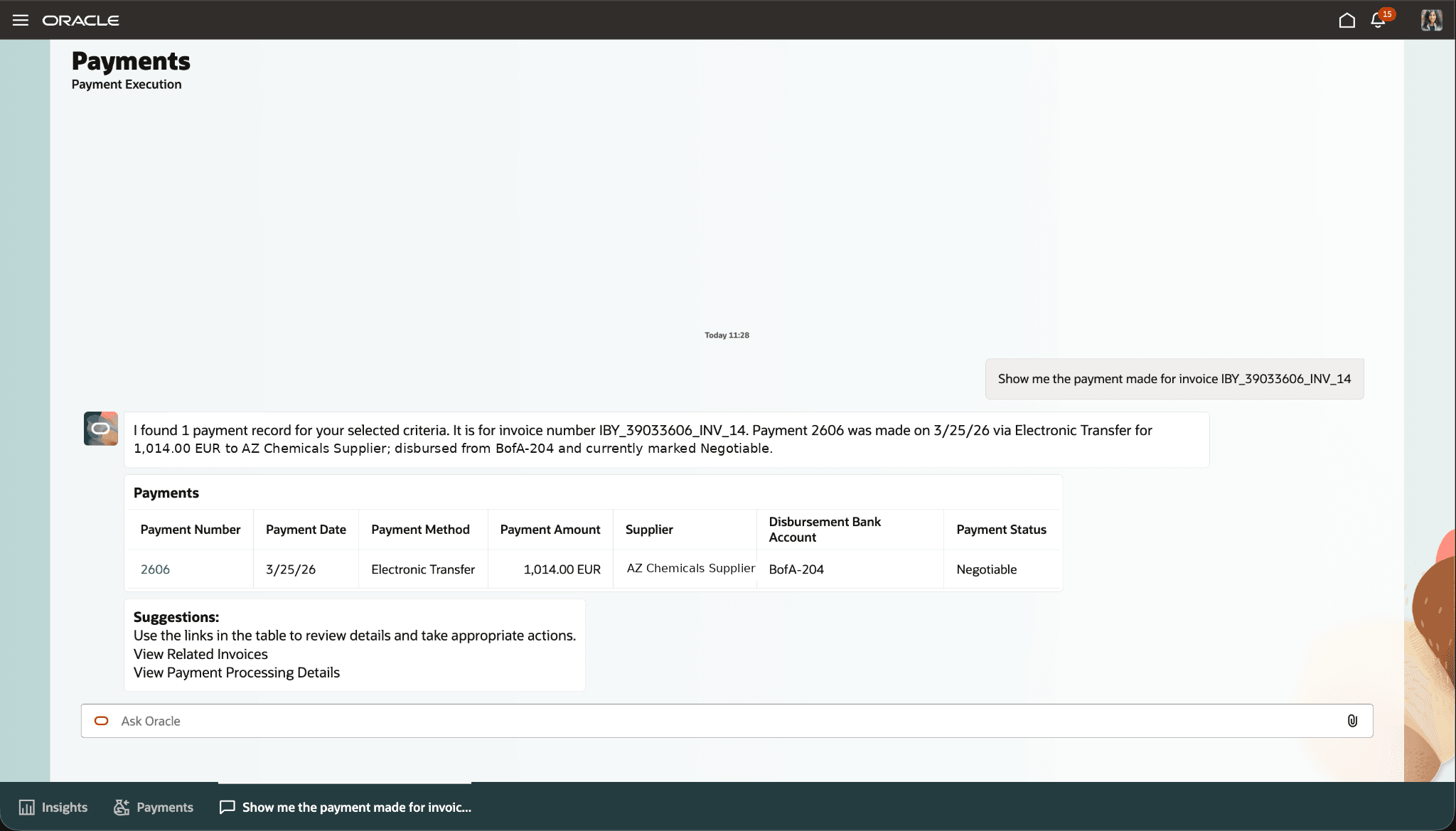
Users can view the payments made for an invoice
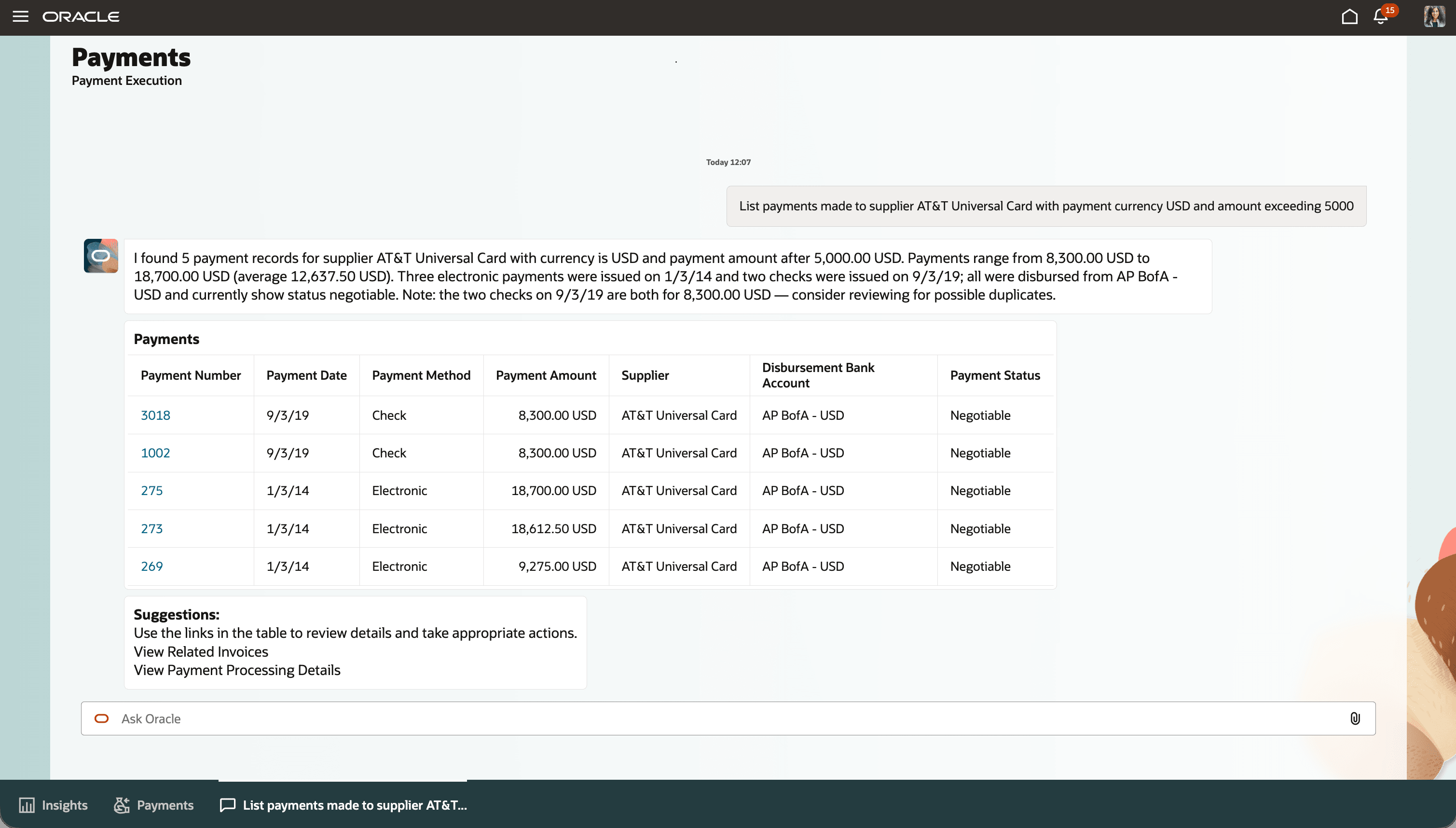
Users wants to see the payments made to a supplier using desired criteria
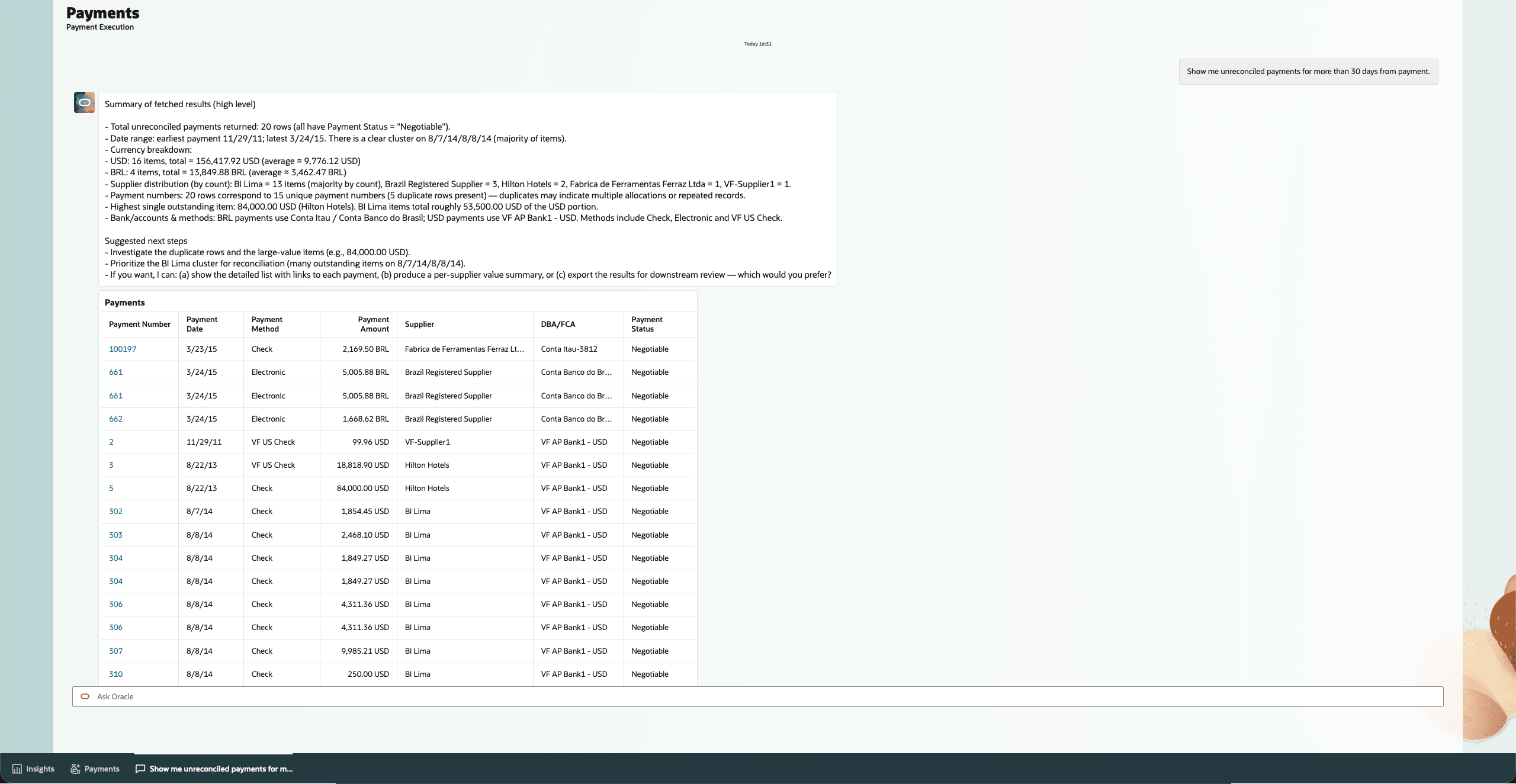
Users can view improved response for unreconciled payments
Payment Options Assistant
- Adds historical supplier spend analysis to help identify suppliers that may be strong candidates for dynamic discounting.
- Allows users to review supplier spend over a selected period and refine the analysis using information such as business unit, currency, payment method, payment terms, invoice count, payment count, discounts taken, discounts lost, and prior early payment participation.
- Ranks suppliers by spend when no ranking criterion is specified.
- Expands financing program discovery by including internal and external financing programs, with clearer tabular views and support for inquiries about specific programs.
- Enhances benefit and cash outflow analysis by supporting specific program, category, type, and supplier-level evaluation, including updated handling for external programs.
- Helps users focus offer activity on suppliers with stronger potential business value.
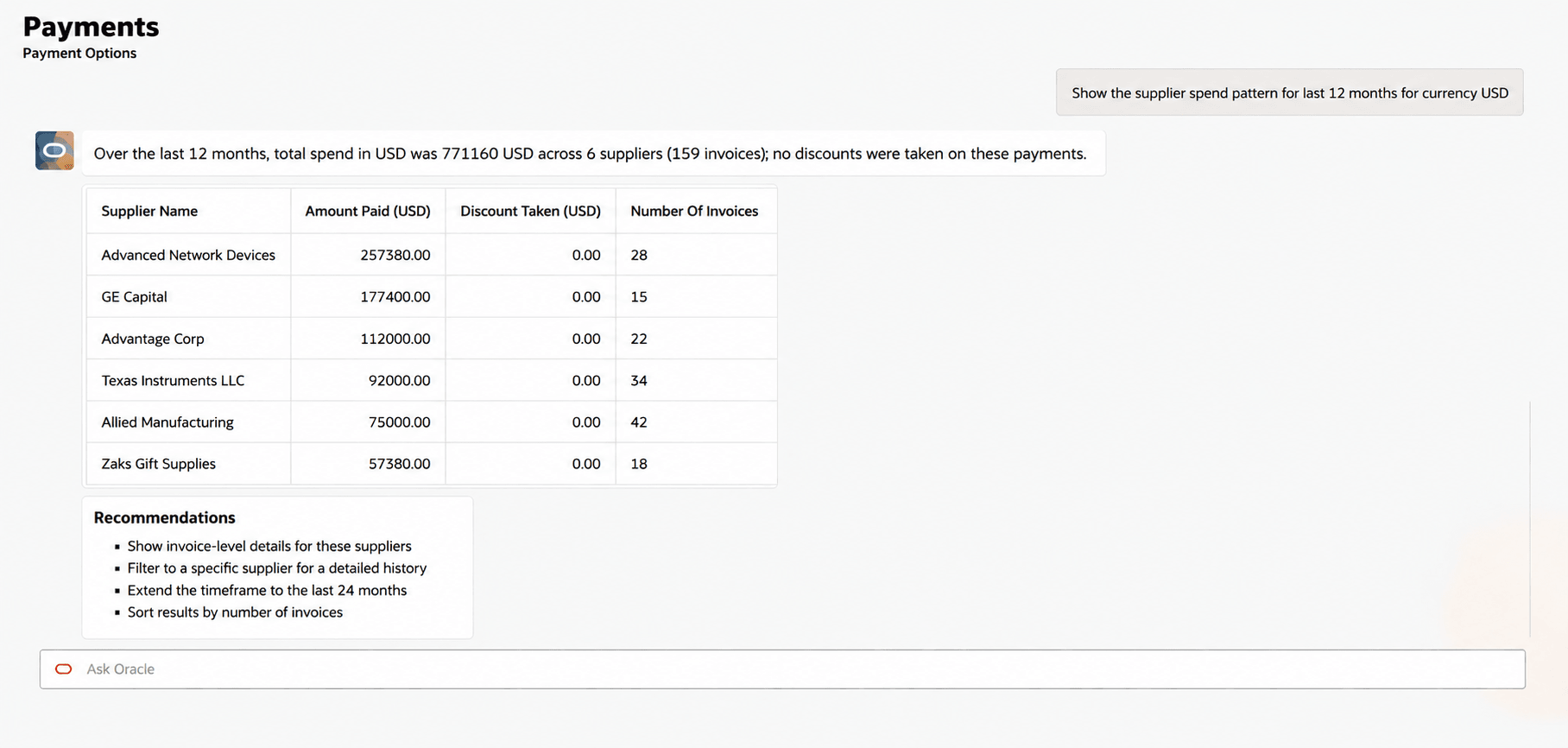
Users can view the suppliers spend pattern to choose best match for financing program offers
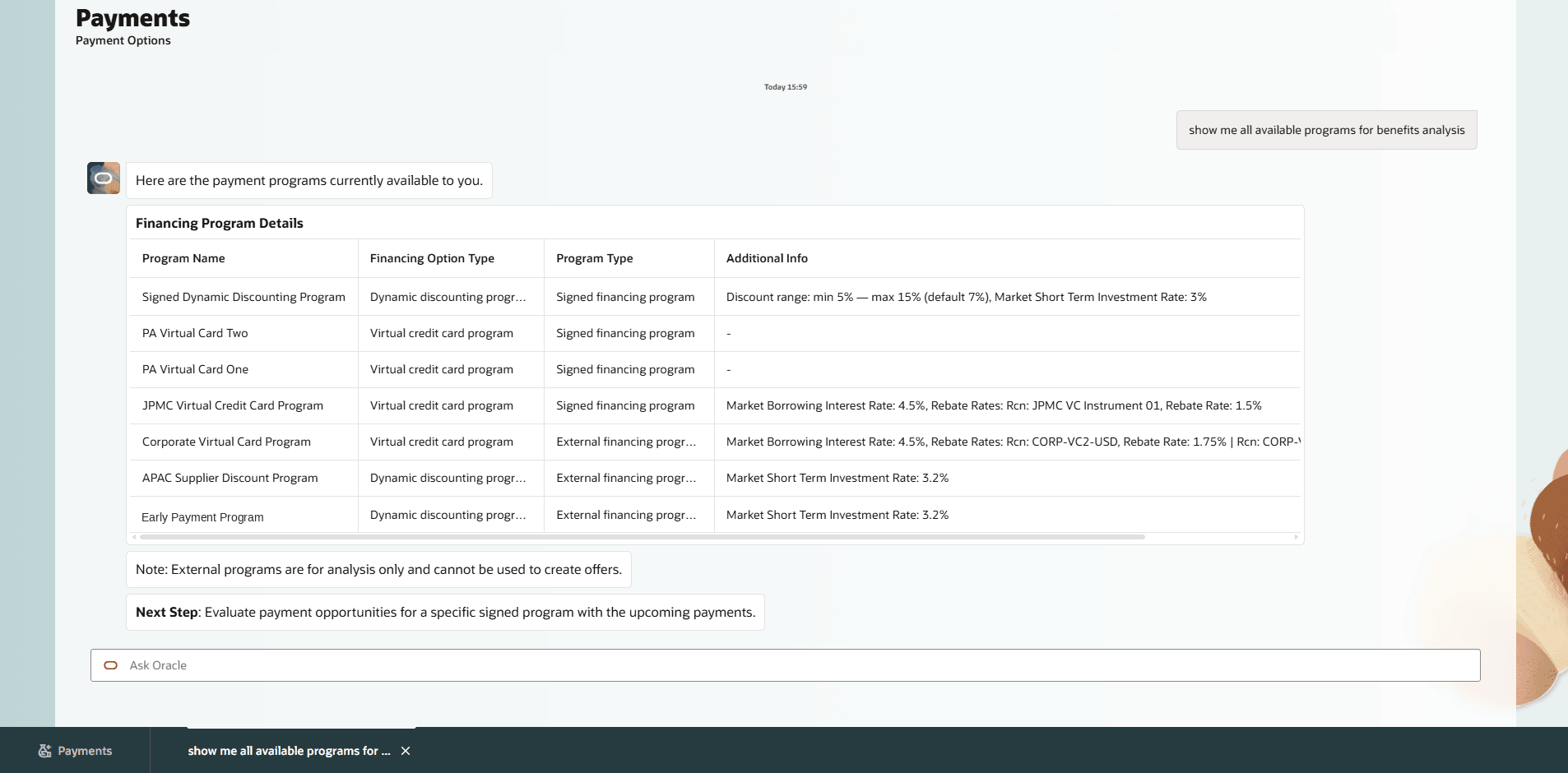
Users can ask to view information about both internal and external financing programs
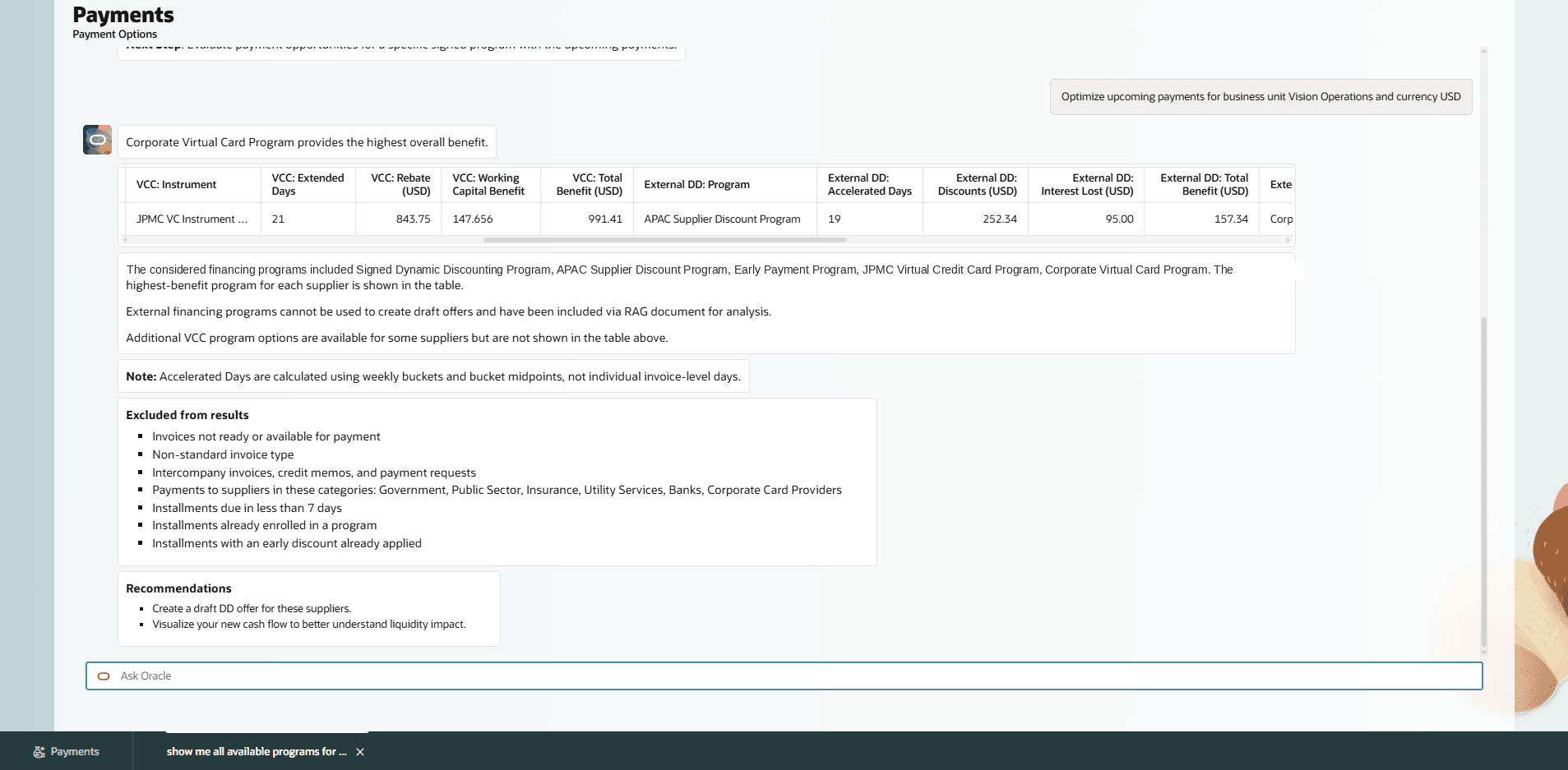
Users can now review the benefit analysis for external payment programs
Note: External financing programs cannot be used to create draft offers and have been included via financing program RAG document for analysis only.
Insights
- Users can review all Payment Execution, Payment Options, and Supplier Offer insights in one place on the Overview page, making it easier to prioritize actions.
- Users receive timely alerts across more conditions, to help address issues before they escalate. These include: prolonged payments pending approval; unsettled or unreconciled payments; recurring card settlement errors; supplier offers pending communication or nearing expiry; and supplier profile gaps, such as missing offer email address or supplier sites on payment hold.
- Users can open any insight directly from the Overview page and continue their investigation in the relevant assistant, with summarized context, structured details, and next steps already loaded, enabling deeper analysis through natural conversation without leaving the workflow.
- Users are alerted to repeated settlement or rejection patterns as they emerge over time, eliminating the need to manually review individual exceptions and enabling faster course correction.
- Users see combined insights for related scenarios, such as payment and payment file acknowledgment outcomes or supplier offers and their related invoices, reducing multiple alerts and making it easier to act from one place.
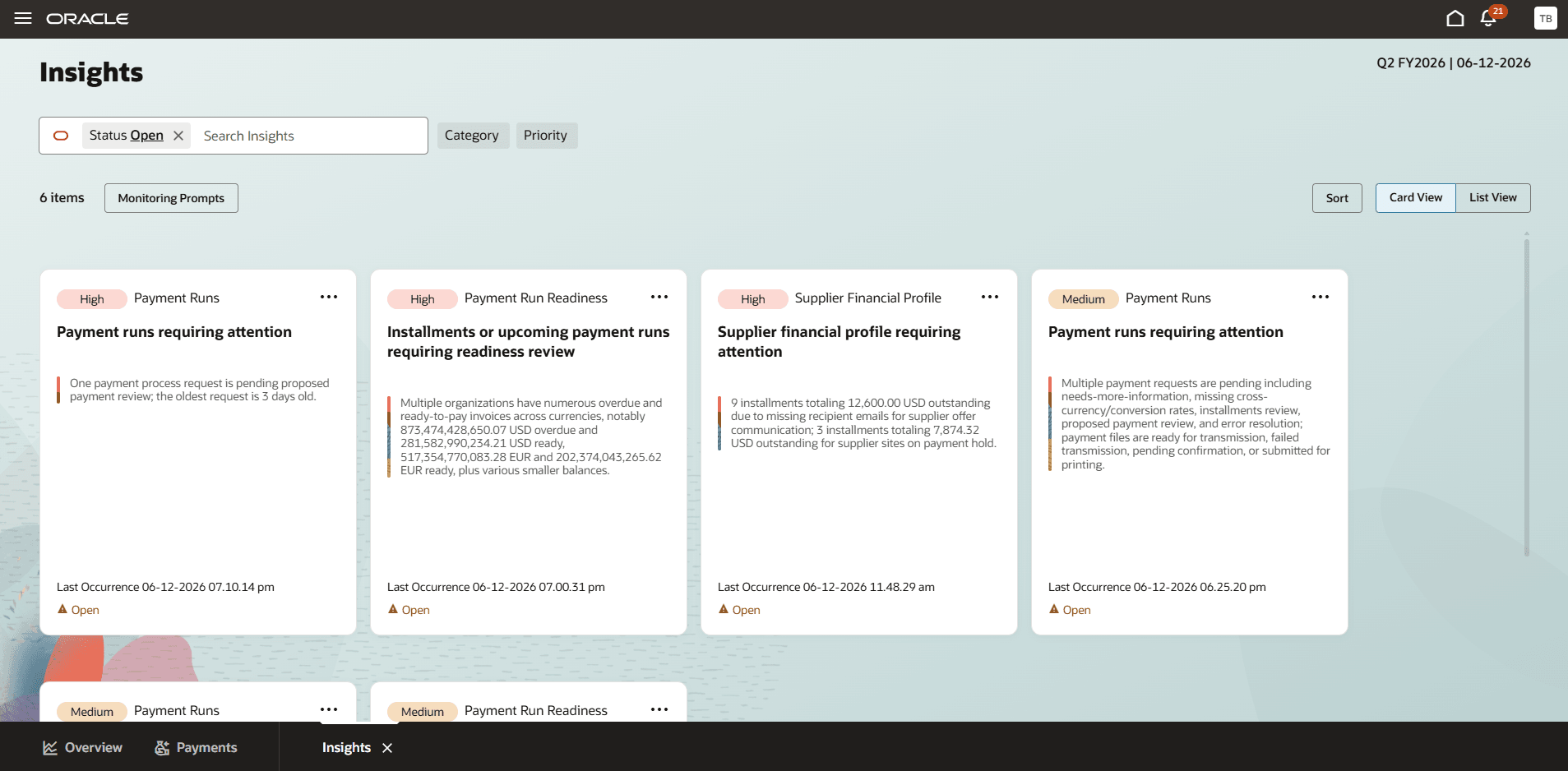
Users can review all Insights including the latest ones in one place
Business benefits include:
- Payments Agent for Payment Options, Supplier Offers, and Payment Execution improves payment operations by helping users review payment activity, analyze supplier spend, and follow up on payment and supplier-offer issues from a centralized, insight-driven experience.
- Enables faster identification of payment execution exceptions, reduces manual navigation, and helps users focus review on unresolved acknowledgments, rejections, validation errors, unsettled payments, and recurring settlement issues.
- Helps prioritize supplier offers that require action.
- Historical supplier spend analysis identifies suppliers with stronger dynamic discounting potential, enabling more targeted supplier outreach and improved cash optimization opportunities.
- Together, these capabilities help Payment Specialists reduce exception review effort, improve operational efficiency, and make more informed payment and supplier-offer decisions.
Steps to enable and configure
No additional setup is required for these enhancements if Payments Agent is already enabled.
- The Payments Agent can now be accessed through the new ERP Agents root menu, making it easier to discover and launch agent-driven experiences.
- Starting with update 26C, the Overview and Payments pages are displayed by default, replacing the Insights and Payments pages that were the defaults in update 26B.
Please refer to the Payments Agent for Payment Options, Offers, and Execution What's New for 26B to view the Steps to Enable.
Tips and considerations
Payments Agent Overview Page
- Use the Payments Agent Overview page to start from insights, choose the relevant assistant context, or ask payment-related questions in Ask Oracle.
- Existing classic ADF payment pages remain available for detailed transaction processing, setup, and review when users need capabilities outside the Payments Agent experience.
Payment Execution Inquiry
- Use Payment Execution inquiry to review payment files, payments, installments, acknowledgments, validation exceptions, settlement status, and reconciliation-related payment status.
- The assistant helps users interpret payment execution status, exceptions, and follow-up actions. Standard payment controls continue to govern validation, approval, bank transmission, acknowledgment processing, reconciliation, and accounting.
- Payment scheduling continues to use existing payment process request templates and requires user confirmation before submission.
Historical Supplier Spend Analysis
- Historical supplier spend analysis uses the period specified by the user. If no period is specified, the assistant uses a default historical period for spend analysis.
- Suppliers spend results are ranked by spend amount by default.
- Users can refine the analysis by supplier, business unit, currency, payment method, payment terms, spend threshold, invoice count, payment count, discounts taken, discounts lost, and prior early payment participation.
Dynamic Discounting Opportunity Analysis
- Configure the applicable dynamic discounting programs and supplier offer setup before users evaluate suppliers for dynamic discounting or create dynamic discounting offers.
- Maintain the applicable payment program reference information used for payment option benefit analysis.
- Dynamic discounting opportunity analysis depends on available supplier spend history, eligible invoices, or installments, configured program terms, supplier offer setup, and the assumptions used for the analysis.
- Review suppliers with multiple sites, currencies, payment methods, or payment terms before using spend analysis results for dynamic discounting offer decisions.
- Review the analysis before sending or acting on supplier offers.
Insights
- Insights reflect the latest information available when the insight is generated.
- Rerun the inquiry after payment processing, acknowledgment, approval, supplier response, settlement, reconciliation, or setup changes.
- Use recurring exception insights to identify root-cause patterns, such as repeated rejection or card settlement issues.
Security and Access
- Confirm that users have access to the applicable business units, suppliers, payment process requests, payment files, payments, installments, financing programs, supplier offers, and insights they need to review.
- Users only see data and actions available through their existing security and data access.
- Suppliers spend analysis, payment execution inquiry, supplier offer review, and insights respect the user’s access to applicable business units, suppliers, payments, payment files, installments, financing programs, and supplier offers.
- The assistant may return a narrower result if the user doesn’t have access to specific business units, suppliers, payments, payment files, supplier offers, or financing programs.
Key resources
- Watch Payment Agent Security Setup Demo
- Watch Manage Data Access for Users - Bulk Upload using FBDi Spreadsheet Demo
- Watch Dynamic Discounting Security Setup Demo
- Oracle Help Center: Refer to the Using Payables guide for payment processing and Dynamic Discounting.
- Virtual Credit Card program overview: Set up virtual cards for supplier payments and Virtual Card Questions and Answers
- Implementing Financials Guide: Payables and Payments setup and program configurations.
- REST API Documentation: Payables and Payments services.
- Security Reference for Financials: Payments and payables duties and privileges.
Access requirements
No new access requirements.
Security and Access
- When creating a custom job role, select Enable Permission Groups on the first page of role creation to make permission-group configuration available.
- If the Enable Permission Groups button or the Permission Groups option isn’t available, set the Enable Security Console External Application Integration profile option (ORA_ASE_SAS_INTEGRATION_ENABLED) to Yes at the site level.
- To grant access to a specific agent only, create a custom job role with permission groups enabled. In the Role Hierarchy section, add the corresponding duty roles on both the Roles and Privileges and Roles and Permission Groups tabs. Include only the duties required for the intended agent capabilities.
| Agent | Roles and Privileges | Roles and Permission Groups |
|---|---|---|
| Payment Execution Assistant | Payment Execution Management (ORA_AP_PAYMENT_EXECUTION_MANAGEMENT_DUTY) | Payment Execution Management (ORA_DR_AP_PAYMENT_EXECUTION_MANAGEMENT_DUTY) |
| Supplier Offers Assistant | Supplier Offers Management (ORA_AP_SUPPLIER_OFFERS_MANAGEMENT_DUTY) | Supplier Offers Management (ORA_DR_AP_SUPPLIER_OFFERS_MANAGEMENT_DUTY) |
| Payment Options Assistant | Payment Options Management (ORA_AP_PAYMENT_OPTIONS_MANAGEMENT_DUTY) | Payment Options Management (ORA_DR_AP_PAYMENT_OPTIONS_MANAGEMENT_DUTY) |
- To add user data access in bulk:
- Download and install the desktop integration utility from Navigator > Tools > Download Desktop Integration Installer and enable macros in Microsoft Excel.
- From the Manage Data Access for Users task in the Setup and Maintenance work area, query and download the current data-access assignments.
- Add or update the required user data-access assignments in the downloaded spreadsheet and then upload the revised data to the application.