Cash Processing Agent for Receipt Processing and Cash Application
The Cash Processing Agent improves cash processing exception handling and increases cash application matching accuracy. It combines AI-assisted cash processing automation with guided insights to help users identify and resolve exceptions more efficiently.
In an earlier release, Document IO, Oracle's GenAI-powered document ingestion capability, introduced automated ingestion of bank files and remittance advices from customer emails, extracting enriched data to create receipts and match them to invoices.
In this release, the Cash Processing Agent builds on those capabilities by surfacing receipt creation and cash application exceptions in a unified conversational experience. Users can focus on the exceptions that matter most, use natural language inquiries to explore supporting details, and take guided actions with user confirmation actions to resolve issues more quickly.
The following sections describe how the agent delivers these business outcomes.
Cash Processing Agent Overview
- The Overview page provides a centralized starting point to review and take action on Receipts and Cash Application open issues using insights and natural language questions and prompts. Users can switch between the Receipts and Cash Application contexts:
- The Receipts context covers receipt exploration and receipt creation exceptions for Bank Statement and Lockbox. It also supports resolving remittance advice data after ingestion.
- The Cash Application context covers unidentified and unapplied receipt investigation, open invoices, open promise-to-pay commitments, remittance information review, and the user-confirmed Apply Receipt flow.
- Enables users to interact through Ask Oracle by selecting context-aware, predefined prompt suggestions with adjustable values or by entering natural language questions.
- Provides navigation links from receipt creation exceptions to source-specific correction paths.
- Helps users move from issue awareness to review and follow-up without manually switching between multiple payment pages and transaction views.
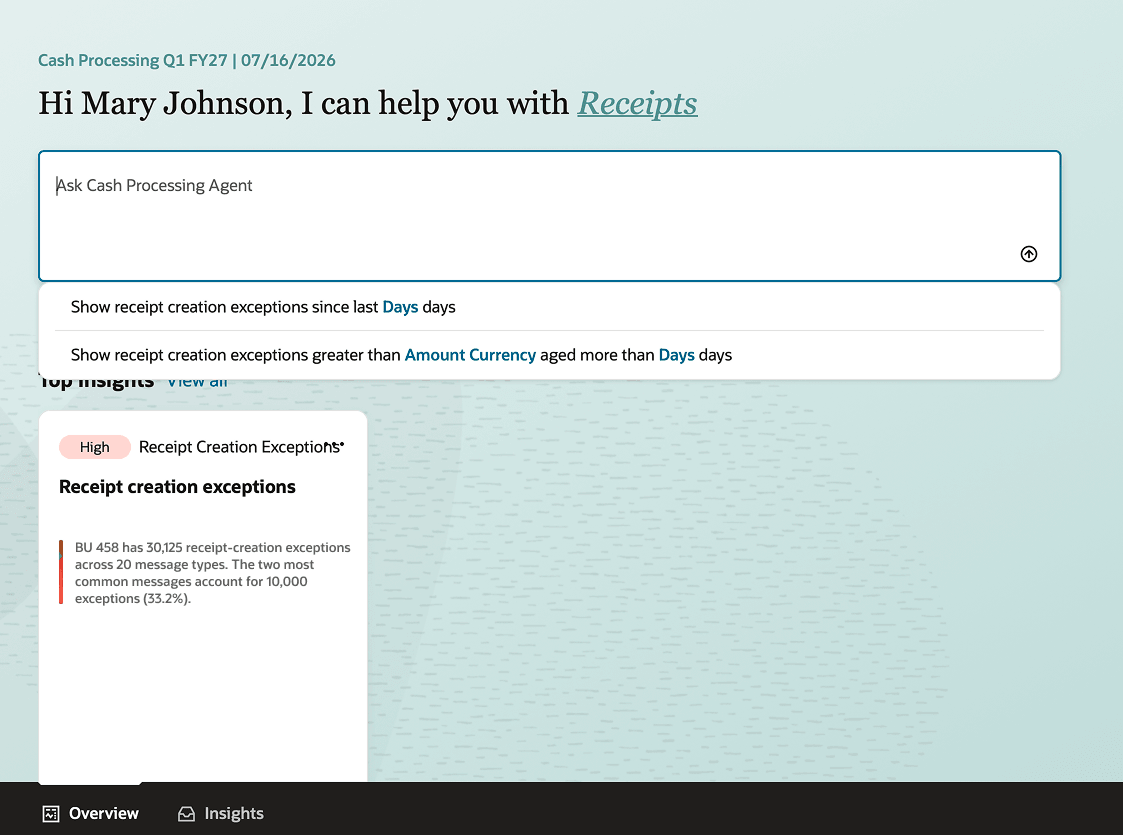
Users can choose from predefined prompts for frequent quick queries and see insights for Receipts context
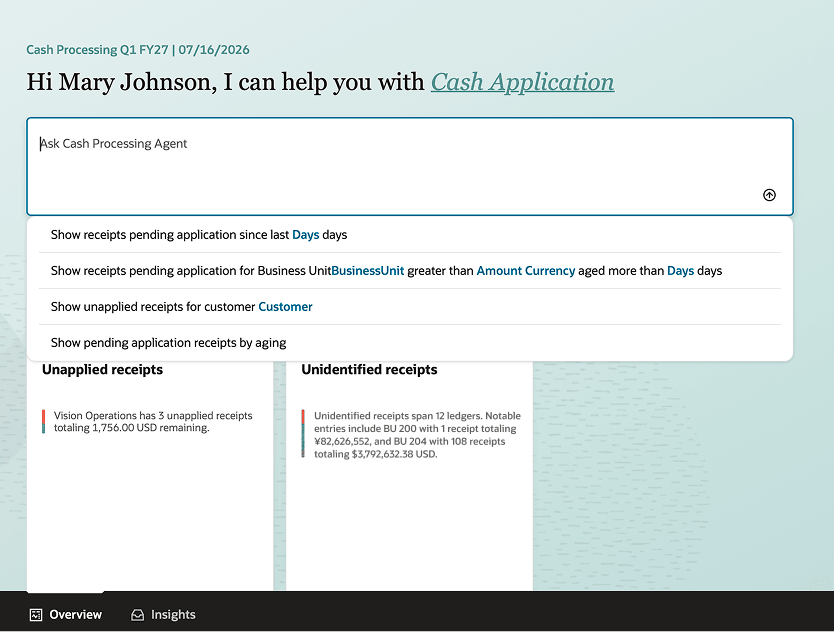
Users can choose from predefined prompts for frequent quick queries and see insights for Cash Application context
Receipts
- Quickly identify receipt creation and remittance advice exceptions from Overview page insights or by using predefined prompts and natural language questions.
- Use the conversational chat experience to explore file ingestion, receipt creation, and remittance advice exceptions. Review supporting details such as:
- Bank, source document, statement line, remittance reference, receipt method, and exception reason.
- Processing status and exception summaries at the document level.
- Maintain conversational context throughout the interaction. For example, if you ask for receipt creation exceptions associated with a specific document, the agent returns the related details, including the source file, impacted amount, and exception reason.
- Receive context-aware recommendations for the next best actions, including a direct link to the correction flow where you can review exception details and take corrective action.
- In the correction flow, search for the relevant batch using the batch number provided in the chat
- Enter the valid missing value and submit the correction job through upload from the spreadsheet.
- After the correction process is complete, recheck the receipt batch to confirm that the exception no longer appears.
Cash Application
- Quickly find unidentified and unapplied receipts from Overview page insights or through predefined or ad hoc prompts that identify receipts requiring resolution.
- In the conversational chat experience, explore supporting details to resolve cash application issues. Ask natural language questions to identify potential customers or matching invoices, and search across:
- Receipt source information, such as payment channel, bank, originator name, wire number, and related details.
- Remittances that have not been matched to receipts, filtered by amount, date, currency, or customer, to determine whether they correspond to the receipt.
- Open invoices, including whether any invoices are currently in dispute.
- Open or past promise-to-pay commitments.
- Receipt activity, including previous applications, partial applications, or unapplied receipts.
- Maintain conversational context throughout the interaction. For example, if you search for a receipt associated with a customer and then ask, "Show me all open invoices," the agent displays the open invoices for that customer.
- Receive context-aware recommendations for the next best actions to support further review and cash application.
- The agent applies the receipt to an invoice after receiving user confirmation.
Insights
- Users can review all Receipts and Cash Application insights in one place on the Insights page, making it easier to prioritize actions across contexts.
- The page surfaces receipt creation exceptions, unidentified receipts, and unapplied receipts, helping users quickly identify delayed, incomplete, or high-value items that require attention.
- Users can open any insight and continue the investigation through the conversational experience, review contextual details, and take supported actions.
- Insights data is refreshed every four hours. After the required roles are assigned, allow up to four hours for data to become available.
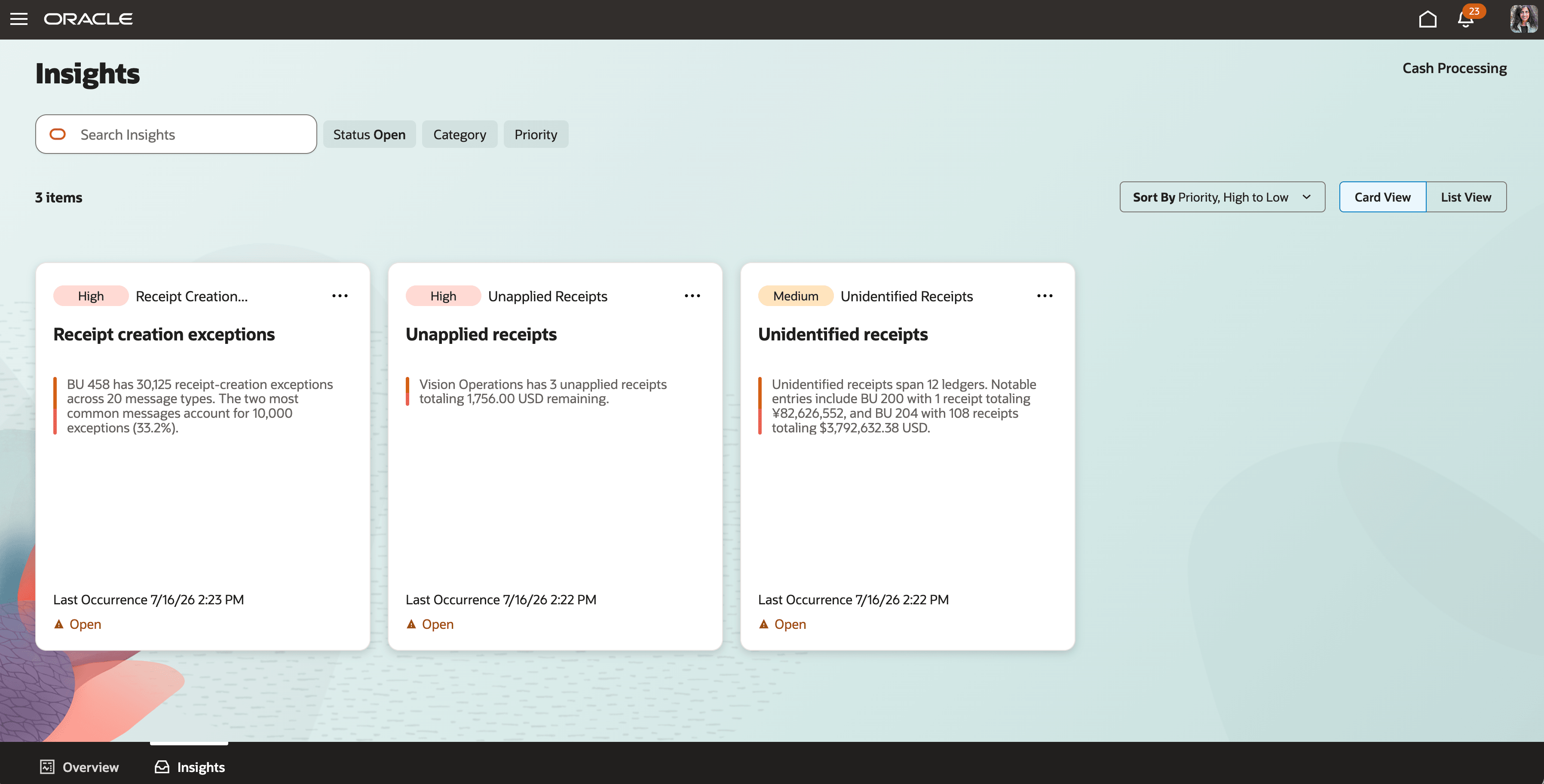
Users can review all insights in one place
Key benefits include:
- Accelerates cash application by helping users identify and resolve unapplied and unidentified receipts more quickly, reducing the time spent researching receipt and invoice information across multiple work areas.
- Improves visibility into receipt processing and cash application by surfacing processing exceptions, unapplied receipts, and application opportunities earlier. This enables teams to address issues before they affect cash application performance.
- Reduces manual effort and context switching by bringing conversational inquiry, actionable insights, guided investigations, and transaction-level follow-up actions into a unified experience.
- Maintains controlled and auditable processing by enforcing existing Receivables validations, authorizations, segregation-of-duties controls, and audit requirements for all actions performed through the agent.
Steps to enable and configure
- The Cash Processing Agent is enabled by default.
- Configure the required security access described in the Access Requirements section so users can access the Cash Processing Agent from the new navigation menu entry.
- No additional enablement is required to automate the ingestion of bank files and remittance advice from customer emails through the Document IO Agent.
- For completeness, the following steps describe how to configure the Receipt Creation from Bank Statement feature delivered in an earlier release:
Enable Receipt Creation from Bank Statements
- Go to Setup and Maintenance > Manage Bank Accounts.
- Select the bank account you want to configure.
- On the Controls tab, enable Create Receipts from Bank Statement.
- Define the Receipt Creation Start Date. You can set the date up to 30 days earlier.
- Set the Default Receipt Method. Select a specific receipt method or use ORA_Bank Statement.
Configure Receipt Methods for receipts created from bank statement lines
- Go to: Setup and Maintenance > Manage Receipt Classes and Methods.
- Verify that the receipt methods used for this feature are configured and associated with the relevant bank accounts and business units.
- Select the receipt method to use for receipts created from bank statements. You can use the predefined receipt method: ORA_Bank Statement or use receipt methods that meet your business requirements.
Note: Verify the receipt method used for this feature is configured with the relevant bank accounts and business units in the Remittance Bank Accounts section. Receipts created from a bank statement are considered reconciled and are therefore created in Cleared status.
Tips and considerations
- Existing classic ADF receipt pages remain available for detailed receipt processing, application, and review when users need capabilities outside the Cash Processing Agent.
- Remittance advice can be ingested from PDF files, email bodies, and image files. Configure email-forwarding rules to route remittance advice documents from corporate email accounts to the provisioned pod email address, reducing the need for manual forwarding. To copy the provisioned pod email address, navigate to Cash Processing Agent > Take Me to Receipt Document Processing > View Email > Copy Email.
- Schedule Apply Receipts Using AutoMatch with Include Remittance set to Yes so the extracted remittance advices can be evaluated for matching to corresponding receipts as they become available. Automated matching is supported even when the remittance advice is ingested before the receipt creation.
- For ad hoc natural language prompts, the data query uses the period specified by the user. For predefined prompts with no user-provided input, the default period is applied.
- Insights data is refreshed every four hours. After the required roles are assigned, allow up to four hours for data to become available.
- Remittance advice ingestion supports documents with up to 2,000 reference lines. Each file must contain a single payment information, or a single header.
Key resources
Detailed Adoption Guide: 26C: Cash Processing Agent for Receipt Processing and Cash Application Detailed Adoption Guide, with step-by-step instructions, screenshots, and configuration examples.
Oracle Help Center: Cash Processing from Bank Statements and Remittance Advices
Oracle Help Center: Get Started with AI Agent Studio
Oracle Help Center: Security Reference for Financials: Receivables and cash processing duties and privilege
Access requirements
Access to the Cash Processing Agent is controlled through Oracle Receivables assistant duty roles and permission groups. Take the following steps to provide users access to the Cash Processing Agent.
Oracle-Provided Predefined Job Roles
The following Oracle-provided predefined Receivables job roles include the required Cash Processing Agent assistant roles:
| Predefined Job Role | Role Code |
|---|---|
|
Accounts Receivable Specialist |
ORA_AR_ACCOUNTS_RECEIVABLE_SPECIALIST_JOB |
|
Accounts Receivable Specialist Segregated Role |
ORA_AR_ACCOUNTS_RECEIVABLE_SPECIALIST_SOD_JOB |
|
Accounts Receivable Manager |
ORA_AR_ACCOUNTS_RECEIVABLE_MANAGER_JOB |
|
Accounts Receivable Manager Segregated Role |
ORA_AR_ACCOUNTS_RECEIVABLE_MANAGER_SOD_JOB |
Cash Processing Agent Assistant Roles
The Cash Processing Agent uses the following assistant roles:
| Assistant Duty Role | Role Code | Access Controlled |
|---|---|---|
|
Cash Receipt Generation Assistant |
ORA_AR_CASH_RECEIPT_GENERATION_ASSISTANT_DUTY |
Receipt context and receipt creation exception insights (AR_RECEIPTS_INTENT_PRIV) |
|
Cash Application Assistant |
ORA_AR_CASH_APPLICATION_ASSISTANT_DUTY |
Cash Application context, cash application insights, and Apply Receipt (AR_CASH_APPLICATION_INTENT_PRIV) |
|
Cash Receipts Inquiry Assistant |
ORA_AR_CASH_RECEIPTS_INQUIRY_ASSISTANT_DUTY |
Supporting receipt inquiry access |
| Cash Processing Agent Insights | ORA_AR_CASH_PROCESSING_INSIGHTS_DUTY | Cash Processing Agent insights |
Configure the Applicable Job Role
Complete these steps for either a custom or an Oracle-provided predefined Receivables job role:
- Navigate to Security Console.
- Search for the applicable job role.
- Click Edit Role.
- Enable Enable Permission Groups.
- Save the changes.
Then complete the steps that apply to your job role type.
For Custom Job Roles
- Navigate to Role Hierarchy > Roles and Privileges.
- Add these required assistant roles:
- Cash Receipt Generation Assistant
- Cash Application Assistant
- Cash Receipts Inquiry Assistant
- Navigate to Role Hierarchy > Roles and Permission Groups.
- Add the same required assistant roles:
- Cash Receipt Generation Assistant
- Cash Application Assistant
- Cash Receipts Inquiry Assistant
- If users need access to Insights, add Cash Processing Agent Insights Role (ORA_AR_CASH_PROCESSING_INSIGHTS_DUTY).
- Save and submit the custom job role.
- Ensure that the required users are assigned to the custom job role and that appropriate data security access is granted.
For Oracle-Provided Predefined Job Roles
The required Cash Processing Agent assistant roles are already included in the predefined Receivables job roles listed previously. After enabling permission groups, no additional assistant roles need to be added for standard Cash Processing Agent access.
If users require access to Insights, create a custom job role:
- Create a custom job role and specify:
- Role Name: Specify an appropriate name, for example, Cash Processing Insights.
- Role Code: Specify an appropriate code, for example, CASH_PROCESSING_INSIGHTS.
- Role Category: Financials – Job Roles.
- Enable Permission Groups: Enable this option.
- Navigate to Role Hierarchy > Roles and Permission Groups.
- Add Cash Processing Agent Insights Role (ORA_AR_CASH_PROCESSING_INSIGHTS_DUTY).
- Add the required users to the custom job role.
- Save and submit the custom job role.
- Ensure that appropriate user and data security access is granted.
Synchronize User and Role Security Data
After user role assignments/changes in Fusion, there can be a synchronization/cache delay. Run the following steps to ensure the role updates.
- Run “Import User and Role Application Security Data”
- Go to Tools > Scheduled Processes
- Click Schedule New Process
- Search for Import User and Role Application Security Data
- Select it and click OK
- Click Submit
- Wait until the process Succeeds before continuing.
2. Run “Retrieve Latest LDAP Changes”
- Again select Schedule New Process
- Search for Retrieve Latest LDAP Changes
- Click Submit
- Wait until it Succeeds.