Ledger Agentic Application
Ledger Agentic Application modernizes accounting operations by evolving the capabilities of Ledger Agent into a unified workspace for day-to-day accounting activities. Leveraging agentic application capabilities, it combines conversational intelligence, deeper financial reasoning, policy-driven recommendations, and coordinated actions to help accountants move from insight to action within a single accounting workspace. These capabilities establish the foundation for more outcome-driven finance operations, supporting improved close readiness and faster exception resolution as organizations adopt and expand intelligent accounting workflows.
Access the Ledger Workspace from the Ledger springboard. For existing Ledger Agent users this will be next to the Ledger agent navigation, allowing customers to explore and adopt new agentic experience while maintaining continuity with existing processes.
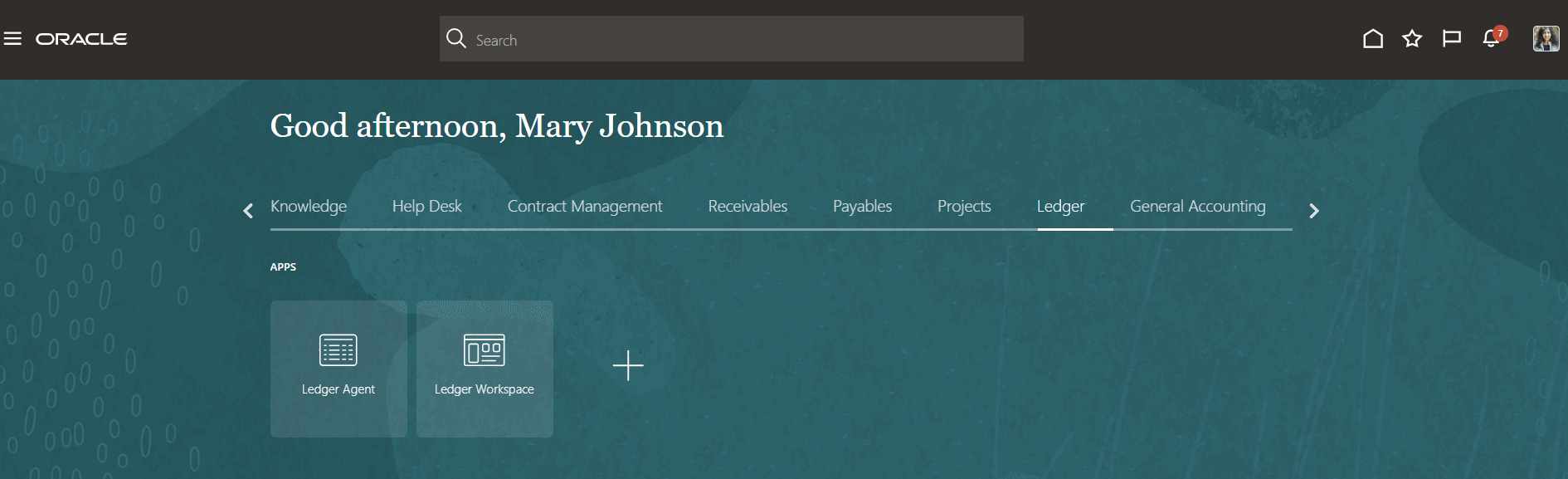
Ledger Springboard
Key Capabilities
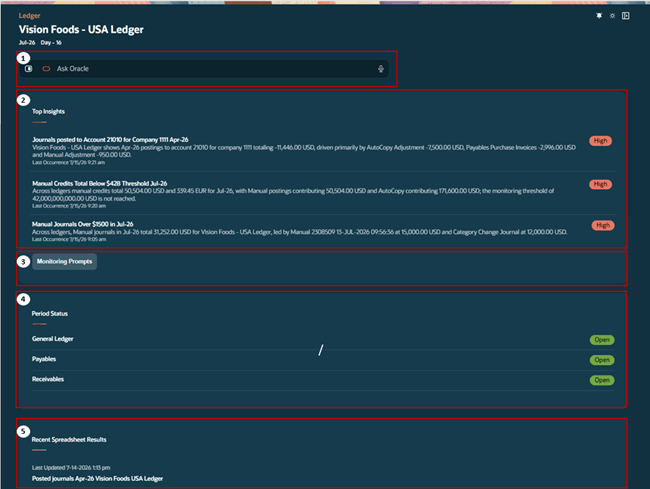
Ledger Agentic App
1. Conversational Inquiry and Account Analysis
-
Use natural language to analyse period variances for key accounts, investigate account movements, walkthrough, and trace back account activity, and inquire on balances, journals and supporting subledger details.
-
Ask accounting questions more naturally with enhanced understanding of accounting terminology, business context, periods, currencies, ledger structures, hierarchies, and journal concepts. Improved conversational continuity across follow-up questions helps finance teams retrieve answers faster with fewer prompt refinements.
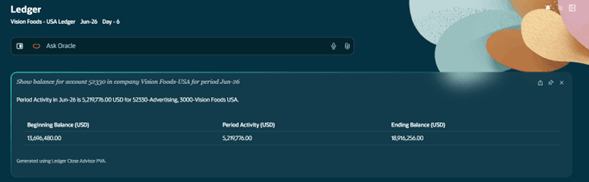
Conversational Inquiry
2. Explain Insights
- Receive rich, contextual summaries for each generated insight to quickly understand operational and control issues from correlated data.
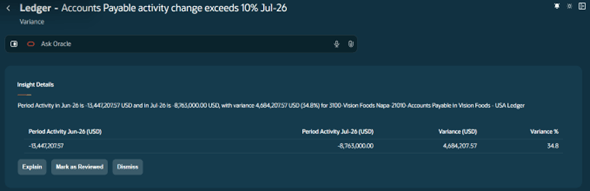
- With the power of Agentic applications get a one-shot view of the details contributing to the insight through Explain.
- Gain more accurate and actionable accounting insights through richer response quality, clearer explanations, improved variance analysis, enhanced filtering and sorting, and more intuitive drill-down capabilities. These improvements make it easier to interpret results, validate findings, and move from insight to action with greater confidence.
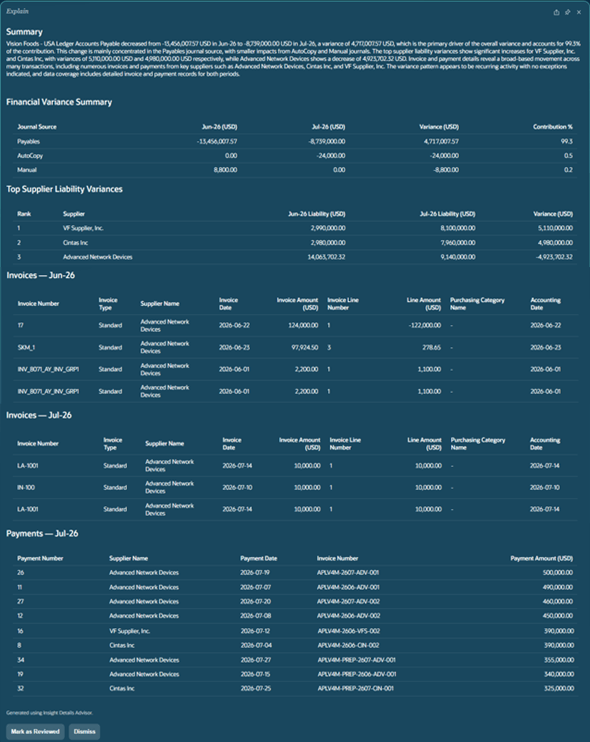
Explain Insight
3. Proactive Financial Monitoring
- Use monitoring prompts to surface exceptions and anomalies when they occur, track business indicators continuously and be alerted with an insight as soon as the condition is met. Personalize monitoring prompts to work at your desired granularity and frequency to meet your business need and area of responsibility.
- Monitor accounting activities more effectively with improved guided experiences, more flexible monitoring prompts, and enhanced performance and reliability.
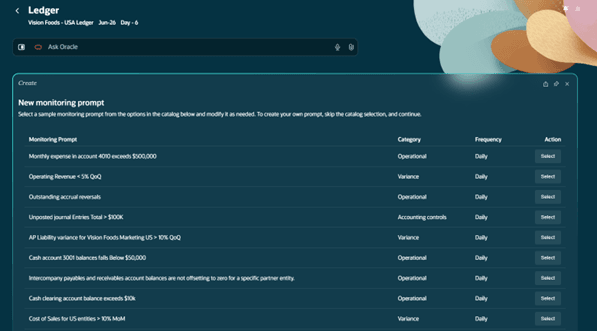
Monitoring Prompts
4. Period Close Visibility
- View period close status across General Ledger (GL), Accounts Payable (AP), and Accounts Receivable (AR) and other subledgers
5. Recent Spreadsheet Results
- Access and manage spreadsheets generated from your recent Ledger Agent inquiries in one convenient location. The Recent Spreadsheet Results panel stores exported Excel files created from large result sets, requests that explicitly require spreadsheet output, and inquiries processed asynchronously due to longer execution times. This allows you to continue working while complex requests are processed in the background, then return later to download and review the generated spreadsheets without having to rerun your queries.
Business Benefits
- Analyze accounting data faster using conversational inquiry.
- Improve visibility into accounting operations with proactive monitoring and insights.
- Resolve issues more efficiently through contextual explanations and enhanced variance analysis.
- Simplify day-to-day accounting with a unified workspace for inquiry, monitoring, and analysis.
- Support more informed accounting decisions with richer, explainable financial insights.
Steps to enable and configure
- If you are an existing Ledger Agent user, no other setup or access steps are required. Once the feature is enabled you can start exploring the Ledger Agentic App.
- If you have not enabled Ledger Agent in the past, ensure Oracle managed pre-requisites are in place. The navigation for ‘Ledger Workspace’ will prompt a message to guide you to raise a service request with Oracle. Following this enablement, please grant access to the required roles and data access as per the Ledger Agentic Application Enablement Guide 26C.
Tips and considerations
- Leverage the monitoring prompts and insights previously available in Ledger Agent directly from within the Ledger Workspace.
- Use natural language prompts with flexibility. Refer to the Practical Tips and Examples guide and other Key Resources for sample prompts and recommended practices.
- Existing Ledger Agent customers can begin exploring the Ledger Agentic App in 26C while continuing to use Ledger Agent and are encouraged to plan their transition to the Agentic App in 26D.
- The conversational experience is currently available in English.
- Conversations are available during the active session and cannot be resumed after they are closed.
- The application is designed for inquiries related to General Ledger balances, journals, period close monitoring, and supported subledger details.
- Responses are based on the data your user account is authorized to access in Oracle Fusion Applications according to your assigned roles and privileges.
- In non-production environments, monitoring results depend on the availability of representative transactional data. Some monitoring conditions may not be displayed if corresponding data is unavailable.
- In 26C, the Ledger Agentic App focuses on core accounting workflows. Guided syntax templates, inquiries on average daily balances and budget balances, and subledger supporting details beyond Accounts Payable and Accounts Receivable will be introduced in future releases.
Key resources
- 26C Ledger Agentic App Resources: FAQs, Prompting Tips & What's New
- Ledger Agent Customer Connect Forum
- Customer Connect Session Replay : ERP – The Ledger Agent Has Become the Ledger Agentic App
Access requirements
- If you are an existing Ledger Agent user, no additional access steps are required. Once the feature is enabled you can start exploring the Ledger Agentic App.
- If you have not enabled Ledger Agent in the past,
- Ensure Oracle managed pre-requisites are in place. The navigation for ‘Ledger Workspace’ will prompt a message to guide you to raise a service request with Oracle.
- Following this enablement, please grant access to the required roles and data access as per the Ledger Agentic Application Enablement Guide 26C.