Payables Agent for Invoice Ingestion, Compliance and Control
The Payables Agent delivers automation and industry best practices across the entire invoice lifecycle, enabling near-touchless processing. By drastically reducing manual intervention, organizations minimize processing errors, maximize operational efficiency, and empower finance teams to refocus on strategic activities. Over time, the Payables function shifts from a traditional cost center to a value-generating engine driving faster cycle times, capturing early payment discounts, and preventing capital leakage through advanced exception management and anomaly detection.
Powered by Generative AI, the Payables Agent automates invoice ingestion, compliance, and control across disparate sources and document formats. It supports multilingual recognition, natively integrates with global e-invoicing providers, and leverages enhanced image recognition to streamline the capture of complex, multi-format, and multi-page invoices. This touchless experience is built on a foundation of unified ingestion, automated processing, intuitive exception workflows, and straight-through processing from data capture to payment readiness. By replacing manual, fragmented, and reactive tasks with automated data enrichment, robust compliance controls, and seamless supplier collaboration, organizations achieve accelerated processing timelines, comprehensive operational visibility, and optimized financial outcomes.
Building on this touchless framework, in this release Payables Agent introduces Compliance and Control, a unified capability that brings automated invoice completion together with built-in compliance and control enforcement in a single experience. Using natural language processing, the Agent reads your existing business policy documents, understands the intent behind them, and automatically generates the corresponding application policies, replacing the manual setup that this traditionally required. During invoice processing, the Agent applies these policies to every invoice. It automatically fills in missing details such as account combinations, tax determinants, and project information, while at the same time running intelligent checks to identify and isolate transactions that fall outside your defined business criteria. Adaptive learning further extends this capability including additional fields such as Descriptive Flexfields and Localization fields, which can be trained once and then applied automatically to invoices going forward, and also expands supplier invoice ingestion from custom XML and CSV file formats with minimal manual intervention
Key Capabilities
| Capabilities | Experiences |
|---|---|
| Payables Home Page | The Payables Agent home page provides a unified landing experience for users to interact with the Payables Agent, review prioritized insights, ask questions, use suggested prompts, and navigate to related Payables work areas. |
|
Insights |
Payables insights provide a prioritized view of open payables signals so users can quickly understand which invoices and processing activities need attention. |
|
Capture Configurations |
Define configurations for Document Receiving Endpoints and Stream configuration definitions. Configure endpoints, email aliases, and other key details to support Invoice ingestion. |
|
Compliance and Control |
The Compliance & Control (C&C) architecture marks a shift from manual ERP setup to an Agent-centric orchestration model. |
| Streams |
Monitor real-time visibility into invoice ingestion of streams with up-to-date processing statuses to review overall health of touchless operations. Review document capture review to view individual invoice detailed processing steps and results to accelerate understanding and actions taken on invoice ingestion and control. |
|
Onboarding New Format- Training |
Access from the Streams page to upload new or review existing Invoice layouts for training and review the training status. |
|
Invoice List |
View all invoice management tasks, including both exception handling and querying on one place. View all invoices and statuses in a central hub, verify exceptions, and take the appropriate action on them. |
Payables Home Page
The Payables Agent provides a single, AI-powered workspace for users to access Payables insights, ask questions and launch guided inquiries. By combining natural language query based assistance, suggested prompts, and prioritized insights in one place, the Home page helps users quickly identify issues, access relevant information, and take action more efficiently. To improve productivity and adoption, the page simplifies navigation by giving users a consistent agentic entry point for Payables work. The experience also offers direct navigation to related Payables pages, reports, and business processes based on users' existing security access.
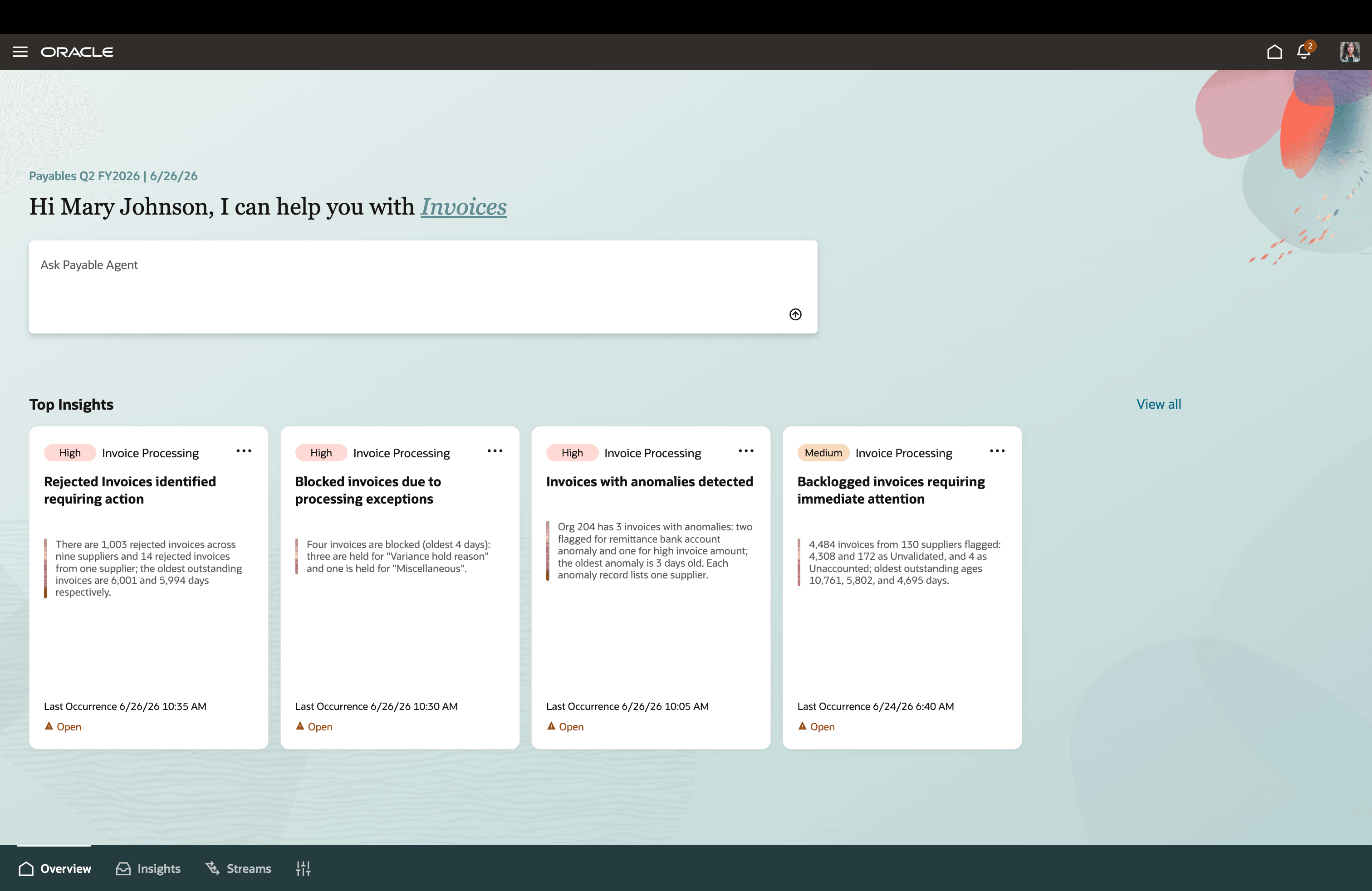
Payables Agent Home Page
Insights
Payables Insights delivers a proactive, insights-driven experience that helps Accounts Payable teams focus on the most important issues requiring attention. Instead of manually reviewing invoice lists and monitoring multiple work areas, users receive prioritized insights that highlight operational risks and processing exceptions from a centralized Payables Agent experience. The solution provides visibility into key areas such as invoice anomalies, processing exceptions, rejected invoices, and invoice backlogs. Each insight includes contextual information and recommended actions, enabling users to quickly understand the issue and navigate directly to the appropriate Payables workflow for investigation and resolution.
By surfacing critical issues earlier and prioritizing work based on urgency, Payables Insights helps organizations improve operational efficiency, strengthen controls, and support a more proactive and touchless invoice processing experience.
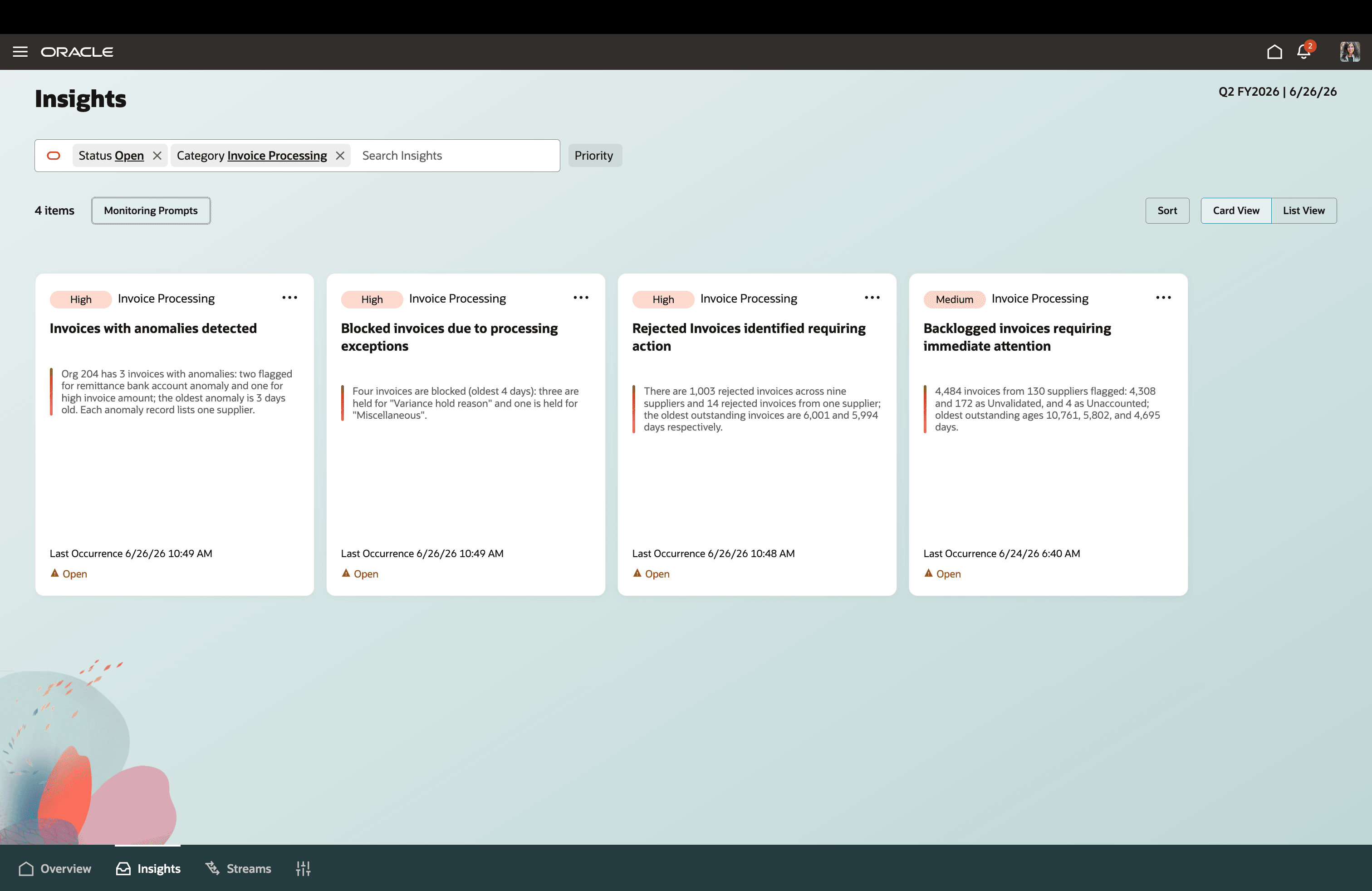
Actionable Insights
Configurations for Capture
For Invoice Image Documents stream, the user can now do actions from the Stream tab such as:
- Alias Email Business Unit Mapping: Users can now associate a Business Unit with an alias email address, enabling automatic Business Unit defaulting for unmatched invoices.
- Requester Email Domain: The invoice requester can now be automatically identified from the invoice document by recognizing the requester’s email address when available on the invoice. To enable this capability, enter your organization’s domain name in the Requester Email Domain configuration.
Compliance and Control
Configuration Steps
Setting up application rules traditionally required users to manually enter business logic based on internal processes and operating documents. The Compliance & Control (C&C) architecture replaces this manual setup with an AI-driven experience. Users can upload their policy details, and the Payables Agent reads the uploaded document, understands the business intent, and converts it into the appropriate policies. All rules are generated based on the content of the uploaded policy details document. The C&C architecture relies on two elements:
- Policy: Defines the overarching structure, purpose, and rules of your business requirements.
- Policy Details: Holds the specific values and conditions for each policy. The system evaluates these details whenever an invoice is created.
How Policies are applied during Invoice Processing
Once policy details are uploaded and activated, they are enforced automatically at every stage of invoice processing, with no manual triggering or individual configuration required for each invoice. As an invoice is ingested or created, it is evaluated against the active Compliance and Control policies before the invoice is finalized. Completion policies are applied first, where the system derives and populates any missing internal attributes such as account combinations, tax determinants, project costing, asset details, localization fields, and Descriptive Flexfields, based on the conditions defined in the corresponding policy details. Control policies are then enforced within the same processing pass, where each invoice is screened against the defined anomaly criteria and validated against related purchase orders or receipts. Any transaction that deviates from policy is automatically flagged and isolated for review. Because this evaluation runs consistently on every invoice, rather than as a one time or sampled check, compliance is applied uniformly across all transactions. The same business rules govern each invoice the moment it enters the system, ensuring that no invoice progresses without being assessed against the established policies.
Invoice Completion
Invoice Completion enables customers to intelligently derive internal attributes that are not explicitly provided on supplier invoices. In many scenarios, key transactional details such as accounting distributions, tax determinants, project costing information, asset information, country specific requirements, or additional information attributes required for reporting and compliance are not present in the source invoice data. This capability ensures such attributes are automatically determined during invoice processing, reducing dependency on manual intervention and completing the invoice in a touchless manner. The system interprets the user-defined policy and automatically generates the underlying logic, which is then consistently applied whenever invoices are processed. This simplifies invoice completion policy creation, accelerates implementation, and makes policy maintenance more accessible to business users.
Invoice Control
Controls consist of the following:
- Anomalies
- Document Processing Options
Anomalies
Anomalies are control mechanisms that automatically detect and flag invoices deviating from defined criteria for review. The feature provides automated, real-time risk management by systematically detecting and flagging invoices that deviate from established business criteria. As operations scale toward Touchless Payables, this feature enforces strict process compliance, proactively preventing financial fraud and processing errors before they impact the business.
Document Processing Options
It helps automate how supplier invoice images are read, interpreted, and converted into Payables invoices. They control recognition of key invoice details such as tax, freight, invoice lines, service orders, utility suppliers, and miscellaneous charges. These options also guide import behavior, including incomplete invoice creation, paired line import, and tax calculation during import. They support validation of critical information such as legal entity for PO matched invoices. Overall, they reduce manual effort, improve invoice capture quality, and ensure consistent, compliant invoice processing.
Onboarding New Format Training: Structured Documents
The enhanced Invoice Document Training experience provides a guided workspace for improving invoice document processing across different formats of structured documents. Users can now review extracted invoice data, identify mapping gaps, provide correction instructions, and continuously train the system to improve future invoice processing accuracy. Users can provide natural-language based mapping and transformation instructions directly within the application. The experience includes visibility into 3 different tabs: Available-unmapped source attributes, missing mandatory invoice attributes, and a preview of how source data maps to Oracle Fusion Payables invoice attributes.
Users can also download the system-generated mapping instructions, modify or add new ones in local device, and upload the modified file defining all the mapping and transformation rules in that dedicated workspace. They can also apply the changes and validate results before submitting those as learning.
Supported Formats:
- XML - Standard Format : UBL, OAG and Custom XML
- Custom CSV - Flat table with invoice header and invoice lines in same sheet
Enhanced Training Capabilities: Descriptive and Global Flexfields, Logo Based Supplier Recognition
Training capability is now enhanced to support additional invoice attributes across header and line levels for unstructured documents (such as PDF, JPEG, and PNG files). During training, all labeled attributes are extracted from source documents and can be mapped to the invoice attributes, including Descriptive Flexfields (DFF) and Global Descriptive Flexfields (GDF), which were not previously supported. This enhancement enables organizations to train customer-specific business attributes captured through DFFs as well as country-specific localization and compliance attributes captured through GDFs. Training provided by users is saved as learning data and automatically applied to subsequent invoice documents. This reduces repetitive manual intervention, improves field-level accuracy over time, and helps streamline downstream invoice processing.
Users can also train supplier recognition based on Logo present in image invoice documents.
Invoice Document Streams: Expanded File Format Support for Invoice Creation
Create Payables invoices from supplier invoice data provided in custom XML and CSV file formats. Suppliers can send those, and the Payables Agent uses generative AI to interpret the source file structure and map source attributes to the corresponding Oracle Fusion Payables invoice attributes, reducing the need to manually transform supplier data into a predefined format. This capability provides accounts payable teams with a unified intake path for structured invoice data received in varying formats, helping transform supplier files into valid and auditable Payables invoices with minimal manual effort.
For CSV files, the capability supports flat-file layouts containing both invoice header and line information in the same file. Custom XML files provide an additional intake option for structured supplier invoice data.
Invoice List
The Invoice page is a powerful, centralized hub that transforms traditional invoice management, exception handling, and query resolution into an intuitive, AI-driven experience. Replacing manual filters with a streamlined, split-screen interface, the page is divided into two core functional areas:
- The AI Chat Window (Left): The primary interaction point where users engage with an agent. Instead of manually configuring filters, users simply ask with the agent to show specific invoices, or request status updates.
- The Action Canvas (Right): A dynamic display area where the agent renders real-time results, invoice details, and flagged exceptions.
Through natural language querying, users can seamlessly verify violations, resolve invoice rejections, override anomalies, or make required corrections directly on the canvas—making invoice management faster, smarter, and entirely hands-free.
Note: Enhanced capabilities for processing structured document formats, such as XML and CSV, are available by default to 26C Cohort C customers. Customers in other than 26C cohorts must apply the 20260925 CWB to use these capabilities.
Business Benefits:
Payables Agent 26C introduces new AI-driven capabilities that help organizations accelerate invoice processing, improve operational visibility, strengthen compliance, and increase automation across the invoice lifecycle. By combining intelligent document ingestion, continuous learning, proactive insights, automated controls, and natural language query-based experiences, customers can reduce manual effort, improve invoice data quality, and enable higher levels of touchless invoice processing.
Key benefits include:
- Increase automation through intelligent invoice capture, enrichment, and processing.
- Increase automation by extending training capabilities to support Descriptive Flexfields (DFFs) and Global Descriptive Flexfields (GDFs) for unstructured invoice documents.
- Reduce manual intervention with AI-assisted learning, policy configuration, and exception management.
- Improve invoice accuracy and data quality through continuous learning and automated validation.
- Strengthen compliance and financial controls with anomaly detection, policy-driven governance, and targeted review mechanisms.
- Accelerate issue identification and resolution through proactive insights and guided recommendations.
- Enhance user productivity with natural language query-based experiences and a unified Payables workspace.
- Improve operational visibility into invoice processing performance, exceptions, and risks.
- Support scalable supplier onboarding through flexible document ingestion and transformation capabilities.
- Increase touchless invoice processing rates while maintaining auditability and control.
Steps to enable and configure
Feature Enablement
- No additional setup is required for these enhancements if Payables Agent is already enabled.
- The Payables Agent can now be accessed through the new ERP Agents root menu, making it easier to discover and launch agent-driven experiences.
Please refer to the Payables Agent for Invoice Ingestion, Compliance and Control What's New for 26B to view the Steps to Enable.
Tips and considerations
Payables Home Page
- Saved and recent prompts are limited to conversations initiated directly from the Home page.
- Users can skip optional attributes in predefined syntax prompts. The agent will still interpret the request using available defaults or broader results.
- Navigation destinations remain security-controlled, and if a user selects a destination they can't access, the experience displays an access error.
- When the navigation destination is from a submitted prompt as a part of the agent experience, it opens in an in-application tab.
- Insight cards only display for those related to the Invoices context, and are prioritized so users can focus first on the most urgent and recent items.
Insights
- Seeded monitoring prompts are delivered by Oracle and enabled by default.
- Users can pause future evaluations by disabling a prompt, while previously generated insights remain available for reference.
- Duplicate monitoring prompts let users adjust execution behavior, such as frequency, time frame, and priority.
- Disabling a duplicate prompt stops future evaluations for that duplicate, but doesn’t delete historical insights.
- Insights are shown based on the user’s access, so users must have access to the Insights page and the related monitoring prompt actions.
- The specific insights and data visible to a user depend on their assigned privileges and data security access.
- If no open insights match the current filters, the page displays a message indicating that the user’s insights are clear.
Anomalies
- Determine Organizational Priorities: Focus anomaly pattern criteria on conditions meaningful to your organization's policies and controls. For stricter enforcement, define longer historical time periods and lower variation percentages across patterns to achieve more stringent control.
- Test Before Broad Rollout: Validate anomaly patterns are being applied as expected and in a manner consistent with your organization's controls and policies in a controlled environment before full-scale operational deployment.
Invoice Completion
- Invoice completion policies can be either for Invoice Header level attributes or Line level attributes or some installment attributes.
- Invoice completion policies will default a value if there is no attribute present on the record. If there is already a value in the field, then attribute defaulting will not override the same.
- Invoice completion policies apply during import, and no invoice completion policy applies for Manually created invoices or invoices directly created in AP base tables.
Document Review Criteria
- It should be clearly configured to pause stream processing when documents require user review, using seeded, extendable, user-enabled, or user-defined rules.
- It can be applied at the file/document level for Stream Specialist review.
- It applies during both runtime processing and should be treated separately from exception handling since it is a review-control mechanism rather than an error condition.
Onboarding New Format-Training
- Ensure mandatory invoice attributes are correctly mapped to avoid processing exceptions and incomplete invoices.
- Leverage natural language instructions for mapping and transformation rules to reduce manual configuration effort.
- Test mapping and transformation rules using representative supplier documents before applying them to large volumes of invoices.
- When onboarding new XML or CSV formats, review available source attributes and validate how they map to Oracle Fusion Payables invoice attributes.
- Transformation related instructions should be validated carefully, particularly when creating additional invoice lines, or applying conditional logic.
- Review and validate mappings for Descriptive Flexfields (DFFs) and Global Descriptive Flexfields (GDFs) before applying them to production invoice processing.
- Ensure DFF and GDF definitions are available and correctly configured in Oracle Fusion before training these attributes.
- Learning is applied to subsequent invoices with similar document layouts, so periodically review and update training as supplier invoice formats evolve.
Invoice Document Streams
- Validate supported custom XML and CSV layouts, before enabling the feature for suppliers or business partners.
- Ensure mapped invoice attributes are reviewed for accuracy, especially where suppliers use non-standard headers, naming conventions, or custom column structures.
- Establish controls for file ownership, upload access, audit tracking, and approval responsibilities to maintain compliance and traceability.
Invoice List
- Utilize Natural Language Query Based experience: Maximize efficiency by treating the Payables Agent as a digital colleague. Instead of just asking for data, use the chat window to engage in a continuous dialogue to guide you through invoice reviews and actions.
- Leverage Spreadsheet Corrections for Bulk Imports: For invoices rejected during the import process, rely on the integrated, intuitive correction spreadsheet to quickly pinpoint data errors and perform cleanup tasks before re-submitting.
- Execute Immediate Exception Actions: When the agent highlights an invoice exception on the canvas, resolve it immediately. You can cancel the invoice, release the exception if it is a false positive, or navigate to the Edit page to update incorrectly captured data.
- Verify Anomalies: Use the right-side canvas to visually review the specific data points flagged by the agent's anomaly detection controls before deciding to override or release it.
- The key attributes that users can search on in the agentic Chat & Canvas UI are: Business Unit, Purchase Order Number, Document Name, Stream, Invoice Number, Supplier Name, Supplier Site, Invoice Amount, Creation Date, Due Date, Invoice Type, Source Currency and key status such as Validation, Approval and Payment.
Key resources
-
Reference Document – Security Reference for Financials: Payments and Payables duties and privileges – Configuring Security in Oracle ERP Cloud
Access requirements
Access to new feature components and pages are managed through specific security artifacts tailored to the underlying design requirements. This section offers a consolidated view of Duty roles required to grant access to the relevant pages. Make sure you’ve finished all necessary prerequisites; For detailed instructions and reference materials, refer to the document listed in the Key resources section.
Duty Role Details
|
Duty Roles |
UI access |
View Access |
Edit Access |
|
Payables Invoice Documents Processing Duty |
Stream |
Yes |
Yes |
|
Training |
Yes |
Yes |
|
|
View Invoice (Redwood Page) |
Yes |
NA |
|
|
Document Attachment (Source File) |
Yes |
NA |
|
|
Payables Invoice Documents Inquiry Duty |
Stream |
Yes |
No |
|
Training |
Yes |
No |
|
|
View Invoice (Redwood Page) |
Yes |
NA |
|
|
Document Attachment (Source File) |
No |
NA |
|
|
Payables Invoice Configuration Processing Duty |
Capture |
Yes |
Yes |
|
Compliance and Control |
Yes |
Yes |
|
|
Payables Invoice Configuration Inquiry Duty |
Capture |
Yes |
No |
|
Compliance and Control |
Yes |
No |
|
|
Payables Invoice Processing Duty |
Invoice List |
Yes |
Yes (Limited actions) |
|
Invoice (Classic Page) |
Yes |
Yes |
|
|
Payables Invoice Inquiry Duty |
Invoice List |
Yes |
No |
|
Invoice (Classic Page) |
Yes |
No |
|
|
Overview Page |
Yes |
NA |
|
|
Payables Agent Insights Duty |
Insights |
Yes |
NA |
|
Payables Agent Monitoring Prompt Management Duty |
Insights Monitoring Prompts |
Yes |
Yes |
Security and Access
-
When creating a custom job role, select Enable Permission Groups on the first page of role creation to make permission-group configuration available.
-
If the Enable Permission Groups button or the Permission Groups option isn’t available, set the Enable Security Console External Application Integration profile option (ORA_ASE_SAS_INTEGRATION_ENABLED) to Yes at the site level.
-
To grant access to a specific agent only, create a custom job role with permission groups enabled. In the Role Hierarchy section, add the corresponding duty roles on both the Roles and Privileges and Roles and Permission Groups tabs. Include only the duties required for the intended agent capabilities.
-
To add user data access in bulk:
-
Download and install the desktop integration utility from Navigator > Tools > Download Desktop Integration Installer and enable macros in Microsoft Excel.
-
From the Manage Data Access for Users task in the Setup and Maintenance work area, query and download the current data-access assignments.
-
Add or update the required user data-access assignments in the downloaded spreadsheet and then upload the revised data to the application.
-
Payables Agent Role Unification
To use this feature, users need the privileges and permission groups associated with the unified duty role. For a custom job role, add each applicable unified Payables Agent duty role to both the Roles and Privileges and Roles and Permission Groups sections on the Role Hierarchy tab This grants the required function-security and permission-group access for both the classic application and business-object access through one assignable role.
| Role | Roles and Privileges section | Roles and Permission Groups section |
|---|---|---|
| Payables Invoice Documents Processing Duty | Payables Invoice Documents Processing (ORA_INVOICE_DOCUMENTS_PROCESSING_DUTY) |
Payables Invoice Documents Processing Duty (ORA_INVOICE_DOCUMENTS_PROCESSING_DUTY) |
| Payables Invoice Documents Inquiry Duty | Payables Invoice Documents Inquiry (ORA_INVOICE_DOCUMENTS_INQUIRY_DUTY) |
Payables Invoice Documents Inquiry Duty (ORA_INVOICE_DOCUMENTS_INQUIRY_DUTY) |
| Payables Invoice Configuration Processing Duty | Payables Invoice Configuration Processing (ORA_INVOICE_CONFIGURATION_PROCESSING_DUTY) |
Payables Invoice Configuration Processing (ORA_INVOICE_CONFIGURATION_PROCESSING_DUTY) |
| Payables Invoice Configuration Inquiry Duty | Payables Invoice Configuration Inquiry (ORA_INVOICE_CONFIGURATION_INQUIRY_DUTY) |
Payables Invoice Configuration Inquiry (ORA_INVOICE_CONFIGURATION_INQUIRY_DUTY) |
| Payables Invoice Processing Duty | Payables Invoice Processing (ORA_AP_PAYABLES_INVOICE_PROCESSING_DUTY) |
Payables Invoice Processing Duty (ORA_AP_PAYABLES_INVOICE_PROCESSING_DUTY) |
| Payables Invoice Inquiry Duty | Payables Invoice Inquiry (ORA_AP_PAYABLES_INVOICE_INQUIRY_DUTY) |
Payables Invoice Inquiry Duty (ORA_AP_PAYABLES_INVOICE_INQUIRY_DUTY) |
| Payables Agent Insights Duty | Payables Agent Insights (ORA_AP_PAYABLES_AGENT_INSIGHTS_DUTY) |
Payables Agent Insights Duty (ORA_AP_PAYABLES_AGENT_INSIGHTS_DUTY) |
| Payables Agent Monitoring Prompt Management Duty | Payables Agent Monitoring Prompt Management (ORA_AP_PAYABLES_AGENT_MONITORING_PROMPT_MGT_DUTY) |
Payables Agent Monitoring Prompt Management Duty (ORA_AP_PAYABLES_AGENT_MONITORING_PROMPT_MGT_DUTY) |
Legacy SAS duty roles retain their _DR role codes and don’t require corresponding classic duty roles.
Users assigned with any of the above mentioned duty roles can access to the Payables Agent card view from ERP Agents root menu.
Security Privileges
|
Component Name |
Component Type |
Security Details |
|
|
Artifact Name |
Artifact Type |
||
|
Capture |
Invoice Image Documents Activation |
Manage Intelligent Document Recognition Option |
Privileges |
*To perform Logo based supplier recognition training in the invoice document training UI, users need to have an additional security privilege - "POZ_VIEW_SUPPLIER_LOV_REST_SERVICE_PRIV”
Data Security Considerations
Unlike the Streams page, invoice related pages, such as Invoice List, are restricted by Business Unit data security. Any custom job roles assigned with the new invoice related duty roles must also be granted Business Unit data security access. Otherwise, users will not be able to view invoice details. For example, a user attempting to drill down from the Streams page into the View Invoice page will be unable to view the invoice.
How to Configure Business Unit Data Security:
- Navigate to Manage Business Unit Data Access for Users.
- Select the user and custom job role, then assign the appropriate Business Unit
- Click Process Permission Group Policies.
- Save your changes and log out.
Note: Access to navigate to payables tasks, reports, or processes is governed by users' regular assigned OPSS security. No separate security is required for those navigation destinations.