 Automatic Creation of Rebills when Canceling Invoices
Cancel and rebill project contract invoices with a single action. Rebill invoices contain the same invoice lines and transactions as the original invoice when the cancel and rebill invoice action is initiated without performing any transaction-level adjustments, thereby allowing adjustments as needed on the rebill before resending them to the customer. The cancel and rebill invoice action links the original invoice, credit memo, and rebill invoice, ensuring that the relationship is displayed on the rebill invoice to comply with legislative requirements in certain jurisdictions.
When you perform the Cancel and Rebill Invoice action after transaction adjustments, the generated rebill invoice reflects those adjustments. Please refer to the worked example 2 below.
The new Cancel and Rebill Invoice crediting action is available under Create Credit Action on the Invoice Details page for an original standard invoice, as highlighted below:
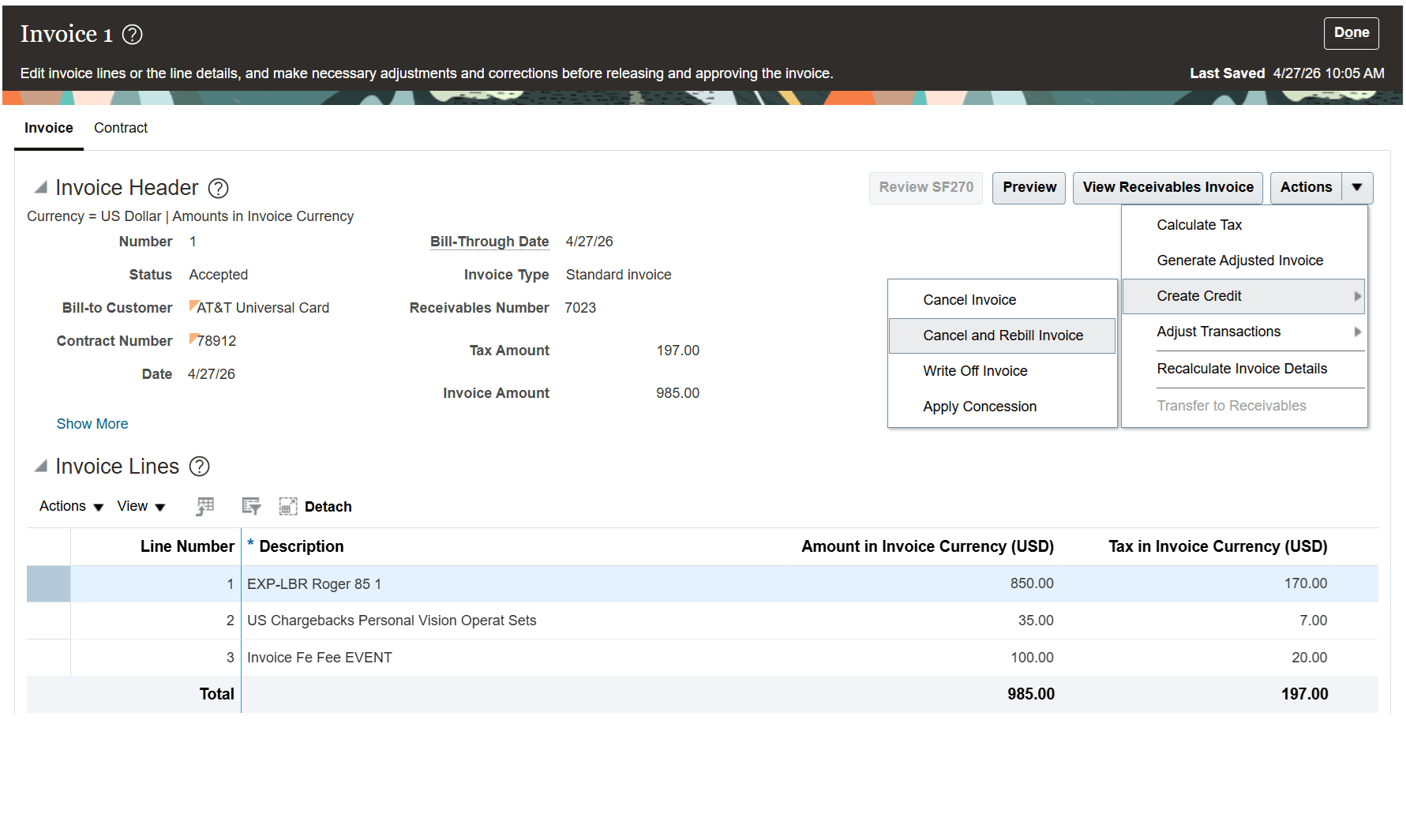
The Invoice Details page showing the Cancel and Rebill Invoice crediting action.
When you perform the Cancel and Rebill Invoice action, you are prompted to provide the following information:
- Cancellation Reason is mandatory if the Require Credit Memo Reason option is enabled in the Contract Business Unit setup.
- Comments is an optional field used to capture additional details about the reason for performing the Cancel and Rebill Invoice action. It supports up to 240 characters of text.
- Canceled Invoice Date is the transaction date of the credit memo. The field defaults to today’s date, but it can be updated by the user to any date on or after the original invoice date.
- Receivables Number (not shown in the screenshot) is used for the credit memo created as part of this action. This input is only displayed when the Invoice Numbering Method in Customer Billing or Internal Billing is set to 'Manual' in the Contract Business Unit setup.
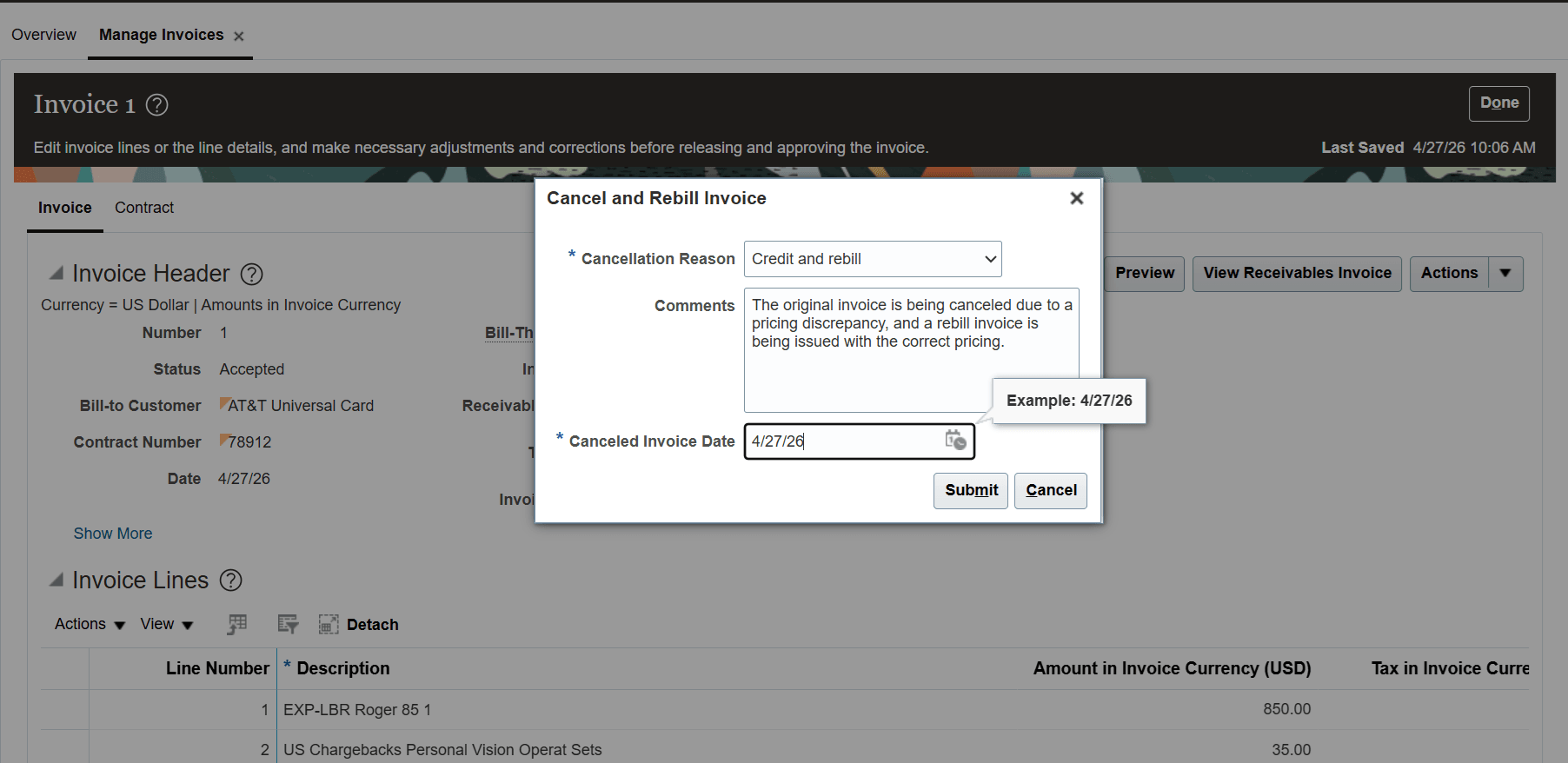
The popup that is displayed when the Cancel and Rebill Invoice action is invoked.
Worked Example 1
- You perform the Cancel and Rebill Invoice action on a standard invoice in Accepted status without first performing any transaction adjustments.
- You haven't enabled the Review and Approval of Credit Memos feature.
- You have enabled the Release Invoices on Approval option in the Specify Customer Contract Management Business Function Properties setup.
The application automatically creates a canceled invoice in Released status and a rebill invoice in Draft status.
NOTE: When the Release Invoices on Approval option is disabled in the Contract Business Unit setup, the canceled invoice is created in 'Approved' status. Once the canceled invoice is released through the user interface, the rebill invoice is automatically created in 'Draft' status.
The credit memo created as part of this action is a full reversal of the original standard invoice. The attributes entered in the Cancel and Rebill Invoice popup are carried over to the canceled invoice, as highlighted below:
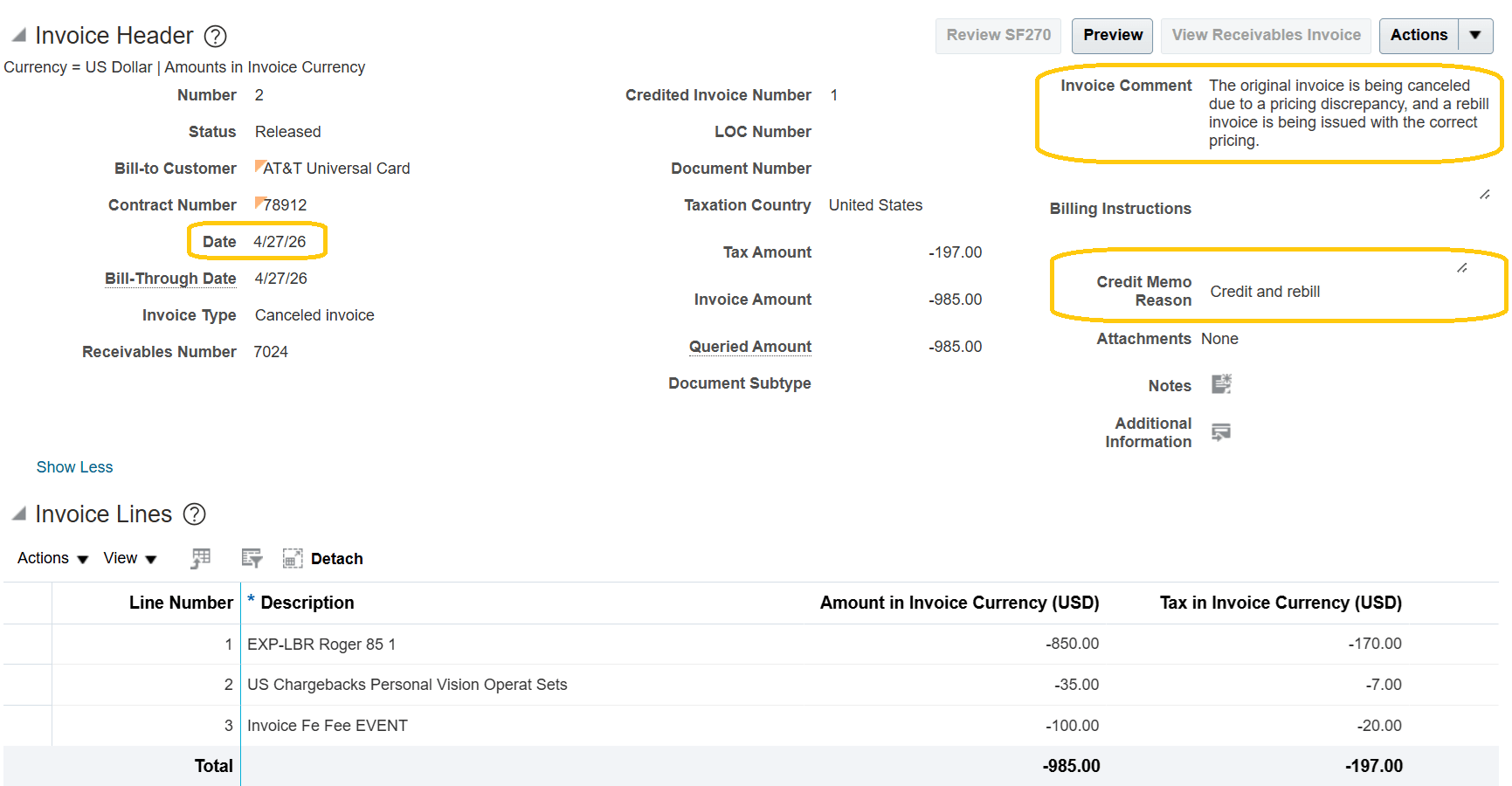
The Invoice Details page showing a credit memo created by the Cancel and Rebill Invoice action.
The rebill invoice created in this case is an exact replica of the original invoice:
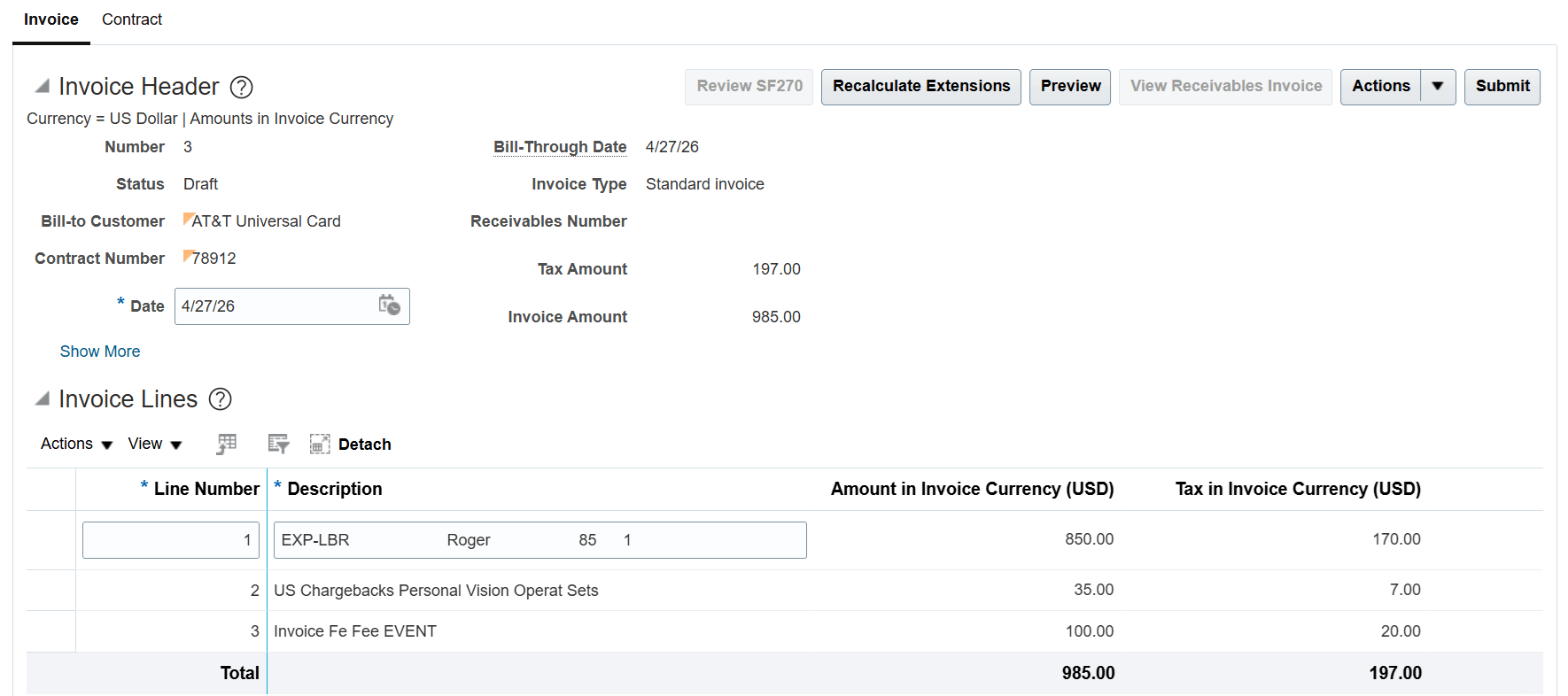
The Invoice Details page showing a rebill invoice in 'Draft' status.
The user can make adjustments on the rebill invoice as needed, such as updating the bill rates for labor or nonlabor resources, or updating the amount on billing events. After making these changes, the user can invoke the Recalculate Invoice Details action to reprice the transactions.
Additionally, the user can remove transactions from the rebill invoice or apply nonbillable or hold adjustments to the included transactions. Tax determinants, such as the tax classification code, can also be updated on the invoice lines, followed by invoking the Calculate Tax action on the rebill invoice:
For example, the bill rate for the labor resource (10 hours) has been updated from 85 USD to 90 USD in the associated rate schedule. When the Recalculate Invoice Details action is invoked on the rebill invoice, the line amount for invoice line 1 is updated from 850 USD to 900 USD.
Rebill invoices include references to both the original invoice and the canceled invoice (credit memo), with drill-down links to their respective details. Additionally, the original invoice includes a reference to the rebill invoice, with a drill-down link to the details, as illustrated below:
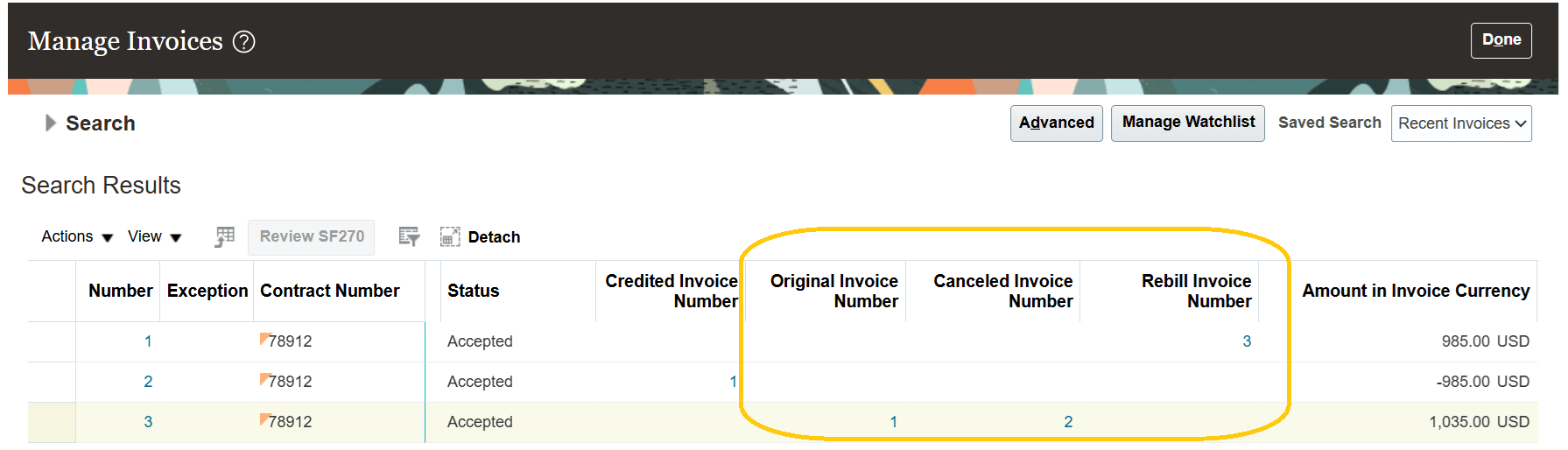
The Manage Invoices page, highlighting cross-references between an original invoice, credit memo, and rebill invoice following a Cancel and Rebill Invoice action.
Worked Example 2
- The Cancel and Rebill Invoice action is invoked on a standard invoice after performing transaction adjustments.
- The Enable Review and Approval of Credit Memos feature is enabled.
Labor and nonlabor project cost transactions incurred for the associated project, along with a billing event, are billed and included in a standard invoice in 'Accepted' status, as highlighted below:
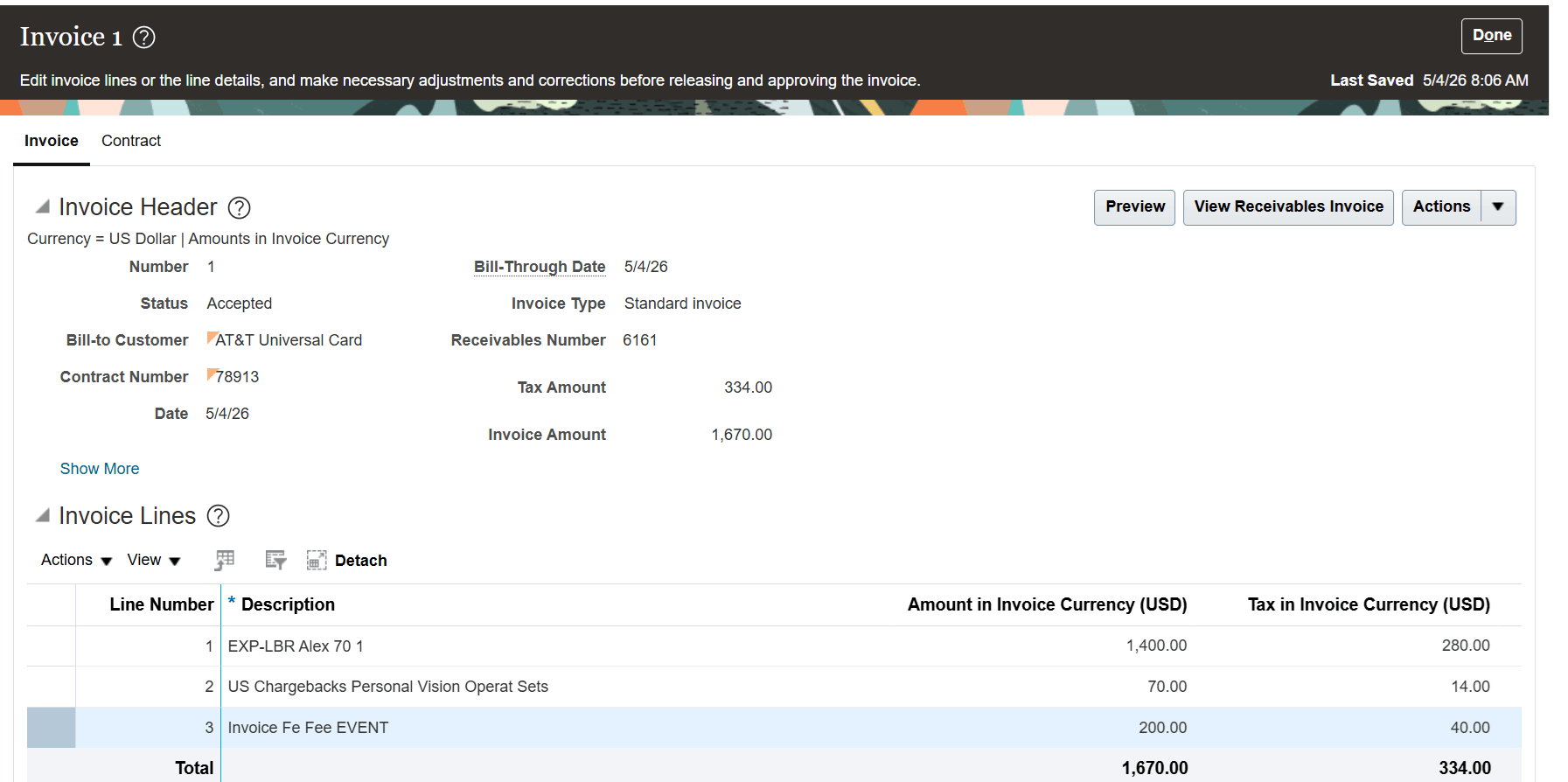
The Invoice Details page, showing an invoice in 'Accepted' status which includes the project costs and billing event.
Two project cost adjustments are now performed:
- A nonbillable adjustment is performed on the nonlabor project cost transaction number 7974827.
- A transfer adjustment is performed on the labor project cost transaction number 7972837, moving the cost to a different task within the same project. The original and reversal project cost transactions are marked as net zero, and a new project cost transaction (number 7974829) is created.
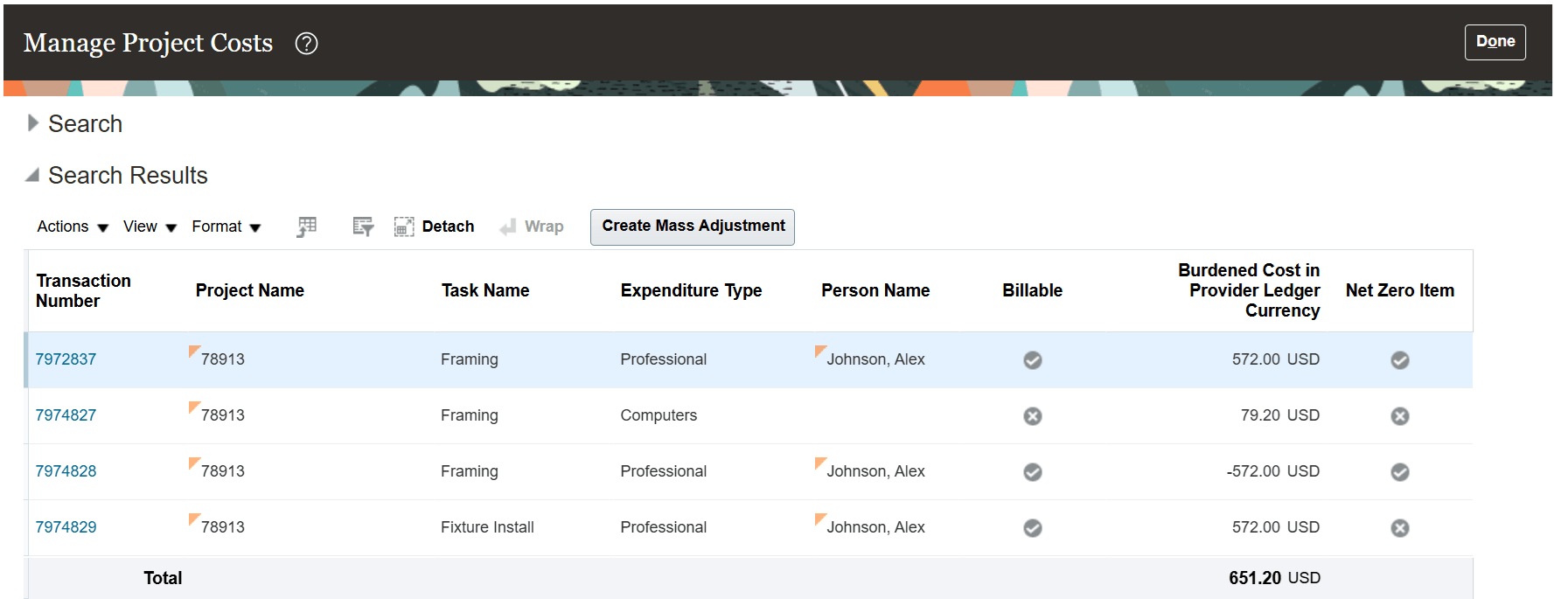
The Manage Project Costs page showing billed project cost transactions after transfer and nonbillable adjustments have been performed.
The event amount for billing event 1 for contract 78913 is now updated from 200 USD to 250 USD, as highlighted below:
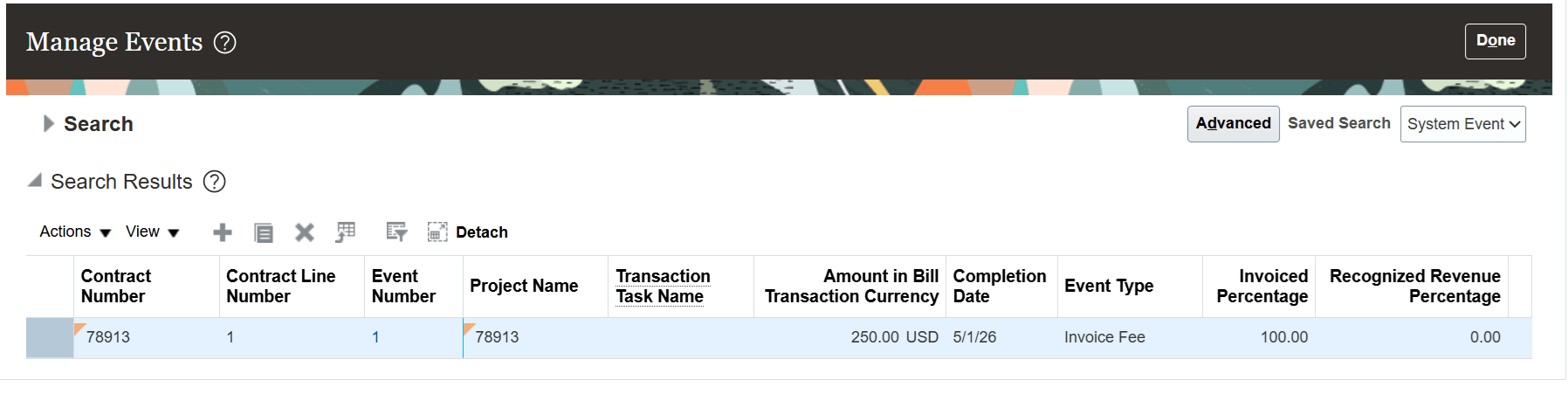
The Manage Events page showing a billing event with an updated amount following invoicing.
The Cancel and Rebill Invoice action is performed on original standard invoice 1. The canceled invoice is created in 'Draft' status because the credit memo approval feature is enabled. Once the canceled invoice is released, the application automatically generates a rebill invoice, and the user is notified of its creation, as highlighted below:
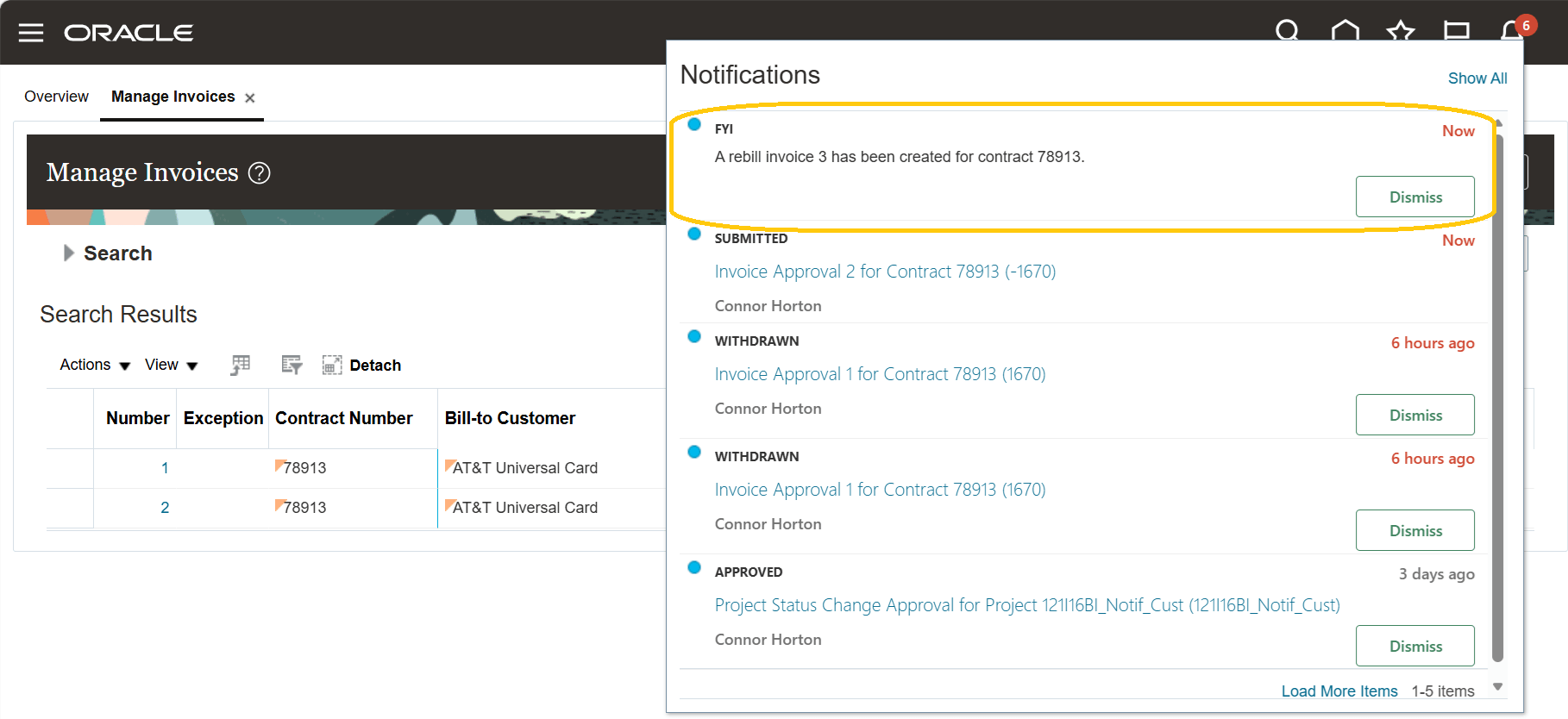
A notification informing the user that a rebill invoice has been created.
Nonlabor project cost transaction 7974827 is not included in the rebill since it is nonbillable. The new labor project cost transaction number 7974829 created from the transfer adjustment is included in the rebill, and the updated event amount is reflected in the rebill invoice too, as highlighted below:
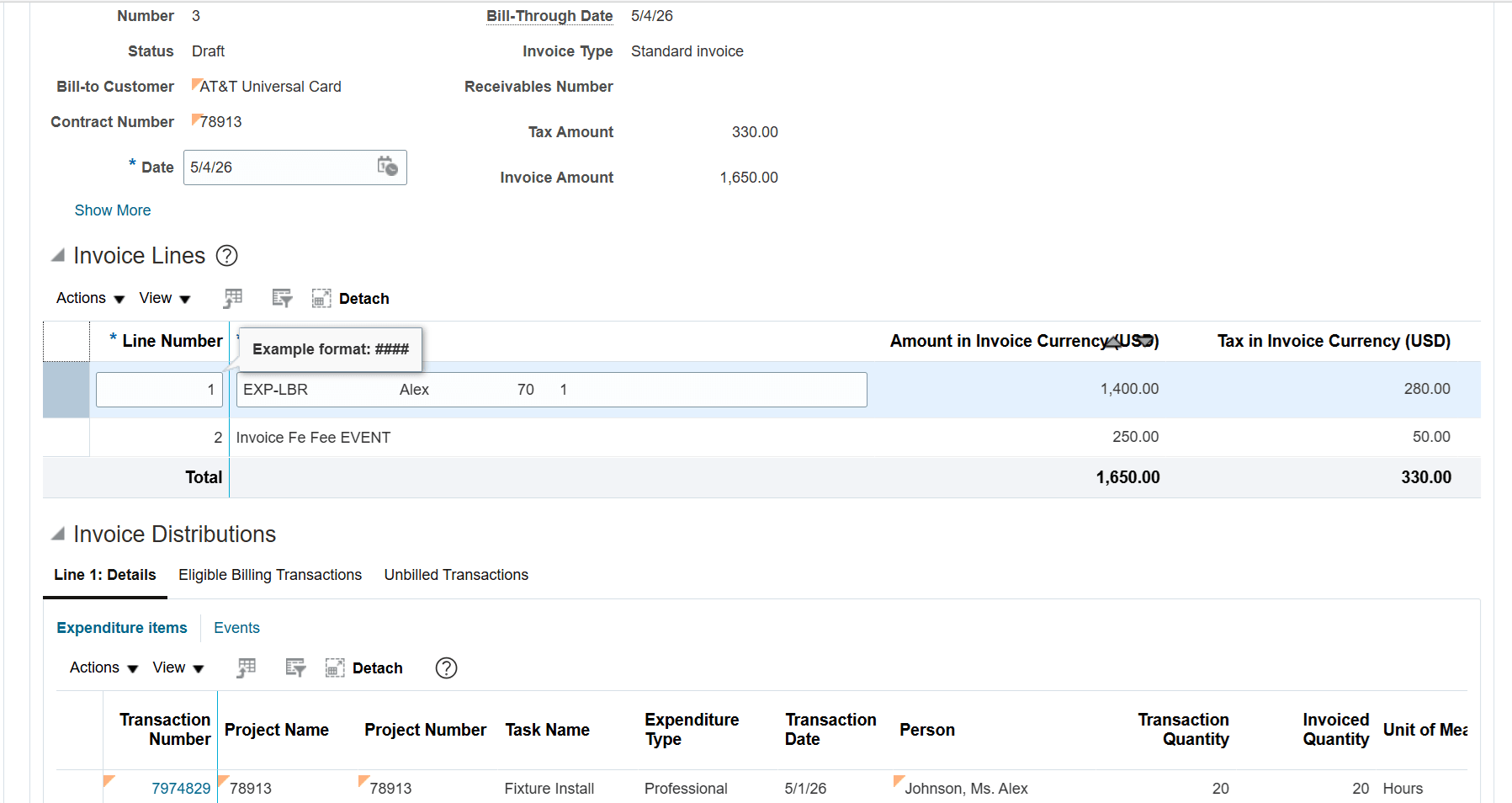
The Invoice Details page showing the rebill invoice incorporating adjusted transactions.
The benefits of this feature are:
- Faster resolution times: Customers receive corrected invoices more quickly, without delays caused by manual re-entry.
- Improved accuracy: Reduces manual errors, ensuring customers are credited and rebilled correctly.
- Clear audit trail and transparency: Linked references between original, canceled, and rebill invoices make it easy to understand what changed and why.
Steps to enable and configure
You don't need to do anything to enable this feature.
Tips and considerations
- The Cancel and Rebill Invoice action is also available for both intercompany and interproject invoices.
- The Cancel and Rebill Invoice action is supported only for standard invoices that are in 'Accepted' status which do not have full or partial credits already applied against them.
- The Cancel and Rebill Invoice action is not supported for standard invoices associated with project contracts that have the Net Invoice option enabled.
- The Cancel and Rebill Invoice action is not supported for prepayment invoices or for standard invoices with prepayments applied.
- Rebills can't be transferred to Receivables until the canceled invoice is in 'Accepted' status in Project Contracts.
- The Cancel and Rebill Invoice action automatically includes adjustment transactions related to transactions on the original standard invoice. For example:
- Approved time card adjustments in Oracle Fusion Time and Labor, such as updates to quantity, task, or expenditure type.
- Project Costing adjustments, such as transfer, split, or split and transfer on project costs.
- Labor schedule changes in payroll costing.
- New project cost transactions incurred for the associated project, or new billing events entered for the project contract can't be added to existing invoice lines in the rebill invoice. Instead, users can create manual invoice lines in the rebill invoice and associate the new project cost transactions or billing events with those lines.
- When a rebill invoice in 'Draft' status is deleted using the Invoice Details, Manage Invoices, or Invoice Overview pages, the user is presented with two options:
- Delete the rebill invoice and regenerate it. The regenerated rebill invoice will have references to the original invoice and the canceled invoice.
- Delete the rebill invoice, after which a standard invoice will be created without references to the original invoice and canceled invoice during a subsequent run of the Generate Invoices process for the project contract, including the transactions that were billed on the rebill invoice.
- When the Cancel and Rebill Invoice action is performed, if there is insufficient balance available in Receivables to apply the full credit memo (for example, due to existing receipt, credit memo applications, or adjustments), the user is presented with a warning message. The message indicates that no balance is available on the original standard invoice in Receivables and that receipts, credit memos, or adjustments must be unapplied in Receivables before the full credit memo can be processed against the original standard invoice.
Key resources
Refer to the Original Invoice and Credit Memo References for Rebill Invoices Receivables feature.
Access requirements
A new functional privilege, Cancel and Rebill Project Contract Invoice, controls the availability of the Cancel and Rebill Invoice crediting action on the Invoice Details page. This privilege is included in the predefined Project Billing Specialist job role.