Program Progress Summary Generator
Reduce time spent on report writing with AI-powered summaries for project programs. Generative AI automatically drafts summaries highlighting key achievements, insights, and recommendations. Program managers can then easily edit and finalize the summaries, saving valuable time.
Program managers can now effortlessly generate comprehensive program status summaries. Simply add the Program Executive Update catalog item to an existing or new report template. The system will automatically refresh data for the new report and produce a detailed summary with a single click. This summary highlights key program metrics, identifies at-risk projects, and offers actionable recommendations. By automating this process, program managers can spend more time on strategic initiatives and less time on report writing.
NOTE: Previously available in Prompt Lab, the 24D Project Program Status Summary Generation feature is now migrated to Fusion AI Agent Studio.
Business benefits include:
- Improved Communication: Deliver concise and informative status reports to stakeholders, fostering better collaboration and alignment.
- Enhanced Insights: Gain deeper insights into project and program performance through AI-generated summaries.
- Increased Efficiency: Streamline status reporting processes, freeing up valuable time for strategic planning and decision-making.
Steps to enable and configure
Use the Opt In UI to enable this feature. For instructions, refer to the Optional Uptake of New Features section of this document.
Offering: Project Financial Management
To be able to access this feature, you need to do the following steps.
1. Enable the FSM opt-in Project Program Status Summary Generation.
2. Enable the required permission groups in the Security Console for each role that you want to use with this feature.
Steps to Enable Permission Groups:
- Navigate to Navigator > Tools > Security Console and click Roles.
- Search for the job role that you want to use for the generative AI feature and select Edit Role.
- On the role Basic Information page, click Enable Permission Groups, and confirm your choice.
- Open the Role Hierarchy step. If needed, go to the Roles and Permission Groups tab and add the required feature-specific duty role and any required runtime duty role.
- Click Summary, and then click Save and Close.
If your organization uses custom roles, add the appropriate feature-specific AI assistance duty role to those custom roles as needed, and then enable permission groups for those roles in the Security Console.
Tips and considerations
- Add the Program Executive Update catalog item to your report template to generate comprehensive, AI-powered summaries.
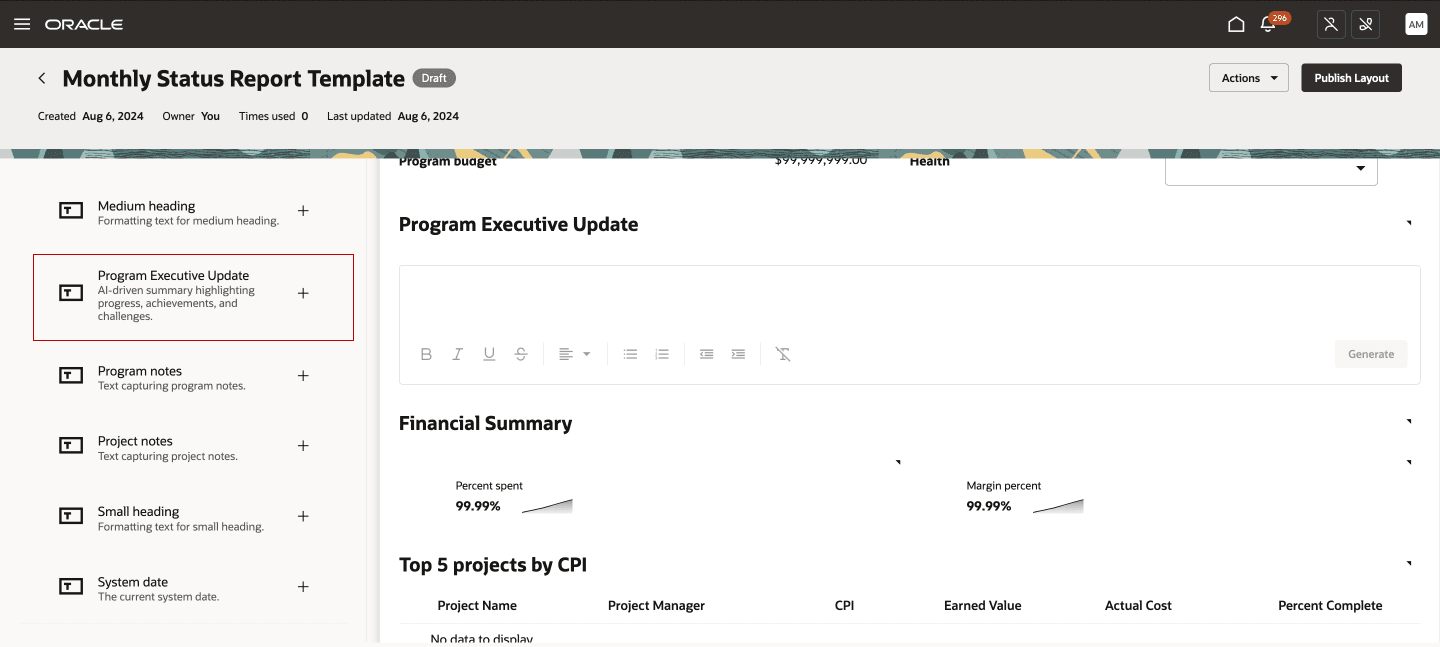
Adding the 'Program Executive Update' Catalog Item to the Template
- To use this generative AI-powered feature, both new and existing customers need to opt-in. Once opted-in, you can immediately start generating summaries.
-
For even more accurate and impactful summaries, ensure your project and program data is complete. Include detailed budgets, forecasts, action plans, and clear project/program names and descriptions.
Key resources
-
For more information about the original release of this capability, see the 24D What’s New topic, Project Program Status Summary Generation.
Access requirements
To use this feature you need the following role and privilege:
- Program Progress Summary Generator (ORA_PJS_PROGRAM_PROGRESS_SUMMARY_GENERATOR_DUTY) duty role.
- Manage Project Program (PJS_MANAGE_PROJECT_PROGRAM) privilege.
These duty roles and privileges are included with the seeded Program Manager job role.