Expenses Agent for itemization and attendees
Use the Expenses Agent to address open expenses that involve itemization and attendee information. Employees can respond by email in natural language to provide attendee information or add missing information to itemized lines. This interaction enables automatic completion and submission of expenses once all required information is provided, streamlining expense reporting and enhancing the employee experience.
Itemization
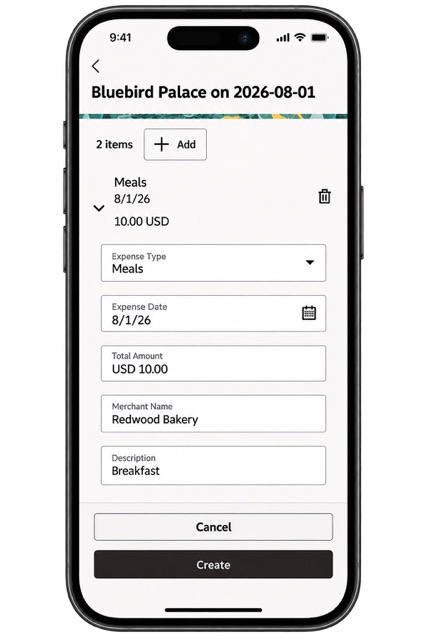
Itemized expense
Attendees
Users can add employees, business guests, or other nonemployees as expense attendees, along with the details required for expense reporting and validation. This example shows an employee captured in the expense.
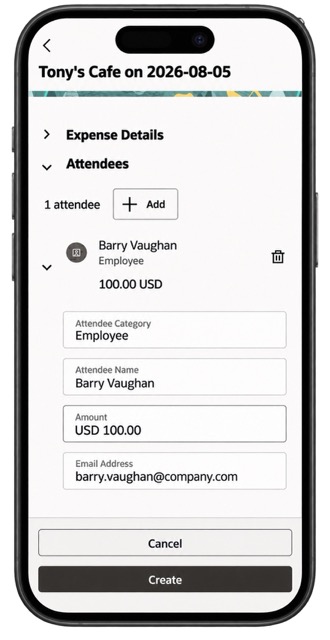
Attendees captured in the expense
Business benefits include:
- Employees can complete expense details more efficiently by managing itemizations and attendees in the Redwood PWA experience. This helps ensure that individual expense components and attendee information are captured accurately before submission.
- The experience highlights missing itemization and attendee information and ensures attendee amounts match the expense total, helping employees comply with company policies, minimize corrections, and submit complete expense reports.
Steps to enable and configure
1. To use itemization, configure the below lookup code and define expense types that support itemization and define the itemization rules according to your business requirements. These configurations determine which expense types employees can itemize and how itemized expenses are validated.
Enable lookup EXM_39813204:
- Log in as user having access to Setup and Maintenance.
- Search for and open Manage Standard Lookups.
- Search for the lookup type ORA_ERP_CONTROLLED_CONFIG.
- On the Lookup Codes page, select Actions > New and enter the following values.
- Lookup Code: EXM_39813204
- Meaning: Enable Itemization (must be unique)
- Description: Enables Itemization experience with Touchless Expenses (optional)
- Enabled: Select the check box
- Save the lookup code.
2. To use attendees, configure the below lookup code and define attendee policies, attendee types, and required attributes according to your business requirements.
Enable lookup EXM_38951654:
- Log in as user having access to Setup and Maintenance.
- Search for and open Manage Standard Lookups.
- Search for the lookup type ORA_ERP_CONTROLLED_CONFIG.
- On the Lookup Codes page, select Actions > New and enter the following values.
- Lookup Code: EXM_38951654
- Meaning: Enable Attendees (must be unique)
- Description: Enables Attendees experience with Touchless Expenses (optional)
- Enabled: Select the check box
- Save the lookup code.
Tips and considerations
- Charging itemized expenses to a project or cost center, adding DFFs or attendees to itemized expenses, splitting itemized expenses, and including family member attendees are planned for a future release.
Key resources
To use these capabilities, first enable Expenses Agent as outlined in the Detailed Adoption Guide feature.
Itemization: Use the details outlined in the Itemizing Expense Type section of the Expense Types document to set up an expense type with itemization.
Automatic Itemization: The Expenses Agent automatically itemizes applicable expenses when itemization is required. For more information, see Expenses Agent Enhancements for Receipt Capture and Matching (26B).
Attendees: Use the details outlined in the Entertainment Expense Policy document to set up an expense type that includes attendees.
Access requirements
No new access requirements.