Electronic Filing of Forms 1099-MISC, 1099-NEC, 1099-G, and 1099-INT using Information Returns Intake System
File Forms 1099-MISC, 1099-NEC, 1099-G and 1099-INT electronically in high volumes through the IRS Information Returns Intake System taxpayer portal. The platform enables online filing of the Form 1099 series at no additional cost.
The Information Returns Intake System (IRIS) system is a modernized system that receives information through two intake channels: IRIS Taxpayer Portal/UI, and IRIS Application to Application (A2A).
IRIS Taxpayer Portal:
It is a free, web-based filing system which allows:
- E-file up to 250 returns at a time.
- Enter manually or by .csv upload.
- Download payee copies to distribute.
Application to Application (A2A):
- Allows bulk submission of large volumes of information returns using software that interacts directly to the IRS using XML format.
- Each XML file not to exceed 100 MB of size.
IRIS system supports two submission formats:
- CSV File Format Support:
Oracle generates IRIS-compliant CSV output files, with each file containing data up to 250 returns (One return refers to one supplier data). If the total number of records exceeds 250, the system automatically splits them into multiple files, each containing a maximum of 250 records.
CSV file formats can be generated for the following forms:
- Form 1099-MISC
- Form 1099-NEC
- Form 1099-G
- Form 1099-INT
How to generate the CSV file Format for 1099 MISC or 1099 NEC or 1099 INT:
- Submit US 1099 Electronic Media Report ESS process.
- For the Media Type parameter, select Comma Separated Value.
- For the Report Output parameter, Select form type.
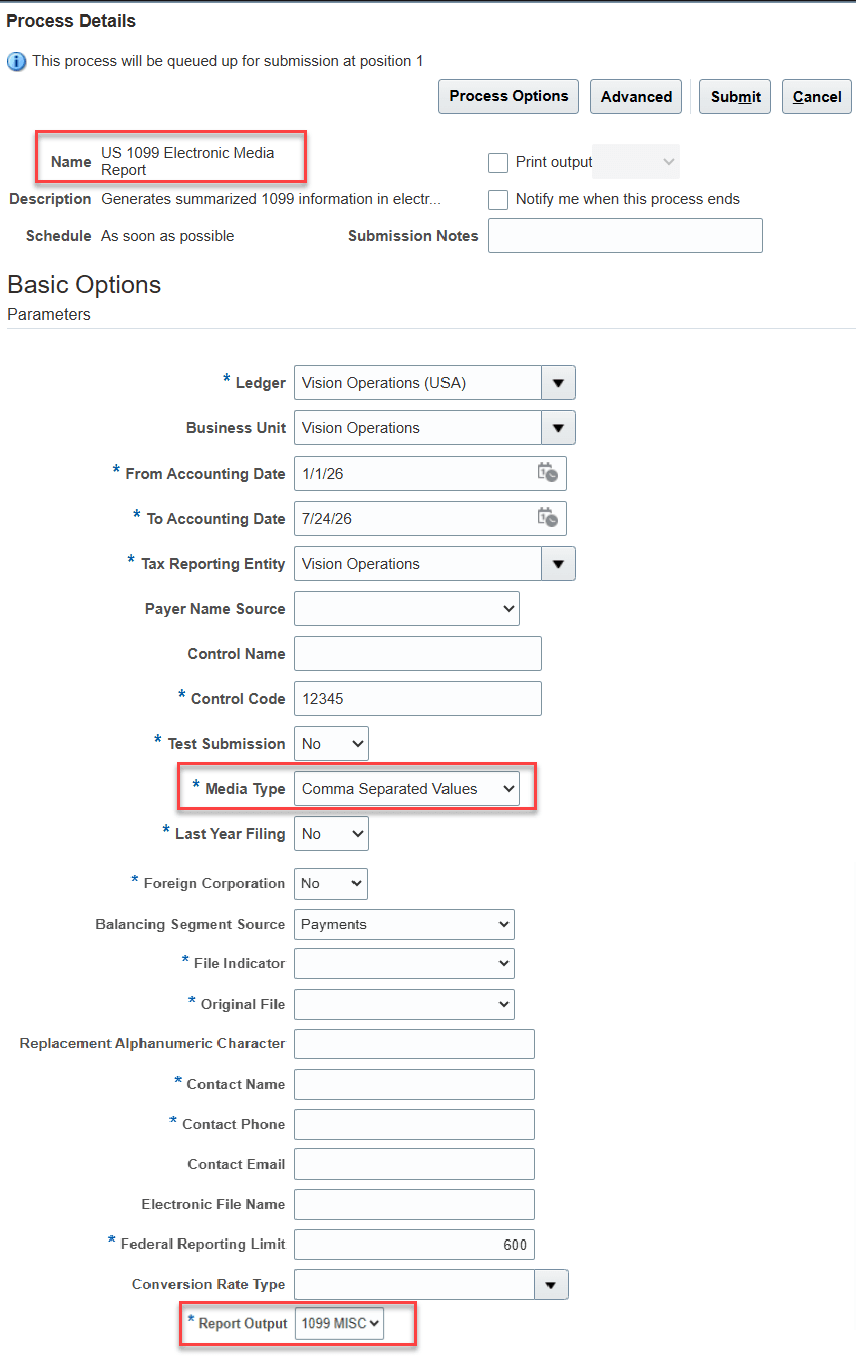
Submit US 1099 Electronic Media Report to generate the CSV file format for forms 1099 MISC, 1099 NECT and 1099 INT
How to generate CSV file format for form 1099-G:
- Submit US 1099-G Electronic Media Report ESS process.
- For the Media Type parameter, select Comma Separated Value.
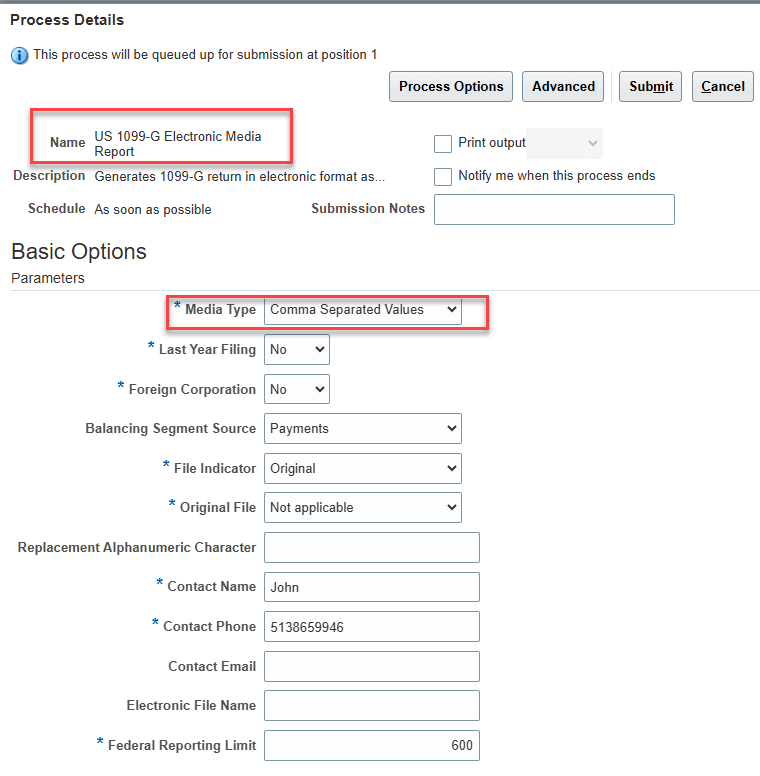
Submit US 1099 G Electornic Media Report for Form 1099-G
2. Application to Application (A2A) Transmission:
Oracle does not support end-to-end Application-to-Application (A2A) transmission to the IRS IRIS system. However, Oracle generates 1099 data in XML format, which customers can provide to their authorized tax partners. Customers are responsible for coordinating with their authorized tax partners to prepare the data in the required submission-ready format and submit it to the IRS IRIS system for processing.
XML file formats can be generated for the following forms:
- Form 1099-MISC
- Form 1099-NEC
- Form 1099-G
- Form 1099-INT
How to generate the XML files for 1099 MISC or 1099 NEC or 1099 INT or 1099-G forms :
- Submit US 1099 IRIS Electronic Filing Process ESS process.
- For the Report Output parameter, Select form type.
- This process will launch the separate child process US 1099 IRIS Electronic File Generation to generate the report ouput for each 100 MB file.
- Download the XML output file from the child process only.
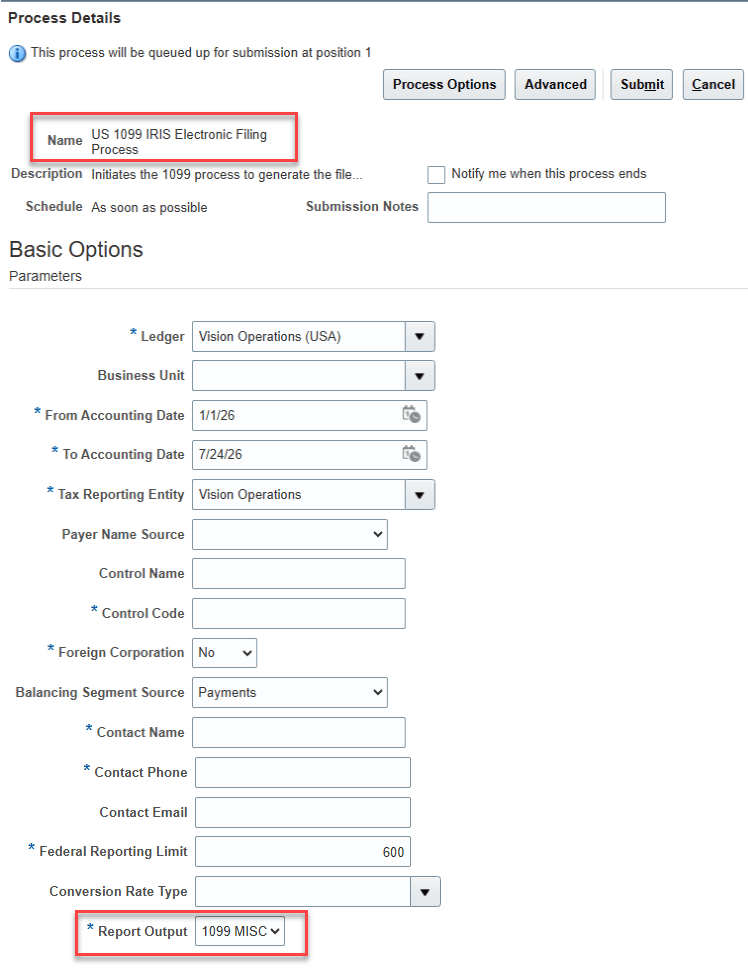
Submit US 1099 IRIS Electronic Filing Process
Changes to the existing US 1096 Report and US 1096 Report for 1099-G:
The US 1096 Report functionality has been integrated into the US 1099 Report and US 1099-G Report ESS processes. As a result, you no longer need to run the US 1096 Report separately to generate Form 1096. Simply submit the US 1099 Report or the US 1099-G Report, and the corresponding Form 1096 will be generated automatically as part of the process.
- Running the US 1099 Report now generates both the detailed Form 1099 output and the corresponding Form 1096 summary.
- Running the US 1099-G Report now generates both the detailed Form 1099-G output and the corresponding Form 1096 summary.
This enhancement streamlines the reporting process by eliminating the need to run the US 1096 Report as a separate ESS process.
The business benefit of leveraging the IRS IRIS portal is reduced administrative workload and the elimination of filing costs, enabling organizations to comply with federal reporting requirements more efficiently.
Steps to enable and configure
You don't need to do anything to enable this feature.
Tips and considerations
- The 1099-INT form has been newly introduced in Fusion Payables application. Currently, support is limited to the following fields:
- Box 1: Interest Income
- Box 3: Interest on U.S. Savings Bonds and Treasury Obligations
- Box 4: Federal Income Tax Withheld on Interest Payments
- Box 8: Tax-Exempt Interest
- As per IRS guidelines, state-level information is optional in the CSV file. The CSV output includes state codes only for states that are enabled for Combined Federal/State Filing (CF/SF). Additionally, the IRS allows a maximum of two state codes to be included in the CSV file. If more than two eligible state codes exist, customers must determine which two state codes to include and remove any additional state codes that are not required in the CSV file.
Currently, Oracle does not support the following state and local-level fields for Forms 1099-MISC, 1099-NEC, 1099-G and 1099-INT:
- State Tax Withheld
- State/Payer State Number
- State Income
- Local Income Tax Withheld
- Special Data Entries
These limitations also apply to the CSV output file.
Access requirements
No new access requirements.