Ledger Agentic Application
Ledger Agentic Application modernizes accounting operations by enabling accountants to delegate work for autonomous execution—combining deeper financial reasoning with policy-driven actions to achieve outcome-driven finance operations. It supports improved close readiness and faster exception resolution as organizations adopt and scale intelligent accounting workflows.
In 26D Ledger Agentic App introduces Fusion Claw - the governed agentic runtime execution layer. Fusion Claw enables Ledger Agentic Application to go significantly further into complex, highest-value aspects of analysis and subsequent actions.
Agentic Applications perform the complex work that can be long-running, multi-step, computationally intensive, and dynamic. It can require research, reconciliation, modeling, optimization, re-planning, and precise enterprise execution. While people define the outcome and enterprise operating envelope: objectives, SOPs, policies, constraints, thresholds, decision rights, approvals, and escalation boundaries.
Working with outcomes
Outcomes are the vehicle for expressing the unit of work an accountant wants to delegate to an agent. They can be goal-oriented—for example, identify all reconciliation breaks caused by manual adjustments and make the appropriate corrections—or research-oriented, such as performing variance analysis, establishing root cause, and preparing an evidence pack.
- Define an outcome as a complete unit of work, such as variance analysis that applies materiality-based thresholds and explains root causes using transactional data and supporting evidence.
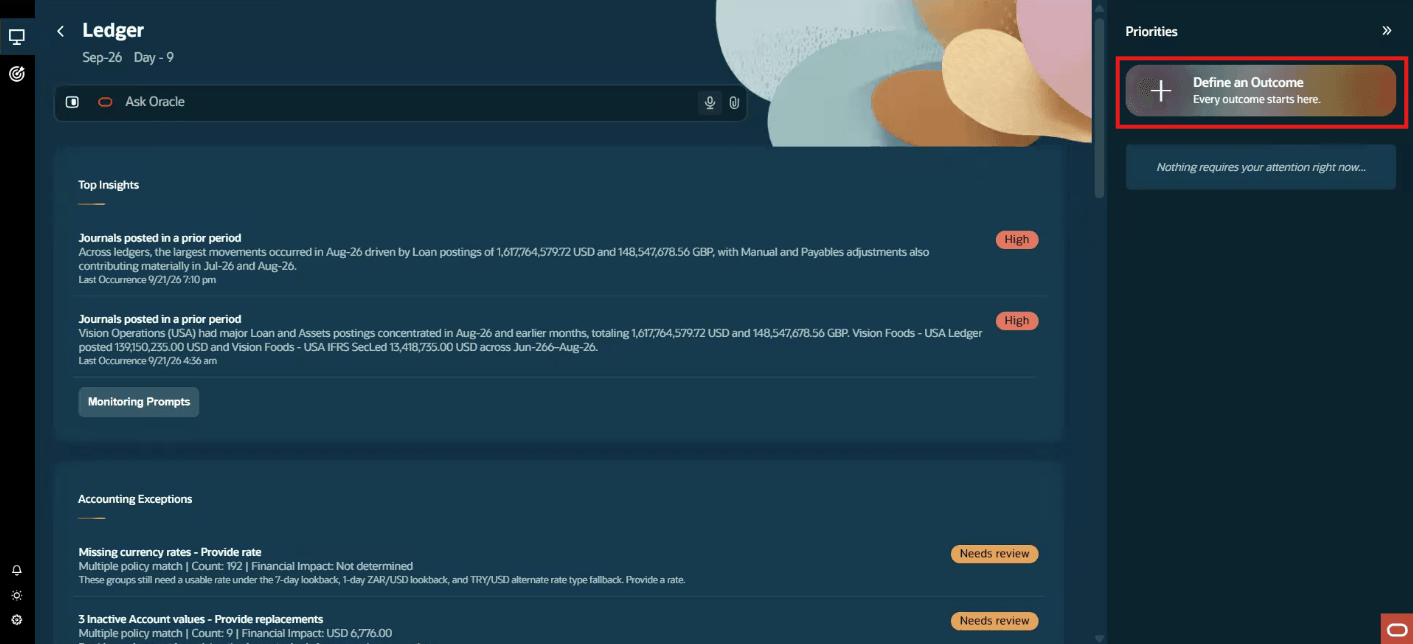
Ledger agentic application - outcomes
- Describe the outcome much like delegating a task to a colleague. This can be complex with multiple intents. Attach instructions, examples of expected explanations, and relevant context as a SOP (standard operating procedure) document, to help produce complete, relevant results as a SOP (standard operating procedure) document.
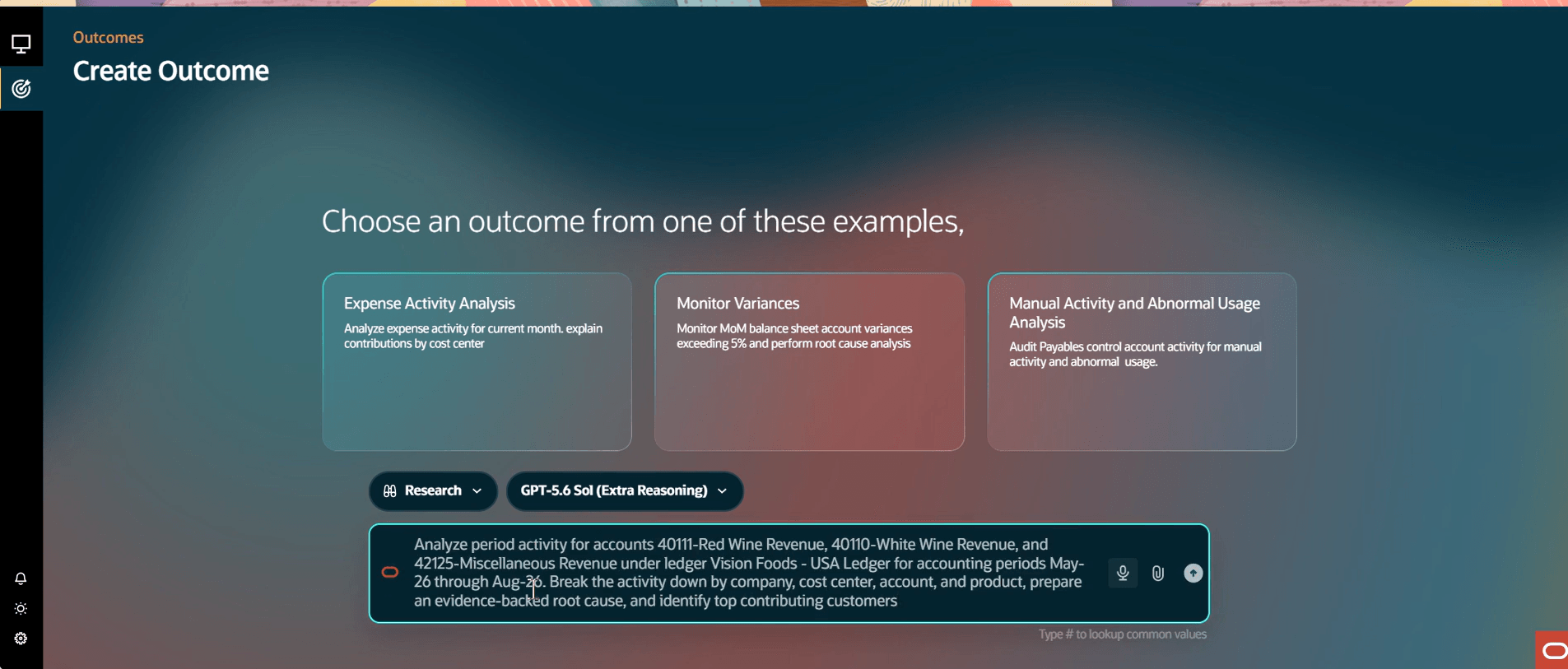
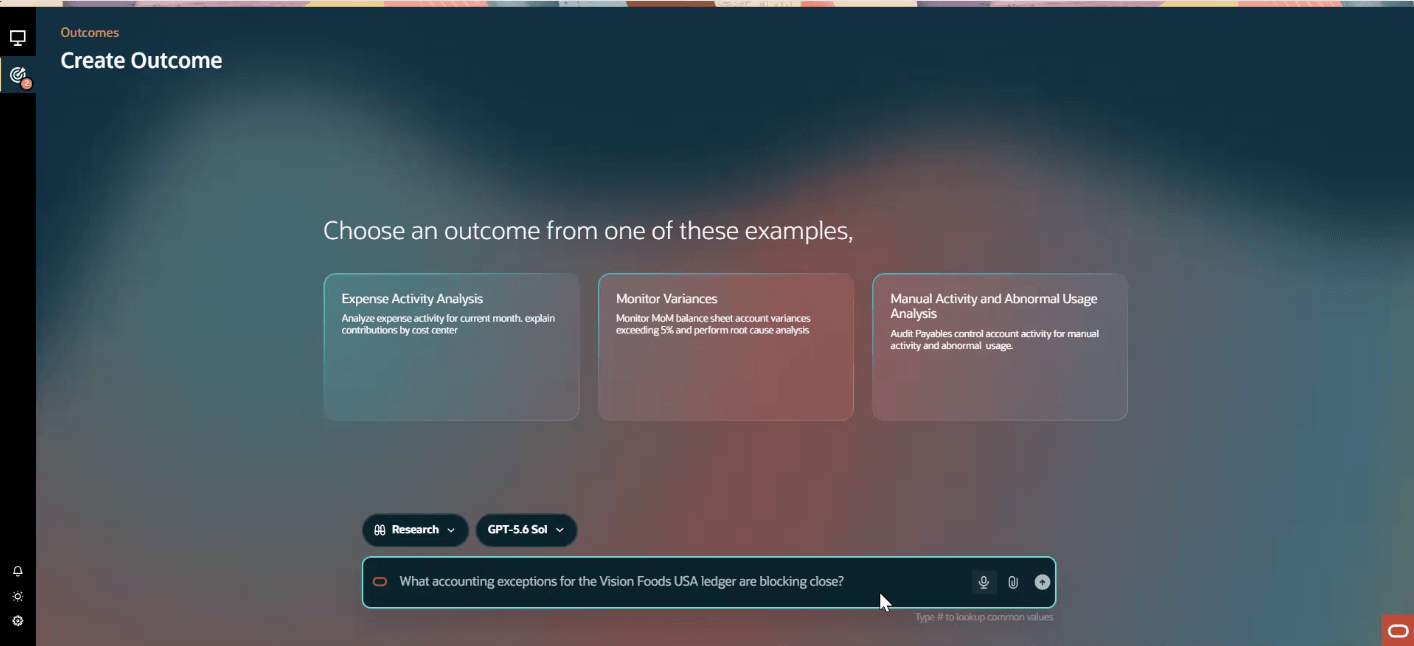
Create outcome
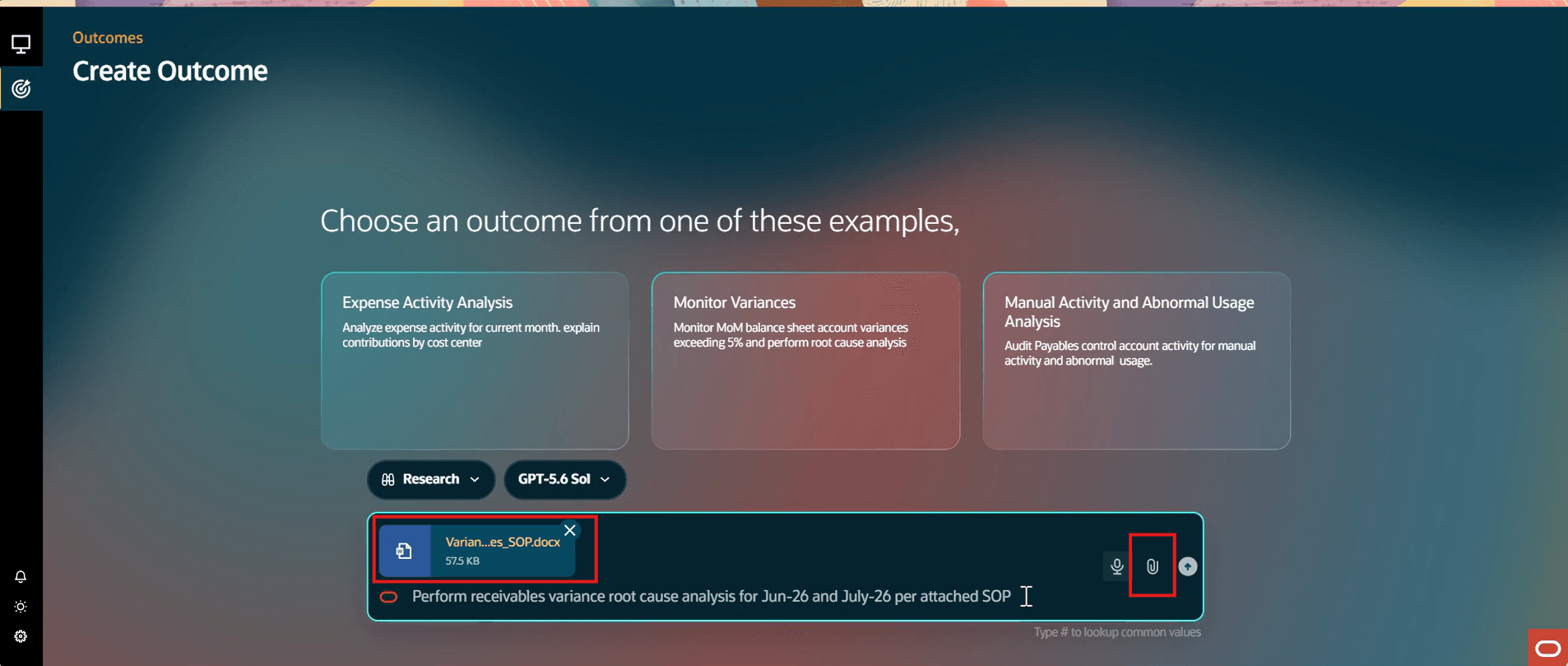
Create outcome with SOP
- Review the planned execution path generated from the outcome prompt before work begins. You can edit or adjust the plan as needed to achieve the intended outcome, then confirm execution. For recurring work, schedule outcomes to run automatically at intervals such as hourly, daily, or on weekdays, enabling an autonomous operating model.
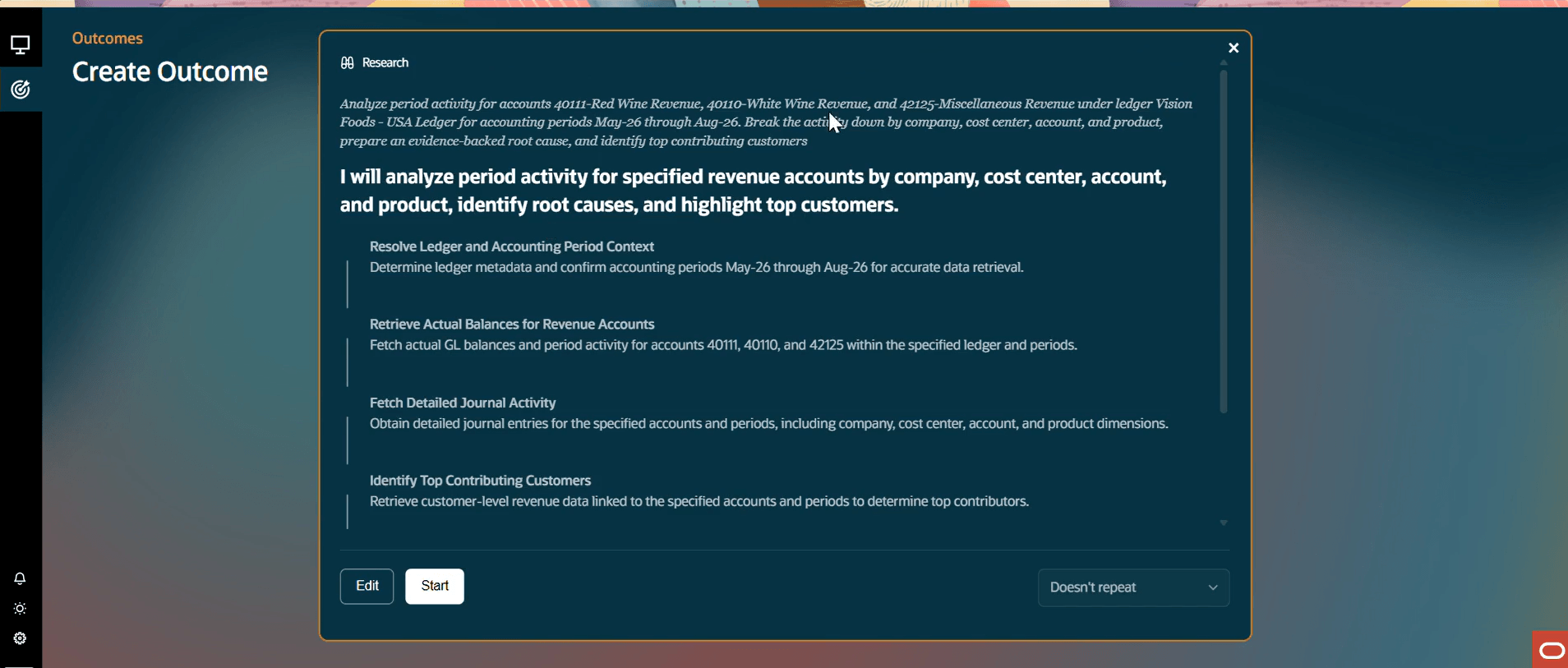
Outcome plan
- Completed outcomes become available for review when the work is finished.
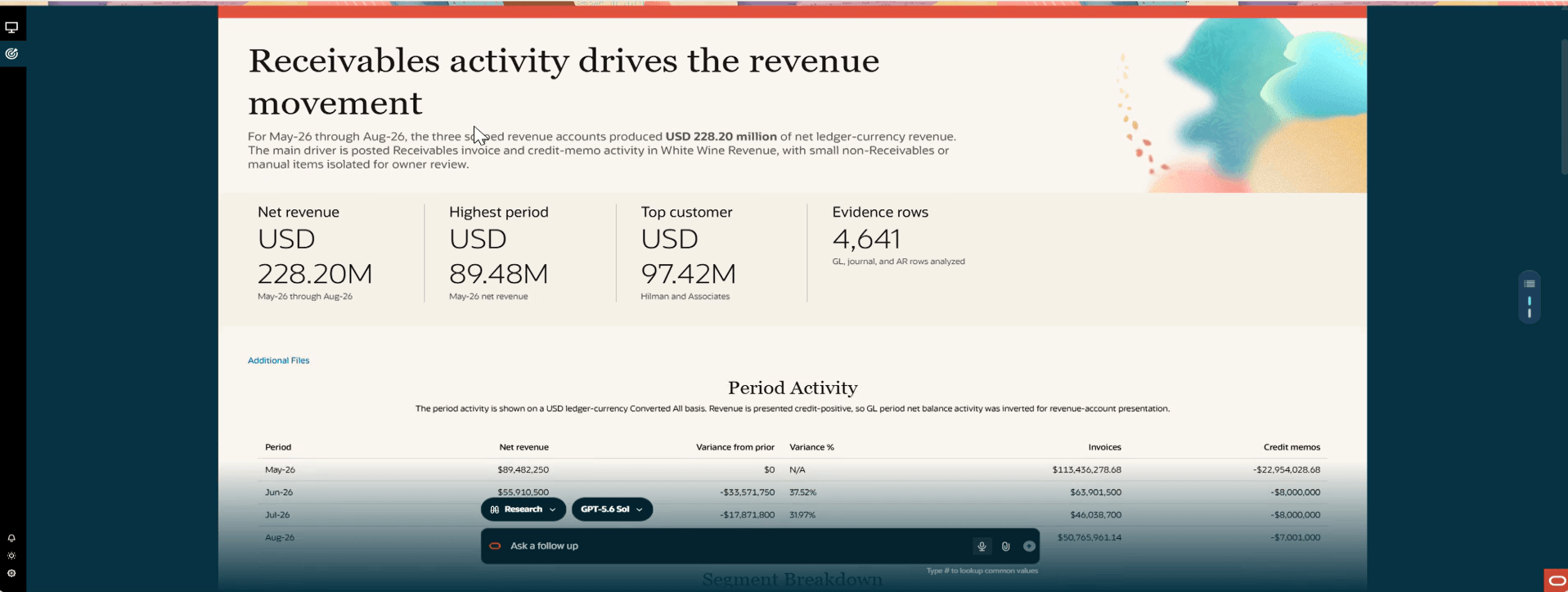
Complete outcome view
- Each outcome includes transactional evidence, root-cause analysis, and supporting evidence coverage as per the SOP.
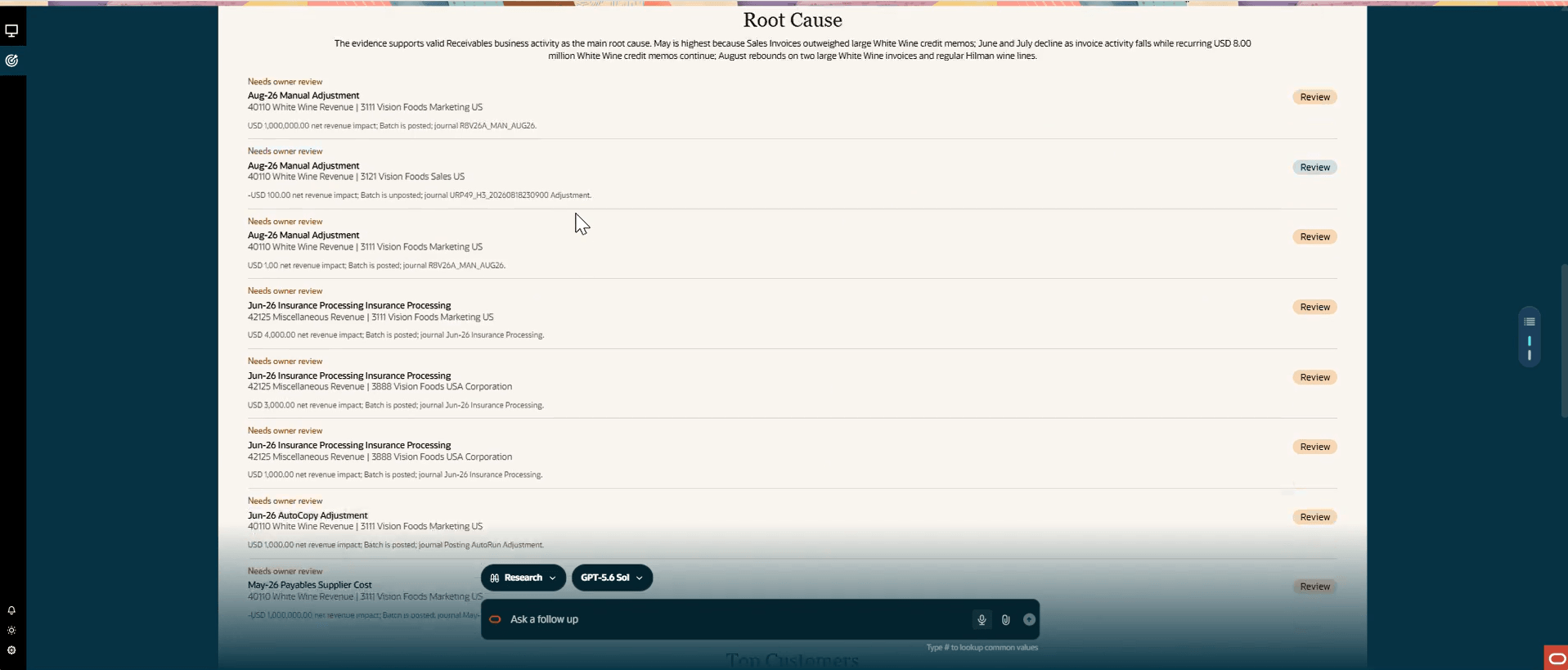
Root cause analysis
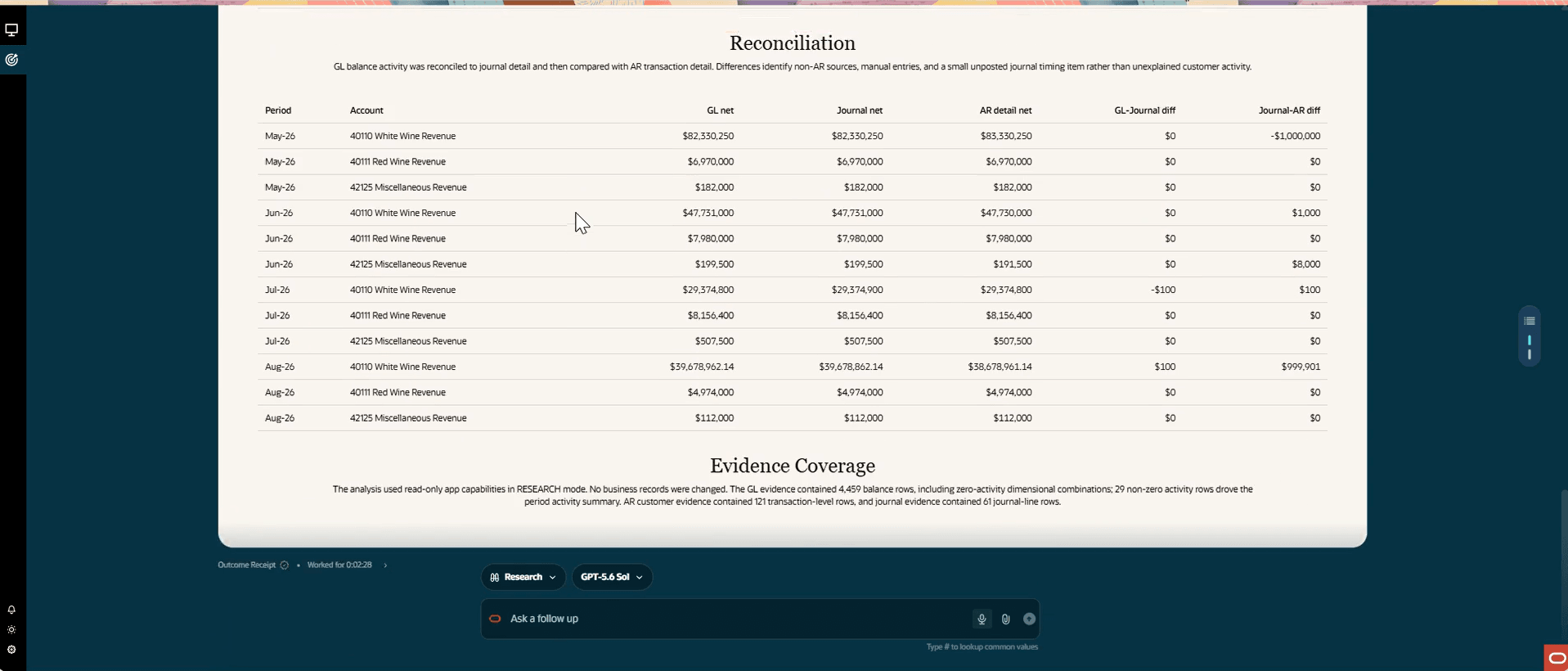
Evidence
Key Capabilities:
The following specialized agent skills help accountants achieve focused, outcome-driven finance operations:
-
Outcome-driven balance and journal analysis
Delegate complex balance and journal investigations through outcome prompts. Analyze approvals, audit trails, anomalies, and activity patterns to surface insights tied to a defined business outcome. Use natural language to express multiple intents, enabling work that goes beyond a single question-and-answer interaction toward broader “art of the possible” outcomes.
-
Accounting health review
Provide a continuous view of accounting processing, exception-resolution metrics, journal-stream metrics, and opportunities for process improvement.
Accounting health review outcome
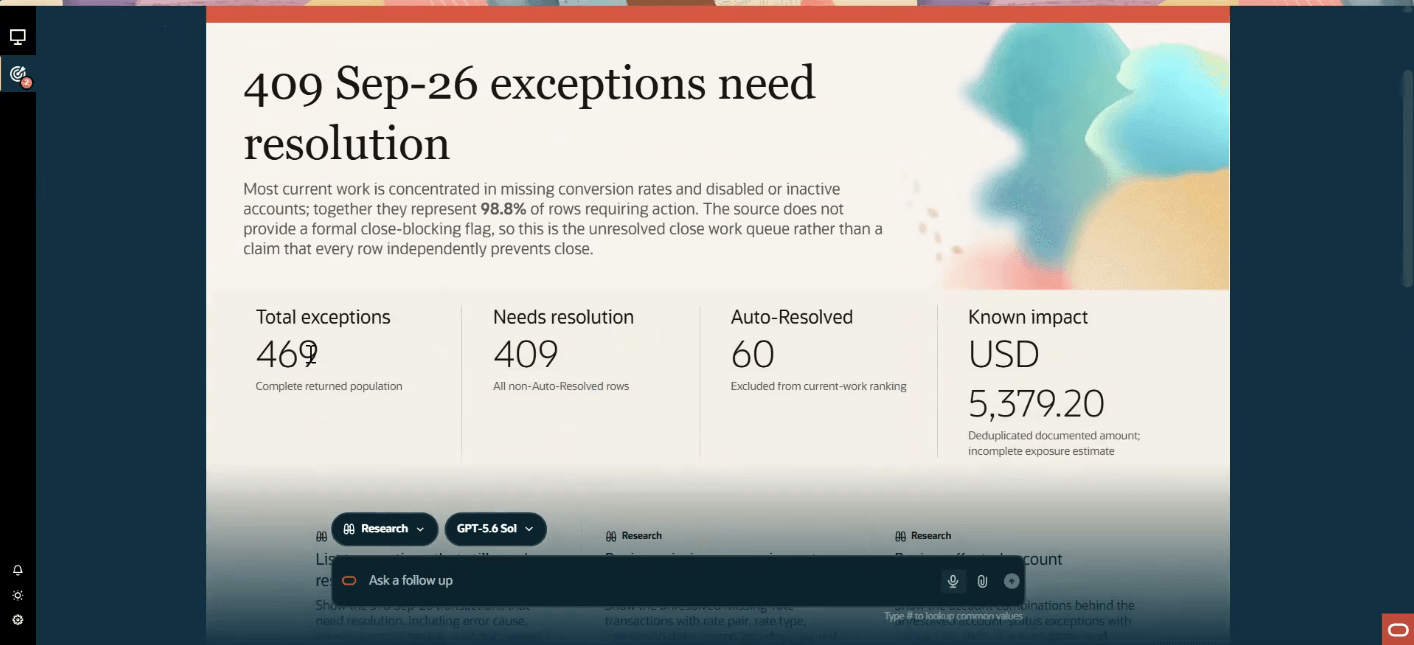
Accounting health results
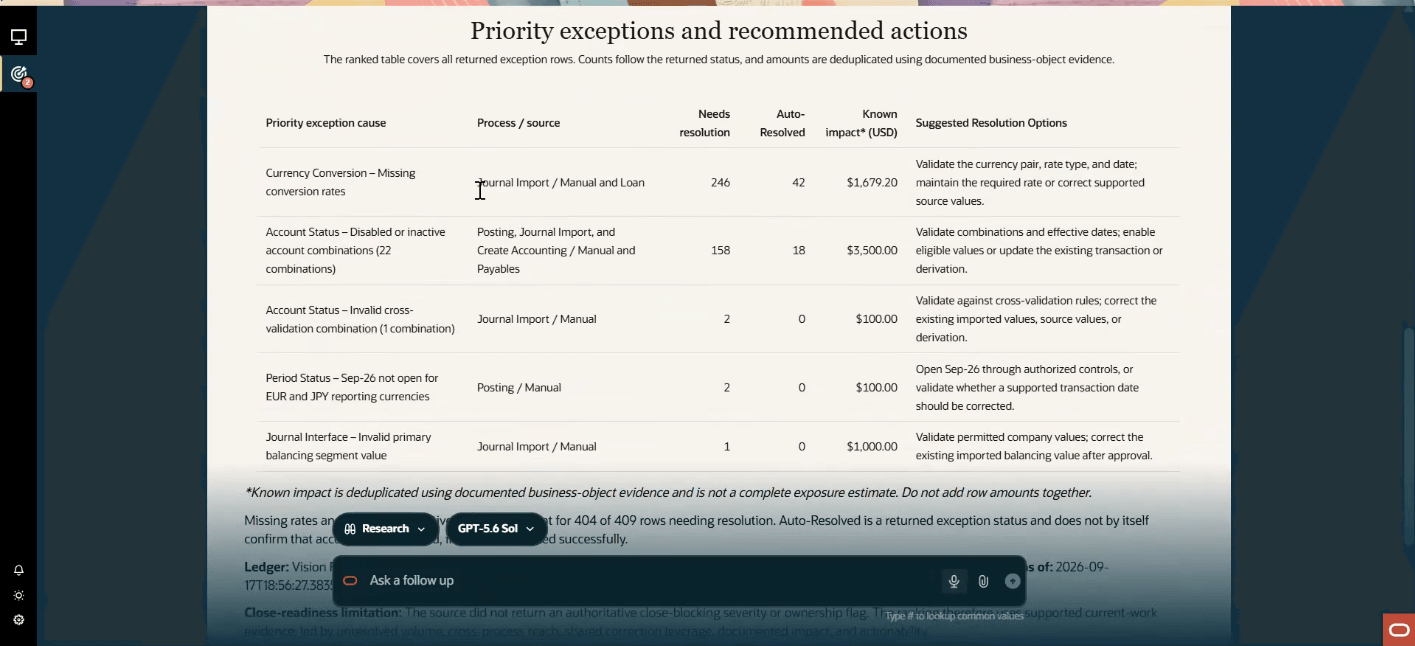
Accounting exceptions visibility
-
Policy-based accounting exception resolution
Use the Accounting policy document as a template.
Detect accounting exceptions and categorize them, using the uploaded policy, as eligible for automatic resolution or requiring accountant review. Continuously surface exceptions for visibility and action, such as journals blocked by missing currency rates or inactive cost centers.
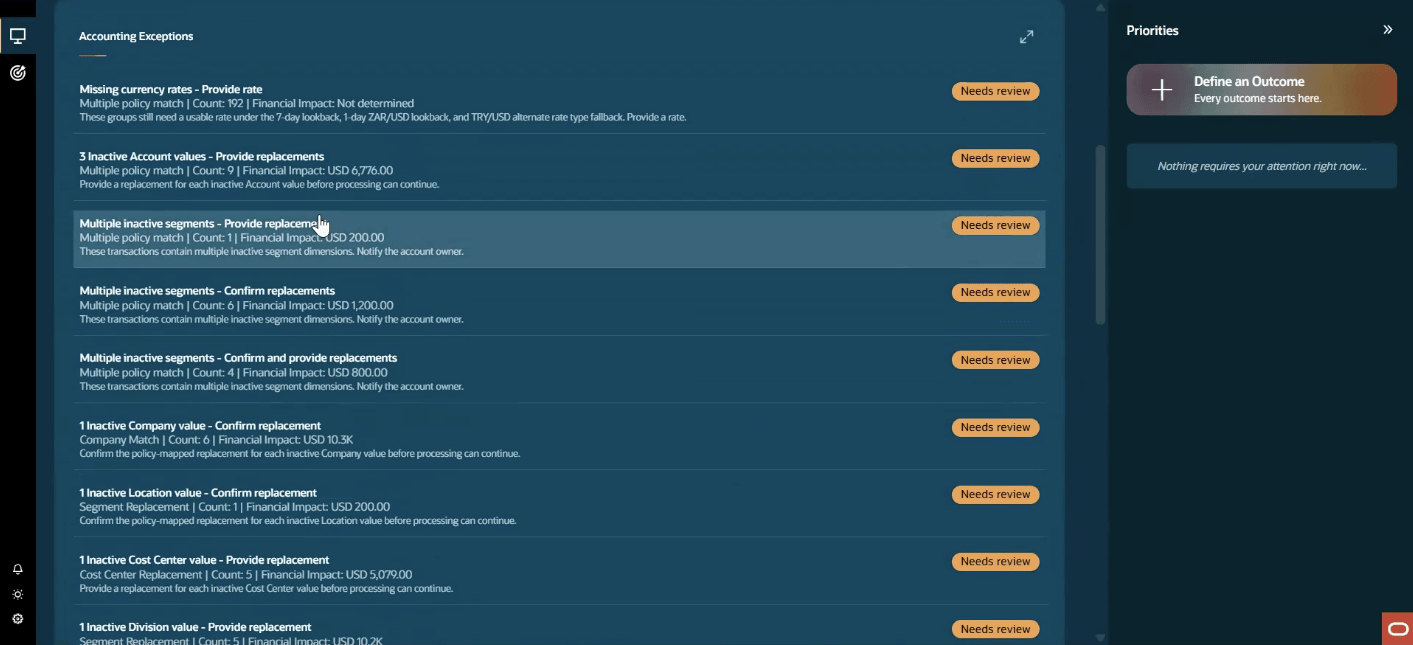
Accounting exceptions needing review
-
Upload an Accounting Exceptions Policy to define correction options for missing currency rates and inactive segment values. Customers can allow policy-approved automatic corrections or retain exceptions for team review.
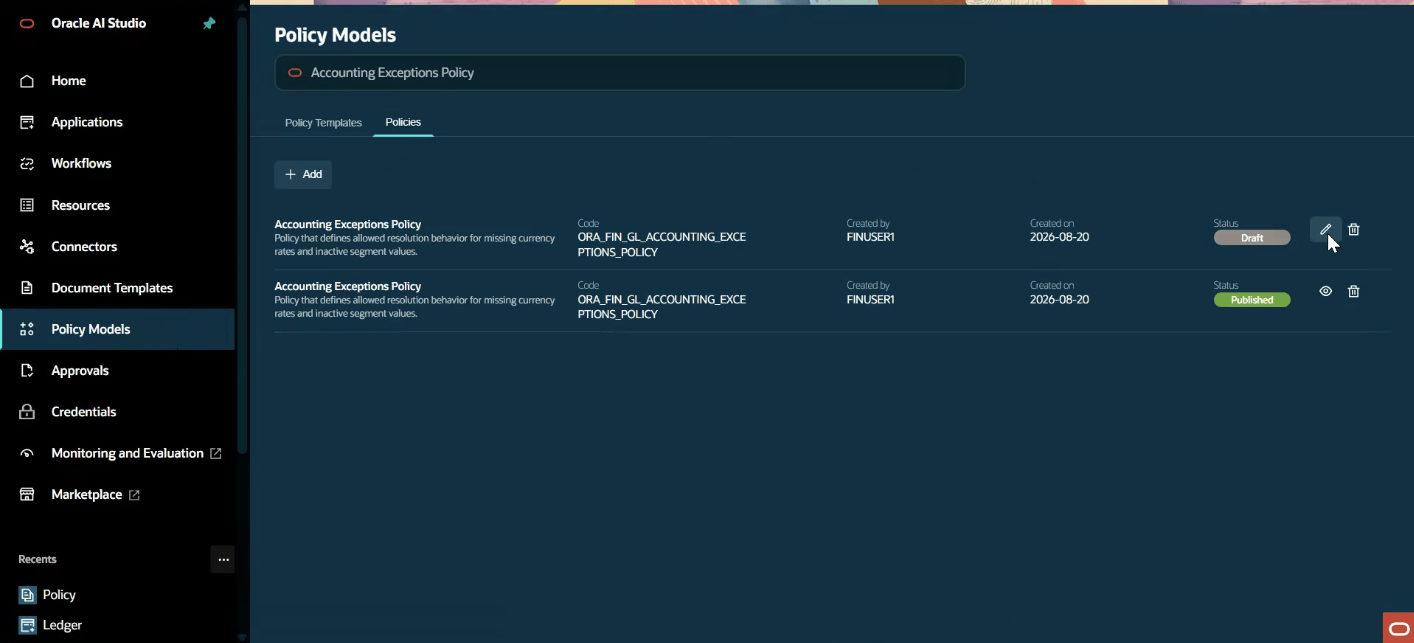
Accounting policy upload in AI Agent Studio
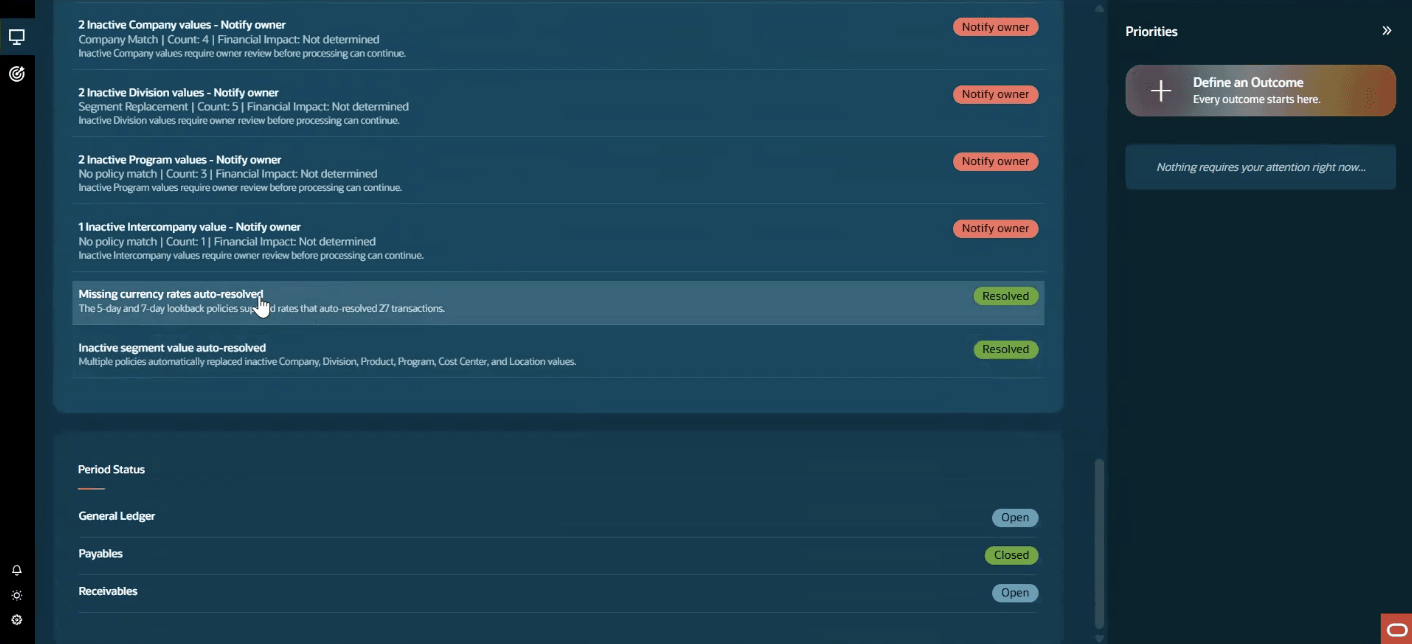
Accounting exception auto-resolved for review
-
Period flux and variance root-cause analysis
Explain and substantiate material Oracle Fusion actual General Ledger balance movements between selected periods using posted journal and supported Oracle subledger evidence. Use this skill for period variance, flux, balance-sheet movement, journal-driver, subledger substantiation requests.
-
Account analysis
Perform a reproducible, evidence-led analysis from a General Ledger account balance to its contributing journals, subledger accounting, and source transactions. Present subledger details that support the accounted result.
-
Account usage evaluation for compliance
Evaluate posted Oracle Fusion actual General Ledger journal lines against seeded and customer account-source policies. Identify governed account-usage findings, assemble General Ledger evidence, govern authorized reversals or account-usage adjustments, and produce a repeatable, audit-ready result.
Business benefits
With Ledger Agentic Application in 26D, accounting teams can:
-
Investigate accounts, balances, and journal activity more deeply to uncover the drivers behind financial results.
-
Identify and explain variances, control-related account usage concerns, anomalies, and issues requiring attention before close.
-
Resolve eligible accounting exceptions in accordance with defined policies, reducing manual effort and accelerating resolution.
-
Apply their own SOPs, instructions, and evidence presentation requirements so analysis and recommended actions reflect their enterprise context and are directly actionable.
-
Continuously assess close readiness and receive actionable insights that support timely business decisions.
Steps to enable and configure
Existing users of Ledger Agent / Ledger Agentic Application -
- Existing Ledger Agent or Ledger Agentic Application users do not need to take additional steps to use Outcomes and outcome-driven analysis.
- To enable Accounting Exception Resolution, assign the Ledger Agentic Application Assistant role to the relevant users. Refer to the Customer Connect enablement guide
New users of Ledger Agentic Application -
- If you have not previously enabled Ledger Agent or the Ledger Agentic Application, first ensure the Oracle-managed prerequisites are in place. When you access the Ledger Workspace, a message will guide you to raise a service request with Oracle. After enablement, grant the required roles and data access as described in the Customer Connect enablement guide.
- Assign the Ledger Agentic Application Assistant role to provide access to all 26D capabilities.
Tips and considerations
-
Define outcomes for complex analysis using detailed prompts. Attach SOP document to provide additional organizational context, clarify instructions, and improve the quality of the supporting evidence.
-
Use 'Ask Oracle' for simpler, single-turn inquiries and insights.
-
Supporting details are available for Payables, Receivables, Fixed Assets, and Accounting Hub.
-
The conversational experience is currently available in English.
-
Responses are based on the Oracle Fusion Applications data that the user is authorized to access through assigned roles and privileges.
-
Accounting process exception resolution currently supports Journal Import and Posting exceptions. Automatic resolution is possible for exceptions relating to missing currency rates and inactive / end-dated segment values.
Key resources
Access requirements
Existing users of Ledger Agent / Ledger Agentic Application -
- Existing Ledger Agent or Ledger Agentic Application users do not need to take additional steps to use Outcomes and outcome-driven analysis.
- To enable Accounting Exception Resolution, assign the Ledger Agentic Application Assistant role to the relevant users. Refer to the Customer Connect enablement guide
New users of Ledger Agentic Application -
- If you have not previously enabled Ledger Agent or the Ledger Agentic Application, first ensure the Oracle-managed prerequisites are in place. When you access the Ledger Workspace, a message will guide you to raise a service request with Oracle. After enablement, grant the required roles and data access as described in the Customer Connect enablement guide.
- Assign the Ledger Agentic Application Assistant role to provide access to all 26D capabilities.