Payables Period Close Workspace
Use the Payables Period Close Workspace to achieve a timely, controlled, and explainable Payables close. For the selected ledger and accounting period, the workspace brings together invoice, payment, and period status to establish the current close posture, identify what is preventing progress, and direct attention to the work that matters most.
The workspace transforms complex close preparation into decision-ready work. It organizes related exceptions, evaluates their effect on close readiness, and presents the supporting business and transaction evidence needed to understand why each issue matters. Priority Actions focus your team on the most consequential work, while Ask Oracle enables you to investigate issues in context, understand their cause and close impact, and determine the appropriate next step.
Every recommendation and action is shaped by your organization’s approved standard operating procedure. Close milestones, materiality thresholds, prerequisites, responsible owners, communication recipients, confirmation requirements, and authority boundaries determine whether work can be recognized as complete, a supported action can be prepared for confirmation, or an exception must be routed for human review. This governed approach makes clear not only what should happen next, but why that path is appropriate.
From this shared and governed workspace, your close team can coordinate responses, confirm supported actions, and progress through the close sequence by opening the next Payables period, sweeping eligible unaccounted transactions as needed, and closing the current period when the required conditions are met. Throughout the process, the workspace maintains visibility into the source information used, the governing rules applied, the decisions and actions completed, and the work that still requires attention.
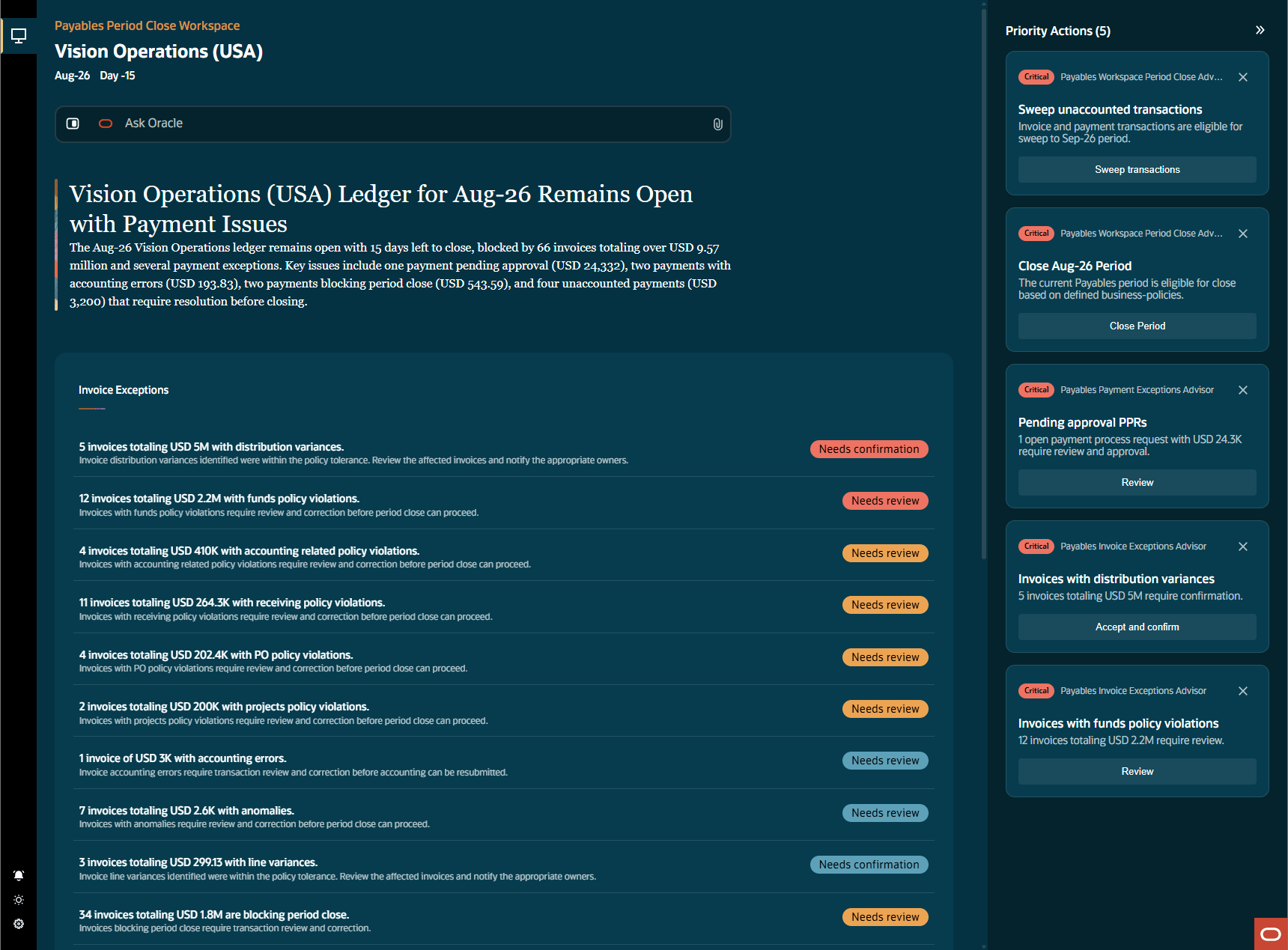
Payables Period Close Workspace
These are the business benefits:
- Accelerated period close: Centralize close readiness, exception investigation, guided actions, and status communication so teams can address issues sooner and move efficiently through close activities.
- Clearer close priorities: Highlight important work with its urgency, monetary impact, and recommended next step so teams can focus on issues that could delay the close.
- Stronger financial control: Apply customer-approved standard operating procedure rules, prerequisites, access controls, and confirmations to guide actions through a controlled close process.
- Faster issue resolution: Bring transaction evidence, Ask Oracle explanations, review paths, and contextual communications together to reduce time spent researching issues and coordinating responses.
- Improved team accountability: Clearly distinguish completed actions, actions awaiting confirmation, and items requiring human review so teams can understand what happened, what remains, and where a response is needed.
Steps to enable and configure
You don't need to do anything to enable this feature.
Tips and considerations
- Select the appropriate ledger and accounting period before reviewing close readiness or taking action. The workspace refreshes its summaries, exception groups, Priority Actions, and Ask Oracle context for the selected scope.
- Keep your standard operating procedure current and review the configured rules whenever close policies, milestones, thresholds, or responsible contacts change.
- Review the supporting transactions and confirmation information before submitting an action that changes invoice, payment, or period status.
- An action can remain unavailable until its required milestone, prerequisite, access, transaction state, and standard operating procedure conditions are satisfied. Review the explanation provided in the workspace before proceeding.
- Use 'Notify' to communicate the selected issue, close impact, requested response, and timing to the appropriate contact. Review recipients and message content before sending when confirmation is required.
- Follow the guided period close sequence. Open the next Payables period before sweeping eligible transactions, and complete required exception and sweep activities before closing the current period.
- Ask Oracle responses reflect the business information available to the workspace and the user's authorized data access.
Access requirements
Access to new feature components and pages are managed through specific security artifacts tailored to the underlying design requirements. This table shows the privileges required to grant access to the relevant pages. Make sure you’ve finished all necessary prerequisites.
|
Privilege Name |
UI access |
View Access |
Edit Access |
|
Manage Payables Period Close Workspace |
Yes |
Yes |
Yes |
|
View Payables Period Close Workspace |
Yes |
Yes |
No |