Payables Agent for invoice ingestion, compliance and control
The Payables Agent delivers automation and industry best practices across the entire invoice lifecycle, enabling near-touchless processing. By drastically reducing manual intervention, organizations minimize processing errors, maximize operational efficiency, and empower finance teams to refocus on strategic activities. Over time, the Payables function shifts from a traditional cost center to a value-generating engine driving faster cycle times, capturing early payment discounts, and preventing capital leakage through advanced exception management and anomaly detection.
In this release, we are introducing enhanced Payables Agent capabilities for touchless processing, including GenAI-powered multilingual support, global e-invoicing compliance, stronger ingestion, and unified exception management. Policy definitions can now be generated automatically from uploaded policy documents, simplifying internal-control setup. The Invoice List delivers intelligent inquiry, prioritized exception resolution, and direct navigation to targeted invoice corrections, while unified training across structured and unstructured documents improves usability and consistency. The reimagined Supplier Portal enables suppliers to create and monitor invoices and payments with minimal manual effort. We are also introducing the Payables Period Close Workspace, which brings period-close processing into one governed workspace—grouping work into actions, surfacing focused invoice and payment exception details, and routing actions or Explain requests through Ask Oracle in accordance with customer-updated standard operating procedures.
This table summarizes the new capabilities and their related user experiences.
| Capabilities | Experiences |
|---|---|
| Payables Period Close Workspace | Use a Generative AI-powered workspace to manage Payables period-close activities from a single experience. Review actions, investigate invoice and payment exceptions, and use Ask Oracle to support issue analysis and resolution. |
| Actionable Insights | Review prioritized recommendations based on recurring invoice-processing patterns, including frequently overridden anomalies, repeatedly released holds, recurring defaulting failures, and invalid policy-detail attributes. |
| Capture Configurations | Use the Document IO Integration Service endpoint available in Document Receiving Endpoints to submit invoice documents for automated ingestion and processing. |
| Domain Value Mappings | Define and manage custom domain value mappings to translate external invoice values into corresponding Oracle Payables values. Bulk upload, download, review, and maintain mappings using determinants such as supplier, country, service provider, or document format. |
| Compliance and Control – Matching Controls | Define more granular matching policies using business attributes such as Business Unit, Purchasing Category, Legal Entity, and Currency. Use these policies to determine how matched invoices are compared with purchase orders and when matching variances require additional action. |
| Compliance and Control – Exceptions | Configure predefined resolution paths for supported invoice import exception patterns to reduce manual correction and improve invoice processing automation. |
| Document Training Data Migration | Export and import fingerprint-based document training data between environments. Transfer trained attribute mappings while validating potential conflicts before existing learning is overwritten. |
| Invoice List | Query invoices using additional status attributes, including Paid Status, Workflow Approval Status, Account Coding Status, Funds Status, and Validation Status. |
To achieve Touchless Payables, organizations can streamline invoice processing, strengthen compliance and controls, and enable faster, more intuitive resolution of exceptions. The following sections describe the redesigned user experiences and the configuration requirements that support these outcomes.
Insights
Payables Insights expands beyond invoice-processing visibility to provide policy-definition recommendations that can help improve touchless invoice processing. Instead of process administrators manually reviewing invalid attribute definitions or manually monitoring for recurring processing exception patterns. Users receive prioritized insights that provide recommendations for recurring processing patterns or errors in policy details that can affect invoice processing. It identifies frequently overridden anomaly conditions, holds that are repeatedly released without an invoice change, and recurring defaulting failures. Process administrators can use these recommendations to evaluate and refine anomaly conditions, hold tolerances, and defaulting rules to reduce manual touch processing.
Configurations for capture
Document receiving endpoints
Document Receiving Endpoints tab now exposes the new Document IO Integration Service endpoint, enabling users or upstream systems to submit invoice documents directly for automated ingestion and processing. This supports multiple document formats and helps streamline the movement of supplier invoice documents into the processing flow without relying only on manual upload channels.
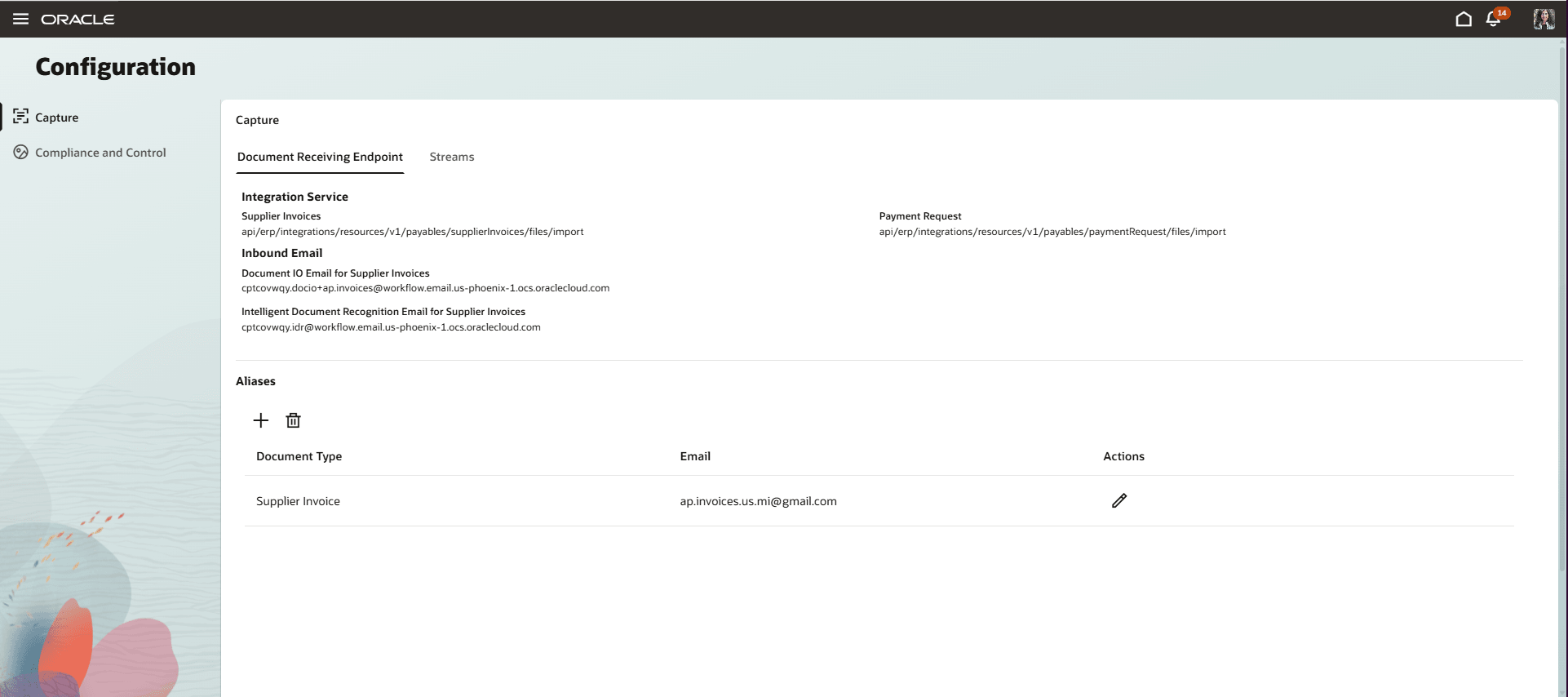
Document Receiving Endpoint tab
Domain value mappings for Payables Invoices
Define and manage custom domain value mappings to translate external invoice values to Oracle Payables values across invoice sources and formats. You can bulk upload user-defined mappings, including the attribute, source and target values, and applicable determinants such as supplier, country, service provider, or document format such as UBL, OAG etc. You can also download, review, and maintain these custom mappings through a centralized user interface.
During setup, users can prepare mappings offline and upload them in bulk instead of creating each mapping individually. After upload, the mappings are available for review in the application. Users can update values as business requirements change, and manage mappings for different invoice scenarios from a single place. This capability provides greater flexibility to accommodate customer-specific invoice values and helps reduce mapping-related processing errors.
Compliance and control
In the current release the compliance and control architecture introduces the ability to define policies for two different areas.
- Matching Controls: This is a new extension under Invoice Controls. It allows flexibility in determining how matched invoices are compared to purchase orders and whether a violation was observed during matching.
- Exceptions: New addition to the Compliance and Control architecture that supports automation of certain exceptions observed during import of invoices into the Payables application.
Matching controls
The Feature modernizes invoice tolerance configuration by bringing matching controls into the Compliance and Controls. Instead of navigating multiple setup pages and maintaining tolerance templates, users can define matching rules. The enhancement supports more granular tolerances using attributes such as Business Unit, Purchasing Category, Legal Entity, and Currency, helping reduce unnecessary invoice holds while maintaining stronger control over meaningful variances. Existing supplier-site and Business Unit tolerance configurations continue to work, while these rules can provide more targeted tolerances and, where applicable, automatically release holds that fall within the more specific policy tolerance.
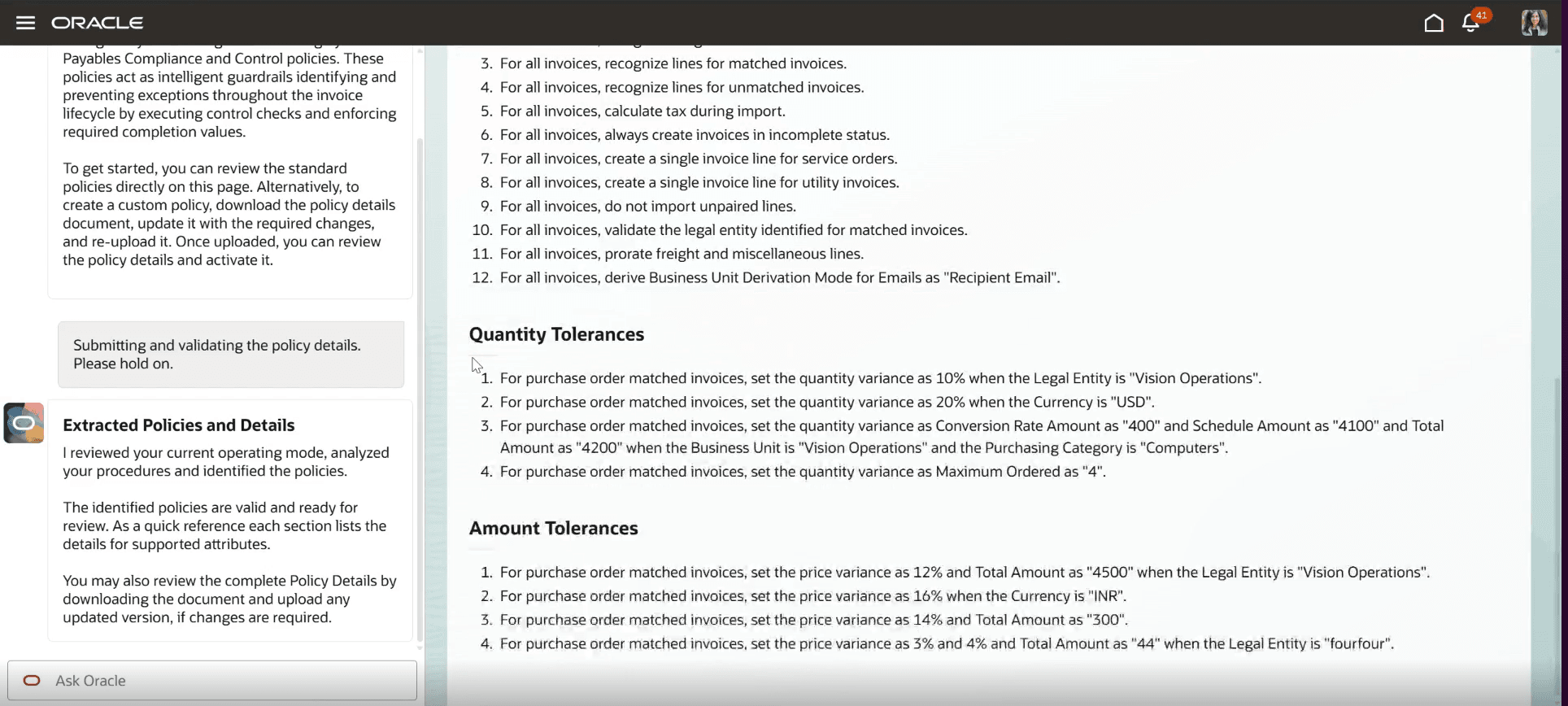
Compliance and Control: Matching controls & tolerances
Exceptions
This feature streamlines the import lifecycle by introducing Automated Exception Resolution, which auto-corrects import rejections by presenting users with predetermined remediation options for specific exception patterns. By selecting the resolution path that best fits their business process, users can significantly reduce manual intervention and accelerate invoice processing.
The feature supports three exception patterns with predefined resolution paths, helping auto-resolve more than 60 import rejections.
Details on these patterns and their corresponding resolution paths are outlined below:
| Exception Pattern | Descriptions | Supported Auto Resolution Paths |
|---|---|---|
|
Amount Precision |
Amount precision does not match the precision configured for the currency |
|
| Invalid Attribute Values | The provided attribute value is not valid or not correct. For example, user-provided distribution set is not a valid value or not applicable to the invoice BU. |
|
| Attribute Name and Value Conflict | User provides both attribute name and attribute ID, but the values provided are not related to each other. For example: BU ID and BU Name provided on the invoice are related to two different business units |
|
The details of all possible resolution actions across the import exception patterns are tabulated below:
| Resolution Path | Description |
|---|---|
| Prioritize Attribute Name | Resolves attribute mismatch by considering the Attribute Name and ignoring the conflicting Attribute ID to continue processing. |
| Prioritize Attribute Identifier | Resolves attribute mismatch by considering the Attribute ID and ignoring the conflicting Attribute Name to continue processing. |
| Round Amount based on the Invoice Currency Precision | Rounds the amount according to the precision rules of the invoice currency. |
| Skip Validation | Handles problematic attribute by either skipping its processing or clearing the user-provided data and proceeding with standard processing. |
| Reject Invoice | Rejects the invoice permanently and terminates all further processing |
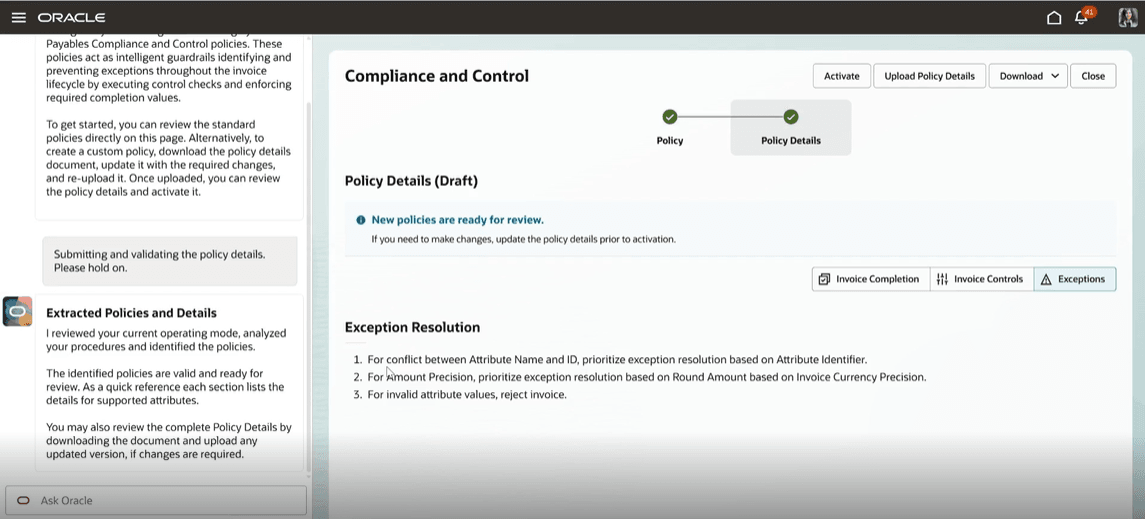
Compliance and Control: Exception Resolution region
Document training data migration
This feature enables users to export and import fingerprint-based document training between environments. It provides a self-service mechanism for transferring trained document-recognition learning from one instance to another, helping maintain consistent invoice processing behavior across environments. Exported learning retains associated attribute mappings while the import process validates the file and identifies potential conflicts before existing learning is overwritten.
Invoice list
The Invoice List page is a powerful, centralized hub that transforms traditional invoice management, exception handling, and query resolution into an intuitive, AI-driven experience. The page replaces manual filters with a streamlined, split-screen interface, divided into a chat pane and the invoice list. In the current release, invoices can be queried from the chat pane on the following additional attributes:
Paid Status: For example, show invoices with Paid Status as Not paid
- Workflow Approval Status: For example, show invoices with Approval Status as Not required
- Account Coding Status: For example, show invoices with Account Coding Status as Not required
- Fund Status
- Validation Status: For example, show invoices with Validation Status as Validated
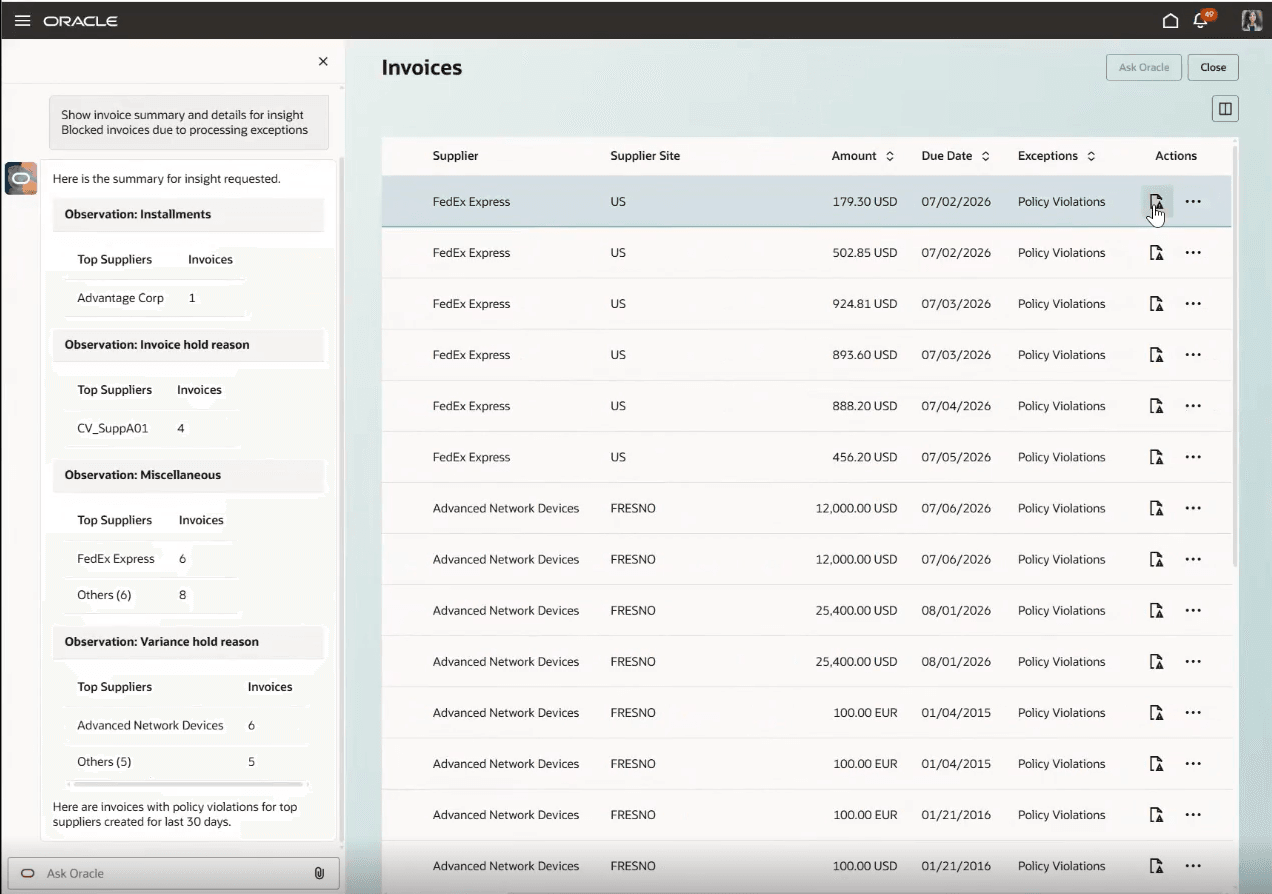
Invoice list
Business Benefits include:
- Higher automation and lower processing effort: Reduce manual invoice handling through smarter recommendations, automated exception remediation, improved defaulting, and more efficient matching controls.
- Fewer avoidable exceptions and holds: Identify recurring anomaly, tolerance, policy, and defaulting issues so teams can address root causes and reduce repeated invoice exceptions.
- Improved processing accuracy and first-pass success: Standardized remediation, stronger matching controls, and better value selection help reduce data-entry errors and improve successful invoice processing.
- Stronger compliance and financial control: Apply more precise tolerance and matching policies using business context such as Business Unit, Purchasing Category, Legal Entity, and Currency to better control overbilling and policy risk.
- Faster and more productive user experience: Enable quicker navigation from inquiry to action, reuse prior prompts, continue recent conversations, and simplify access to Payables tasks, reports, and utilities.
- Greater configurability and self-service: Give users more control over policy configuration, exception handling, and training-data migration, reducing dependency on manual backend processes or external support.
- Lower operational cost and rework: Reduce repetitive investigation, duplicate input, exception cleanup, and environment-migration effort, improving overall invoice-processing efficiency.
Steps to enable and configure
- No additional setup is required for these enhancements if Payables Agent is already enabled.
- The Payables Agent can now be accessed through the new ERP Agents root menu, making it easier to discover and launch agent-driven experiences.
You can refer to the Payables Agent for Invoice Ingestion, Compliance and Control What's New for 26B to view the Steps to Enable.
Tips and considerations
Actionable insights
- The invalid-attribute insight is based on detected errors in policy details.
- Recommendations for anomaly conditions are based on patterns in which anomalies are repeatedly overridden.
- Recommendations for policy violations are based on holds that are repeatedly released without an invoice change.
- Recommendations for defaulting and controls are based on recurring exceptions caused by defaulting failures.
- Review each recommendation and make the appropriate configuration change before expecting a processing outcome to change.
Matching controls
- Define matching rule at appropriate level of granularity, such as Business Unit, Purchasing Category, Legal Entity, or Currency, to avoid overly broad tolerance rules.
Exceptions
- Review historical rejections data to ensure the predefined resolution paths cover the specific root causes of your most frequent rejections.
- Ensure exceptions that fall outside the three supported patterns are routed directly to a designated queue or specialist for manual review, rather than sitting in interface tables indefinitely.
- Every upload of Policy Details file to application will replace the existing data. Hence, be cautious when you delete data from downloaded file.
Invoice document streams
- Validate supported custom XML and CSV layouts, before enabling the feature for suppliers or business partners.
- Ensure mapped invoice attributes are reviewed for accuracy, especially where suppliers use non-standard headers, naming conventions, or custom column structures.
- Establish controls for file ownership, upload access, audit tracking, and approval responsibilities to maintain compliance and traceability.
Export and import of training data
- Before importing, review any override warnings carefully, particularly when the target environment contains training that is newer or different from the source.
Key resources
-
Security Reference for Financials: Payments and Payables duties and privileges – Configuring Security in Oracle ERP Cloud
-
Payables Agent for Invoice Ingestion, Compliance and Control 26C What's New
Access requirements
Access to new feature components and pages are managed through specific security artifacts tailored to the underlying design requirements. This section offers a consolidated view of Duty roles required to grant access to the relevant pages. Make sure you’ve finished all necessary prerequisites; For detailed instructions and reference materials, refer to the document listed in the Key Resources section.
|
Duty Roles |
UI access |
View Access |
Edit Access |
|
Payables Invoice Documents Processing Duty |
Stream |
Yes |
Yes |
|
Training |
Yes |
Yes |
|
|
View Invoice (Redwood Page) |
Yes |
NA |
|
|
Document Attachment (Source File) |
Yes |
NA |
|
|
Payables Invoice Documents Inquiry Duty |
Stream |
Yes |
No |
|
Training |
Yes |
No |
|
|
View Invoice (Redwood Page) |
Yes |
NA |
|
|
Document Attachment (Source File) |
No |
NA |
|
|
Payables Invoice Configuration Processing Duty |
Capture |
Yes |
Yes |
|
Compliance and Control |
Yes |
Yes |
|
|
Payables Invoice Configuration Inquiry Duty |
Capture |
Yes |
No |
|
Compliance and Control |
Yes |
No |
|
|
Payables Invoice Processing Duty |
Invoice List |
Yes |
Yes (Limited actions) |
|
Invoice (Classic Page) |
Yes |
Yes |
|
|
Payables Invoice Inquiry Duty |
Invoice List |
Yes |
No |
|
Invoice (Classic Page) |
Yes |
No |
|
|
Overview Page |
Yes |
NA |
|
|
Payables Agent Insights Duty |
Insights |
Yes |
NA |
|
Payables Agent Monitoring Prompt Management Duty |
Insights Monitoring Prompts |
Yes |
Yes |
Data security consideration
Unlike the Streams page, invoice related pages, such as Invoice List, are restricted by Business Unit data security. Any custom job roles assigned with the new invoice related duty roles must also be granted Business Unit data security access. Otherwise, users will not be able to view invoice details. For example, a user attempting to drill down from the Streams page into the View Invoice page will be unable to view the invoice.
How to Configure Business Unit Data Security:
- Navigate to Manage Business Unit Data Access for Users.
- Select the user and custom job role, then assign the appropriate Business Unit
- Click Process Permission Group Policies.
- Save your changes and log out.