Payments Agent for Payment Options, Offers, and Execution
Manage payment opportunities, supplier offers, payment execution, and payment processing exceptions through guided interactions with the Payments Agent.
In this release, the Payments Agent extends beyond inquiry and recommendation into additional payment options evaluation, supplier offer, and payment execution activities. Payment specialists can now create ad hoc virtual card offers for eligible suppliers and progress those offers through supplier acceptance and payment. Dynamic discounting is expanded with direct supplier and supplier site enrollment and standing offers for ongoing participation. Payment opportunity evaluation now includes supply chain financing, and the Supplier Spend Analysis report can be submitted directly from supplier opportunity analysis.
This release also introduces payment processing exception diagnosis, which explains supported Payment Process Request and Payment File failures in business terms and recommends the next action. Insight follow-ups are enhanced so payment specialists can continue interactions in insight context, refine the surfaced items, investigate details, and determine the next best action directly in the Payments Agent. In addition, the new Buyer Onboarding assistant provides the Payment Program Manager with guided support for financing program creation and inquiry, and for establishing the payment setup required to support payment processing.
You can open the Payments Agent from Navigator > ERP Agents > Payments Agent. Within the Payments Agent, users can access the assistant experiences available to them based on their assigned access, including the Buyer Onboarding Assistant for Payment Program Managers.
Following are the key enhancements introduced in this release.
Virtual card offer lifecycle
This release introduces the ability to create and manage one-time, ad hoc virtual card offers for eligible suppliers that aren't currently enrolled for the applicable virtual card program.
- Create a draft virtual card offer from an identified opportunity without waiting for the supplier to complete the standard virtual card enrollment process, and review or adjust the financing program, payment instrument, Payment Method, and proposed payment term before creation.
- Apply offer terms to one or more eligible suppliers, with the applicable financing program and payment instrument combinations validated independently.
- Review and send virtual card offers, or discard an offer that should no longer proceed and release the associated installments for subsequent payment processing.
- Process supplier acceptance so that the agreed virtual card arrangement and payment term are applied to the applicable installments.
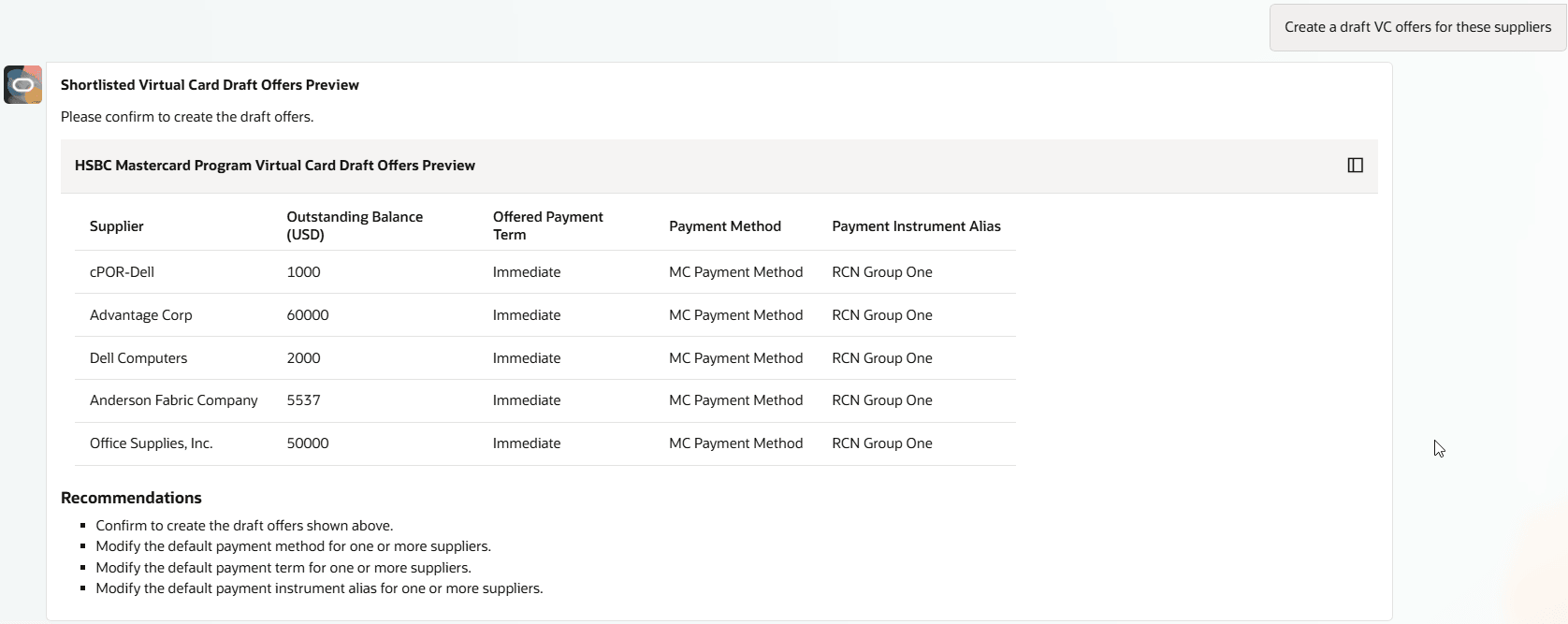
Payment specialists can create and review draft ad hoc virtual card offers for eligible suppliers
Note: Virtual card offers created through this flow are one-time, ad hoc offers and don't establish ongoing virtual card participation. Ongoing participation continues through the standard supplier enrollment process. Standing offers and direct supplier enrollment are supported for dynamic discounting only.
Dynamic discounting lifecycle
This release expands dynamic discounting with direct financing program enrollment and standing offers for recurring supplier participation.
- Add eligible suppliers and supplier sites as candidates to an active dynamic discounting financing program using the program default rate or an allowed supplier-specific rate, and review reasons for suppliers that aren't enrolled.
- Review, update, and end-date financing program candidates as supplier participation changes.
- Establish ongoing participation through standing offers or standing enrollment and process supplier responses, including one-time acceptance, standing acceptance, decline, and unsubscribe.
- Identify installments requiring a new offer while excluding those already covered by an applicable active offer or standing arrangement.
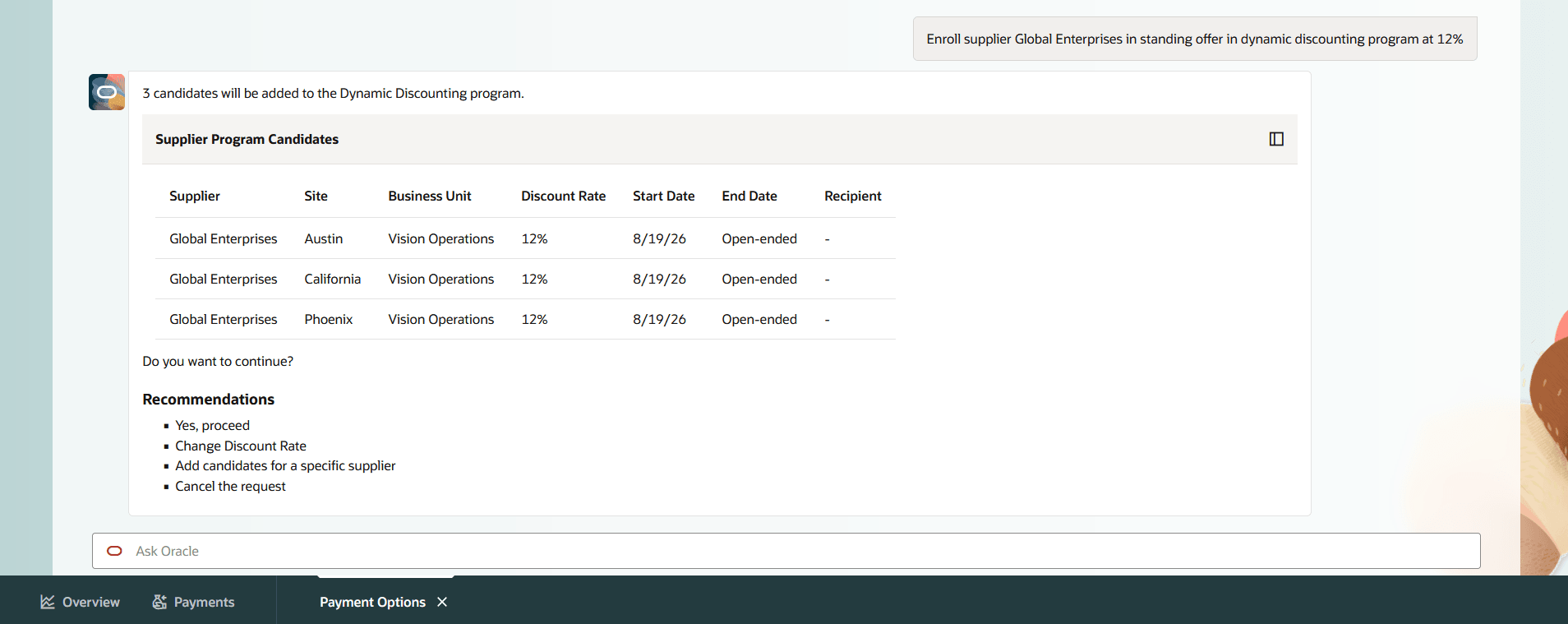
Payment specialists can enroll suppliers and establish standing dynamic discounting arrangements
Supply chain financing evaluation
This release adds supply chain financing to the financing strategies that can be evaluated for upcoming supplier payments.
- Compare supply chain financing with dynamic discounting and virtual card for the same eligible population of upcoming payments.
- Review the estimated benefit and model alternative assumptions such as extended payment days or a revised market borrowing rate.
- Evaluate configured supply chain financing programs or, where applicable, prospective programs using financing program reference information.
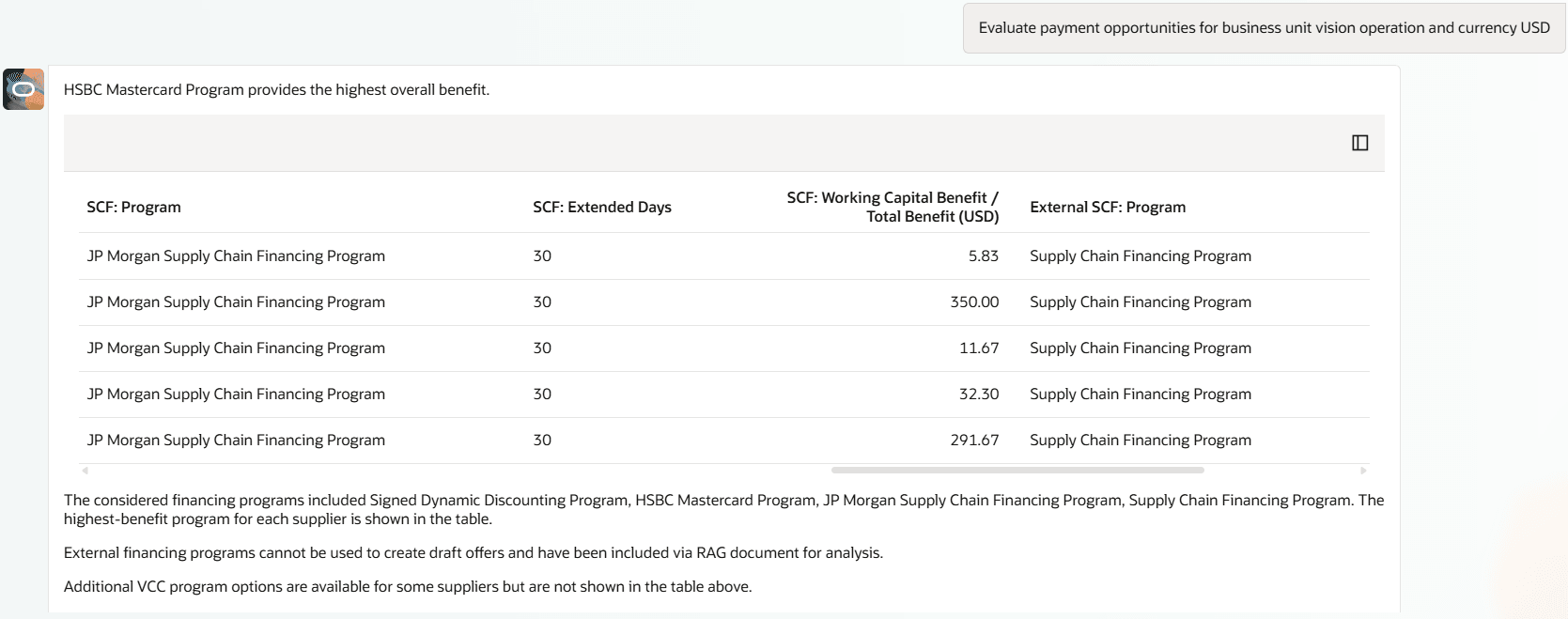
Payment specialists can compare dynamic discounting, virtual card, and supply chain financing benefits
Note: Supply chain financing is supported for benefit analysis and comparison only in this release. Supplier enrollment and offer lifecycle management aren't supported for supply chain financing in 26D.
Supplier spend analysis enhancements
This release extends Supplier Spend Analysis with additional segmentation criteria and direct report submission from the agent-guided analysis.
- Refine the supplier population using supplier country, Legal Entity country, and supplier type in addition to the existing criteria.
- Submit the Supplier Spend Analysis report for the refined population, review the report parameters, and retrieve the generated report for offline analysis or supplier recruitment activities.
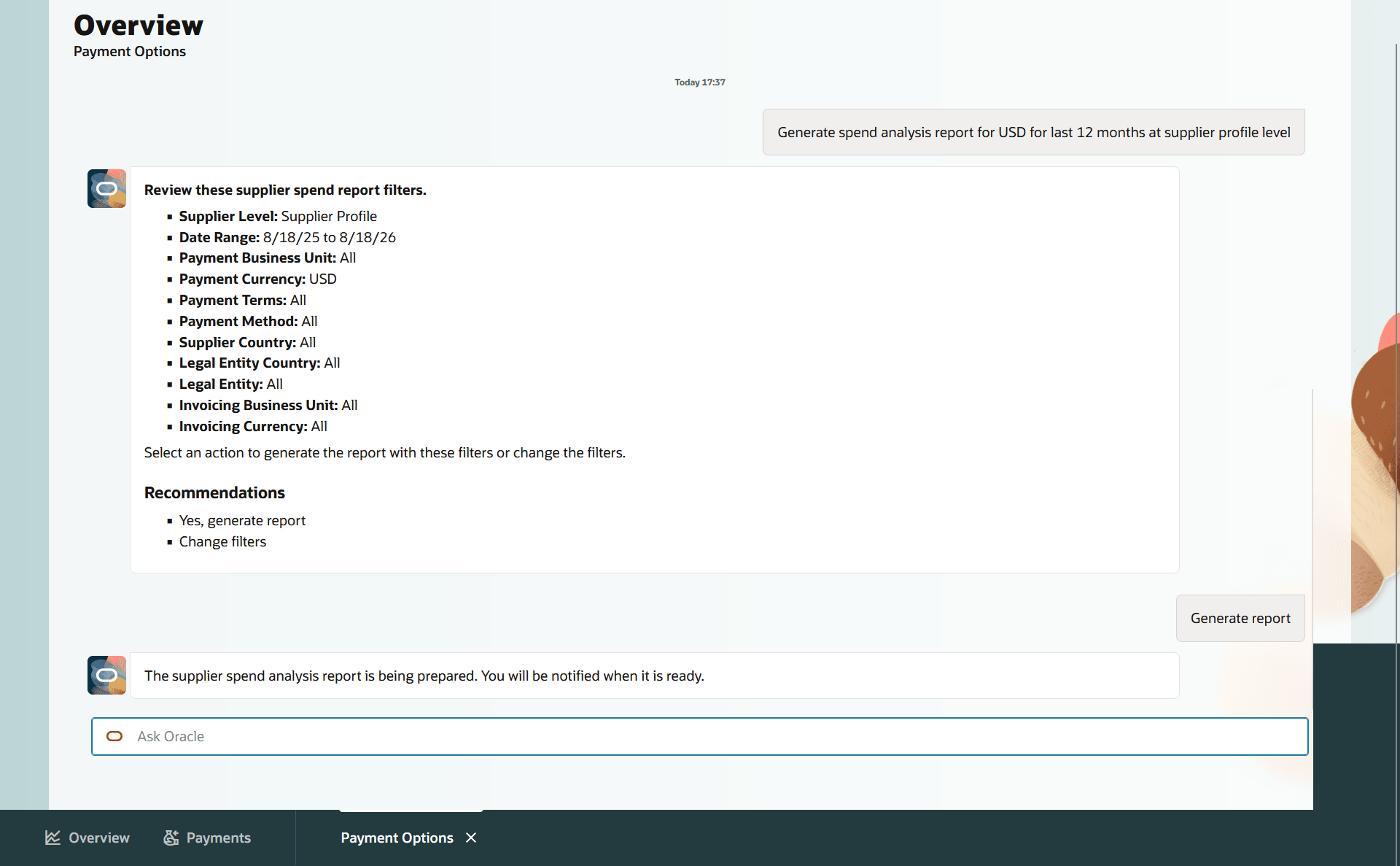
Payment specialists can generate the Supplier Spend Analysis report
Payment processing exception diagnosis
This release introduces agent-assisted diagnosis for supported Payment Process Request and Payment File processing failures.
- Ask why a Payment Process Request or Payment File failed and receive the failed processing stage, probable cause, supporting evidence in business terms, and recommended next action.
- Diagnose supported failures associated with building payments, formatting Payment Files, transmitting Payment Files, and confirming Payment File processing without first interpreting the underlying Scheduled Processes log.
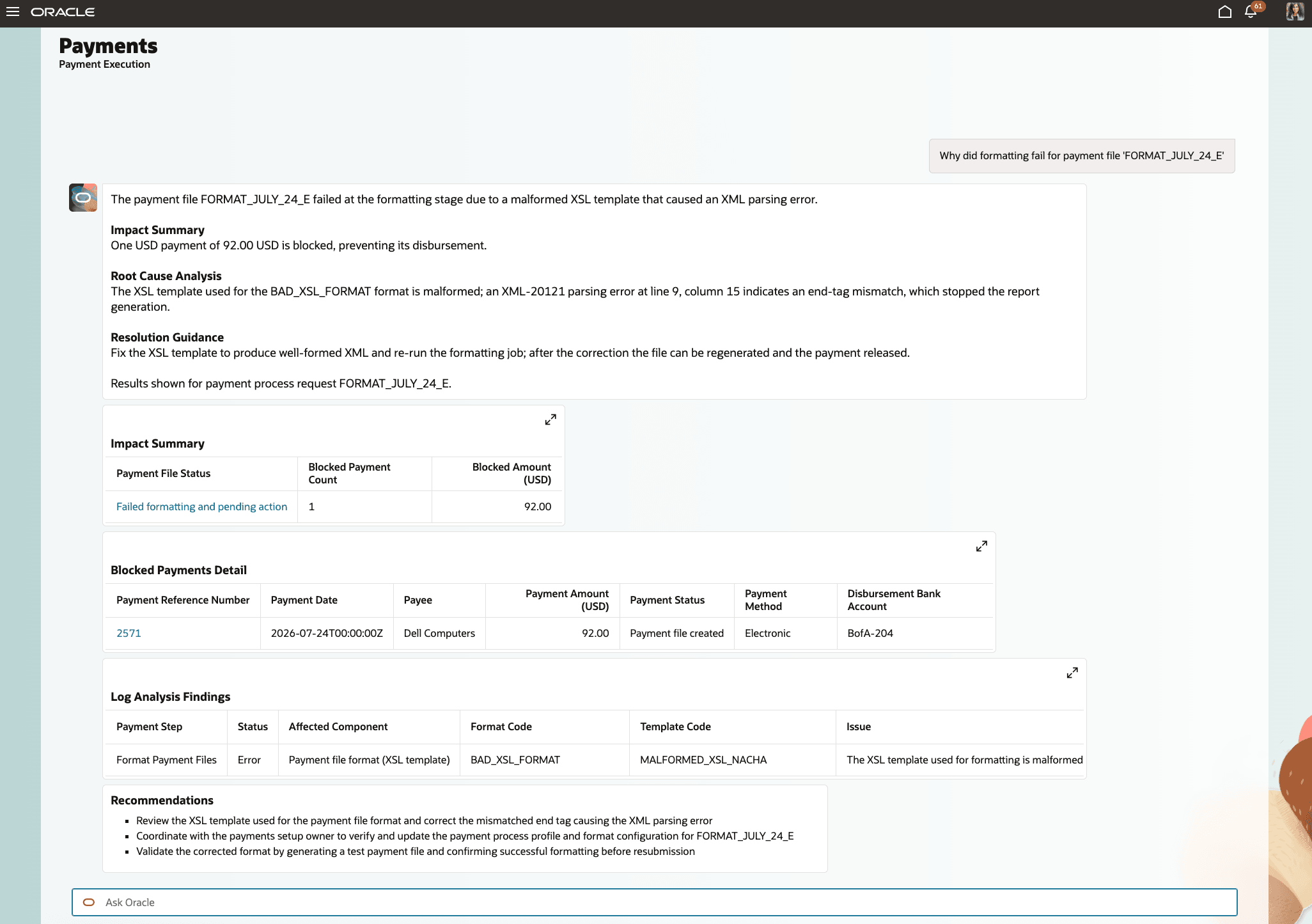
Payment specialists can investigate a Payment File failure and review the probable cause and recommended next action
Note: Use Scheduled Processes to investigate failures outside the supported payment processing stages.
Virtual card payment processing
This release extends the ad hoc virtual card offer lifecycle into payment execution.
- Schedule a Payment Process Request for accepted virtual card installments using the applicable virtual card Payment Process Request template.
- Review the resulting Payment Process Request, Payment File, Payments, and Installments using applicable virtual card attributes.
Supplier remittance advice submission
This release enables supplier remittance advice submission for a Payment File from the Payments Agent.
- Submit supplier remittance advice for a selected Payment File using the format defaulted from the associated Payment Process Profile.
- Receive the request identifier to track the submitted remittance advice through processing.
Note: Supplier Remittance Advice is submitted for one Payment File per request.
Buyer onboarding and payment program setup
This release introduces the Buyer Onboarding assistant within the Payments Agent for Payment Program Managers. You can access the Buyer Onboarding assistant from the Payments Agent experience when the required access is assigned. For more information, see Access Requirements.
- Create a dynamic discounting financing program conversationally and review existing dynamic discounting and virtual card financing programs.
- Receive guided assistance for virtual card financing program setup, with captured information carried forward to the applicable setup experience where supported.
- Review the payment setup required for payment processing and navigate to the applicable Oracle Fusion setup task when configuration must be completed outside the assistant.
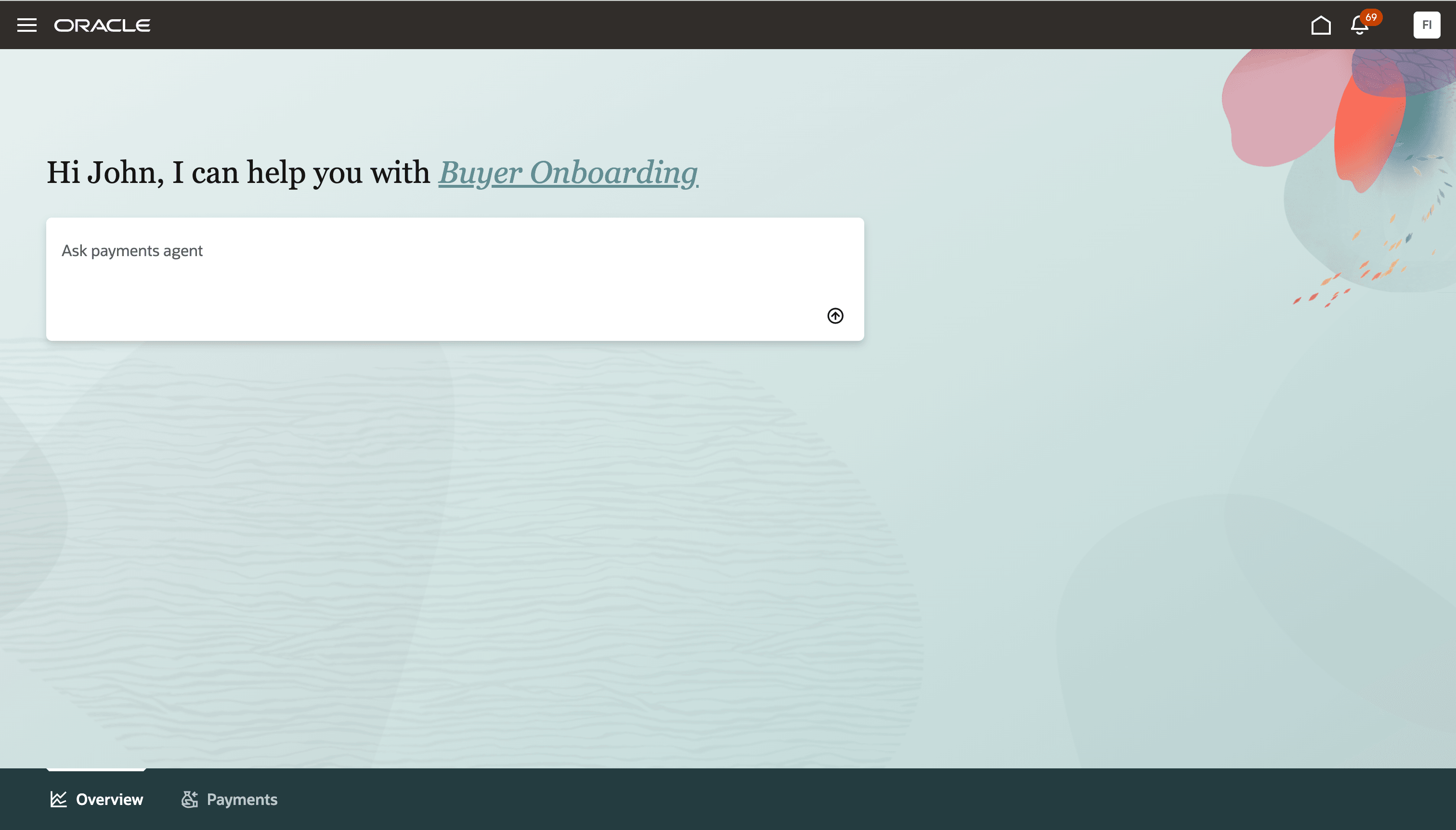
Payment Program Managers can access the Buyer Onboarding assistant from the Payments Agent experience
Insights
This release enhances insight follow-ups so users can continue the conversation in context of the insight results and move from review to action. Users can ask contextual follow-up questions on the displayed insight results, such as filtering or requesting details for specific surfaced items.
Business benefits include:
- Accelerate virtual card adoption and payment execution by guiding specialists from payment opportunities through supplier offer acceptance and payment.
- Expand supplier participation and reduce program administration through direct dynamic discounting enrollment, standing arrangements, and targeted spend analysis.
- Improve working capital decisions by comparing virtual card, dynamic discounting, and supply chain financing options for upcoming payments.
- Resolve supported payment processing failures faster with clear explanations, execution evidence, and recommended next actions.
- Simplify buyer onboarding and payment program setup with guided assistance for financing program creation, review, and required payment configuration.
- Move from insight to action faster through contextual follow-ups, refined results, and guided investigation.
Steps to enable and configure
- No additional setup is required for these enhancements other than Buyer Onboarding if Payments Agent is already enabled.
- The Buyer Onboarding assistant requires separate Buyer Assistant access, granted through a customer-defined job role for the Payment Program Manager persona. Oracle doesn't deliver a seeded job role for this persona. Refer to the Access Requirements section for details.
- Adopt the 26D capabilities at your own pace. Review the Tips and considerations for the program and payment setup each capability depends on.
Tips and considerations
Virtual card offers
- Configure the applicable virtual card financing program, and the payment instruments for each legal entity and currency in scope, before evaluating suppliers for virtual card offers.
- Confirm the virtual card payment method and the downstream payment processing setup used to pay accepted offers.
- Maintain a payment process request template configured for virtual card payment so accepted installments can be paid.
- Maintain valid supplier contacts with Supplier Portal user accounts so offers can be communicated.
- Virtual card offers created through this flow are one-time, ad hoc offers extended to suppliers who aren't already enrolled in a virtual card program. Long-term participation continues to be established through standard virtual card supplier enrollment.
- The flow uses the configured B2B virtual card partner integration. Oracle supports B2B virtual card partner configurations, including J.P. Morgan and Mastercard. Validate the specific partner configuration enabled for your environment.
- Review the financing program, payment instrument, payment method, proposed payment term, supplier, and eligible installments before creating the draft offer.
- Where more than one payment instrument qualifies for a legal entity and currency, the assistant recommends one and asks for confirmation. Confirm the intended card arrangement where interchange terms are commercially material.
- Business unit and currency establish the eligibility and analysis context for an offer preview. Changing either requires a new request.
- Installments included in a draft offer are reserved and aren't selected by standard payment processing. Discard the draft offer to release them.
- Accepted installments are selected for payment where the payment instrument on the payment process request matches the one recorded on the offer.
- Only fully unpaid installments are considered for program evaluation and offer creation.
- Available credit limit on the card arrangement isn't validated by the assistant. Confirm available capacity with your virtual card partner where this is material.
Dynamic discounting standing offers and candidates
- Review the existing dynamic discounting financing program setup and supplier contact configuration before establishing standing arrangements.
- Review any customized offer notification template so the supplier response actions available in this release are presented to suppliers.
- Standing offers and direct candidate enrollment without an offer are supported for dynamic discounting only.
- Candidate discount rates must fall within the minimum and maximum discount rates defined on the financing program.
- Suppliers who unsubscribe are excluded from future offer readiness and aren't re-enrolled automatically.
- Existing saved searches or lists that filter on campaign won't return candidates created without a campaign. Remove the campaign filter to include them.
Supply chain financing
- Make the applicable supply chain financing program information available to Payment Options before running comparisons.
- Publish external program information through the financing program reference documents where analysis of programs not yet configured is required.
- Supply chain financing is available for benefit analysis and comparison only. It doesn't create offers, enroll suppliers, or process supplier responses.
- The buyer benefit reflects the working capital value of extending the payment timeline, based on the installment amount, extension period, and program rate parameters.
Supplier spend analysis report
- Confirm the payment specialist has the applicable supplier spend report privilege and reporting access, and business unit data access for the supplier population in scope.
- Select the reporting level before the report is generated.
- If no period is specified, the report uses a default historical period.
- Where a requested filter isn't supported for report generation, the assistant identifies it and lists the supported alternatives.
- Report generation doesn't transmit the report to a financing partner or process the partner's response. Partner exchange remains an offline process.
- Report generation doesn't require a payment program to be configured. Supplier onboarding into a program does.
Payment exception diagnosis and guided actions
- Exception diagnosis applies to the supported payment processing stages. Continue to use Scheduled Processes for failures outside this scope.
- While a process is still running, the assistant reports current status rather than attempting a diagnosis, because the execution evidence isn't yet complete.
- Guided payment lifecycle actions present the relevant payment context and require explicit user confirmation before the action is completed.
- Payment run scheduling continues to use existing payment process request templates and requires confirmation before submission.
- Submit supplier remittance advice for one payment file per request.
Buyer onboarding
- Buyer onboarding is intended for the Payment Program Manager and has separate access requirements from the three payment specialist assistants. See Access Requirements.
- Dynamic discounting program creation is completed by the assistant. Virtual card program creation and broader payment setup continue through the applicable Oracle Fusion setup tasks.
- Creating a financing program doesn't complete dynamic discounting setup. Complete the offer notification template, sender configuration, supplier contact setup, and financing program reference document before extending offers to suppliers.
Security and access
- Existing Oracle Fusion payment security, business unit data access, approvals, payment validations, payment process profiles, and bank connectivity remain authoritative.
- Users see only the data and actions available through their existing security and data access.
- The assistant may return a narrower result where the user doesn't have access to specific business units, suppliers, payments, payment files, supplier offers, or financing programs.
Key resources
- Oracle Help Center: Refer to the Using Payables guide for payment processing and Dynamic Discounting.
- Virtual card program overview: Set up virtual cards for supplier payments and Virtual Card Questions and Answers.
- Implementing Financials Guide: Payables and Payments setup and program configurations.
- REST API Documentation: Payables and Payments services.
- Security Reference for Financials: Payments and payables duties and privileges.
- Data Access: Assigning Data Access to User using a Spreadsheet.
Access requirements
- New capabilities for Payment Options, Supplier Offers, and Payment Execution use the existing Payment Specialist security model together with the additional privileges delivered for the applicable 26D functions. Refer to the Steps to enable and configure section in Payments Agent for Payment Options, Offers, and Execution What's New for 26B to understand existing access requirements.
- To assign only Buyer Onboarding Assistant to a custom job role, create the custom job role with permission groups enabled and in the ‘Role Hierarchy’ tab, assign the specific duty roles each in the ‘Roles and Privileges’ tab and in the ‘Roles and Permission Groups’ tab.
Agent Roles and Privileges Roles and Permission Groups Buyer Onboarding Assistant Buyer Assistant Management (ORA_AP_BUYER_ASSISTANT_MANAGEMENT_DUTY) Buyer Assistant Management (ORA_AP_BUYER_ASSISTANT_MANAGEMENT_DUTY)
- All actions continue to respect the user's existing business unit, legal entity, supplier, payment, financing program, and setup security.