Project Financial Control Agents
Gain clear insight into project costs, capitalization, and reconciliation to the general ledger to improve financial oversight and keep projects aligned with business objectives. With the Project Financial Control Agents, project teams can quickly understand cost distribution flows, investigate project-to-ledger reconciliation, and monitor financial progress through guided, conversational interactions. By providing fast, accurate answers to complex financial questions, the agents reduce manual investigation, improve operational efficiency, and give project personnel the confidence to make informed decisions that keep projects on track and support the delivery of high-quality products and services.
The Project Financial Control Agents provide a preview of agent-driven project financial management that you can try out in this release. This will be replaced with an agentic app-based experience, currently targeted for 27A.
This release expands the Project Financial Control Agents with additional reconciliation, billing exception, and payroll cost distribution capabilities. The new capabilities are explained below.
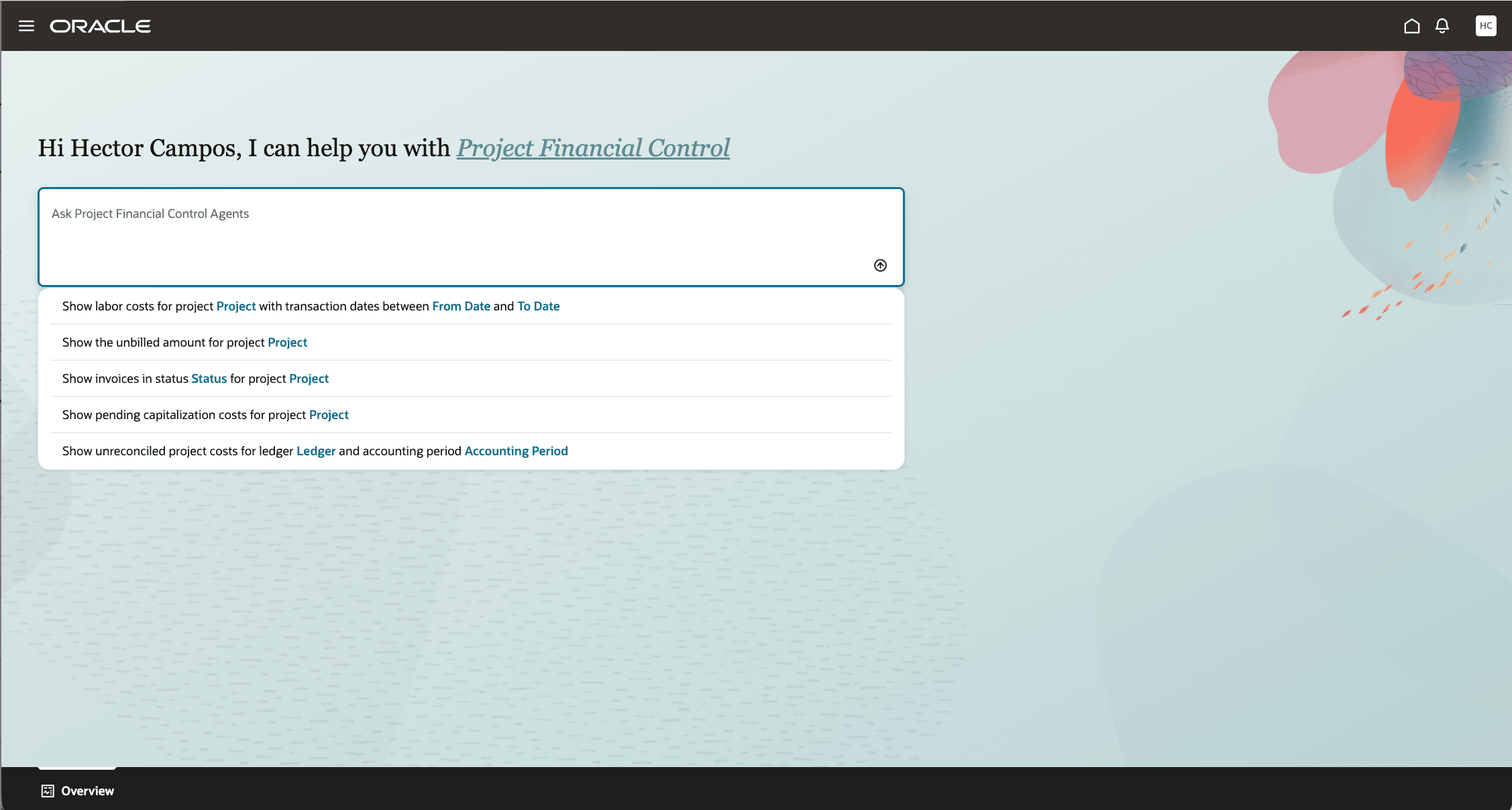
Overview with additional suggested prompts
Project Cost Accounting Reconciliation - Adds reconciliation support for project cost accounting. A new predefined prompt to initiate the added reconciliation analysis is available to help start the analysis. Additional examples are:
- Show unreconciled project costs for ledger [Ledger] and accounting period [Accounting Period].
- Show unreconciled project costs for business unit [Business Unit] and accounting period [Accounting Period].
- Show variance drivers for the unreconciled project costs in business unit [Business Unit] and accounting period [Accounting Period].
Project Contract Bill Transactions Exceptions Assistance - Adds to help users investigate bill transaction exceptions using natural language. You can get help identifying likely causes, classified issues such as funding, contract setup, pricing, currency, accounting, or system exceptions, with a drill-down to exception types, and highlights the affected transactions and blocked amounts, and recommends next actions. Example prompts include:
- Show bill transaction exceptions for contract C-10045.
- Show Pricing Exceptions for project ABC.
Project Contract Invoicing Assistance - Helps authorized users approve project contract invoices, review approval history, automatically release approved invoices when configured, and release credit memos or credit invoices with a required credit memo reason all through a conversational experience. Example prompts include:
- Approve invoice 1.
- Show approval history for invoice number 1.
- Release credit invoice 2.
Note: If the interaction is not already in the context of an invoice, include the contract number in the prompt.
Payroll Cost Distribution Assistance - Adds ability to review and simulate labor cost distribution to projects based on payroll data and applicable labor schedules. Added inquiry capability examples are:
- “Show me all applicable labor schedules for Bella Clarkson for July 2026.”
- “Find all labor schedules applicable to Bella Clarkson.”
- “Review Bella Clarkson’s labor schedules for July 2026 and highlight any gaps or overlaps.”
- “Create a cost distribution simulation for Bella Clarkson for July 2026 using a payroll amount of 10,000.”
Expanded Project Financial Inquiry Assistance - Adds the ability to use natural language queries to quickly access information about project contract invoices, bill transactions, and revenue distributions. Example prompts include:
- “What’s the unbilled amount for contract number 70023?”
- “Show bill transactions in Error status for project name Advisory Platform Services.”
- “Show invoices in Draft status for contract number 70022.”
- “Show all revenue distributions for accounting period Aug-26 for contract number 70021.”
The business benefits are:
-
Improved financial control by helping project teams reconcile project cost accounting information more efficiently.
-
Reduced billing-resolution time by identifying and explaining bill transaction exceptions, including likely causes and recommended next actions.
-
Expanded self-service financial inquiry to include invoice-level information, bill transactions, and revenue, reducing the need to navigate across multiple pages or request assistance.
-
Extended project financial visibility to payroll distribution information, helping teams investigate and manage payroll-related financial activity.
Steps to enable and configure
After the required security roles and privileges described in the Access requirements section are configured, users can access the additional features through the ERP Agents navigation entry.
Tips and considerations
- Results are limited by the user’s functional and data security access.
- When a result contains more than 50 rows, the assistant displays only the top 50 rows ranked by impact.
- If your inquiry isn't providing the expected response, try including more specifics in your request, like "project bridge remediation" instead of just "bridge remediation". This provides additional context to help route your inquiry to the appropriate agent.
Key resources
- Creating Custom Roles for Projects: Learn how custom enterprise roles and project roles work together to provide functional and project-level access.
- Create Project Roles: Learn how to create a project role and associate it with an enterprise role.
- Configure the Security Console: Learn about the security synchronization processed used after role configuration.
- Security Reference for Project Management: Review the delivered Project Management roles, duties, privileges, and security policies.
- Project Accountant Job Role: Review the delivered Project Accountant role hierarchy and privileges.
Access requirements
Users require both access to Project Financial Control Agents and associated Duty Role access to the projects or business units they need to analyze.
Configure one of the following access options:
A. Users with the Project Accountant or Project Manager Job Roles
Enable Permission Groups for the applicable role if they aren’t already enabled, and assign the following roles to the user:
| Role | Role Code |
|---|---|
| Project Accountant | ORA_PJF_PROJECT_ACCOUNTANT_JOB |
| Project Manager | ORA_PJF_PROJECT_MANAGER_JOB |
| Project Financial Control Agents | ORA_PJF_PROJECT_FINANCIAL_CONTROL_AGENTS_DISCRETIONARY |
Users who already have the Project Accountant job role require only the additional Project Financial Control Agents role.
B. Users Without the Project Accountant or Project Manager Job Roles
Create a custom job role and enable Permission Groups for the role.
On the Roles and Privileges tab, add the following roles:
| Role | Role Code |
|---|---|
| Project Financial Control Agents |
ORA_PJF_PROJECT_FINANCIAL_CONTROL_AGENTS_DISCRETIONARY |
Duty roles are needed for the agents to perform. Project Accountant and Project Manager roles have them, but the table below can be used for the custom role as a reference set:
| Role | Role Code |
|---|---|
| Project Cost Transaction Processing | ORA_PJC_PROJECT_COST_TRANSACTION_PROCESSING_DUTY |
| Project Cost Setup Inquiry | ORA_PJC_PROJECT_COST_SETUP_INQUIRY_DUTY |
| Accounted Project Cost Distribution Inquiry | ORA_PJC_ACCOUNTED_PROJECT_COST_DISTRIBUTION_INQUIRY_DUTY |
| Project Asset Maintenance | ORA_PJC_PROJECT_ASSET_MAINTENANCE_DUTY |
| Project Contract Invoice Management | ORA_PJB_PROJECT_CONTRACT_INVOICE_MANAGEMENT_DUTY |
Function Security Policies > Privileges
- Get Project Setups (PJF_GET_PROJECT_SETUPS_PRIV)
- Manage Award Service (GMS_MANAGE_AWARD_SERVICE_PRIV)
(Note: This privilege is required to view award and funding source configuration details.) - View Project Contract Bill Transactions Service (PJB_VIEW_PROJECT_CONTRACT_BILL_TRANSACTIONS_PRIV)
- Manage Project Contract Bill Transaction (PJB_MANAGE_PROJECT_CONTRACT_BILL_TRANSACTION_PRIV)
- Manage Project Contract Invoice Service (PJB_MANAGE_PROJECT_CONTRACT_INVOICE_SERVICE_PRIV)
- Approve Project Contract Invoice (PJB_APPROVE_PROJECT_CONTRACT_INVOICE_PRIV)
- View Contract (OKC_VIEW_CONTRACT_PRIV)
Permission Groups
- read:Project Contract Bill Transaction (oraErpCoreProjectBillingTransactions_ProjectContractBillTransaction_read)
- read:Project Contract Billing Event Bill Transaction (oraErpCoreProjectBillingTransactions_ProjectContractBillingEventBillTransaction_read)
- read:Project Contract Cost Bill Transaction (oraErpCoreProjectBillingTransactions_ProjectContractCostBillTransaction_read)
- For each of these permission groups, set the Security View to Business Unit Access Rows and All Fields.
Data Security Policies
- Access for Business Units
- Data Resource: Business Unit
- Data Set: Select by Instance Set
- Condition Name: Access the business units for which the user is explicitly authorized
- Actions: Manage Project Unprocessed Expenditure Item
- Access for Project Unprocessed Cost Transactions
- Data Resource: Project Unprocessed Cost Transaction for Table PJC_TXN_XFACE_ALL
- Data Set: Select by Instance Set
- Condition Name: Access the Unprocessed Transaction for Table PJC_TXN_XFACE_ALL for business unit
- Actions: Manage Project Unprocessed Expenditure Item
- Access for Awards
(Note: This data security policy is required to view award and funding source configuration details.)- Data Resource: Award for Table GMS_AWARD_HEADERS_B
- Data Set: Select by Instance Set
- Condition Name: Access awards for table GMS_AWARD_HEADERS_B for business units based on Grants Management Award security as defined in the Manage Data Access for Users Page.
- Actions: View Award Data
- Access for Bill Transactions
- Data Resource: Bill Transaction for table PJB_BILL_TRXS
- Data Set: Select by Instance Set
- Condition Name: Access to project contract bill transactions for table PJB_BILL_TRXS for the contract business units
- Actions: View Project Contract Bill Transaction Data
- Access for Project Contract Invoices
- Data Resource: Business Unit
- Data Set: Select by Instance Set
- Condition Name: Access the business units for which the user is explicitly authorized
- Actions: Manage Project Contract Invoice
- Access for Customer Accounts
- Data Resource: Trading Community Customer Account
- Condition Name: All values
- Actions: View Customer Account; Read;
After creating the custom role:
- Assign the required users to the custom role.
-
Assign the required Business Unit Access:
-
Ensure that users have access to the relevant business units. In Setup and Maintenance, use the Manage Data Access for Users task, select Business Unit as the security context, and assign the applicable business units.
-