Billing Operations Workspace for billing readiness and dispute resolution
The Billing Operations Workspace represents a paradigm shift from administrative users carrying out routine, repetitive tasks across separate applications, to a unified experience underpinned by policy-driven automated actions. Agents continuously identify and resolve billing exceptions, spanning feeder systems such as Project Management, through to invoice consolidation, sending invoices to customers, and dispute resolution. Exceptions falling outside of policies are surfaced for human judgment.
Key capabilities
The overall objective of the Billing Operations Workspace is to help invoices get paid in full and on time. The workspace covers each step of the billing process that contribute toward that objective, such as ensuring charges and resulting invoices are accurate, invoices are approved and sent to customers on time, and disputes are handled more quickly.
What impediments might exist at each step, and what actions need to be taken to resolve them? The agents underlying the Billing Operations Workspace autonomously target such barriers, according to policies, streamlining the flow of transactions and optimizing for the overall goal.
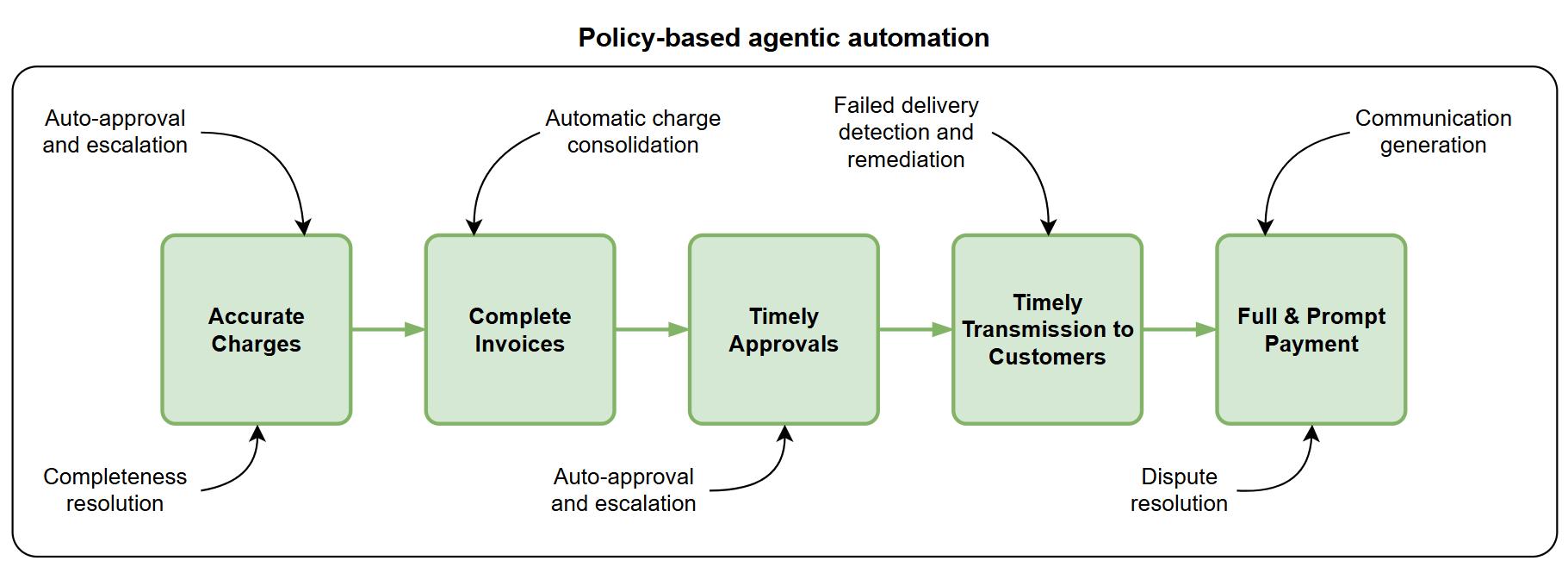
A flow diagram showing how agents work autonomously to optimize each step of the billing process.
For example, the Billing Operations Workspace agents can automatically:
- Ensure project charges are ready to bill by automatically escalating project invoice approvals, and identifying high-value bill transactions that are on hold.
- Consolidate charges into invoices.
- Approve invoices (or make recommendations for a human to approve them).
- Detect failed invoice delivery and resend to customers.
- Resolve disputes and draft correspondence.
User experience
The Billing Operations Workspace provides a focused billing experience that helps users understand what has already been handled by agents and why, identify exceptions that require attention, review the supporting evidence and any recommended actions, and take timely actions all in one place. Ask Oracle can be used for natural language conversations with agents, in the data context of where the conversation was initiated.
The workspace provides a consolidated operational view organized around panels for Project Billing Readiness, Invoice Generation and Delivery Exceptions, and Dispute Resolution. Each area summarizes the financial impact and current status of the underlying work, while the Priority Actions panel calls out the most urgent cross-workstream actions. Agent-completed items remain visible for transparency, while user-decision items are clearly separated and linked to the relevant drilldown.
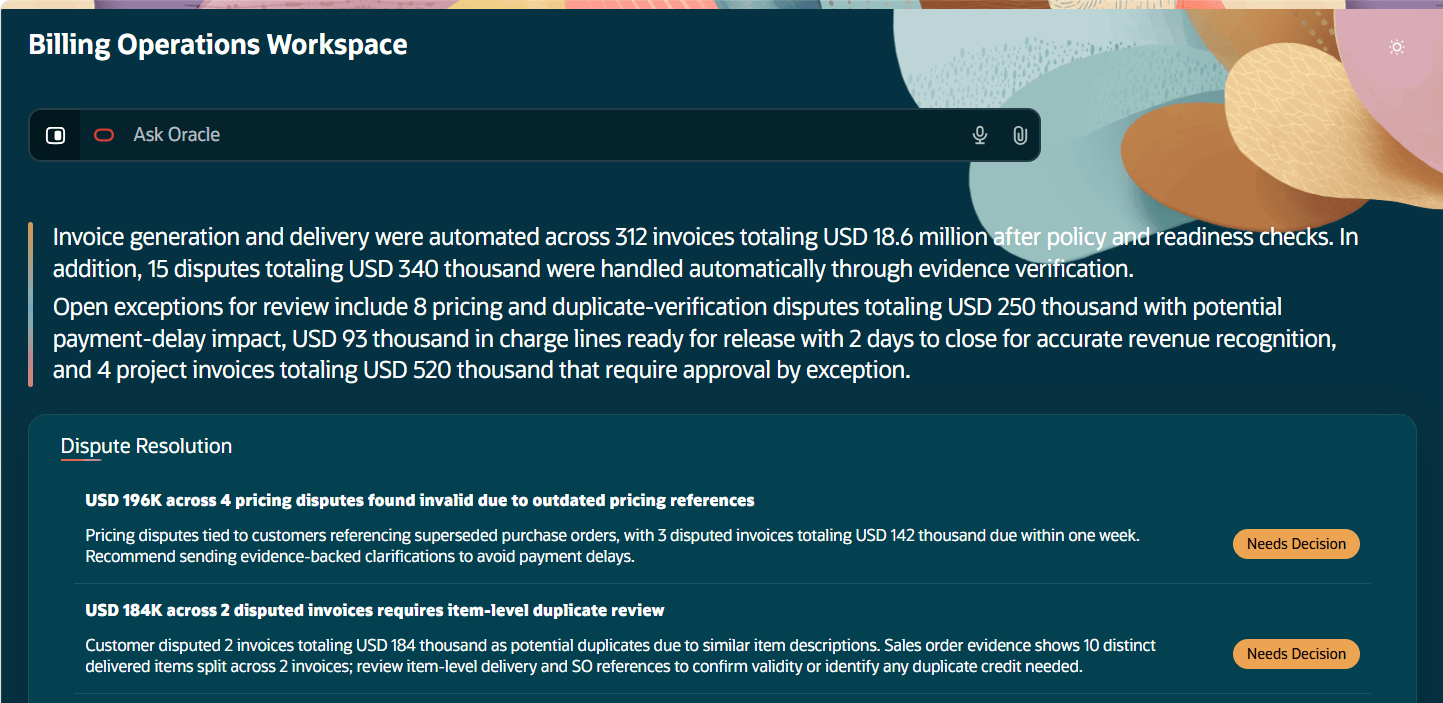
The Billing Operations Workspace, summarizing actions automatically performed by agents, and listing items pending a human decision.
Accurate charges
The Project Billing Readiness agent identifies overdue project invoice approvals, and according to policies, autonomously sends reminders and escalations. This alleviates efforts from the PMO and helps ensure project-related charges are sent to customers on time. The agent also uses policies to alert billers to transactions with material values that are on billing hold, helping ensure that invoices are complete to maximize cashflow. When holds are removed, transactions are automatically added to existing draft invoices, without billers needing to manually delete and recreate them.
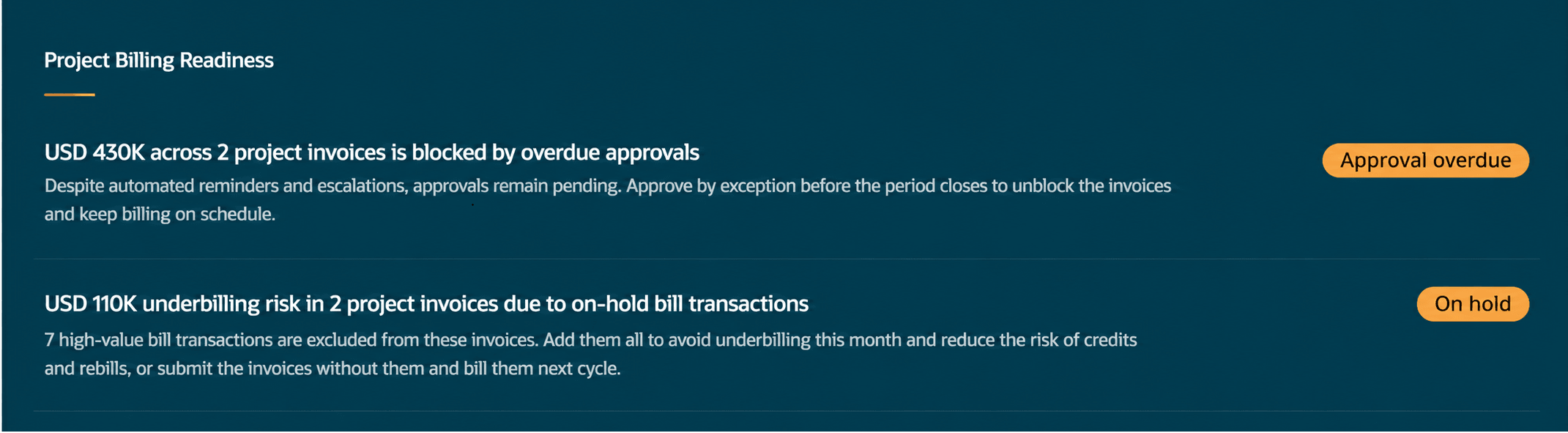
The Project Billing Readiness panel, highlighting that the agent has automatically sent reminders and escalations for overdue invoice approvals. It also shows that the agent has automatically identified high-value bill transactions that are on hold.
Automated approval reminders and escalations
The Overdue Invoice Approvals agent is policy-driven, automating the actions typically taken by the PMO to chase invoice approvals. The agent automatically sends reminders to current approvers according to the threshold stated in the policy. If the approval remains pending, the workspace automatically sends an escalation to the approver and the approver’s line manager. If invoices remain unapproved after that, billers can take action by exception. For example, billers can drill down to see specific invoice approval details, and review the actions taken autonomously by the agent (such as the dates and times when reminders and escalations were sent). Billers can then approve individual invoices or multiple invoices by exception.
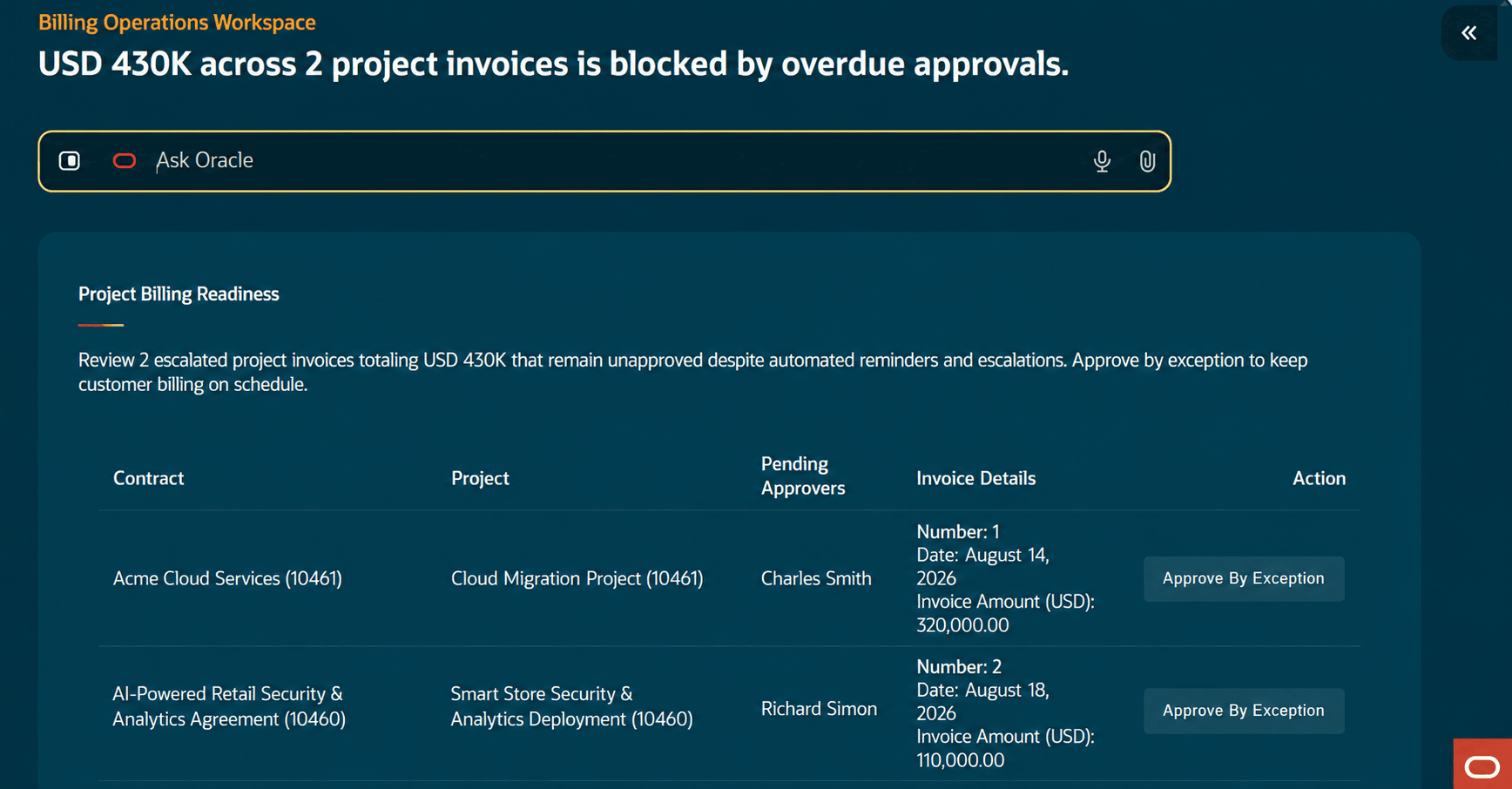
The Project Billing Readiness panel, showing the drilldown for overdue approvals.
At all times, the Priority Actions drawer displays the two largest project contract invoices that remain unapproved after reminders and escalations. This helps users to prioritize their work, tackling the highest value items first.
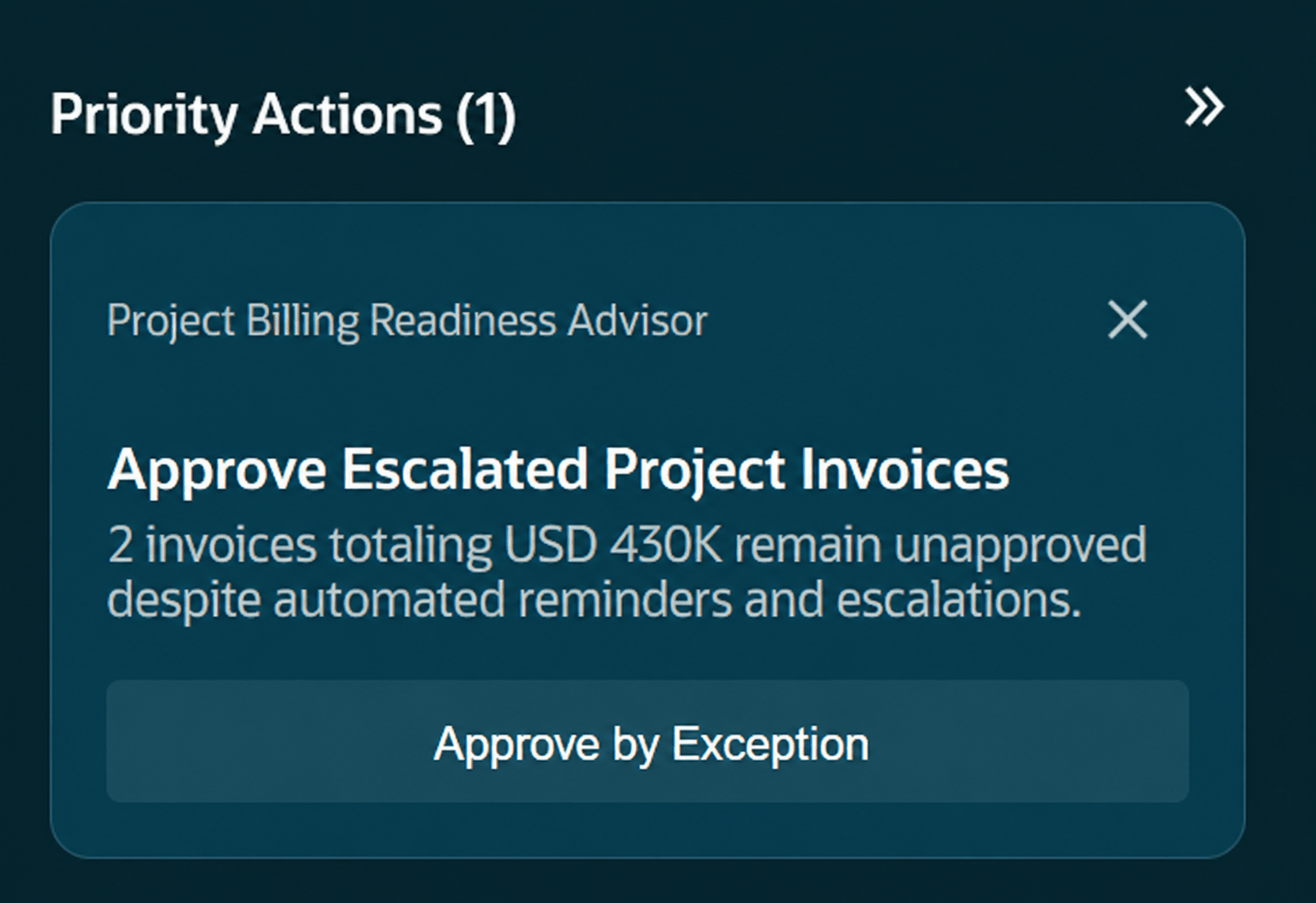
The Priority Actions drawer, showing an action to approve a project invoice by exception.
Automated notification of high-value transactions on hold
The On-Hold Bill Transactions agent is policy-driven and surfaces draft project contract invoices where there are related bill transactions on hold, and their summarized unbilled impact exceeds the threshold defined in the policy. Users can review the associated contract, project, invoice details, and on-hold impact in the insight drilldown. They can use the Add to Invoice action to release the holds, which automatically adds the transactions to the existing draft invoice (without it needing to be manually deleted and recreated), or submit the invoice for approval and defer the on-hold transactions to a future billing cycle.
The Add to Invoice action is available for an individual invoice or multiple invoices. After the transactions are added, the completeness policy reevaluates the affected invoice or invoices. When the completeness check passes, the invoices continue processing according to the configured auto-submission and approval rules.
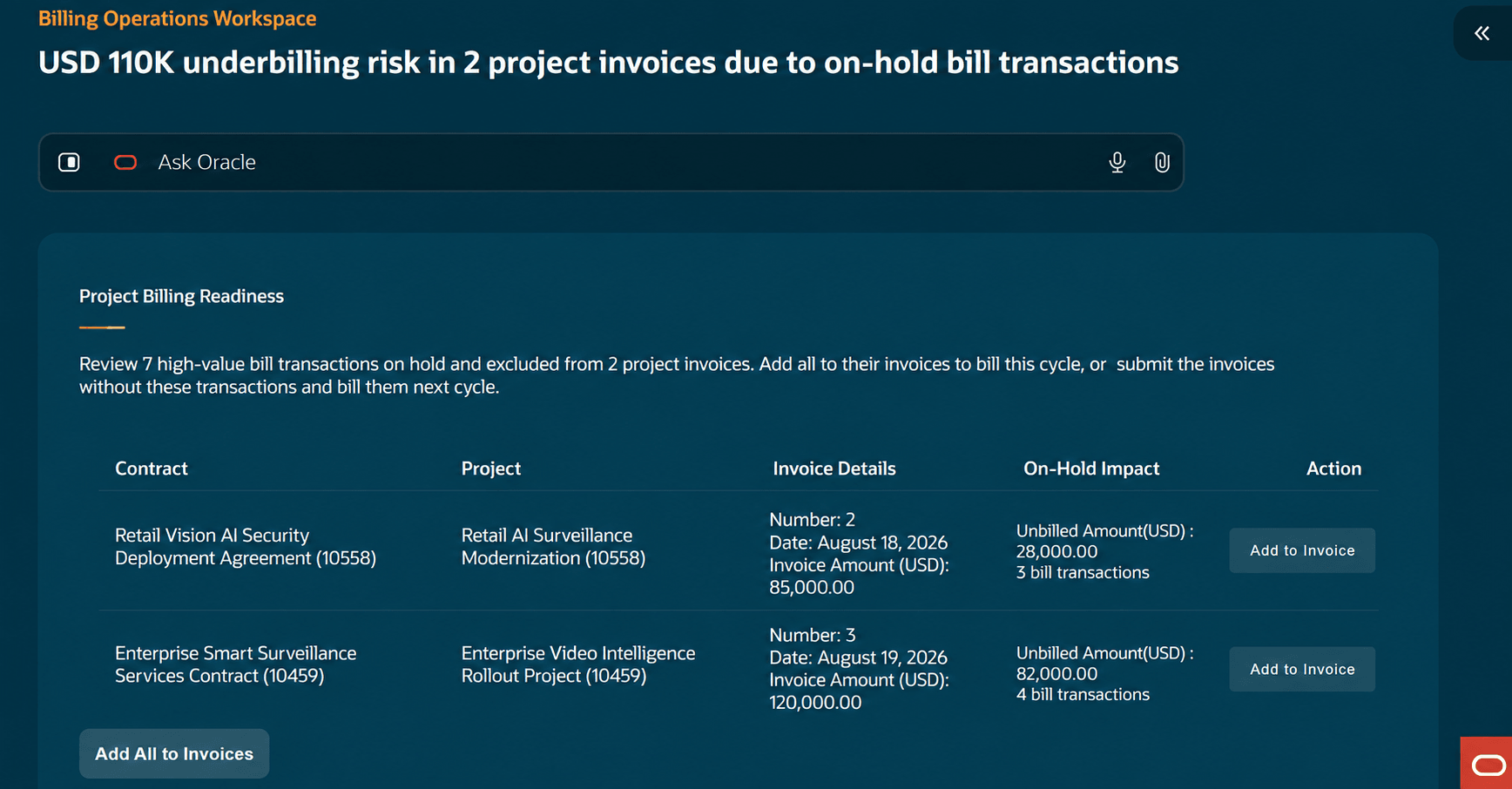
The Project Billing Readiness panel, showing the drilldown for on-hold bill transactions.
Complete, accurate invoices - Approved and delivered on time
Billing Operations Workspace agents help ensure charges are consolidated and invoices are completed, approved, and delivered on time with minimal manual intervention. Agents complete eligible work autonomously, recommend actions when judgment is required, and surface exceptions only when user attention is needed.
- Optimize consolidated billing by automatically applying standard consolidation practices and recommending additional consolidation opportunities when user approval is warranted:
- The agent keeps eligible charges moving into billing by applying the configured consolidation policy.
- Charges become eligible for consolidation and release when the configured amount thresholds are reached or the period-end cutoff is reached.
- When the policy permits autonomous processing, the agent consolidates and releases the charges automatically.
- When user approval is required, the workspace surfaces the proposed consolidation and release action, together with the supporting context, for the user to review and approve.
- Accelerate transaction approval by automatically approving transactions that meet established criteria, recommending approval where appropriate, and escalating only those transactions that require additional review:
- The agent evaluates transactions against the related purchase order and the applicable policy.
- It confirms that the required supporting evidence is available and compares relevant transaction details, including items, quantities, and unit prices, with the purchase-order information.
- When the evidence is complete, the details match, and the transaction meets the configured auto-approval criteria, the agent approves it automatically.
- If required evidence is missing or unreadable, or if the transaction doesn't match the purchase order, the agent surfaces the exception to an authorized approver together with the relevant evidence and mismatch details.
- The user can review the information, provide a missing reference document when needed, and rerun the approval check from the workspace. This keeps straightforward approvals moving automatically while making exceptions decision-ready.
- Resolve invoice delivery failures by identifying undelivered billing emails, automatically resending invoices when a verified alternate address is available, and requesting confirmation only when needed before retrying delivery:
- The agent detects invoice delivery failures and applies the configured policy to identify a permitted alternate bill-to contact.
- It evaluates available customer-contact evidence in the configured order, including alternate contacts for the bill-to site and customer account.
- When a verified alternate contact is available and the policy permits autonomous processing, the agent resends the invoice automatically.
- When confirmation is required, the workspace surfaces the alternate contact for user review before resending the invoice.
- If no permitted alternate contact can be identified, the agent alerts the Billing Department. This keeps invoice-delivery decisions consistent, evidence-based, and reviewable while helping customers receive invoices promptly.
The result is fewer manual touchpoints, faster exception resolution, and a higher likelihood that customers receive complete and accurate invoices on time.
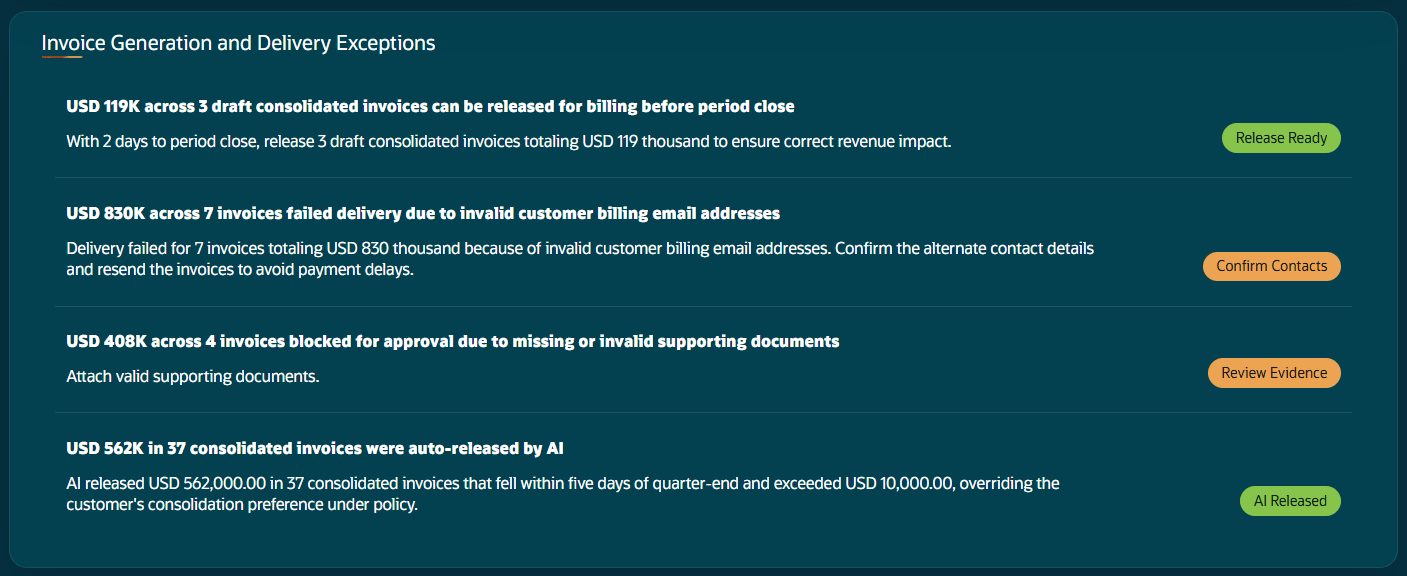
The Invoice Generation and Delivery Exceptions panel, highlighting where agents have taken actions based on policy, and where human actions are required by exception.
Full and prompt payment
The Billing Operations Workspace helps accelerate dispute resolution and protect cash flow by resolving routine disputes automatically, recommending action when judgment is required, and providing the evidence needed to make decisions quickly and confidently.
The Collections Email Response Assistant captures billing issues raised by customers through email and creates traceable disputes for incorrect price and duplicate invoice scenarios. The Billing Agent evaluates each dispute using the available evidence and policy guidance. For eligible cases, it automatically approves or rejects the dispute. When human judgment is required, the agent routes the exception to the Billing Operations Workspace with a recommended approve or reject action, supporting evidence, and rationale.
Approved disputes can be routed through the configured financial approval workflow notifications. After financial approval, a credit memo is created for the approved dispute. The agent can also help prepare the related customer communication, enabling teams to move efficiently from customer request through resolution and follow-up.
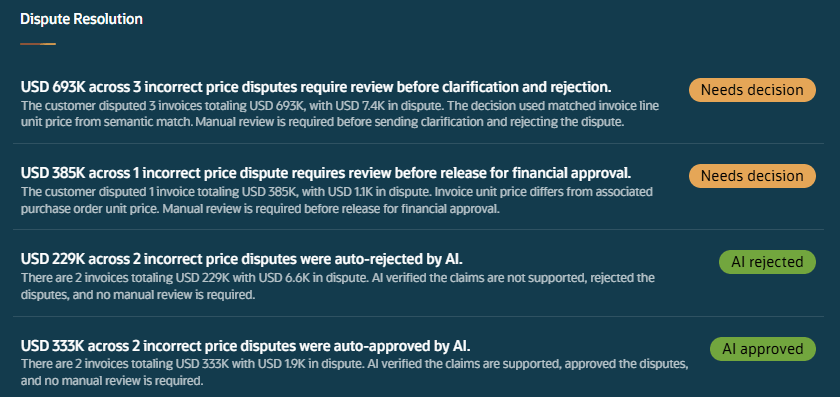
The Dispute Resolution panel, highlighting where agents have taken actions based on policy, and where human actions are required by exception.
These are the business benefits:
- Accelerate cash collection by resolving routine billing disputes automatically and reducing the time invoices remain unpaid.
- Focus teams on high-value exceptions by allowing billing work to progress autonomously until a policy threshold or business decision requires intervention.
- Keep eligible charges in the current billing cycle by adding on-hold project transactions to existing draft invoices without requiring invoices to be deleted and recreated.
- Shorten time to resolution by bringing together relevant evidence, agent recommendations, resolution actions, and customer communications.
- Maintain control and accountability with reviewable automated actions that show what agents completed, which evidence and policies supported the decision, and what still requires human action.
Steps to enable and configure
- To use the incoming email intelligence capability, associate the email account with the Collections Email Response Assistant in AI Agent Studio so that incoming emails can be read and processed. For details on adding email accounts, refer to Add Email Accounts. This step is not required if the Collector Workspace Agent is already used.
- Setup for Project Billing Readiness:
- The agents that underpin Project Billing Readiness use the Project Billing Readiness Policy.
- The policy focuses on three areas:
- Invoice Completeness - The policy specifies the business object criteria and threshold amount for the total on hold amount that determine whether draft invoices are displayed in the On-Hold Bill Transactions insight for review and action.
- Invoice Auto-Submission and Approval. The policy specifies the business object criteria to automatically submit and approve qualifying invoices, or automatically submit invoices that require explicit human approval. These rules apply after the invoice passes the completeness check.
- Approval Reminder, Escalation, and Exception Approval. The policy specifies business object criteria and thresholds for automatically sending approval reminders and escalations. If an invoice remains unapproved after the exception approval threshold is reached, it is displayed in the Overdue Invoice Approvals insight for further action.
- The Project Billing Readiness Policy is preconfigured. The policy comprises of three functions, evaluateInvoiceCompleteness, determineInvoiceApprovalRoute, and determineInvoiceApprovalFollowUpAction, which correlate with the above areas respectively.
- You can review or replace the preconfigured policy using AI Agent Studio, for example, to specify business object criteria such as the business units to which the policy applies. The simplest way to do this is to download a sample Microsoft Word policy template, written in natural language.
- For criteria such as Business Unit, Contract Type, and Customer, you can select a specific value, select All where available, or specify multiple values separated by commas.
- Amount-based determinants support comparison operators such as Greater than, Greater than or equal to, and Less than or equal to.
- Reminder, escalation, and exception approval thresholds can be configured in days and hours.
- To upload a policy document, in AI Agent Studio, navigate to Policy Model > Policies, search for the predefined Project Billing Readiness Policy, and open it. Click Customize, select Choose File, and upload the document with all three policy rules configured. Then, click Generate. Review the rule conditions in the Functions section, and publish the policy.
- If you modify the Project Billing Readiness Policy, create a copy of the predefined Project Billing Operations Scheduler Assistant workflow template in AI Agent Studio. Then, schedule the workflow agent using a user who has both the Application Implementation Consultant and Custom Billing Operations Workspace roles assigned. For access requirements for the custom role, refer to Access Requirements. For information about scheduling a workflow, refer to the Key Resources section.
Tips and considerations
- Dispute scope - The current dispute scope only covers incorrect price and duplicate invoices scenarios.
- Additional information for the Project Billing Readiness panel:
- Invoices that don’t match the determinants configured in the Invoice Completeness policy remain in Draft status and can be reviewed in the existing invoice work area.
- Invoices that match the determinants configured in the Approval Reminder, Escalation, and Exception Approval policy but have an invoice amount below the configured threshold, as well as invoices that don’t match the configured determinants, don’t trigger automated reminders or escalations.
- Enabling the predefined Allow Invoice Processing in any Sequence profile using the Manage Administrator Profile Values setup page allows you to approve invoices by exception in any sequence for a project contract.
Key resources
- For the overview of Disputes, see Process Collection Disputes
- For the overview of Transaction Controls, see Control and Transaction Completion
- To understand the Agentic Apps framework, see What's an agentic app?
- To manage AI agents, workflows, and agentic applications, see How do I use AI Agent Studio?
- To create and associate policy models with policy nodes in workflows, see Add a Policy Model to a Policy Node of Workflows
- For information on scheduling a workflow, refer to Configure Workflow Triggers > Schedule
Access requirements
To enable access to the Billing Operations Workspace, create and assign a custom job role with the required assistant duty role to the user:
- Navigate to the Security Console.
- Create a Role. Mark the Role Category as 'Financials - Job Roles' and Enable Permission Groups.
- Create the following two data security policies by navigating to Data Security Policies > Create Data Security Policy:
- Policy Name: Grant on Business Unit
- Data Resource: Business Unit
- Data Set: Select by instance set
- Condition Name: Access the business units for which the user is explicitly authorized
- Actions: Manage Project Contract Invoice
- Policy Name: Grant on Customer Account
- Data Resource: Trading Community Customer Account
- Data Set: All values
- Actions: View Customer Account; Read
- Policy Name: Grant on Business Unit
- Navigate to Role Hierarchy > Roles and Privileges.
- Add the duty role Billing Operations Work Space (ORA_AR_BILLING_OPERATIONS_WORKSPACE_DUTY).
- Assign this custom Job Role to required users. This could be done separately even from the User Accounts page.
- Save your changes.
- The Billing Operations Workspace is accessible from the ERP Agents work area.
The Approve by Exception action (in the drilldown for overdue approvals in the Project Billing Readiness panel) is controlled by the Approve Project Contract Invoice functional privilege. This privilege is included in the predefined Project Billing Readiness duty, which in turn rolls up to the predefined Billing Operations Workspace duty role (as above).
Data access requirements for the Billing Operations Workspace
Users must also have the appropriate data access for the business units, customer accounts, customers, and the transactions they are expected to review. The Billing Operations Workspace displays transactions, disputes, and activities only for the data the user is authorized to access. Use the Manage Data Access for Users task in the Users and Security functional area to assign users the appropriate data access based on their job roles