Project Planning Workspace for project initiation and budget planning
Accelerate the path from project proposal through staffing with Project Planning Workspace. AI-powered capabilities help you assess qualified sales opportunities, generate proposals, create structured project plans, produce governed budgets, and staff approved demand with qualified, available people. Improve efficiency and accuracy by using natural language to refine estimates, plans, budgets, and staffing decisions, while applying your organization's policies for consistent governance. Automatically create named-person assignments when applicable policy conditions are met to help move projects into execution faster.
The Project Planning Workspace experience continues to expand from release 26C with new capabilities. In upcoming releases there would be more capabilities across the project lifecycle. The current experience includes:
- Estimate opportunity costs and generate proposals.
- Project creation from opportunities or supporting documents.
- Detailed budget planning across project tasks and resources.
- Create resource requests and staff approved labor demand with named people.
Project Planning Workspace automatically surfaces the work that needs your attention, so you can act without searching for status or next steps. Priority Actions identifies items requiring immediate action, while Planning Priorities highlights work to review and act on, such as projects requiring detailed budget generation.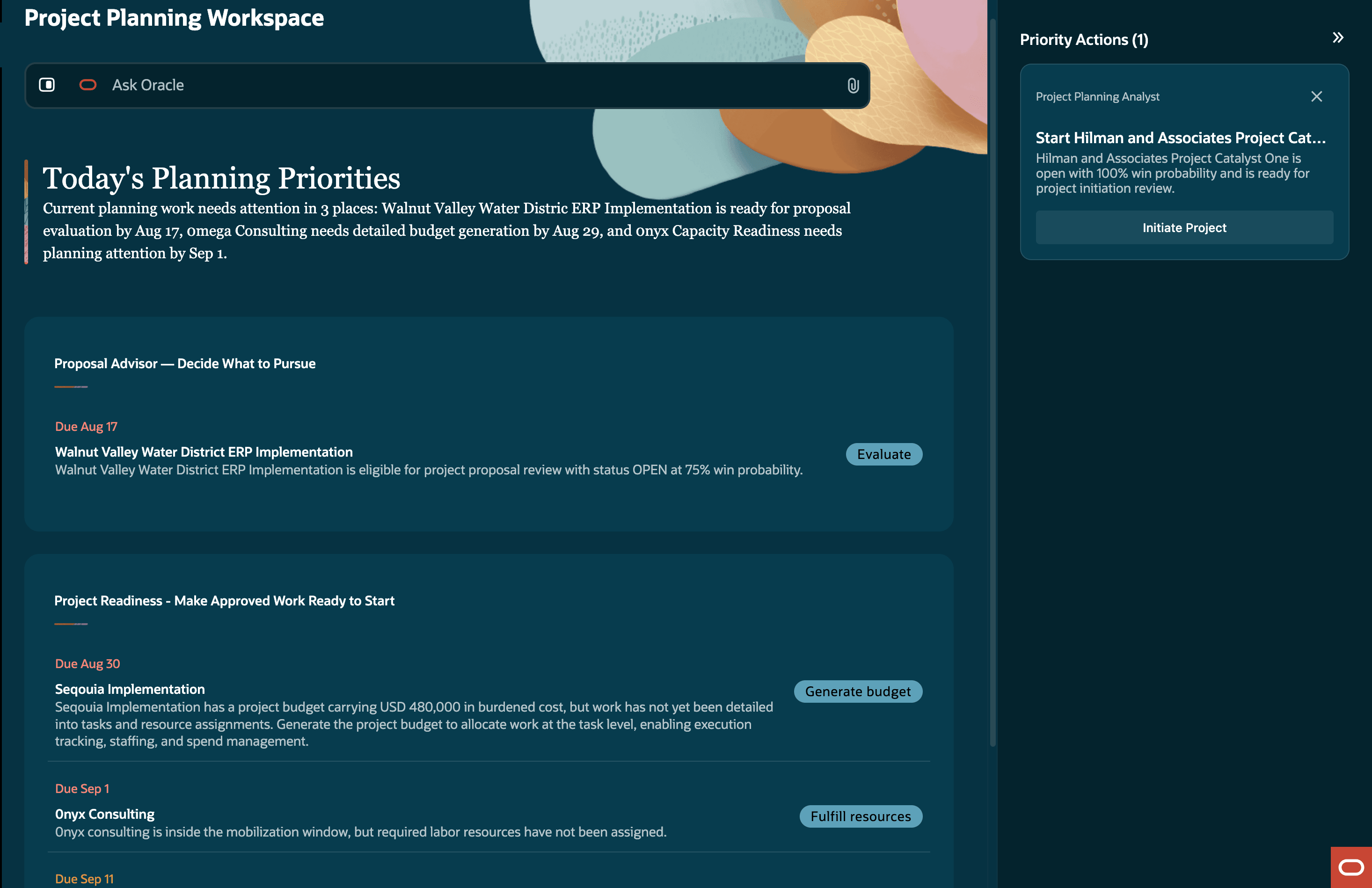
Today's planning priorities displayed in the Project Planning Workspace
Opportunity cost estimation and proposal generation
Assess eligible sales opportunities with a policy-guided estimate of cost. Review cost, margin, and scope before committing delivery capacity. Generate a consistent, shareable PDF proposal from the reviewed estimate. Refine the estimate using natural language and generate the proposal when the estimate meets your requirements.
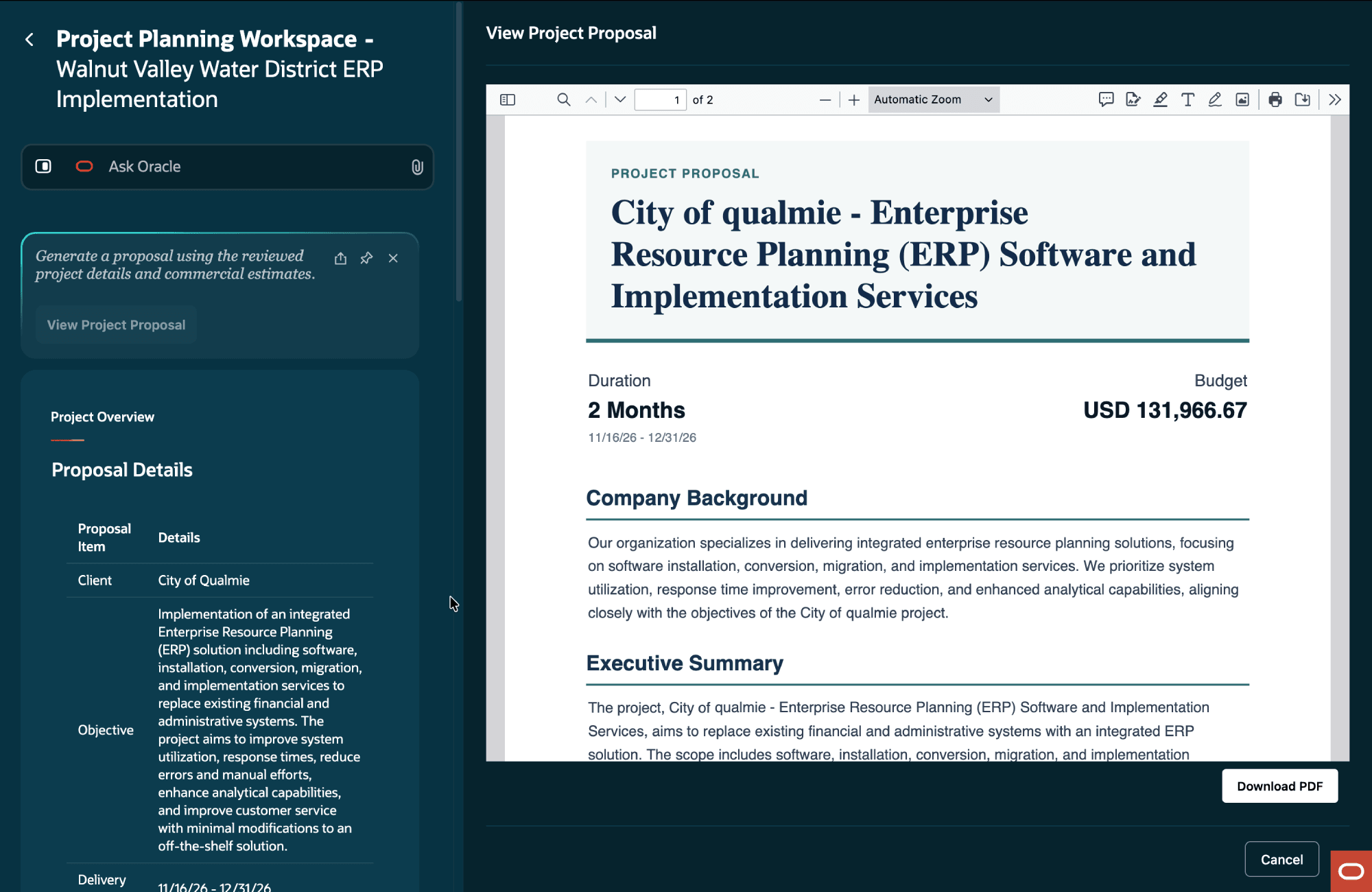
Refine an opportunity cost estimate and generate a proposal.
Project creation from opportunity
Create a project from a sales opportunity and its supporting business documents. The workspace extracts business objectives, scope, milestones, schedules, resources, and financial information from the statement of work and available sales handoff information to create a structured project plan. This reduces manual data entry and accelerates project readiness for delivery.
You can also create a project directly in Ask Oracle by attaching a supporting document, such as a statement of work or request for proposal, without starting from an opportunity.
Depending on the organization's configuration, the agent also prepares associated contract information, including contract lines and payment milestones. When additional work is covered by an existing master services agreement, the agent creates new contract lines on that contract rather than creating a new contract.
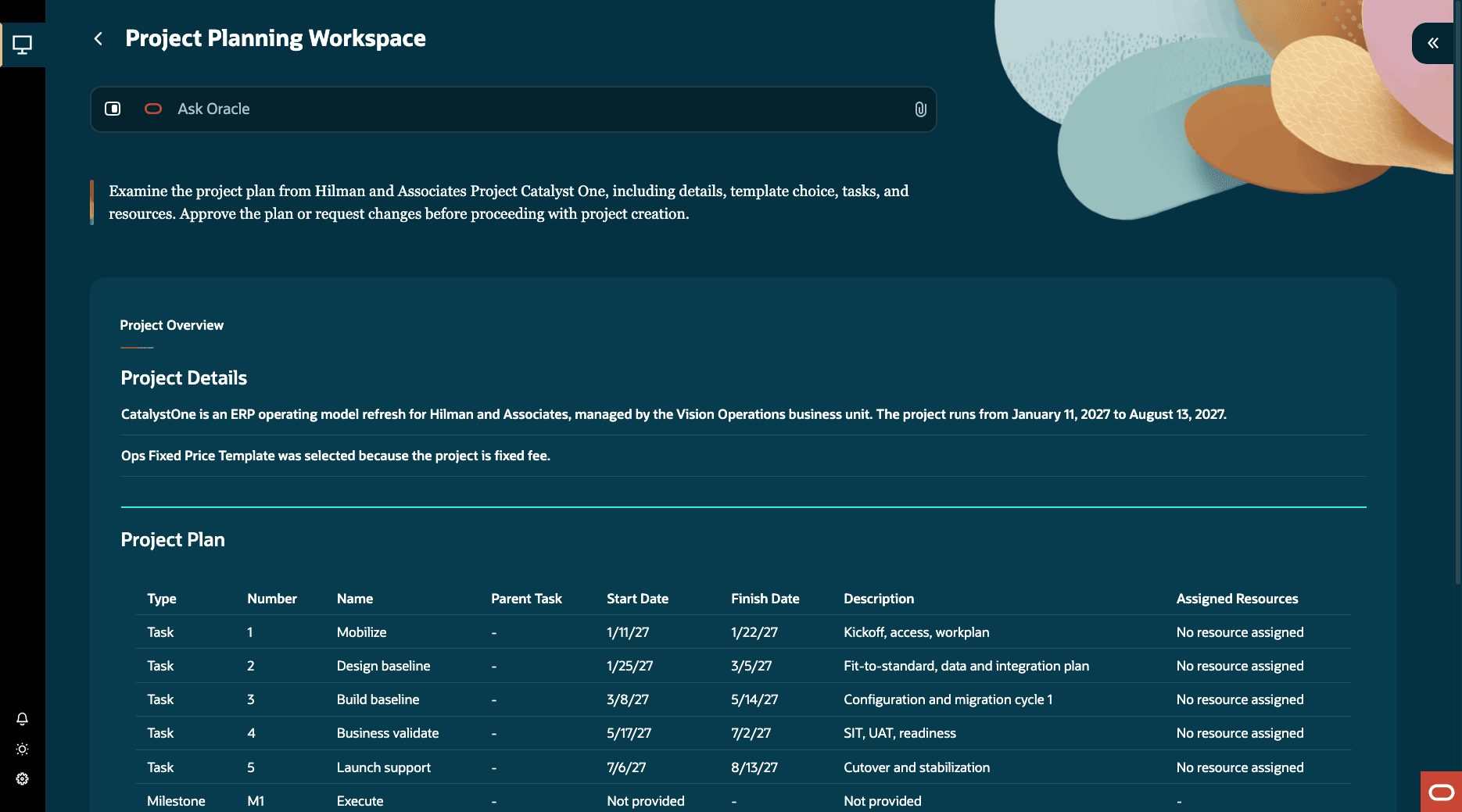
Start a project from a project initiation recommendation.
Detailed budget planning
Create detailed budget allocations across tasks and resources for funded projects. The workspace identifies relevant past projects based on conditions defined in your organization's planning policies and uses them as reference points for budget recommendations. Apply margin and contingency reserve requirements to create policy-aligned budget allocations.
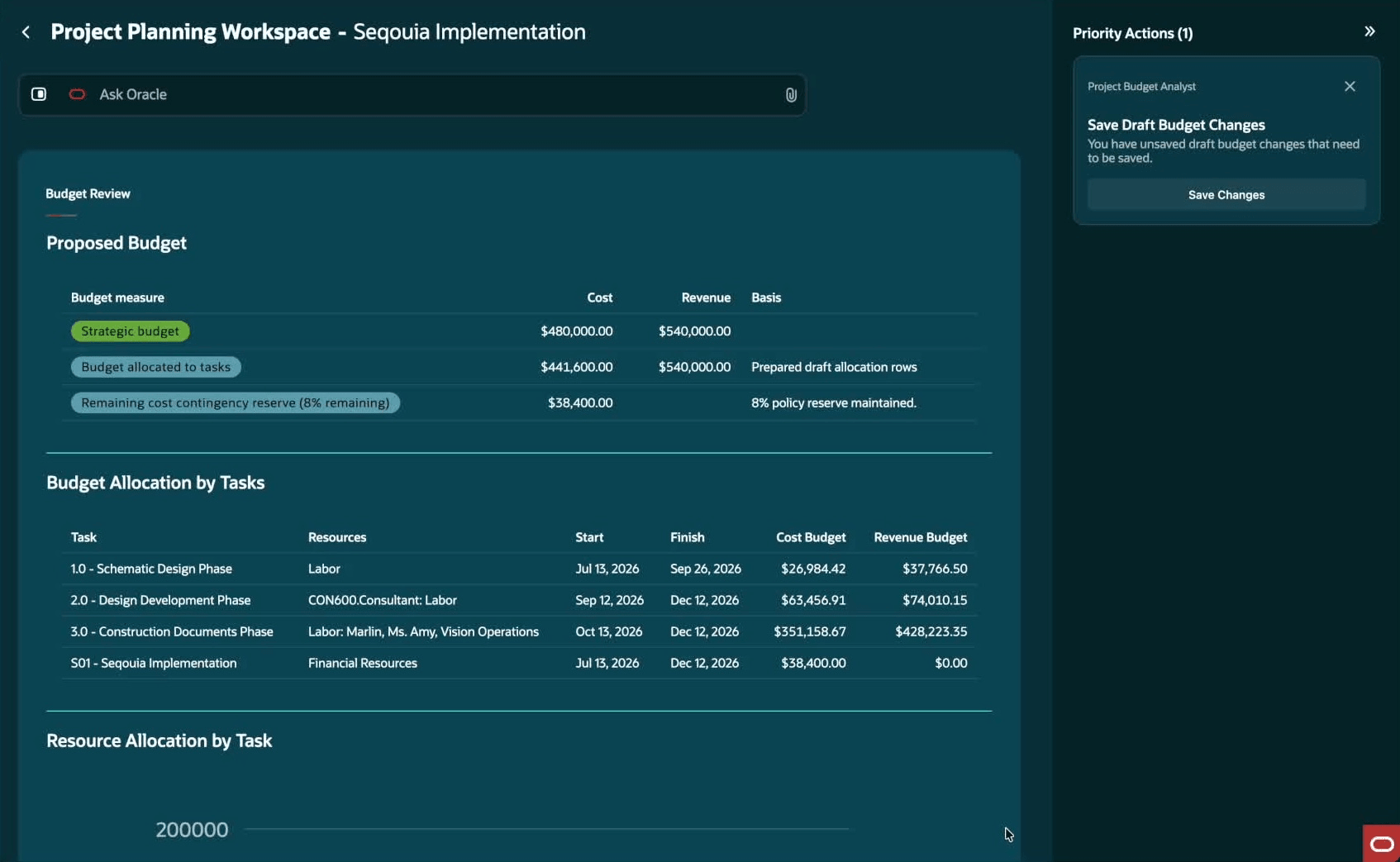
Review a proposed detailed budget allocation
Refine generated budget allocations using Ask Oracle. For example, request a reduction in labor effort when productivity expectations change. The workspace incorporates the request and presents the resulting budget updates for review before you apply or save the changes.
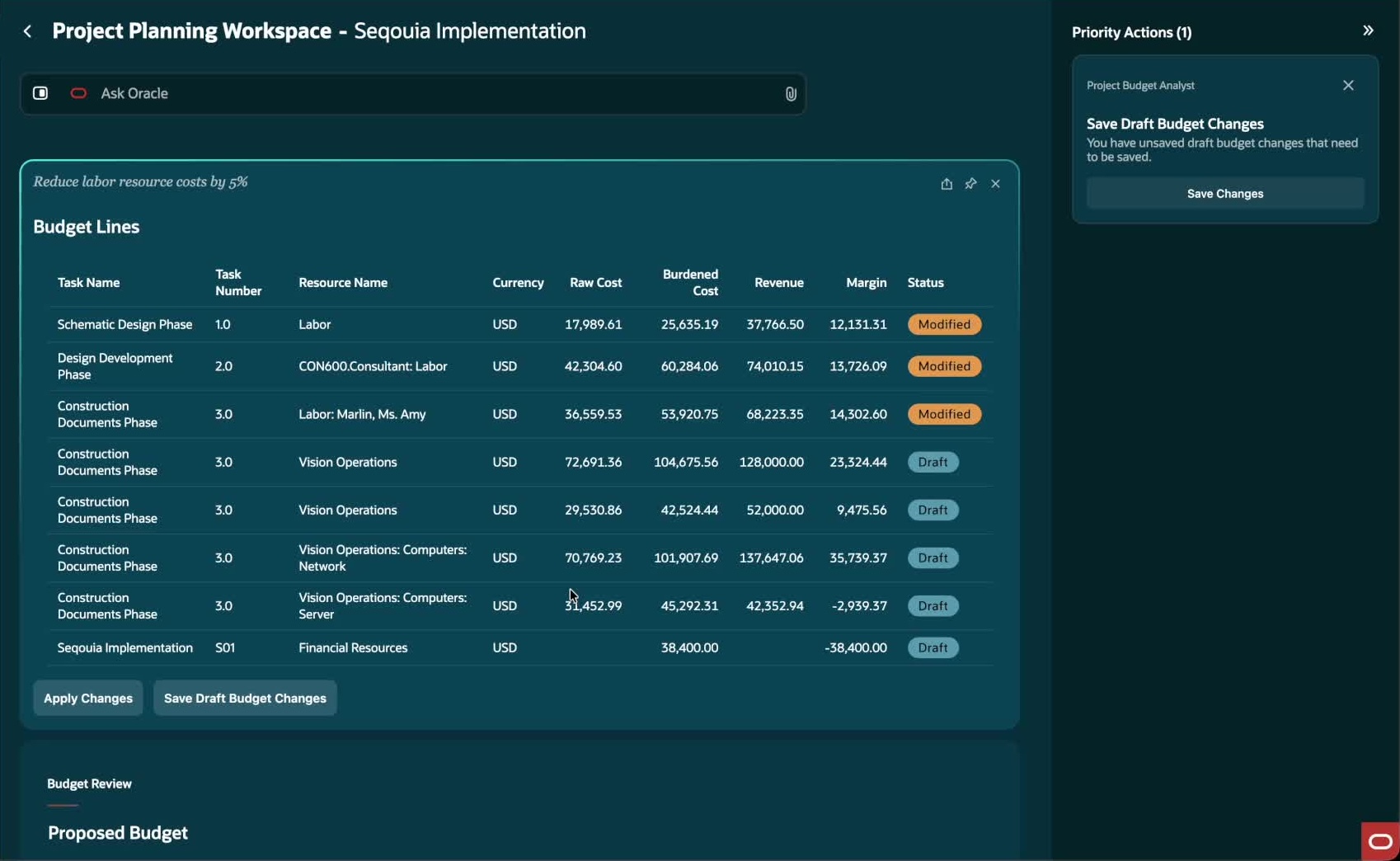
Review updated detailed budget lines after an Ask Oracle query
Resource requests and staffing
Staff approved project demand with qualified people who have available capacity. Improve confidence in staffing decisions by considering the skills and availability required for the work.
Automatically create named-person assignments for project roles in the project plan or budget when the applicable SOP conditions are met. Retain control through policy-driven approvals, and raise a resource request when suitable resources aren't available.
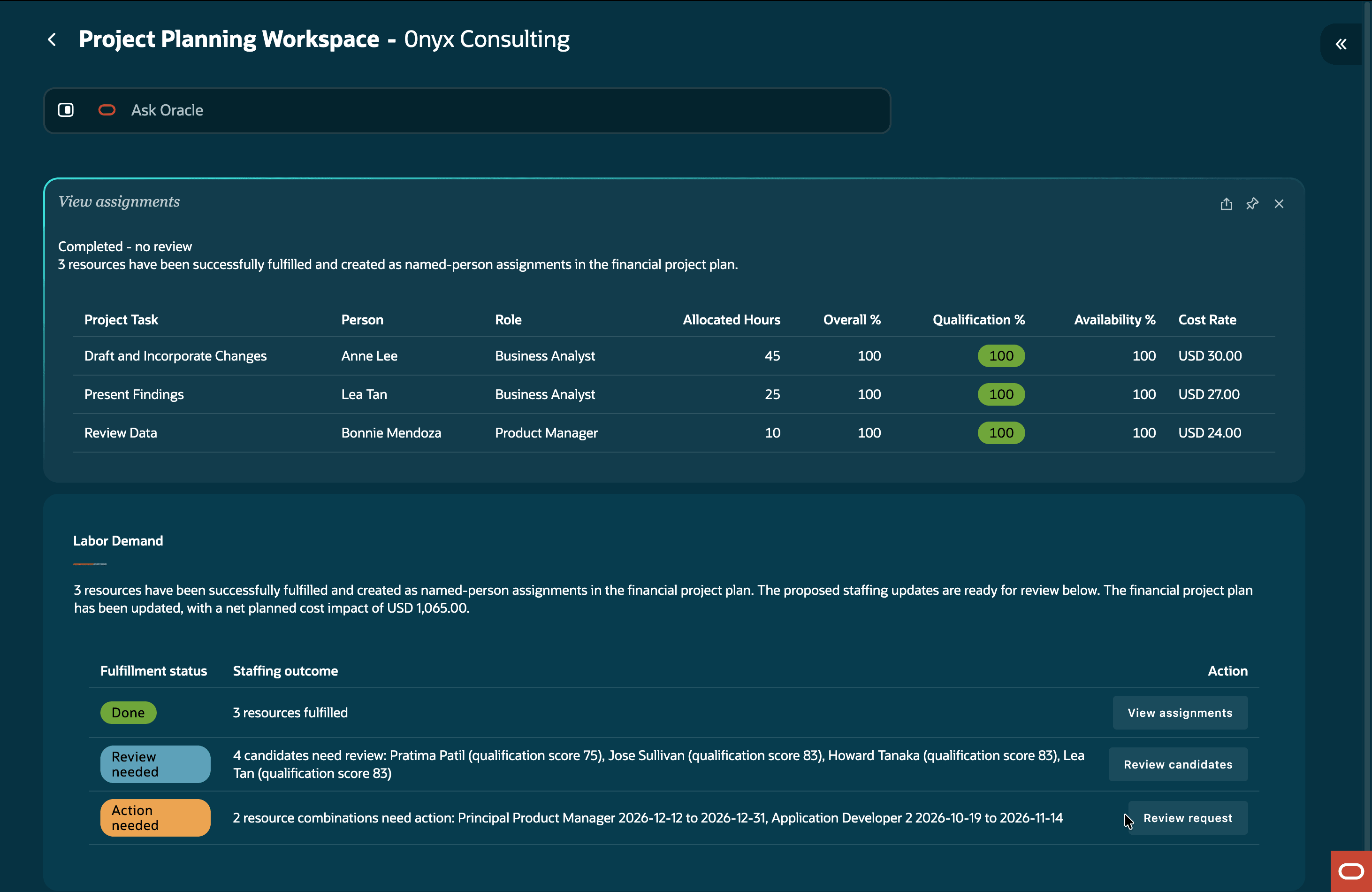
Review matching candidates and request staffing for approved project demand.
The business benefits are:
- Reduce project initiation time and manual effort by transforming sales opportunities and approved scope into execution-ready project plans and associated contract information.
- Reduce financial and governance risk by applying organizational planning policies, margin targets, and contingency reserve requirements consistently when creating project budgets.
- Improve opportunity decisions by using policy-governed cost and effort estimates that can be refined before proposal generation.
- Improve staffing decisions by matching approved project demand with qualified, available resources and retaining control through required approvals.
Steps to enable and configure
Before using Project Planning Workspace, optionally configure the standard operating procedures that guide workspace insights and planning recommendations, see sample policy documents.
- Configure the following policies:
- Project Planning Workspace Policy (ORA_PRJ_PJO_PROJECT_PLANNING_WORKSPACE_POLICY) to define the business rules and preferences that govern workspace behavior, priorities, and user experience.
- Project Budget Detail Policy (ORA_PRJ_PJO_PROJECT_BUDGET_DETAIL_POLICY) to define the business rules, method-selection criteria, calculation guardrails, and fallback behavior for generating project budgets.
- Project Initiation Governance and Approval Policy (ORA_PRJ_PJF_PROJECT_INITIATION_GOVERNANCE) to govern Project Initiation Assistant readiness, template eligibility, approval routing, and create-action decisions.
- Project Cost Estimation and Proposal Evaluation Policy (ORA_PRJ_PJF_PROJECT_COST_ESTIMATION_PROPOSAL_EVALUATION_POLICY) to defined estimation method and approach.
- Project Labor Resource Request Policy (ORA_PRJ_PJO_PROJECT_LABOR_RESOURCE_REQUEST_POLICY) to evaluate and fulfill labor resource requests.
- Assign the applicable workspace and project-planning privileges as described in the Access requirements section.
- After configuring the access requirements, navigate to the Project Planning Workspace from ERP Agents navigation menu.
Tips and considerations
-
Review generated project plans, commercial information, and budget recommendations before applying or saving them.
-
Use your organization's configured policies as the basis for planning recommendations. Values such as the opportunity-confidence threshold and contingency percentage are configurable and may differ by organization; the values shown in demonstrations are examples only.
Key resources
- To understand the Agentic Apps framework, see What's an agentic app?.
- To manage AI agents, workflows, and agentic applications, see How do I use AI Agent Studio?.
- To configure workflows for use in an agentic app, see Create and Enable Workflows for Using in Agentic Applications.
- To configure user access to AI agents, see How can I give users access to AI agents?.
- To create and associate policy models with policy nodes in workflows, see Add a Policy Model to a Policy Node of Workflows.
- For AI Agent Studio subscription and pricing information, see How do I use AI Agent Studio?.
Access requirements
- Users must have the Project Planning Workspace Duty (ORA_PJO_PROJECT_PLANNING_WORKSPACE_DUTY) to access the Project Planning Workspace.
- Enable permission groups for the applicable role if they are not already enabled.
- Users must also have the privileges, roles, and permissions required for the respective capabilities they intend to use, as described below.
A. Project cost estimation and proposal generation
The following duty roles are required for estimation of a project cost. These are available through the predefined Project Manager job role (ORA_PJF_PROJECT_MANAGER_JOB). For custom roles, assign these roles from the Roles and Privileges tab under Role Hierarchy:
- Project Inquiry (ORA_PJF_PROJECT_INQUIRY_DUTY)
- Project Budget Inquiry (ORA_PRJ_PROJECT_BUDGET_INQUIRY_DUTY)
B. Project creation
|
Privilege Name |
Privilege Code | Data Access Resource Name | Data Access Action | Included in predefined Project Manager job role |
|---|---|---|---|---|
| Manage Project Planning Resource Breakdown Structure Version | PJF_MANAGE_PROJECT_PLANNING_RESOURCE_BREAKDOWN_STRUCTURE_VERSION_PRIV | Project (PJF_PROJECTS_ALL_VL) | Edit Project Resource Breakdown Structures for Project | Yes |
| Manage Project REST Service | PJF_MANAGE_PROJECTS_REST_PRIV | Project (PJF_PROJECTS_ALL_VL) | Manage Projects Using Service | No |
|
Manage Project Financial Plans Service |
PJO_MANAGE_PROJECT_FINANCIAL_PLANS_SERVICE_PRIV |
Project (PJF_PROJECTS_ALL_VL) |
Manage Project Task Structure |
Yes |
Additionally, the following duty roles are required for creating projects. These are available through the predefined Project Manager job role (ORA_PJF_PROJECT_MANAGER_JOB). For custom roles, assign these roles from the Roles and Privileges tab under Role Hierarchy:
- Project Inquiry (ORA_PJF_PROJECT_INQUIRY_DUTY)
- Project Foundation Setup Inquiry (ORA_PJF_PROJECT_SETUP_INQUIRY_DUTY)
For contract line creation, the following functional and data access privileges are required:
| Privilege Name | Privilege Code | Data Access Resource Name | Data Access Action | Included in predefined Project Manager job role |
|---|---|---|---|---|
| Create Contract | OKC_CREATE_CONTRACT_PRIV | Contract Header (OKC_K_HEADERS_ALL_B) | Manage Contract | No |
|
Edit Contract by Web Service |
OKC_EDIT_CONTRACT_VIA_WEB_SERVICE_PRIV | Contract Header (OKC_K_HEADERS_ALL_B) |
|
No |
To create project using Oracle Sales Opportunity, the following functional and data access privileges are required:
| Privilege Name | Privilege Code | Data Access Resource Name | Data Access Action | Included in predefined Project Manager job role |
|---|---|---|---|---|
|
View Opportunity |
MOO_VIEW_OPPORTUNITY_PRIV | Opportunity (MOO_OPTY) | Read | No |
C. Detailed budget management
| Privilege Name | Privilege Code | Data Access Resource Name | Data Access Action | Included in predefined Project Manager job role |
|---|---|---|---|---|
| Manage Project Financial Plans Service | PJO_MANAGE_PROJECT_FINANCIAL_PLANS_SERVICE_PRIV | Project (PJF_PROJECTS_ALL_VL) | Manage Project Budget Working Version | Yes |
Additionally, the duty role Project Budget Inquiry (ORA_PRJ_PROJECT_BUDGET_INQUIRY_DUTY) is required for detailed budget management. This is available through the predefined Project Manager job role (ORA_PJF_PROJECT_MANAGER_JOB). For custom roles, assign this role from the Roles and Privileges tab under Role Hierarchy.
D. Labor resource requests
| Functional Privilege Name | Functional Privilege Code | Data Access Resource Name | Data Access Action | Access provided through Seeded Project Manager Role (
ORA_PJF_PROJECT_MANAGER_JOB ) |
|---|---|---|---|---|
| Manage Project Resource Requests |
PJR_MANAGE_PROJECT_RESOURCE_REQUESTS_PRIV |
Project (
PJF_PROJECTS_ALL_VL ) |
Manage Project Work Plan Data | Yes |
| Fulfill Project Resource Requests |
PJR_FULFILL_PROJECT_RESOURCE_REQUESTS_PRIV |
Not applicable — scoped by owned resource pools | Not applicable | No |
| Manage Project Work Plan |
PJT_MANAGE_PROJECT_WORK_PLAN_PRIV |
Project (
PJF_PROJECTS_ALL_VL ) |
Manage Project Work Plan Data; Manage Project Work Plan Resource Assignments Data | Yes |
| Manage Project Plan Resource Assignment |
PJO_MANAGE_PROJECT_PLAN_RESOURCE_ASSIGNMENT_PRIV |
Project (
PJF_PROJECTS_ALL_VL ) |
Manage Project Task Structure | Yes |
| Manage Project Planning Resource Breakdown Structure Version |
PJF_MANAGE_PROJECT_PLANNING_RESOURCE_BREAKDOWN_STRUCTURE_VERSION_PRIV |
Project (
PJF_PROJECTS_ALL_VL ) |
View Project Resource Breakdown Structures for Project | Yes |
| Assign Project Resource to Project |
PJT_ASSIGN_PROJECT_RESOURCE_TO_PROJECT_PRIV |
Project (
PJF_PROJECTS_ALL_VL ) |
Manage Project Work Plan Data; Manage Project Work Plan Resource Assignments Data | No |
Additionally, the duty role Financial Project Plan Inquiry (ORA_PJO_FINANCIAL_PROJECT_PLAN_INQUIRY_DUTY) is for creating labor resource requests. This is available through the predefined Project Manager job role (ORA_PJF_PROJECT_MANAGER_JOB). For custom roles, assign this role from the Roles and Privileges tab under Role Hierarchy.