Retirement of the legacy Careers Website
The legacy Careers Website (CWS) will be retired with the 24B release on May 17th, 2024. The CWS was succeeded by the modern, highly improved mobile-optimized TBE Career Center released to all customers in 2015, and the legacy CWS was disabled for new customers in 2016. Older customers may still be posting jobs to the legacy CWS.
Important: If you are still using the legacy CWS in any capacity, you will need to fully configure, test and deploy your TBE Career Center, and update all links from all web properties (such as any corporate web pages) to the Career Center to avoid interruptions in your online career website(s). Completion of this migration must be completed before the May 2024 deadline.
How to confirm if you are using the legacy CWS or the Career Center
If you are not sure which career site you are using, first check to see if the CWS is still enabled in your TBE instance.
- Select Administration, then select Customize Recruit.
- Under the Customize Pages section, do you have a section called Manage Careers Websites? If not, you are already using the Career Center. However, just in case you may have links to the old CWS in email templates or your job library, we encourage you to attend a free webinar to ensure that you remove references to the CWS (please see 'Getting Help' below).
- If you do have both a Manage Careers Websites and a Manage Career Centers section, you have a couple options.
- You can click the View link under both sections and compare the data to see which site seems to have your current job postings. You can then navigate to your postings from your corporate site to compare.
- You can go directly to your corporate job listings. If the look and feel matches the below example, you are already using the Career Center.
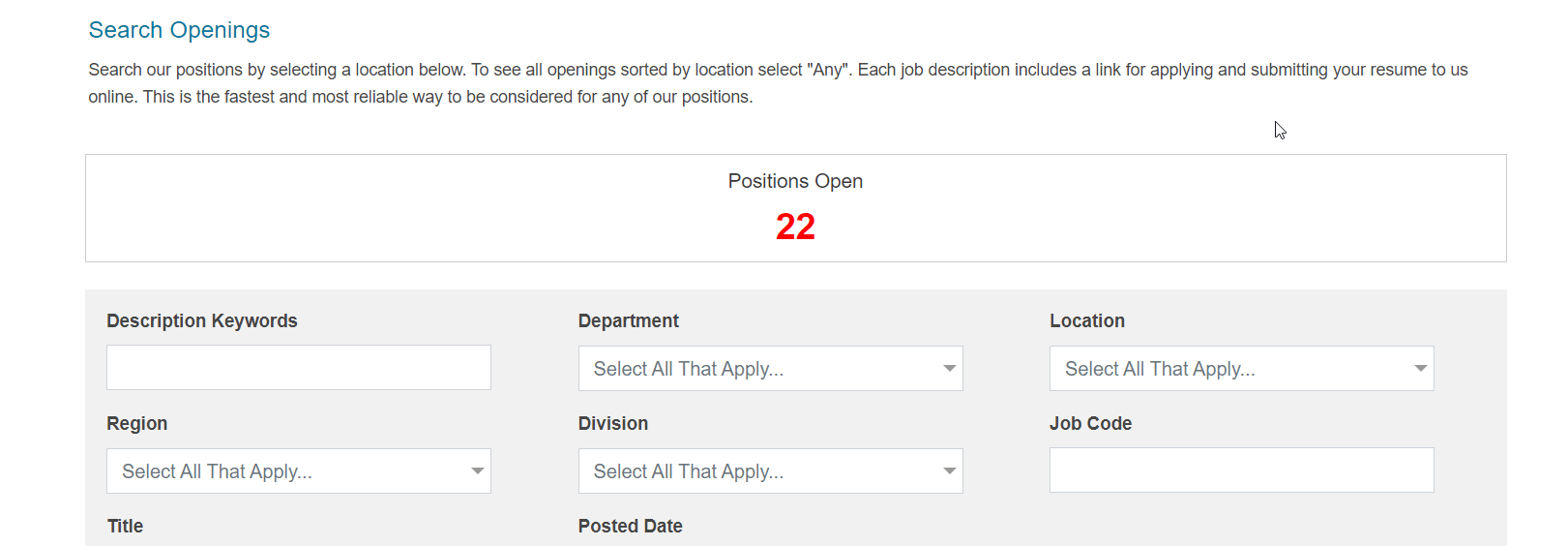
However, even if your corporate site is using the Career Center, you may still have an old CWS for internal postings, internships, etc. You may not have removed all the old postings, or you may have hard-coded links to the CWS in your email templates or job library.
Therefore, if you have ever previously used the legacy CWS or you are not sure, we encourage you to review the 'Getting Help' section below and attend a free webinar available every week during this process.
You will want to migrate to the Career Center as soon as possible. Besides the greatly improved look and feel to the Career Center, it is fully mobile responsive and mobile friendly, while the legacy CWS doesn't work correctly on candidate mobile devices. Candidates are much more likely to drop out of the application process when faced with the older career website, which means fewer candidates for all of your open requisitions.
Besides being state-of-the-art and completely mobile optimized, the Career Center features numerous other functionality improvements, such as the Save Draft option, guest login, social media sharing to Facebook, Twitter and more, all of which are not available in the legacy CWS.
Getting Help Migrating to the Career Center
To get started, you should review the information in the online Help. Choose Help>Help Recruit and expand the Table of Contents. Expand the Administration chapter, and then expand the Career Center section. As you can see, there is a lot of detailed information here that you will want to review. You can also visit the Resource Center (Help>Resource Center) and search for Career Center. There are a few videos as well as a PDF document that will get you started on setting up your Career Center.
Additionally, our Oracle Gold Partner, RecruitingDash, has a comprehensive list of complimentary CWS to Career Center resources available at TBECareerCenter.com. We encourage all TBE customers to review and take advantage of these no-cost informative resources:
- Comprehensive overview of all Career Center features and functionality
- Free checklists detailing what is required to move from CWS to the Career Center
- Free interactive 'Migrating from TBE CWS to Career Center' Webinar and C&A sessions every other Wednesday at 10 AM Pacific. Sign up at TBECareerCenter.com
- Complimentary Career Center readiness assessment, with no obligation, for any TBE customer. Interested customers may learn more and sign up for their free assessment at TBECareerCenter.com