New Profile Option for Enabling Blind Query in Redwood Address LOVs
In the 25B update, we removed the blind query that was executed when a user clicked an address attribute. For details about that change, see this What's New for 25B: New Profile Option Added and Blind Query Removed for Redwood Address LOVs.
With this update, you can optionally use blind queries when entering address attributes.
With blind queries in the address attributes, a search will execute as soon as the user places the cursor in the field. The benefit of this option is that the user doesn't have to type anything before the search begins. The downsides to this option are that the search may take a long time, and the initial values returned may not be relevant. In the following image, the user has clicked in the City field, and hasn't entered anything yet. The search results include a list of cities in Alaska. Once the user enters some characters, the search results will be refined.
City attribute with blind query returns values before the user enters any characters
Without blind queries in the address attributes, the user must enter a few characters before the search begins. The benefits of this option are improved performance, along with more relevant initial results. The downside to this option is that users may not realize that they need to start typing in order to initiate the search. In the following image, the user has entered "dy" in the City field. The search results include several cities that the user can choose from, such as Kennedy, Grady, and Dyer.
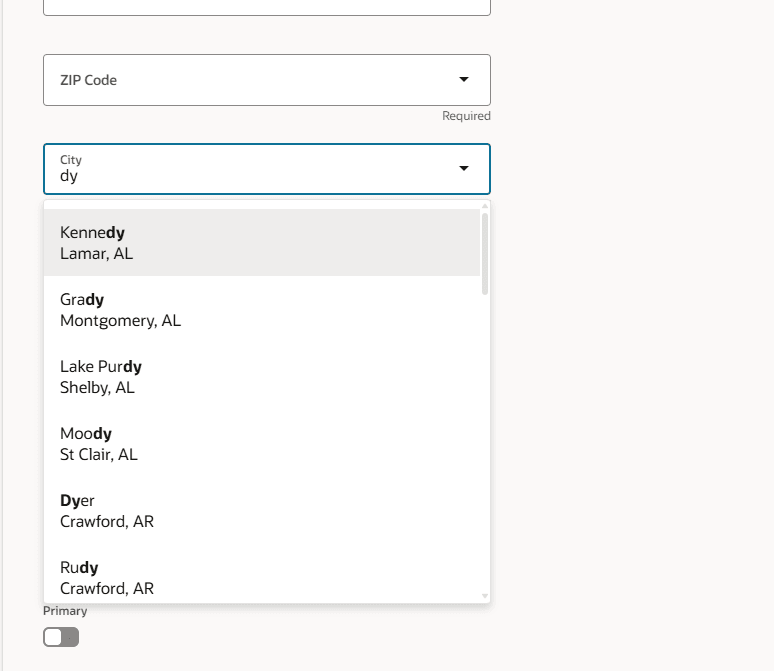
City attribute without blind query requires the user to enter some characters
With this new profile option, you can choose which type of search is more useful for your users.
Steps to enable and configure
To enable blind queries in address attributes, set the ORA_PER_REDWOOD_ADDRESS_LOV_BLIND_SRCH profile option value to Yes.
For more information about the steps required, see How do I enable a profile option?