Enhanced Public Worker Access for Oracle Search
Public Worker Access UI now supports advanced filtering, including configurable attributes and flexfields. You can also configure multiple roles to meet complex organizational requirements. With enhanced Public Worker Access (PWA) settings, you can now define more granular and flexible security criteria for public person searches in Oracle Search.
This feature lets you:
- Have multiple public worker access configurations,
- Associate roles to the configuration, and
- Define complex PWA conditions using a comprehensive set of attributes.
Public Worker Access Using Security Filters Profile Option
To support more complex filtering requirements and multiple, varied Public Worker Access configurations with role associations, the available values for the ORA_PER_PUBLIC_WORKER_ACCESS_ENABLED (Public Worker Access Using Security Filters Enabled) profile option have been expanded. Refer to the table below to determine which option best applies to your implementation.
| Current Value | Prior Value |
|---|---|
| Disabled | No |
| Enterprise | Yes |
| Role-based | <New value> |
Selecting the role-based profile option value allows you to define multiple Public Worker Access configurations, each of which can be associated with one or more assignable roles. If a configuration is not associated with any roles, it will not apply to any users.
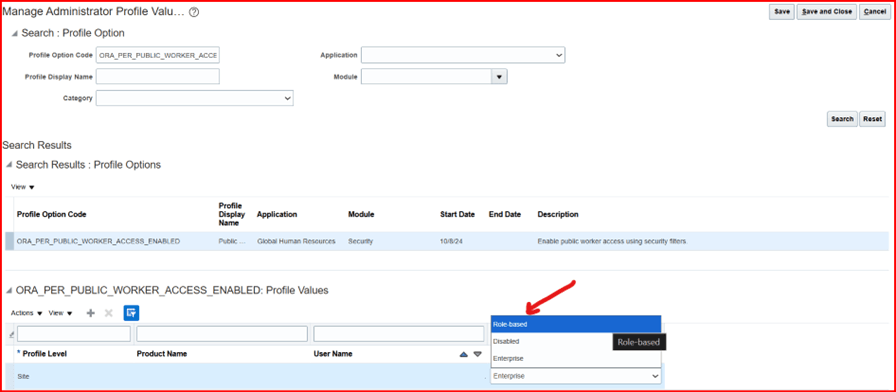
Redefined and New Profile Option Values
Enterprise Public Worker Access Configurations
As part of this feature enhancement, enterprise-wide Public Workers Access (PWA) configurations can also utilize the advanced filtering option to better align with your organization’s specific needs.
Prior options for Included public workers, are:
-
All workers,
-
Workers in user’s legal employer,
-
Workers in user’s business unit, or
-
Other inclusion criteria.
If the above options do not support your business needs and you want to define public worker access for Oracle Search, you can keep the profile option set to “Enterprise”. You now have the ability to define advanced filter criteria across your entire organization, as illustrated in the following example:
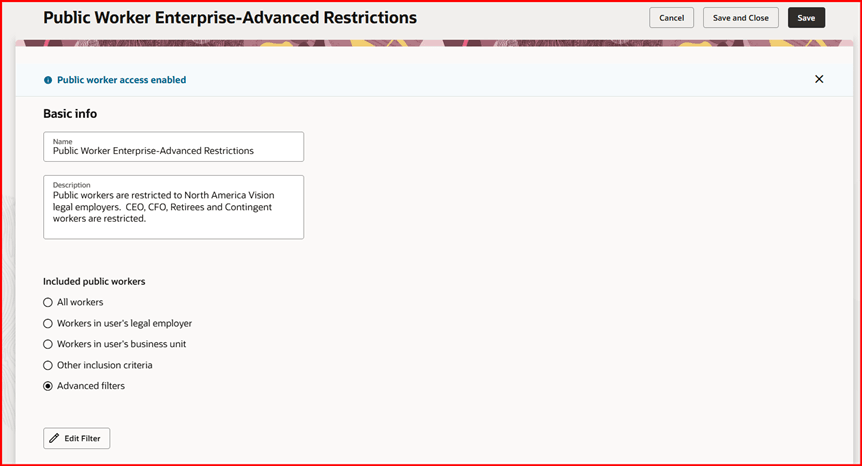
Public Worker Access Using Advanced Filters for Enterprise
Notice that the banner at the top of the page, “Public worker access enabled”, indicates that the Enterprise profile option value is selected.
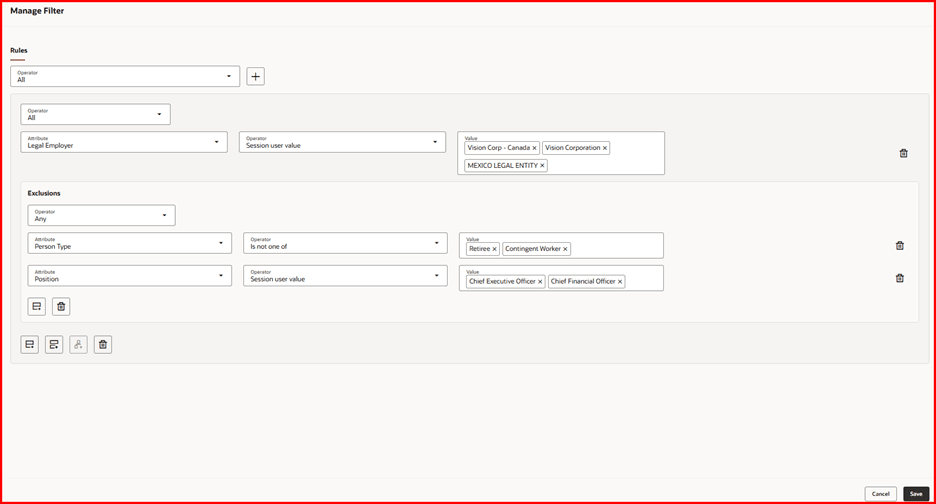
Manage Enterprise-Wide Filter Rules
The attributes available in the advanced filter rules are restricted to attributes from a worker’s assignment and work relationship. This includes assignment-based descriptive flex fields that are specifically used within your organization. For attributes to be referenced and used with your Public Worker Access Filter Rules, they must already exist on your Oracle Search index.
Modifying Oracle Search Index to Support Descriptive Flexfields (DFFs)
Adding or removing custom attributes to the person index requires modifying the fa-hcm-person index. While the person index supports adding person, assignment, and work relationship descriptive flexfields (DFFs), Public Worker Access (PWA) only supports assignment (PER_ASG_DF) and work relationship (PER_PPS_DF) segments. For more guidance on how to manage the index, refer to the topic Overview of Search Indexes.
CAUTION Adding many custom fields to the index may impact the search performance as well as the size of the index, which will impact the index ingestion performance. Only add the minimum necessary fields to the person index.
As an example, suppose you have an assignment-based DFF attribute called ConnectionShow that you want to reference in one of your Public Worker Access advanced filter rules. After the attribute is created on the assignment global segment and deployed, it becomes available on the fa-hcm-person index. While editing the index, expand the collapsed assignment and assignment DFF segments until you can find your newly-added DFF. Make sure you enable the value checkbox associated with your DFF attribute, as reflected in the screenshot below.
fa-hcm-person Index Showing Expanded Assignment DFF Segment with DFF Enabled
After you activate your custom DFF and save your changes, the publish button becomes active on the Manage Search Index page. Click this button to start the process called, ESS job to create index definition and perform initial ingest to OSCS. Allow time for the ESS job to complete successfully.
Publish Button is Active after Modifying fa-hcm-person Index
After the ESS process completes, navigate to the Public Worker Access page and select the Advanced Filters option to define rules that control which people are included in or excluded from Connections and other public worker search lists. At this point, you can reference your custom DFF when defining filters to exclude those people.
PWA Filter Rule with Activated Custom Assignment DFF
In this example, the Public Worker Access (PWA) filter excludes people whose custom DFF Connection Show is set to No.
Public Worker Access Filter Rule Configurations
Additional attributes have been added to support advanced Public Worker Access filter rules. Further explanation is provided below. Refer to the following table for guidance when defining your advanced filters:
| Rule Attribute / Operator | Meaning |
|---|---|
| Direct manager | This attribute works together only with “Session user value” operator. This combination narrows down the search results to only show direct reports of the signed in user. |
| Hierarchy Manager |
This attribute works together only with “Session user value” operator. This combination narrows down the search results to show all workers reporting to signed-in user (signed in user’s entire manager hierarchy). |
| Has Direct Reports | This attribute indicates whether or not the manager has workers reporting to him/her. |
| Session user value ** |
This operator references the attribute belonging to the signed-in user, for instance: Business Unit= Session user value will narrow down the search results to only show workers hired in the same business unit as the signed in user who is performing the search. |
**Session user value only functions with a user's business unit, department, grade, job, legal employer, position, country, direct manager, and hierarchy manager.
New Public Worker Access Search Capability
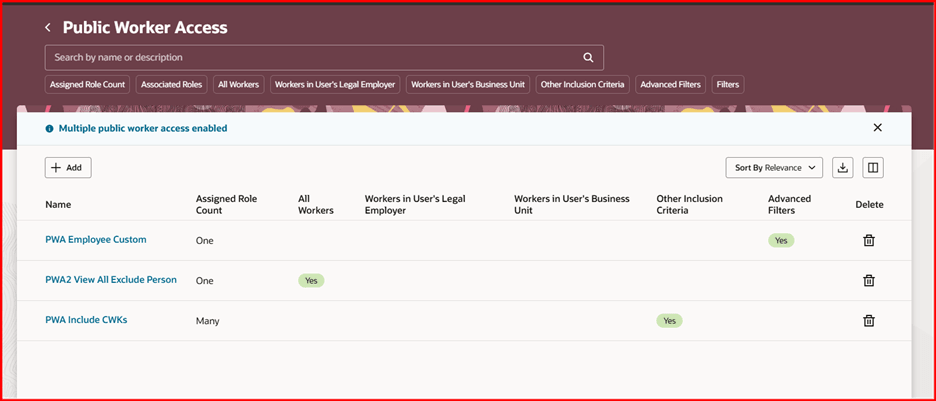
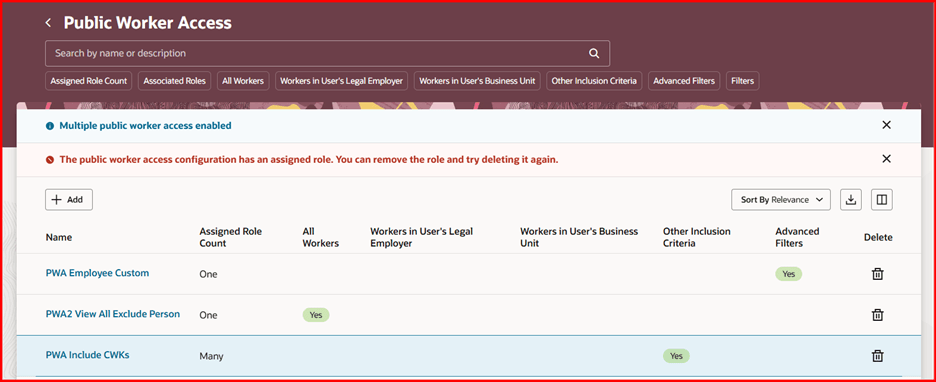
To support multiple Public Worker Access configurations, a new search page appears when ORA_PER_PUBLIC_WORKER_ACCESS_ENABLED (Public Worker Access Using Security Filters Enabled) profile option is set to “Role-based”.
Public Worker Access Search Page
The search page includes predefined filters, allowing you to easily identify configurations by Assigned Role Count (none, one, or many), Associated Roles (by name), or any of the included Public Worker configuration options. You can also use VB Studio to customize columns and filters to suit your requirements.
You can delete a Public Worker Access configuration only if no roles are associated with it. If you attempt to delete a configuration that has an assigned role, a message will appear informing you that you must first remove the role before deleting the configuration.
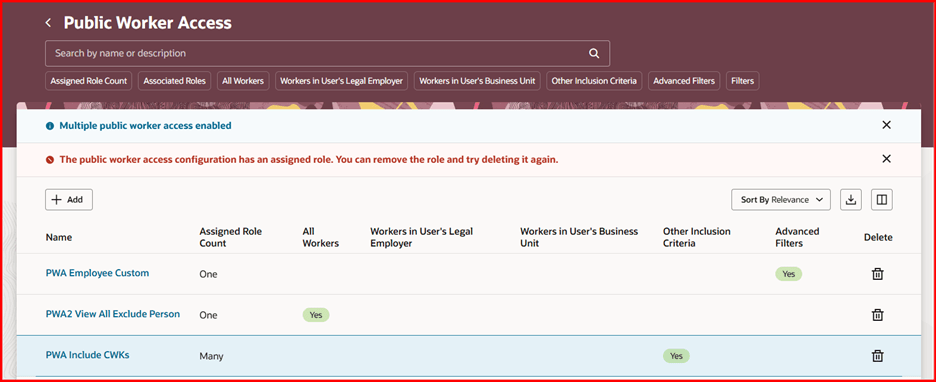
Can’t Delete Public Worker Access Configuration When Roles Are Assigned
Notice that the banner at the top of the search page, “Multiple public worker access enabled”, indicates that the role-based profile option value is selected.
Role Assignment
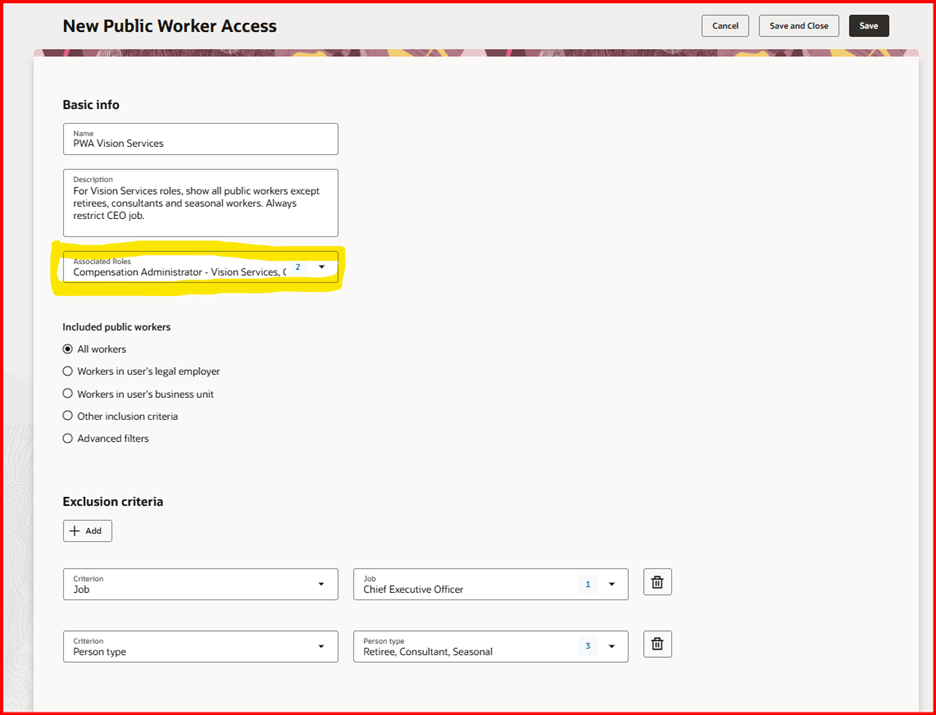
In addition to defining multiple Public Worker Access configurations, another significant enhancement is the ability to associate each configuration with one or more user roles.
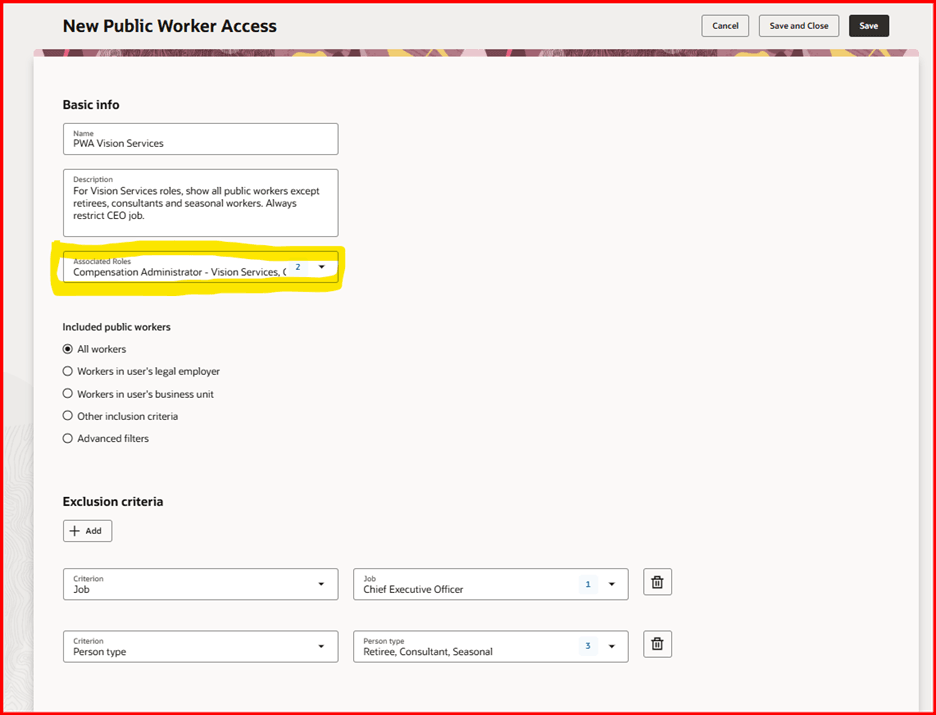
Roles Can Be Assigned to a Public Worker Access Configuration
While roles are not mandatory when creating a PWA configuration, one or more roles must be associated with a configuration to be active for those users with the corresponding role(s). For example, this feature can be used to segment security access based on different roles and legislation requirements, such as creating separate PWAs for the US and Germany.
Auditing and Data Management
Auditing and FSM import/export features for Public Worker Access (PWA) have been modified in this release. Data migration is only possible for PWA configurations that use the predefined "Included public worker" options—that is, all except those defined with the advanced filter option. Due to technical limitations, it is not possible to audit or migrate PWA filter rule definitions between environments when the advanced filter option is enabled.
Business benefit: You can configure multiple public worker access definitions which can be assigned to one or more roles to restrict their Oracle Search public worker list. The lists can be based on advanced criteria, including assignment custom fields, which provide greater flexibility for customers.
Steps to enable and configure
Enable the following profile option:
-
ORA_PER_PUBLIC_WORKER_ACCESS_ENABLED (Enable Public Worker Access Using Security Filters Enabled)
From the below table, choose the profile value that best fits your organizational requirements:
|
Profile Value |
Purpose |
|---|---|
|
Disabled |
This is the default value. Choosing this option doesn't apply any restrictions on Public Workers for Oracle Search. |
|
Enterprise |
This option applies a single Public Worker Access configuration across your entire enterprise. |
|
Role-based |
This option allows you to define multiple Public Worker Access configurations based on user roles. |
Purpose of Each Profile Value
-
For details, see How do I enable a profile option?
-
For more details on enabling Redwood for HCM, see How do I adopt Redwood for HCM?
Tips and considerations
-
Most customers utilizing Public Worker Oracle Search lists are satisfied with the default behavior, which allows viewing all public workers without restrictions. If you are content with your current list of public workers, there is no need to enable this feature. Leave the ORA_PER_PUBLIC_WORKER_ACCESS_ENABLED profile option Disabled which is the out-of-the-box value.
-
If you previously enabled Public Worker Access (PWA) in an earlier release and now want to use the "assign to roles" feature, you must define all new PWA configurations as described in this document. The key point is that you can't reconfigure your existing enterprise-wide Public Worker Access to be role-based. There can be only one enterprise-wide configuration, and it no longer applies when role-based access is enabled.
-
When a user is granted multiple roles, and each role has a different Public Worker Access (PWA) configuration, the applied security will be a combination of these configurations—that is, access is determined by a logical OR of the assigned PWAs.
-
For example, when using the User and Roles UI, the Role Delegation and Approval lists of values (LOVs) are impacted by this feature enhancement.
-
When you define multiple Public Worker Access (PWA) configurations, each assigned to different roles (e.g., Role1 and Role2), and a user is granted both roles, the runtime behavior for the Role Delegation and Approval lists of values (LOVs) will combine the results from both PWAs. This means the LOVs will display all people included in either PWA—for example, users from both “PWA-India” (assigned to Role1) and “PWA-Germany” (assigned to Role2) will be listed. In effect, a logical OR is performed between the two data sets, showing all individuals from both configurations.
-
Advanced filter rules must be manually redefined in target environments. Note that out-of-the-box (OOTB) PWA definitions without advanced filter rules can be exported and imported without intervention. However, any PWA configurations that use advanced filters must be manually recreated in the new environment.
-
Known Issue:
-
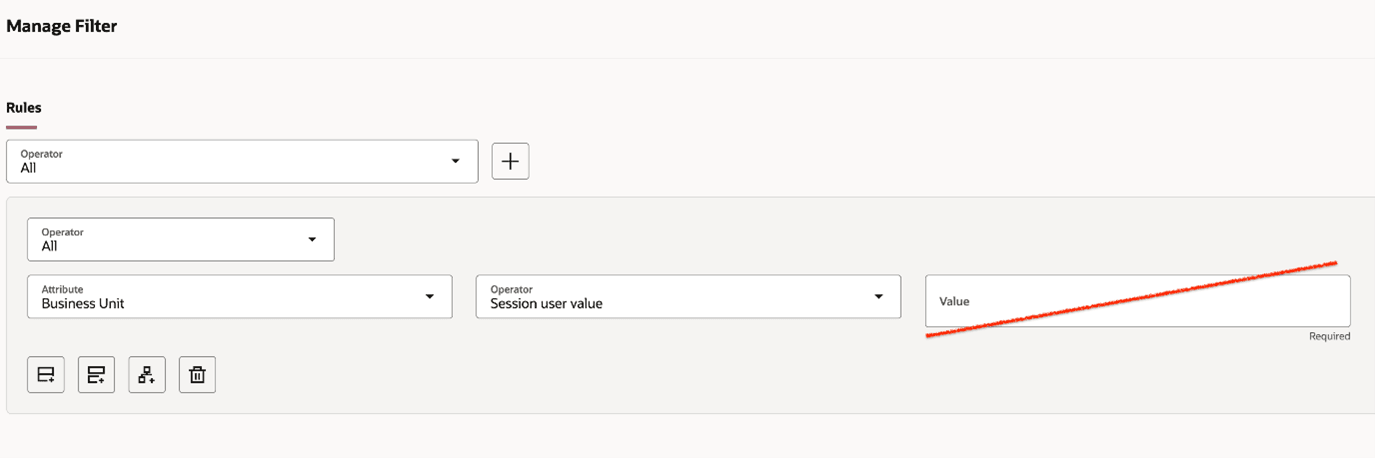
On the Manage Filter page, when the Session user value operator is selected, an unnecessary Value input field may be displayed. This field is ignored, and the Session user value operator functions as expected; this is purely a user interface display issue. Until a fix is available, you must select any value in order to save the rule.
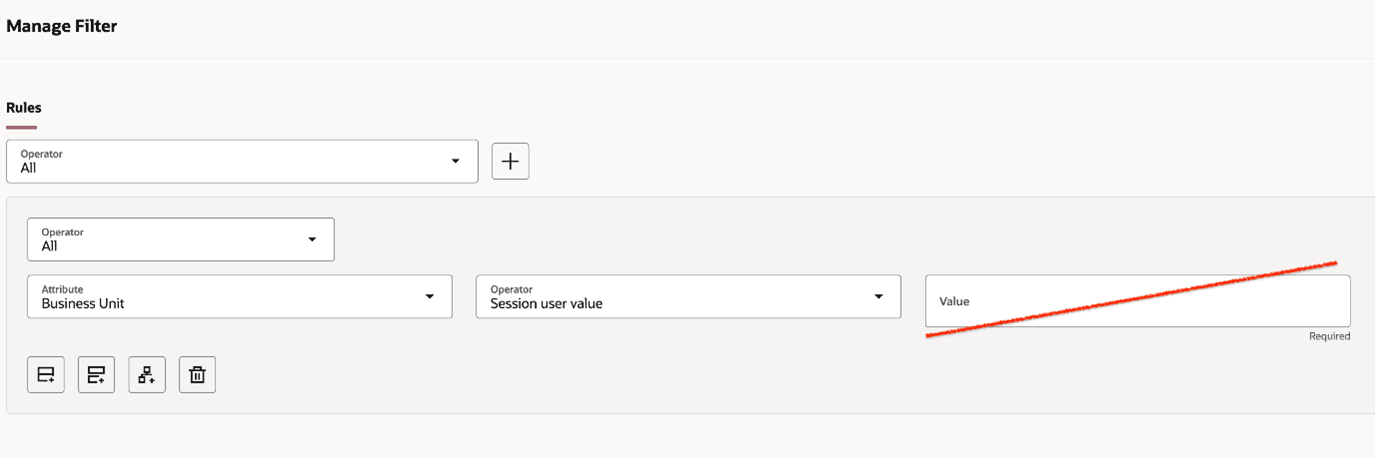
Manage Filter Example – Enter Any Value
Key resources
For more information, refer to these topics on the Oracle Help Center:
- Export and Import HCM Security Setup
- How You Audit Oracle HCM Cloud Business Objects
- Enable Audit for Oracle HCM Cloud Business Objects
- Best Practices for HCM Data Roles and Security Profiles
Access requirements
To use the Public Worker Access feature, you need the following job role:
IT Security Manager (ORA_FND_IT_SECURITY_MANAGER_JOB)
Access to the Manage Search Index requires the privilege Grant Search Framework Manager Permissions (FND_SEARCH_FWK_MGR_PRIV) which is granted to the following roles:
- IT Security Manager
- Application Administrator
- Application Developer
- Application Implementation Consultant
For auditing and migration, you need the following job role:
Application Implementation Consultant (ORA_ASM_APPLICATION_IMPLEMENTATION_CONSULTANT_JOB)