Ability to Hide When and Why Step in Redwood Cancel Work Relationship Page
You can now hide the When and why step in the Redwood Cancel Work Relationship page.
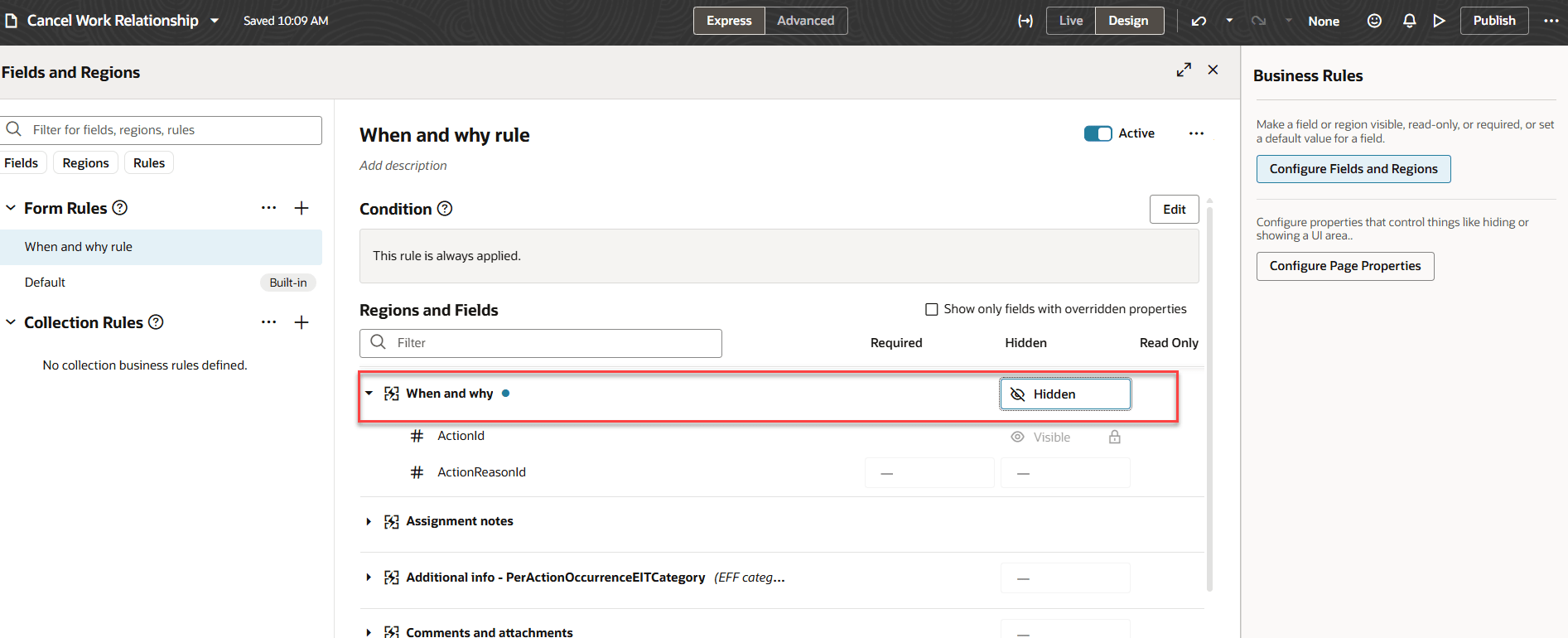
Hidden property for the When and why steps in Cancel Wor Relationship page
.
This feature provides organizations with greater control over process flow and user experience while canceling a work relationship.
Steps to enable and configure
For information on displaying fields using business rules, see this chapter - Working with Configure Fields and Regions in the Extending Redwood Applications for HCM and SCM Using Visual Builder Studio guide.
Key resources
For more information, refer to these resources on the Oracle Help Center:
-
Cancel Work Relationships in the Using Global Human Resources guide
For more information, refer to these resources:
- Express Mode in VBS for detailed instructions on using specific Express Mode features.
- Extending Redwood Applications for HCM and SCM Using VB Studio for details on what’s supported by HCM.
- You can refer to the VB Studio documentation "Configure an Oracle Cloud Application" to check the steps to access VB Studio from a Redwood page.
- Extending HCM Redwood Applications Using Visual Builder Studio
- Refer to the Customer Connect forum Visual Builder Studio for HCM