Updates to the Skills Library Enrichment Agent
The Skills Library Enrichment agent has been updated to generate skill suggestions by leveraging free-form skills that are added to the HCM application in application flows such as Skills Center, Candidate Experience, and Talent Profiles.
Self-service users, recruiters, and HR specialists may create new, free-form skills in HCM application flows that aren't present in the Oracle Dynamic Skills Library, Lightcast Skills Library, or any existing custom library. These new skills are now added to an inactive skill catalog called Nonlibrary Skills. You can view this skill catalog from My Client Groups > Profiles > Item Catalogs.
The Skills Library Enrichment agent helps you to curate skills from the Nonlibrary Skills catalog and move them to the skill catalog of your choice. The agent has also been simplified with the removal of these fields on the configuration page:
- Include synonyms for skills
- Show in pending review if score more than
- Automatically approve if score more than
Instead, a new field called Minimum usage count has been introduced, which helps you curate nonlibrary skills that are repeatedly used across HCM application flows.
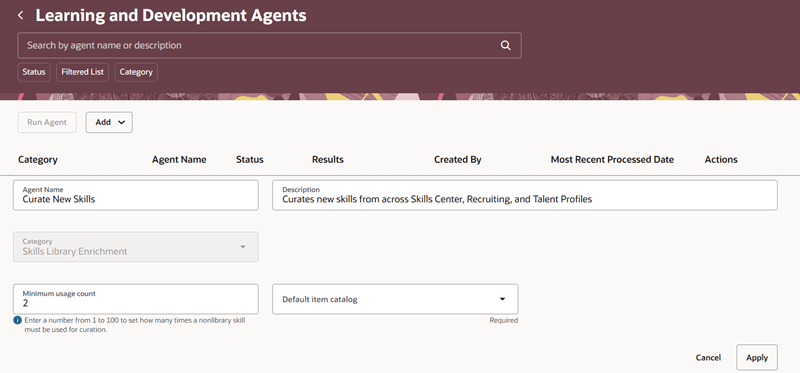
Configuring the Skills Library Enrichment Agent
For example, let’s say an employee creates a developing skill in Skills Center (which isn’t present in any active skill library) and a manager creates the same skill in a new job profile. This skill will be added only once to the Nonlibrary skill catalog, with its usage count set as 2.
When you run the Skills Library Enrichment agent, you can choose to select any nonlibrary skills that are used twice or more across various HCM application flows. Only these skills will be available for you to curate in the Microsoft Excel spreadsheet that’s downloaded after the agent completes running. These skills will be moved to the target skill catalog that was specified while configuring the agent. Even if you don’t approve a skill in the downloaded spreadsheet, it’ll still be moved to the target skill catalog in Pending review status. If you search for it in Item Catalogs, it won’t be listed as part of the Nonlibrary Skills catalog anymore.
Note: If there were any skills in Pending review status from a previous run of this agent, those skills will also be present in the downloaded Excel sheet. The skills will show as being present in the target catalog that was selected as part of the previous run and continue to be in Pending review status.
Business benefit: This enhancement is an efficient way to identify and curate new skills that are added in other areas of HCM and to also manage duplicate skills.
Steps to enable and configure
There are no specific steps to enable this feature. However, you need to configure the agent and run it. To do this, refer to How do I configure and run the updated Skills Library Enrichment Agent?
For privileges, see the Access Requirements section.
Access requirements
To view this agent, an administrator needs to have the functional security privilege, WLF_MANAGE_BULK_SKILLS_LIBRARY_ENRICHMENT.