Recommend Career Roles Manually
You can now manually recommend career roles that might be of interest to your peers. You can only recommend roles that are based on job profiles at this time. Position profile-based recommendations aren't supported.
When you click a career role card in Opportunity Marketplace, you can now see a Recommend button on the career role details page.
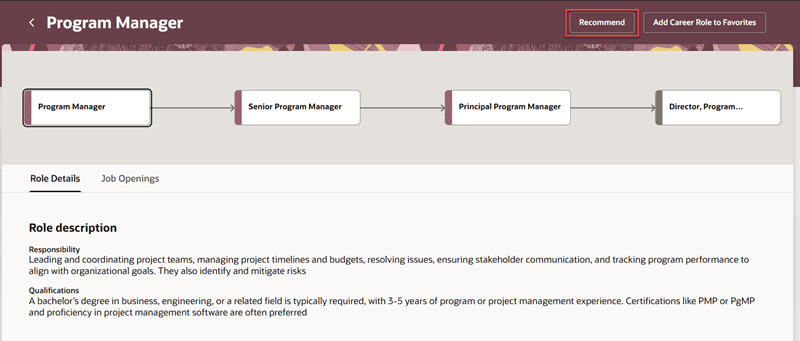
Recommend Button on the Career Role Details Page
Clicking the button displays a drawer, from where you can select the employees to whom you want to recommend the role and optionally provide a reason for the recommendation. This in turn creates a recommendation profile, which you can see on the Recommendation Profiles page.
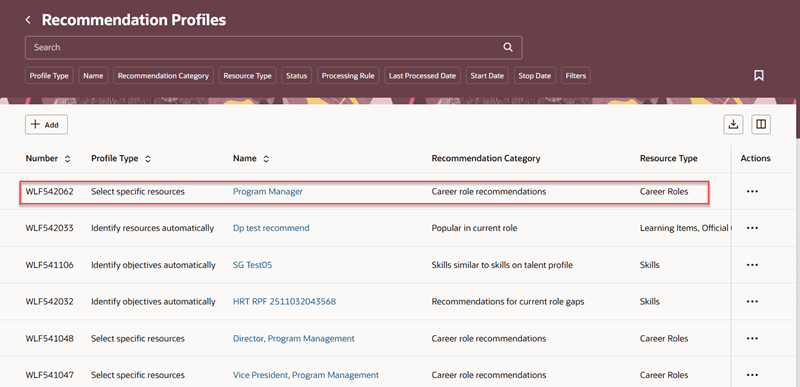
Recommendation Profiles Page with Career Role Recommendations
Once the recommendation profile completes running, you can see the career roles displayed on the target employees’ Grow page in a new swim lane called Career role recommendations for you on the Grow Your Career tab.
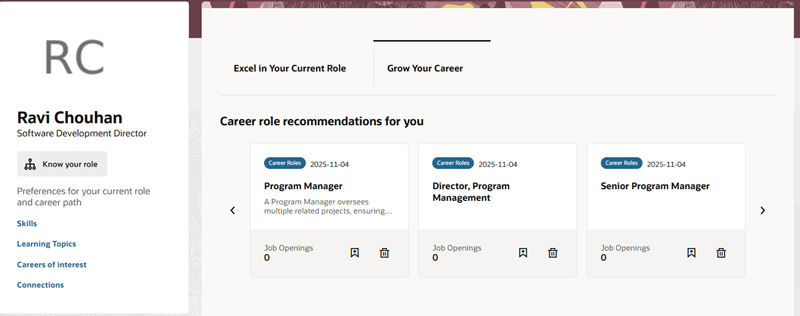
Career Role Recommendations for You Swim Lane
Note: Before you recommend a career role to someone, if they already added that role to their career of interest, it won’t be recommended in Grow.
When an employee receives recommendations from more than one source, recommendations made by their manager are displayed first, followed by recommendations made by the administrator, then by peers and lastly, AI-based recommendations, if any.
The recommendations will also be displayed in Opportunity Marketplace as part of the Recommended filter, if the profile option, ORA_HRD_ENABLE_LLM_SUMM_CAREER_ROLE_SUGGSNS, is enabled.
Business benefit: This feature enables targeted career role recommendations, supporting talent mobility and professional growth.
Steps to enable and configure
The Recommend button is displayed by default on the career role details page. However, you can hide it using the page property, Show Recommend Button in Career Role Details, in Visual Builder Studio. For details, see How do I control the display of a UI element in Visual Builder Studio?
To display the recommendations in the Recommended filter in Opportunity Marketplace, enable the profile option, ORA_HRD_ENABLE_LLM_SUMM_CAREER_ROLE_SUGGSNS. For details, see How do I enable a profile option?