Redwood Experience: Schedule Interview Action Enhancements
Various enhancements were done to the Schedule Interview action in Redwood.
Error message
When you schedule an interview for a candidate, an error message is now displayed when you try to move forward in the creation flow but didn’t save changes you made in a section.

Error Message When Changes Aren't Saved
Link in schedule interview notifications
In previous releases, when adding a feedback request while scheduling an interview, interviewers would receive the interview schedule notification and the feedback request notification.
If feedback respondents were selected while scheduling the interview but these respondents aren't interviewers, they'll receive the usual feedback request notification (since they don't receive the interview scheduled notification).
A new token is available in interview notifications to include the links to provide feedback: ${InterviewSchedulingFeedbackResponseDeepLinksURLHTML} This token is replaced by the following information. For each requested feedback:
- The name of the questionnaire or information indicating it’s a rating-only feedback.
- The name of the candidate for whom the feedback applies.
- A link to provide the feedback.
The feedback request content (new token which was introduced) can't be in the calendar events (events added to the interviewers' calendars) and calendar files; it can only be used in the specified interview notifications.
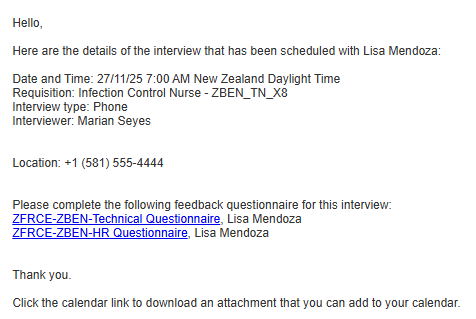
Example of Notification
The default content of these Alerts Composer notifications was updated:
- Interview Reminder Notification to Interviewer (IRC_Intrv_Reminder_Interviewer)
- Interview Scheduled Notification to Interviewer (IRC_Intrv_Scheduled_Interviewer)
- Interview Updated Notification to Interviewer (IRC_Intrv_Updated_Interviewer)
New content include:
- Text explaining that feedback is requested for the interview.
- For each requested feedback:
- The name of the questionnaire or information indicating it’s a rating-only feedback.
- The name of the candidate for whom the feedback applies.
- A link to provide the feedback.
- If multiple feedback requests are part of an interview, the information regarding all the requests is included. For example, if there are two candidates with two feedback requests each (two questionnaires each), this means four separate requests are listed.
When a scheduled interview (or an interview being scheduled) has no feedback request associated to it, no feedback request information is included in the notifications.
Business benefit: Including feedback links directly in interview notifications streamlines the feedback process, making it more convenient for users to respond promptly and improving overall engagement and efficiency.
Steps to enable and configure
To use Redwood experience, you need to enable these profile options:
- ORA_IRC_RECRUITING_REDWOOD_ENABLED
- ORA_IRC_JOB_APPLICATION_REDWOOD_ENABLED
- ORA_IRC_CANDIDATE_REDWOOD_ENABLED
- ORA_IRC_REQUISITION_REDWOOD_ENABLED
For details, see How do I enable a profile option?
For details on enabling and customizing Redwood for HCM, see How do I adopt Redwood for HCM? and Extending Redwood Applications for HCM and SCM Using Visual Builder Studio.