Redwood Experience: Translate Job Requisition
You can translate the content of job requisitions using the Translate Job Requisition action that has been recreated in the Redwood toolset called Visual Builder Studio.
When you select the Translate Job Requisition action for a job requisition, a panel opens. From this panel, you can view items to be translated: requisition details, and media items.
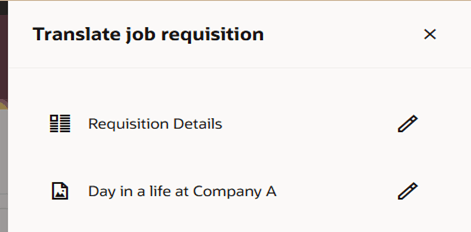
Translate Job Requisition Panel
When you click the Edit icon for one of the items, the Translation Editor page opens. From that page, you can select one or more languages for which you want to add translated content. Click Edit to add the translated content for the selected language.
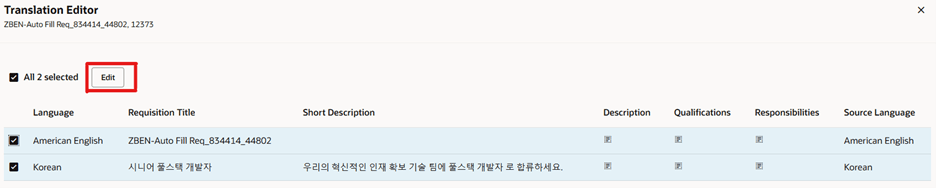
Translation Editor
Use the Update button options to move to the next language. Arrows are also provided to navigate from one language to the other. When the translated content is added for all the languages, you click the Update and Close button.
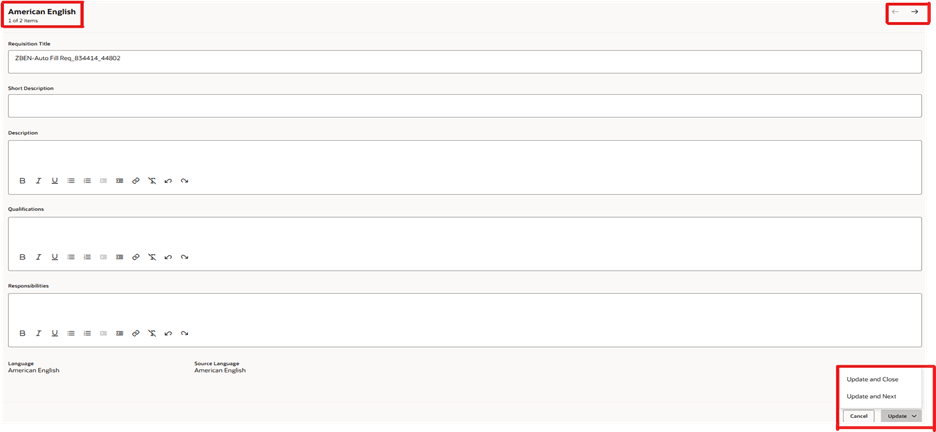
Translating the Requisition Details
Business benefit: Users have a consistent user experience when they navigate from the Redwood requisition details page and land on the new Redwood Translate job requisition panel.
Steps to enable and configure
To use the Redwood Translate Job Requisition action, you need to enable these profile options:
- ORA_IRC_RECRUITING_REDWOOD_ENABLED
- ORA_IRC_REQUISITION_REDWOOD_ENABLED
For details, see How do I enable a profile option?
For details on enabling and customizing Redwood for HCM, see How do I adopt Redwood for HCM? and Extending Redwood Applications for HCM and SCM Using Visual Builder Studio.