Redwood: Identify Dotted Line Reports When Sharing Goal
When you share goals with your team members, you can now identify your dotted line reports.
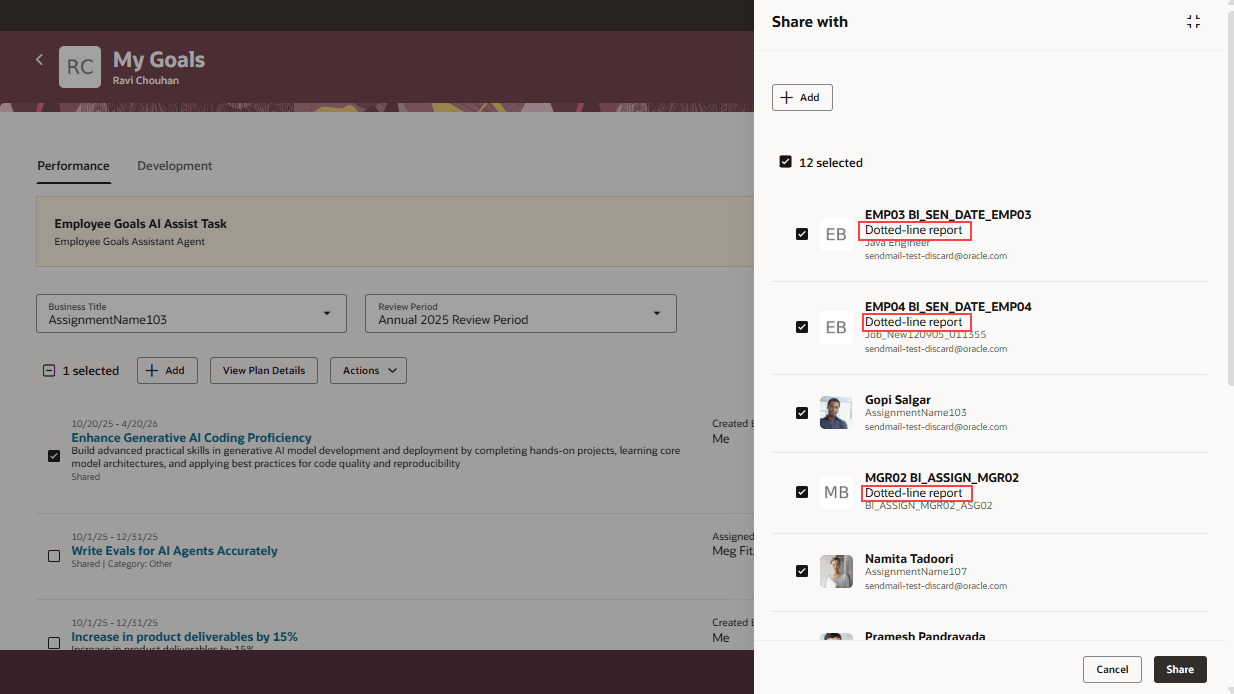
Share with Panel
Leverage this feature to easily decide who you want to share your goals with.
Steps to enable and configure
To enable Redwood Goals Center, you need to enable the profile options indicated in the table.
|
Profile Option Code |
Profile Option Display Name |
Value |
|---|---|---|
|
ORA_HCM_VBCS_PWA_ENABLED |
Enable VBCS Progressive Web Application User Interface |
Y |
|
ORA_HRA_PERFORMANCE_DOCUMENTS_AND_GOALS_REDWOOD_ENABLED |
Enable Redwood Performance Documents and Goals Center |
Yes |
NOTE: The Performance Document, Check-in, and Goals Center features are closely connected. So, the Redwood version of these pages can all be enabled or disabled only using the common ORA_HRA_PERFORMANCE_DOCUMENTS_AND_GOALS_REDWOOD_ENABLED profile option. These features can't be enabled individually.
For more information, see How do I enable a profile option?.