Display of Partial Day Absences on Worker's Calendar
The Redwood Calendar now displays the absence duration in the event title for partial day absences. For elapsed schedules and absences with days UOM, the duration is shown in parentheses after the absence type name.
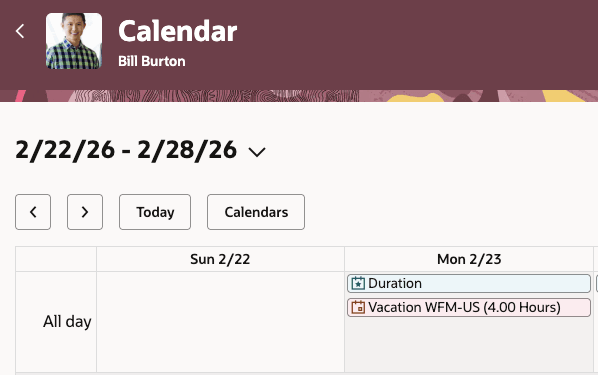
Absence duration displayed after absence type name
For time-based schedules, in the monthly view, the absence start time is displayed along with the absence type name. For time-based schedules, in the weekly and daily views, the absence is displayed as a time-blocked event spanning the scheduled start and end time.
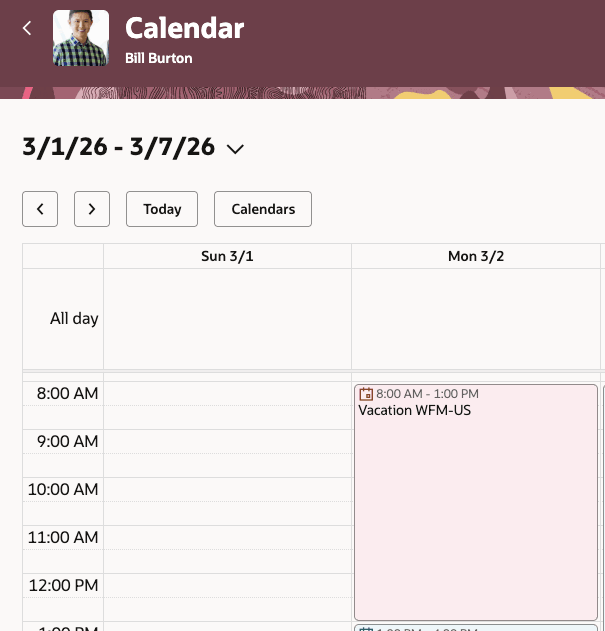
Absence displayed as a time blocked event on the calendar
When a worker enters a partial day absence, you can now view the duration of it on the Redwood Calendar.
Steps to enable and configure
You don't need to do anything to enable this feature.